1. Úvod
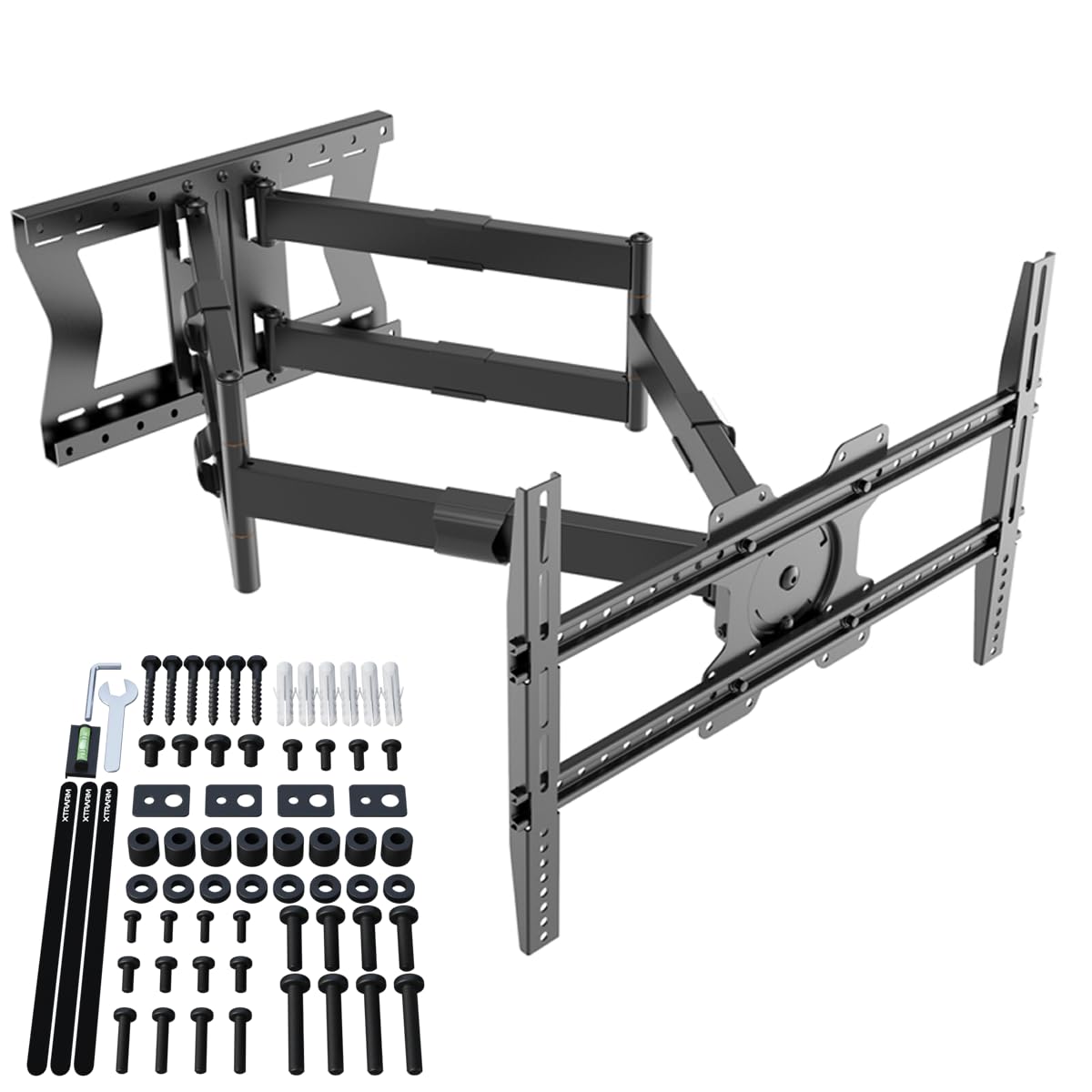
This manual provides detailed instructions for the safe and proper installation, operation, and maintenance of your XTRARM TiTon Double TV Wall Mount. Please read this manual thoroughly before installation and retain it for future reference. This wall mount is designed to securely hold televisions within specified weight and VESA compatibility limits, offering flexible viewing angles through its articulated arm, tilt, swivel, and rotation features.
XTRARM TiTon Double TV Wall Mount installed in a modern living room with a large TV.
2. Bezpečnostní informace
VAROVÁNÍ: Failure to read and follow all instructions may result in personal injury, property damage, or voiding of your warranty. If you have any questions, please contact customer support.
- Ensure the mounting surface can safely support the combined weight of the mount and your television.
- Nepřekračujte maximální nosnost 80 kg (176 lb).
- Verify VESA compatibility with your television before installation.
- Používejte vhodné nástroje a pečlivě dodržujte všechny pokyny pro vrtání a upevňování.
- Installation should be performed by at least two people to prevent injury or damage.
- Během instalace držte děti a domácí zvířata mimo dosah.
- Regularly check all fasteners to ensure they remain secure.
3. Obsah balení
Please verify that all components are present and undamaged before beginning installation. If any parts are missing or defective, contact XTRARM customer support.
- XTRARM TiTon Double TV Wall Mount assembly
- Mounting hardware kit (screws, anchors, washers for various wall types and TV models)
- Instalační šablona
- Mini bubble level
- Uživatelská příručka
4. Specifikace
| Číslo modelu | XTR-LA2060-600 |
| Materiál | Kov |
| Barva | Černý |
| Maximum TV Size | Až 110 palce |
| Minimum TV Size | 45 palců |
| Maximální nosnost | 80 kg (176 lb) |
| Kompatibilita VESA | 100x100, 100x200, 200x100, 200x200, 200x300, 300x200, 300x300, 400x200, 400x300, 400x400, 500x300, 600x200, 600x400 |
| Arm Extension Length | 11.4 cm (4.5 palců) až 100 cm (39.3 palců) |
| Úhel náklonu | -5° až +15° |
| Úhel otočení | Up to 180° (depending on TV size) |
| Otočení obrazovky | ±3° (nastavení úrovně) |
| Kompatibilní zařízení | Samsung, Sony, LG, Panasonic, Philips, Sharp, and other TVs/Monitors/LCDs |

Diagram showing TV size compatibility (45-110 inches), VESA patterns, and maximum weight capacity (80 kg).

Detailed dimensions of the XTRARM TiTon Double TV Wall Mount, including arm length and VESA plate size.

Image highlighting the 100 cm extension arm of the TV wall mount.
5. Instalační příručka
Before starting, ensure you have all necessary tools (drill, stud finder, screwdriver, etc.) and understand your wall type. It is highly recommended to have two people for installation.
5.1. Příprava stěny
- Locate wall studs (for wood stud walls) or ensure the concrete/brick wall is solid and free of obstructions.
- Use the provided template to mark the drilling locations on the wall. Ensure the template is level using the included bubble level.
- Drill pilot holes according to the instructions for your specific wall type (wood stud, concrete, brick).
5.2. Montáž nástěnné desky
- Attach the wall plate to the wall using the appropriate screws and anchors from the hardware kit. Ensure all fasteners are tightened securely.
5.3. Attaching TV Brackets
- Opatrně položte televizor displejem dolů na měkký, čistý povrch.
- Attach the TV brackets to the back of your television using the correct VESA screws and spacers from the hardware kit. Ensure the brackets are centered and securely fastened.
5.4. Mounting TV to Wall Plate
- With assistance, carefully lift the television and hook the TV brackets onto the wall plate.
- Secure the TV to the wall plate using the safety screws or locking mechanisms as indicated in the detailed video instructions.
5.5. Správa kabelů
Route your cables through the integrated cable management clips on the mount arms to maintain a tidy appearance and prevent damage.
Video demonstrating the complete installation process for the XTRARM TiTon Double TV Wall Mount.
Videoprezentaceasing the features and installation steps of the XTRARM TiTon TV Wall Mount.
6. Návod k obsluze
The XTRARM TiTon Double TV Wall Mount offers multiple adjustment options for optimal viewpohodlí.
6.1. Vysunutí a zasunutí ramene
Gently pull or push the television to extend or retract the articulated arm. The arm can extend up to 100 cm (39.3 inches) from the wall.

The XTRARM TiTon Double TV Wall Mount extended from the wall, illustrating its full articulation.
6.2. Naklánění obrazovky
The screen can be tilted from -5° (downward) to +15° (upward) to reduce glare and achieve the desired viewing angle. Loosen the tilt adjustment knobs, set the angle, and re-tighten to secure.

Diagram showing the tilt adjustment range of the TV wall mount, from -5 to +15 degrees.
6.3. Swiveling the Screen
The mount allows for a swivel range of up to 180° (left to right), depending on your TV size and distance from the wall. Gently push the TV to the desired angle.

Diagram illustrating the 180-degree swivel capability of the TV wall mount.
6.4. Screen Rotation (Level Adjustment)
The TV plate can be rotated ±3° to ensure the screen is perfectly level after installation. Use the provided hex key to adjust the leveling screws, then tighten them to secure the position.

Diagram showing the 90-degree rotation feature of the TV wall mount.
7. Údržba
- Čištění: Otřete držák měkkým, suchým hadříkem. Nepoužívejte abrazivní čisticí prostředky ani rozpouštědla.
- Pravidelná prohlídka: Každých několik měsíců zkontrolujte všechny šrouby a vruty, zda jsou pevně utažené. V případě potřeby je dotáhněte.
- Mazání: The moving parts are designed for smooth operation and generally do not require lubrication. If movement becomes stiff, contact customer support.
8. Řešení problémů
- Televizor není vodorovně umístěn: Use the screen rotation (level adjustment) feature as described in Section 6.4.
- Držák se zdá být uvolněný: Immediately check all wall and TV attachment screws. Ensure they are fully tightened. If the issue persists, consult a professional installer.
- Difficulty moving the arm/TV: Ensure no cables are snagged. Check for any obstructions. The joints may be stiff initially; gentle, firm movement should loosen them. Do not force.
- Chybějící části: Refer to Section 3 (Package Contents) and contact XTRARM customer support for assistance.
9. Záruka a podpora
The XTRARM TiTon Double TV Wall Mount comes with a 5letá záruka výrobce against defects in materials and workmanship. Spare parts are available for 2 roky od data nákupu.
For warranty claims, technical support, or any questions regarding your product, please contact XTRARM customer service through the retailer where you purchased the product or visit the official XTRARM webmísto.


