1. Úvod
The Sena Parani A10 is a sleek, low-profile Bluetooth headset designed for motorcycle helmets. It allows riders to connect to their smartphone for various on-the-go features, including listening to music and making phone calls. The A10 also supports Bluetooth Intercom, enabling communication with up to three other Parani users within an effective range of up to 1 km (0.6 mi). Featuring a built-in LCD screen, the device provides quick visual updates on essential functions such as battery capacity, frequency, and volume level, ensuring a superb audio experience backed by Sena's quality.
2. Co je v krabici
- Parani A10 Headset Unit
- Wired Microphone (for this specific model)
- Sada reproduktorů
- Montáž Clamp Kit
- USB Charging & Data Cable
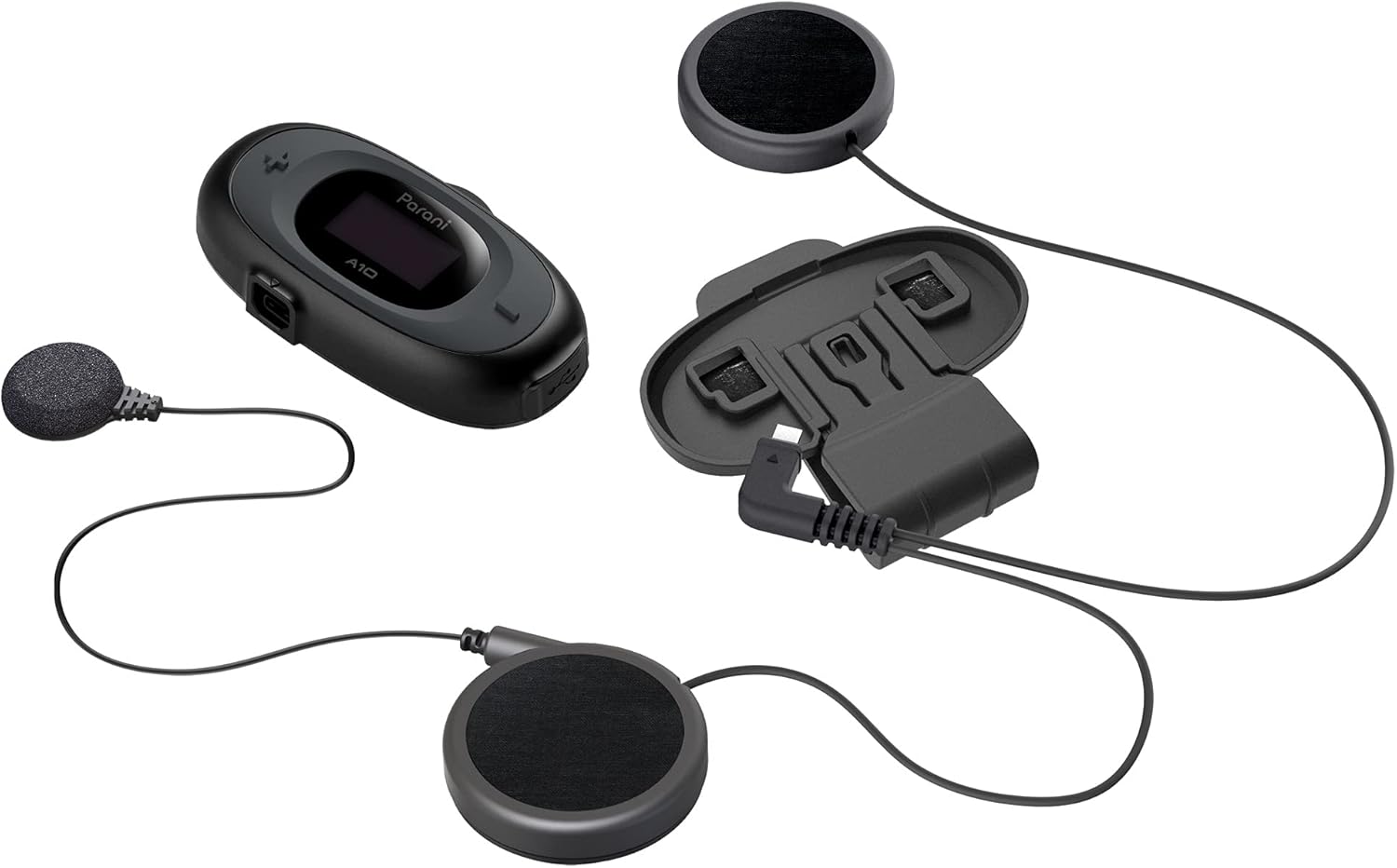
Image: All components included with the Parani A10 Wired Mic version, laid out for clear identification.
3. Vlastnosti produktu
- 4-way Bluetooth Intercom: Connects with up to three other Parani users.
- 2-way HD Intercom: Provides high-definition audio for two-person communication.
- Rozsah interkomu: Up to 1 km (0.6 mi) in open terrain.
- LCD obrazovka: Displays device settings, battery status, and current mode.
- Bluetooth 5.1: For stable connection to smartphones.
- Integrace smartphonu: Allows music listening, GPS navigation, and phone calls.
- Kabelový mikrofon: Designed for full-face helmets.
- Aktivní potlačení hluku: Snižuje šum na pozadí pro čistší zvuk.

Image: The Parani A10 unit, highlighting its integrated LCD screen and control buttons.
4. Průvodce nastavením
4.1 Nabíjení headsetu
Before first use, fully charge the Parani A10. Connect the supplied USB cable to the headset's charging port and to a USB power source (e.g., computer USB port or USB wall adapter). The LED indicator will show charging status. A full charge takes approximately 2.5 hours.
Životnost baterie: Až 8 hodin hovoru.
4.2 Instalace do helmy
The Parani A10 is designed for easy installation in most motorcycle helmets. Follow these steps:
- Namontujte hlavní jednotku: Zajistěte montáž třamp kit to the left side of your helmet. Ensure it is firmly attached. Slide the Parani A10 main unit onto the clamp dokud nezapadne na místo.
- Instalace reproduktorů: Attach the speakers to the inside of your helmet, aligning them with your ears. Most helmets have designated pockets for speakers. Use the provided hook-and-loop fasteners if necessary.
- Pozice mikrofonu: For the wired mic version, route the microphone cable and position the microphone near your mouth, inside the helmet's chin bar. Ensure it is not obstructed and does not interfere with helmet closure.
- Připojit kabely: Plug the speaker and microphone cables into the corresponding ports on the main Parani A10 unit.

Image: The Parani A10 unit securely attached to the side of a motorcycle helmet, ready for use.
5. Návod k obsluze
5.1 Zapnutí/vypnutí
- Zapnutí: Stiskněte a podržte Střední tlačítko na 1 sekundu.
- Vypnout: Stiskněte a podržte Střední tlačítko po dobu 5 sekund.
5.2 Nastavení hlasitosti
- Zvýšení hlasitosti: Klepněte na Tlačítko (+).
- Snížit hlasitost: Klepněte na (-) Knoflík.
5.3 Phone Pairing & Calls
- Párování: With the A10 powered off, press and hold the Střední tlačítko for 10 seconds until the LED flashes red and blue, indicating pairing mode. On your smartphone, search for Bluetooth devices and select "Parani A10".
- Přijmout hovor: Klepněte na Střední tlačítko.
- Ukončit hovor: Stiskněte a podržte Střední tlačítko po dobu 2 sekund.
- Odmítnout hovor: Stiskněte a podržte Střední tlačítko for 2 seconds when a call comes in.
5.4 Přehrávání hudby
- Přehrát/pozastavit: Klepněte na Střední tlačítko.
- Další skladba: Stiskněte a podržte Tlačítko (+) na 1 sekundu.
- Předchozí skladba: Stiskněte a podržte (-) Knoflík na 1 sekundu.
5.5 Komunikace přes interkom
The Parani A10 supports 4-way Bluetooth Intercom. For detailed pairing instructions with other Parani units, refer to the full manual available on the Sena website. Basic 2-way intercom pairing:
- Ensure both A10 units are powered on.
- On both units, press and hold the Střední tlačítko for 5 seconds until the LED flashes green rapidly.
- The units will automatically pair and establish an intercom connection.

Image: The Parani A10 headset with its wired microphone and speakers, illustrating the full audio system.
6. Specifikace
| Funkce | Detail |
|---|---|
| Název modelu | Parani A10 |
| Technologie připojení | Bezdrátové připojení (Bluetooth 5.1) |
| Rozsah interkomu | Až 1 km (0.6 mil) |
| Max Intercom Users | 4-way Bluetooth Intercom |
| Výdrž baterie (doba hovoru) | 8 hodin |
| Doba nabíjení | 2.5 hodin |
| Kontrola hluku | Aktivní potlačení hluku |
| Frekvenční odezva | 10000 Hz |
| Citlivost | 20 Hz |
| Hmotnost položky | 7.7 unce |
| Rozměry produktu | 7.36 x 4.57 x 2.48 palce |
| Materiál | Plast |
| UPC | 885465012665 |
| Číslo modelu položky | A10-P03 |
7. Údržba
- Čištění: Jednotku otřete měkkým, damp tkanina. Nepoužívejte agresivní chemikálie nebo abrazivní čisticí prostředky.
- Skladování: Pokud sluchátka nepoužíváte, skladujte je na chladném a suchém místě. Nevystavujte je extrémním teplotám.
- Péče o baterie: To prolong battery life, avoid fully discharging the battery frequently. Charge it regularly, even if not used for extended periods.
- Aktualizace firmwaru: Periodically check the Sena webweb s aktualizacemi firmwaru pro zajištění optimálního výkonu a přístupu k novým funkcím.
8. Řešení problémů
| Problém | Možné řešení |
|---|---|
| Jednotka se nezapne. | Ujistěte se, že je baterie nabitá. Připojte k napájení a zkuste to znovu za několik minut. |
| Nelze spárovat se smartphonem. | Ensure the A10 is in pairing mode (LED flashing red/blue). Turn off and on your phone's Bluetooth. Try restarting both devices. |
| Problémy s připojením interkomu. | Ensure both units are within range and in intercom pairing mode. Try resetting both units to factory settings and re-pairing. |
| Audio is distorted or too low. | Adjust volume using the (+) and (-) buttons. Check speaker placement in the helmet. Ensure microphone is positioned correctly and not obstructed. |
| LCD obrazovka je prázdná. | The screen may enter power-saving mode. Press any button to wake it up. If it remains blank, try restarting the unit. |
9. Záruka a podpora
The Sena Parani A10 Intercom Headset is backed by Sena's quality assurance. For specific warranty details, including coverage period and terms, please refer to the warranty card included with your product or visit the official Sena webmísto.
For technical support, firmware updates, or additional resources, please visit the official Sena support page:
You can also find frequently asked questions and detailed user guides on their webmísto.
10. Oficiální produktová videa
Based on the available information, there are no official product videos from the seller that meet the criteria for embedding in this manual. Please refer to the Sena support webstránky s dostupnými video tutoriály nebo ukázkami.


