1. Úvod
Thank you for choosing the MOES 3 Gang WiFi Wall Touch Smart Switch. This device is designed to enhance your home lighting control with smart features, including touch control, app control, voice control, and multi-control association. Please read this manual carefully before installation and use to ensure safe and correct operation.
2. Důležité bezpečnostní informace
- Vyžadován neutrální vodič: This smart switch requires a neutral wire in your switch box for proper operation. Please confirm its presence before installation.
- 2.4GHz WiFi Network: The switch only supports 2.4 GHz WiFi networks. It is not compatible with 5 GHz networks.
- Není to stmívač: This is an ON/OFF switch and does not support dimming functionality.
- Není to tradiční třípolohový přepínač: This switch uses multi-control association via the app for 3-way functionality, not traditional wiring.
- Vypnutí napájení před instalací: Always turn off the circuit breaker before performing any wiring or installation to prevent electric shock.
- Doporučená profesionální instalace: Pokud si nejste jisti elektrickým zapojením, poraďte se s kvalifikovaným elektrikářem.
- Vyhněte se Damp Prostředí: Do not install the switch in damp nebo vlhkých místech.
- Nepřekračujte maximální zatížení: Ensure the connected load does not exceed the switch's maximum rating (10 Amps, 2200W/Gang).

Image: Key considerations for MOES smart switch installation, highlighting 2.4GHz WiFi, neutral wire requirement, and non-compatibility with traditional 3-way or dimming functions.
3. Obsah balení
- MOES 3 Gang WiFi Wall Touch Smart Switch
- Montážní šrouby
- Průvodce rychlou instalací
4. Specifikace
| Funkce | Popis |
|---|---|
| Provozní režim | Vypnuto, chytrý přepínač |
| Aktuální hodnocení | 10 Amps |
| Provozní svtage | 250 voltů |
| Typ kontaktu | Touch-sensitive Mechanical Switch |
| Typ konektoru | Bezdrátový |
| Značka | MOES |
| Terminál | Šroub |
| Typ obvodu | 3cestné (prostřednictvím propojení s aplikací) |
| Typ pohonu | Dotek |
| Kontaktní materiál | Sklo |
| Hodnocení mezinárodní ochrany | IP54 |
| Počet pozic | 3 |
| Typ ovladače | Amazon Alexa, Android, Google Assistant, iOS |
| Kontrolní metoda | Vzdálený |
| Protokol připojení | Bluetooth, WiFi |
| Barva | Bílý |
| Číslo modelu položky | WS-EU3-LW-N |
5. Nastavení a instalace
5.1 Použité nástroje
- Odizolovací kleště
- Elektrické pero (sv.tage Tester)
- Elektrická páska
- Wiring Terminal (Wago connectors or similar)
- Šroubovák
5.2 Wiring Diagram and Preparation
Before starting, ensure the circuit breaker is turned off to prevent electric shock. This switch requires a neutral wire. The diagram below illustrates the wiring connections.

Obrázek: Zadní view of the MOES smart switch with labeled terminals for Live (L), Neutral (N), and Load (L1, L2, L3) connections.
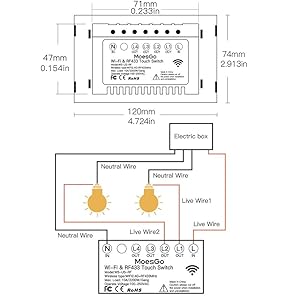
Image: Detailed wiring diagram illustrating the connection of Live, Neutral, and three separate lamp wires to the MOES 3 Gang smart switch.
5.3 Fyzická instalace
- Vypnout napájení: Locate your circuit breaker and turn off the power to the switch you are replacing. Verify power is off using an electric pen.
- Demontáž starého spínače: Carefully remove the faceplate and unscrew the old switch from the wall box. Disconnect the wires, noting their positions.
- Připojit dráty: Connect the Live wire, Neutral wire, and the three Lamp wires to the corresponding terminals on the MOES smart switch as shown in the wiring diagram. Ensure all connections are secure.
- Namontujte nový spínač: Gently push the wired switch into the wall box and secure it with screws. Attach the glass panel faceplate.
- Obnovit napájení: Znovu zapněte jistič.
Video: Step-by-step installation guide for the MOES touch switch, demonstrating how to safely replace an old switch with the new smart switch.
5.4 App Pairing (WiFi Link Method)
To enable smart features, you need to pair the switch with the Smart Life/Tuya app.
- Stáhnout aplikaci: Download the Smart Life or Tuya Smart app from your mobile app store.
- Povolit Bluetooth a WiFi: Ensure your phone is connected to a 2.4GHz WiFi network and Bluetooth is enabled.
- Vstupte do režimu párování: Press and hold any button on the smart switch for approximately 6 seconds until the blue indicator light flashes rapidly.
- Přidat zařízení do aplikace: Open the Smart Life/Tuya app, tap the '+' icon to add a device. The app should automatically discover the switch. Follow the on-screen prompts to connect.
Video: Demonstrates the WiFi link method for pairing the smart switch with the Smart Life/Tuya app, including steps for entering pairing mode and connecting.
5.5 RF Pairing (RF Link Method)
This switch supports RF433 remote control (remote not included). To pair with an RF remote:
- Ensure Switch is Off: Confirm the smart switch is in the OFF state.
- Vstupte do režimu RF párování: Press and hold the desired button on the smart switch for approximately 8 seconds until you hear two 'Di-Di' sounds.
- Stiskněte tlačítko na dálkovém ovladači: Immediately press the corresponding button on your RF433 remote control. The light connected to the smart switch will toggle ON/OFF, indicating successful pairing.
Note: The key of the remote controller can control the switching of the state of the switch on and off corresponding to the position of the switch.
6. Návod k obsluze
6.1 Dotykové ovládání
Simply touch the circular icons on the glass panel to toggle the connected lights ON or OFF. The blue backlight indicates the status of each gang.
6.2 Ovládání aplikací (Smart Life/Tuya)
Once paired, you can control your lights from anywhere using the Smart Life/Tuya app on your smartphone. Each gang can be controlled independently.

Image: A smartphone displaying the Smart Life app, demonstrating remote control of the MOES smart switch.
6.3 Hlasové ovládání (Alexa a Google Home)
Integrate your MOES smart switch with Amazon Alexa or Google Home for hands-free voice control. After linking your Smart Life/Tuya account in the Alexa or Google Home app, you can use commands like: "Alexa, turn on the living room light" or "Hey Google, turn off the kitchen lights."

Image: Illustration of voice control functionality with Amazon Alexa and Google Home, showing smart speakers interacting with the MOES smart switch.
6.4 Vícenásobné propojení (třícestná funkcionalita)
To achieve 3-way control (two switches controlling one light) without traditional wiring, use the multi-control association feature in the Smart Life/Tuya app. This allows multiple smart switches to control the same light.
- Ensure both smart switches are added to the same Smart Life/Tuya app.
- In the app, select the main switch that is wired to the light.
- Go to its settings and find "Multi-Control Association".
- Add the second smart switch (the one not wired to the light) to the multi-control group.
- Now, both switches can control the same light.
Video: Detailed demonstration of how to set up multi-control association in the Smart Life/Tuya app for 3-way switch functionality.
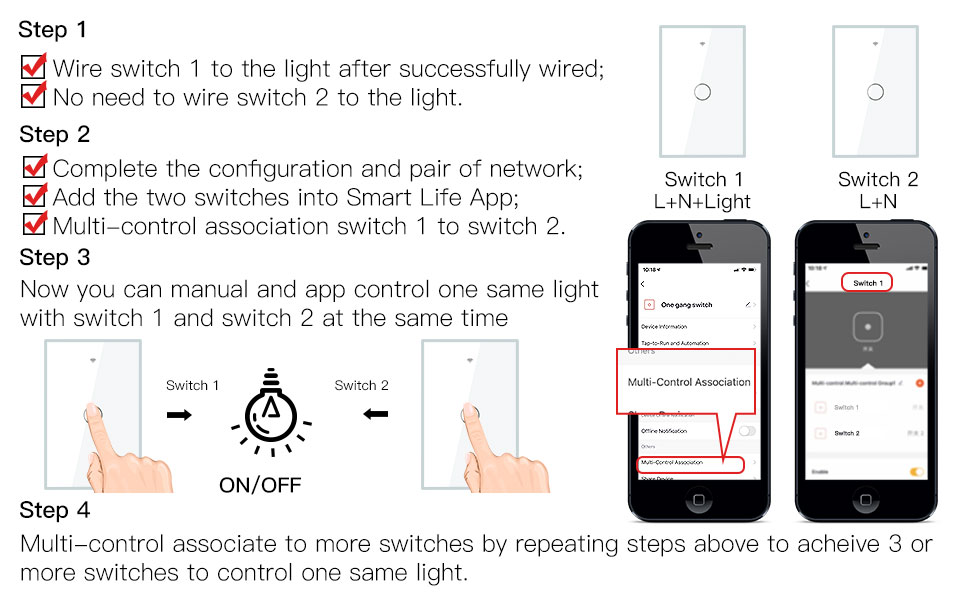
Image: Visual guide for setting up multi-control association between two smart switches to operate a single light source.
6.5 Timer and Countdown
Use the Smart Life/Tuya app to set schedules, timers, and countdowns for your lights. This allows for automated control, such as turning lights ON at sunset or OFF after a set duration.

Image: The Smart Life app displaying options for setting timers and countdowns to automate light control with the MOES smart switch.
6.6 Relay Status Adjustable
In the app settings, you can configure the relay status after a power outage. Options include ON, OFF, or 'Remember last status' to restore the state prior to the power interruption.

Image: App screenshot showing the relay status setting, allowing users to choose the switch's state after a power interruption.
6.7 Ovládání podsvícení ZAP/VYP
The backlight of the touch buttons can be turned ON or OFF via the app settings. This is useful for bedrooms or areas where you prefer no light from the switch.

Image: The MOES smart switch demonstrating the backlight ON and OFF feature, with the corresponding setting visible in the Smart Life app.
6.8 Device Share & Group Control
Share control of your smart switch with family members through the app. You can also create groups to control multiple switches or lights simultaneously with a single command.

Image: The Smart Life app illustrating how to share device control with family and create groups for simultaneous control of multiple MOES smart switches.
6.9 Smart Automation
Create custom automation routines based on various conditions (e.g., time, weather, device status) to make your home truly smart. For example, turn on lights when a motion sensor is triggered.
Video: Konecview of the functions and features of the MOES smart switch, including smart automation capabilities.
7. Údržba
- Čištění: Wipe the glass panel with a soft, dry cloth. Avoid abrasive cleaners or solvents.
- Aktualizace firmwaru: Keep the Smart Life/Tuya app updated to receive the latest firmware for your switch, ensuring optimal performance and security.
- Pravidelné kontroly: Periodically check the switch for any signs of damage or loose connections.
8. Řešení problémů
- Přepínač nereaguje: Check if the circuit breaker is ON. Ensure the neutral wire is correctly connected.
- Nelze se připojit k Wi-Fi:
- Ověřte, zda je vaše WiFi síť 2.4 GHz.
- Ensure your phone is connected to the same 2.4GHz WiFi network.
- Bring the switch closer to your WiFi router during pairing.
- Reset the switch to pairing mode (press and hold any button for 6 seconds until the blue indicator flashes rapidly).
- RF dálkové ovládání nefunguje: Ensure the switch is in the OFF state before attempting RF pairing. Repeat the RF pairing steps carefully.
- Blikání světel: This switch is not a dimmer. Ensure you are using compatible non-dimmable bulbs.
8.1 How to Reset/Re-pair WiFi Code
If you need to reset the WiFi connection or re-pair the switch:
- Stiskněte tlačítko spínače 6krát.
- On the 6th press, hold the button.
- Release the button when you hear 'Di-Di-Di' (3 times).
- The blue indicator on the switch will flash fast after 3 seconds, indicating it's in pairing mode.
9. Záruka a podpora
MOES products come with a standard manufacturer's warranty. For specific warranty details, technical support, or further assistance, please refer to the warranty card included with your product or visit the official MOES website. You can also contact MOES customer service through the Smart Life/Tuya app or their official support channels.


