Zavedení
The HTC True Wireless Earbuds 2 offer a seamless audio experience with advanced features designed for comfort and convenience. These earbuds utilize the latest Bluetooth 5.1 technology for instant pairing and stable connections across various devices. Enjoy extended listening times, intuitive touch controls, and a comfortable, ergonomic fit for all-day use.

Image: HTC True Wireless Earbuds 2 in their pink charging case, showcasinkompaktní design.

Image: A display of HTC True Wireless Earbuds 2 in three available colors: white, black, and pink.
Video: Úředník u konceview of the HTC True Wireless Bluetooth Earbuds, highlighting key features and design.
Co je v krabici
Your HTC True Wireless Earbuds 2 package includes the following items:
- HTC True Wireless Earbuds 2 (Left and Right)
- Nabíjecí kabel USB-C
- Rubber Eartips (Two pairs: Large and Small sizes, in addition to the pre-installed medium size)
- Nabíjecí pouzdro
Video: An unboxing video for the HTC True Wireless Earbuds 2, showing the contents of the package.
Nastavení
1. Nabíjení sluchátek a pouzdra
Before first use, ensure both the earbuds and the charging case are fully charged. Connect the provided USB-C cable to the charging port on the case and plug the other end into a compatible USB power source. The indicator light on the case will show charging status. A full charge provides up to 8 hours of listening time for the earbuds and up to 32 hours total with the charging case.

Image: Pink HTC True Wireless Earbuds 2 and their charging case, illustrating the 30-hour combined battery life.
2. Párování s vaším zařízením
- Otevřete nabíjecí pouzdro. Sluchátka se automaticky přepnou do režimu párování.
- Na svém zařízení (chytrý telefon, tablet, notebook) přejděte do nastavení Bluetooth.
- Select "HTC True Wireless Earbuds 2" from the list of available devices.
- Po připojení uslyšíte zvukový signál a kontrolka na sluchátkách se změní.
The earbuds utilize Bluetooth 5.1 for quick and stable connections. They are compatible with iOS, Android, and Windows devices.

Image: A diagram illustrating the quick pairing process and wide compatibility of the HTC True Wireless Earbuds 2 with various devices.
3. Achieving Optimal Comfort
The earbuds are ergonomically crafted for a secure and comfortable in-ear fit. Experiment with the included rubber eartips (small, medium, large) to find the size that provides the best seal and comfort for your ears. A proper fit enhances sound quality and noise isolation.

Image: A woman wearing pink HTC True Wireless Earbuds 2 while working on a laptop, emphasizing the ultra-lightweight comfort and ergonomic design.
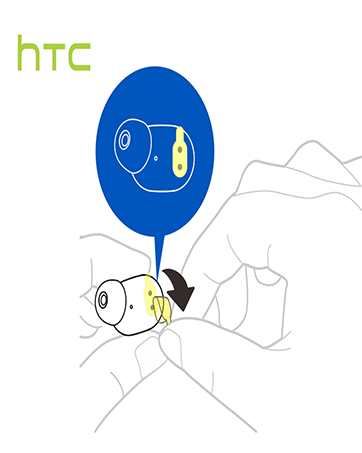
Image: A diagram illustrating the correct method for inserting an earbud to ensure a secure and comfortable fit.
Návod k obsluze
Dotykové ovládání
The HTC True Wireless Earbuds 2 feature intuitive touch controls on each earbud for easy management of your audio and calls:
- Přehrát/pozastavit: Tap left/right earbud once.
- Přijmout hovor: Tap left earbud once.
- Zavěsit: Tap right earbud once.
- Odmítnout hovor: Tap and hold left/right earbud for 2 seconds.
- Předchozí skladba: Tap and hold left earbud for 2 seconds.
- Další skladba: Tap and hold right earbud for 2 seconds.
- Zvýšit hlasitost: Tap left earbud twice.
- Snížit hlasitost: Tap right earbud twice.
- Aktivovat Voice Assistant: Tap left/right earbud three times.

Image: A visual guide detailing the simple touch controls for the pink HTC True Wireless Earbuds 2.

Image: A visual guide detailing the simple touch controls for the black HTC True Wireless Earbuds 2.
Jedno použití sluchátek
You can use either earbud independently for mono audio or calls. Simply take one earbud out of the case, and it will automatically connect to your device. This feature allows for versatility depending on your listening needs.

Image: Two smartphones connected to individual pink HTC True Wireless Earbuds 2, showcasing the versatility of using one or both earbuds.

Image: A diagram illustrating the versatility of using one or both black HTC True Wireless Earbuds 2 with different devices.
Údržba
Čištění a péče
- Pravidelně čistěte sluchátka a nabíjecí pouzdro měkkým, suchým hadříkem.
- Sejměte ušní ocásky a v případě potřeby je očistěte jemným mýdlem a vodou. Před opětovným nasazením se ujistěte, že jsou zcela suché.
- Vyhněte se použití abrazivních materiálů nebo agresivních chemikálií.
Voděodolnost
The HTC True Wireless Earbuds 2 are IPX5 waterproof, meaning they are protected against low-pressure water jets from any direction. This makes them suitable for workouts and light rain. However, they are not designed for submersion in water.
Odstraňování problémů
If you encounter any issues with your HTC True Wireless Earbuds 2, please refer to the following common solutions:
| Problém | Řešení |
|---|---|
| Sluchátka se nespárují | Ensure earbuds are charged. Place them back in the case, close, then reopen to re-enter pairing mode. Check your device's Bluetooth settings and forget/remove previous connections if necessary. |
| Žádný zvuk z jednoho sluchátka | Ujistěte se, že jsou obě sluchátka nabitá. Zkuste obě vložit zpět do pouzdra a znovu je vyjmout. Znovu je spárujte se zařízením. |
| Dotykové ovládání nereaguje | Ensure earbuds are clean and dry. Restart your device and re-pair the earbuds. |
| Špatná kvalita zvuku | Adjust the eartips for a better seal. Ensure your device is within the 10m Bluetooth range. Check for interference from other wireless devices. |
Specifikace
| Funkce | Detail |
|---|---|
| Název modelu | Bezdrátová sluchátka HTC True Wireless Earbuds 2 |
| Číslo modelu položky | HTC TWS3 |
| Technologie připojení | Bezdrátové připojení (Bluetooth 5.1) |
| Výdrž baterie (sluchátka) | Až 8 hodin na jedno nabití |
| Výdrž baterie (s nabíjecím pouzdrem) | Až 32 hodin |
| Kapacita baterie nabíjecího pouzdra | 500 XNUMX mAh |
| Úroveň odolnosti proti vodě | IPX5 (voděodolný) |
| Typ ovládání | Touch Control (Volume, Play/Pause, Call Management, Voice Assistant) |
| Umístění uší | V uchu |
| Frekvenční rozsah | 20-20,000 Hz |
| Hmotnost položky | 2.82 unce |
| Rozměry produktu | 1.71 x 1.71 x 1.36 palce |
Záruka a podpora
HTC provides a 12-month warranty for the True Wireless Earbuds 2. For any support inquiries or warranty claims, please contact HTC customer service through their official webna webu nebo u prodejce, kde byl produkt zakoupen.
Pro více informací navštivte oficiální Obchod HTC na Amazonu.


