1. Úvod
This manual provides detailed instructions for the installation, operation, and maintenance of your EONON GA2190K 10.1-inch Android 10 Car Navigation System. Please read this manual thoroughly before using the product to ensure proper functionality and safety.

Figure 1: EONON GA2190K Car Navigation System
2. Klíčové vlastnosti
- Vysoce výkonný procesor: Equipped with an advanced 8-core CPU, 4GB RAM, and 64GB ROM for smooth operation and ampúložiště.
- Pokročilé připojení: Built-in 4G module and Wi-Fi support for internet access, plus Bluetooth 5.0 for faster data transfer and hands-free communication.
- Integrace smartphonu: Compatible with wired Apple CarPlay and wired Android Auto for seamless smartphone connectivity.
- Funkce zrcadlení: Supports both wireless and wired mirroring for iPhone and Android smartphones via the 'EasyConnection' app.
- Superior Display: 10.1-inch IPS touch panel with 1024x600 resolution, offering clear visuals from any angle and a customizable UI.
- Vylepšený zvuk: Built-in DSP (Digital Sound Field Processing) with a 48-band graphic equalizer and 8 EQ modes for a personalized audio experience.
- Přehrávání multimédií: Integrated DVD player and RCA output for full-screen sharing to external monitors.
- Rozšiřitelné funkce: Supports offline navigation with a dedicated map card, TV viewing with an external digital tuner, AHD backup cameras, OBD2 diagnostics, and drive recorders.
3. Konec produktuview a Komponenty
3.1 Vlastnosti hlavní jednotky

Obrázek 2: Přesview of GA2190K's main features including 4G, AHD camera support, 8-core CPU, 4GB RAM, 64GB ROM, 10.1-inch IPS display, Android 10, iPhone connectivity, DSP, unique UI, and built-in CD/DVD player.
3.2 Dodávané příslušenství

Figure 3: Standard accessories included with the GA2190K unit. These typically include GPS antenna, power cable, AV cables, microphone, USB cables, 4G antenna, backup camera input, 10A fuse, mounting screws, and disassembly tools.
4. Nastavení a instalace
Proper installation is crucial for the optimal performance of your EONON GA2190K. It is recommended that installation be performed by a qualified professional.
4.1 General Installation Guide (for similar models)
Video 1: This video demonstrates the installation process for the IAH10D 10.1-inch car navigation system, which shares similar installation principles with the GA2190K. It covers mounting the unit into a double DIN opening.
Video 2: This video illustrates the panel removal and installation method for the UX7SKJ-PRO-MAX, which can be helpful for understanding general panel handling for EONON units.
Video 3: This video demonstrates the front panel removal and installation method for the UX6SKJ-PRO-MAX, providing general guidance for similar EONON units.
4.2 Panel Assembly and Disassembly
The display panel is detachable from the main unit. Follow these steps for proper handling:
- Align the display panel with the main unit, ensuring the connectors are properly oriented.
- Gently push the panel onto the main unit until it clicks into place.
- To remove, simultaneously press the safety switches on both sides inwards and lift the panel upwards.
- Carefully disconnect the ribbon cable by pushing the clips inwards and pulling the cable downwards.
Video 4: This video demonstrates the process of attaching and detaching the display panel from the main unit, including handling the ribbon cable.
5. Návod k obsluze
5.1 Android 10 System Overview
The GA2190K runs on a powerful Android 10 system, offering a smooth and responsive user experience. You can install various applications from the Google Play Store.

Figure 4: Android 10 interface and iPhone connection capabilities.
5.2 Connectivity (Wi-Fi, 4G SIM, Bluetooth)
Stay connected on the go with multiple options:
- Wi-Fi: Connect to a Wi-Fi hotspot from your smartphone for internet access.
- 4G SIM: Directly insert a 4G SIM card into the unit for independent internet connectivity (check regional frequency band compatibility).
- Bluetooth 5.0: Enjoy hands-free calling and high-quality audio streaming from your smartphone.

Figure 5: Visual representation of Wi-Fi, 4G, Bluetooth 5.0, and mirroring functionalities.
5.3 CarPlay a Android Auto
Integrate your smartphone for a safer and more convenient driving experience:
- Wired Apple CarPlay: Connect your iPhone (iPhone 5 or later) to access navigation, make calls, send messages, and play music via Siri voice control or the touch screen.
- Kabelové Android Auto: Connect your Android smartphone (requires EONON A0585 USB dongle, sold separately) to use Google Assistant, navigation, and media apps.
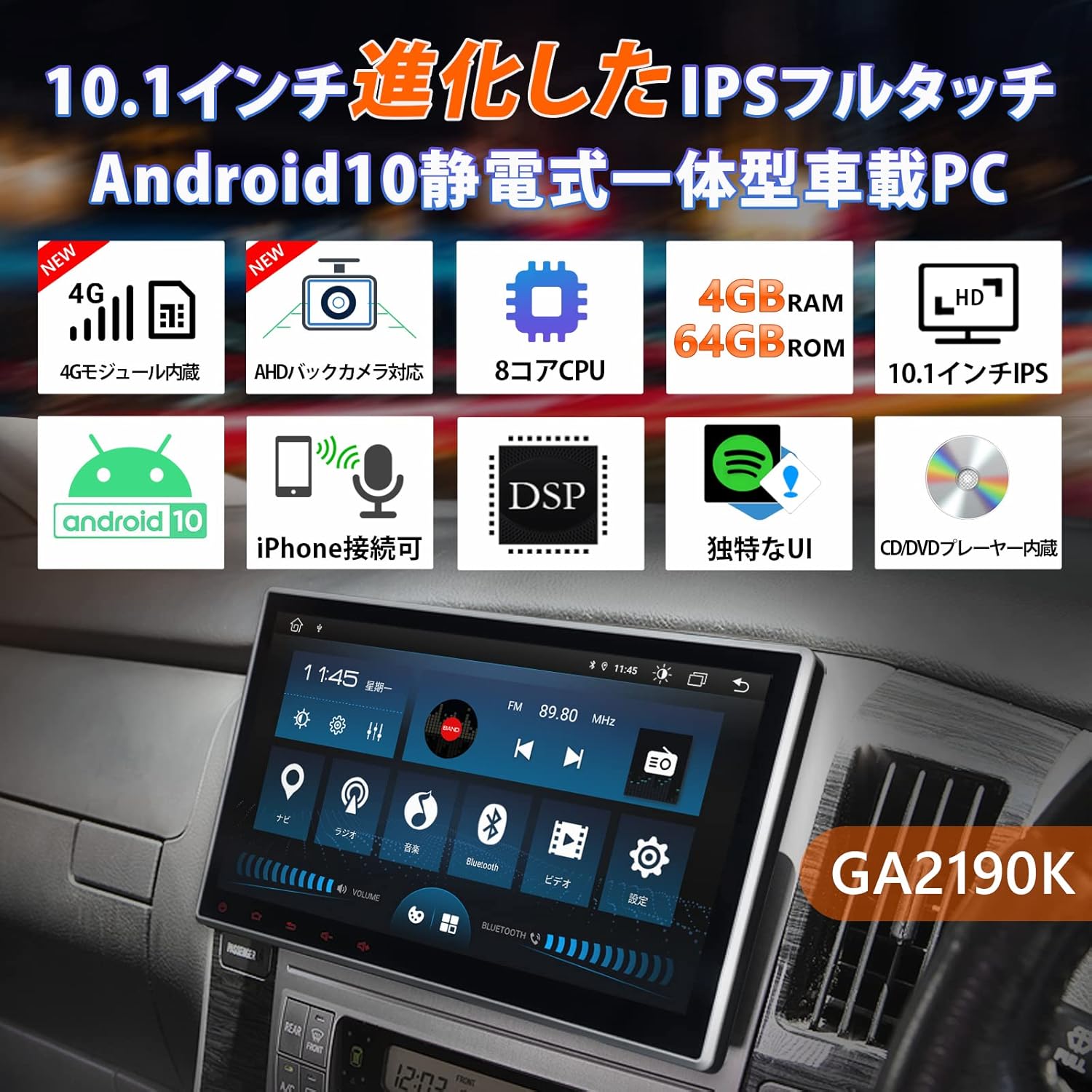
Figure 6: CarPlay and Android Auto interfaces displayed on the unit.
5.4 Mirroring Function
Share your smartphone's screen directly to the GA2190K display:
- Use the built-in 'EasyConnection' app to mirror photos, music, and videos from your iPhone or Android smartphone.
- Supports both wireless and wired connections.
5.5 Displej a uživatelské rozhraní
The 10.1-inch IPS display offers vibrant visuals and a user-friendly interface:
- IPS Touch Panel: 1024x600 ultra-high resolution for clear images from any viewúhel.
- Unique UI Design: Customizable UI colors to match your preference, providing a personalized experience.
- Zobrazení ve více oknech: Run two applications simultaneously on the screen, such as navigation and music.
Video 5: Toto video poskytuje celkový pohledview of the UI and features of a similar EONON unit (GA2198J), demonstrating multi-tasking, app installation, and QLED display capabilities.
Video 6: This video introduces the UI of a similar EONON unit, showcasing split-screen functionality, volume control, media player integration, and day/night mode switching.
Video 7: This video demonstrates various functions of a similar EONON unit (UX7SKJ-PRO-MAX), including map display, music playback, video playback, and system information.
5.6 Audio Features (DSP, Equalizer)
Zažijte vynikající kvalitu zvuku s pokročilým zpracováním zvuku:
- Vestavěný DSP: Digital Sound Field Processing with a 56-bit double-precision mode for precise sound signal adjustment.
- 48pásmový grafický ekvalizér: Customize your audio with a detailed equalizer and 8 preset EQ modes.
- Časová korekce: Adjust sound field and time delay for optimal listening.

Figure 7: Visual interface for DSP and graphic equalizer settings.
5.7 Navigace
Navigate with ease using various map options:
- Offline mapy: Use a dedicated map card (EONON G3047, sold separately) for navigation without an internet connection.
- Online mapy: Utilize Google Maps or other navigation apps downloaded from the Play Store.
5.8 Další funkce
- Ovládání na volantu: Connect to your vehicle's steering wheel controls for convenient operation.
- AHD Backup Camera Support: Connect AHD backup cameras (EONON A0126J, A0119N, sold separately) for enhanced parking safety.
- Diagnostika OBD2: Link with an OBD2 car diagnostic tool (EONON V0056, sold separately) to monitor vehicle data.
- Drive Recorder Mode: Connect drive recorders (EONON R0020, R0019H, R0018H, sold separately) to view footage on the large screen.
- TV Viewing: Connect an external digital tuner (EONON V0050, sold separately) to watch TV in your car.

Figure 8: IPS touchscreen, panel adjustment, and backup camera integration.

Obrázek 9: Přesview of navigation, TV, AHD camera, OBD2, drive recorder, and RCA output functionalities.
6. Specifikace
| Funkce | Specifikace |
|---|---|
| Velikost obrazovky | 10.1 palců |
| Typ zobrazení | IPS LCD |
| Rezoluce | 1024x600 |
| Operační systém | Android 10 |
| BERAN | 4 GB |
| ROM | 64 GB |
| Procesor | 8jádrový |
| Konektivita | Bluetooth 5.0, Wi-Fi, 4G (SIM card support), USB |
| Typ tuneru | AM/FM |
| Kompatibilní zařízení | chytré telefony |
| Typ mapy | Ulice |
| Speciální funkce | Hands-free, CarPlay, Android Auto, Mirroring, DSP, DVD Player |
| Typ montáže | Držák na palubní desku |
| Rozměry produktu | 24.5 x 20.5 x 15.3 cm |
| Hmotnost produktu | 3.57 kg |
7. Údržba
To ensure the longevity and optimal performance of your EONON GA2190K, follow these general maintenance guidelines:
- Čištění: K čištění obrazovky a vnějšího povrchu používejte měkký, suchý hadřík. Nepoužívejte abrazivní čisticí prostředky ani rozpouštědla.
- Aktualizace softwaru: Regularly check for and install system software updates to ensure stability and access to new features.
- Teplota: Nevystavujte jednotku extrémním teplotám, delšímu přímému slunečnímu záření nebo vysoké vlhkosti.
- Připojení kabelů: Pravidelně kontrolujte všechna kabelová připojení, abyste se ujistili, že jsou bezpečná a nepoškozená.
8. Řešení problémů
If you encounter any issues with your EONON GA2190K, please refer to the following common troubleshooting steps:
- Bez napájení: Zkontrolujte všechna napájecí připojení a pojistkovou skříňku vozidla. Ujistěte se, že je zapnuté zapalování.
- Žádný zvuk: Verify volume settings, check speaker connections, and ensure the correct audio source is selected.
- Dotyková obrazovka nereaguje: Try restarting the unit. If the issue persists, perform a factory reset (note: this will erase all user data).
- Bluetooth/Wi-Fi Connection Issues: Ensure Bluetooth/Wi-Fi is enabled on both the unit and your smartphone. Try re-pairing devices or restarting the unit.
- Problémy s navigací: Ensure GPS antenna is properly installed and has a clear view oblohy. Zkontrolujte aktualizace mapových dat.
For more complex issues or if troubleshooting steps do not resolve the problem, please contact Eonon customer support.
9. Záruka a podpora
Eonon is committed to providing quality automotive electronics. For any product-related inquiries, technical assistance, or warranty claims, please contact our customer support team. Our dedicated team is ready to assist you with any questions or concerns.
Please refer to your purchase documentation or the official Eonon webkonkrétní záruční podmínky a kontaktní informace naleznete na webových stránkách.

Figure 10: Eonon Brand Logo


