1. Úvod
This manual provides detailed instructions for the ANBERNIC RG351MP Handheld Game Console. Please read this manual thoroughly before using the device to ensure proper operation and to maximize your gaming experience. Keep this manual for future reference.
2. Bezpečnostní informace
- Nevystavujte zařízení extrémním teplotám, přímému slunečnímu záření nebo vysoké vlhkosti.
- Zabraňte pádu zařízení nebo jeho vystavení silným nárazům.
- Udržujte zařízení mimo dosah vody a jiných kapalin.
- Nepokoušejte se zařízení rozebírat ani opravovat sami. Požádejte o pomoc autorizovaný servisní personál.
- Používejte pouze dodaný nabíjecí kabel a adaptér.
- Během používání a nabíjení zajistěte dostatečné větrání.
- This product contains a Lithium Polymer battery. Dispose of batteries responsibly according to local regulations.
3. Obsah balení
Ověřte, zda jsou v balení přítomny všechny položky:
- 1 x RG351MP Game Console
- 1 x WIFI Module
- 1 x 64GB SD karta
- 1 x USB nabíjecí kabel
- 1 x Uživatelská příručka
- 1x Ochrana obrazovky
- 1 x Wipes
4. Konec produktuview
Familiarize yourself with the various components and controls of your ANBERNIC RG351MP console.
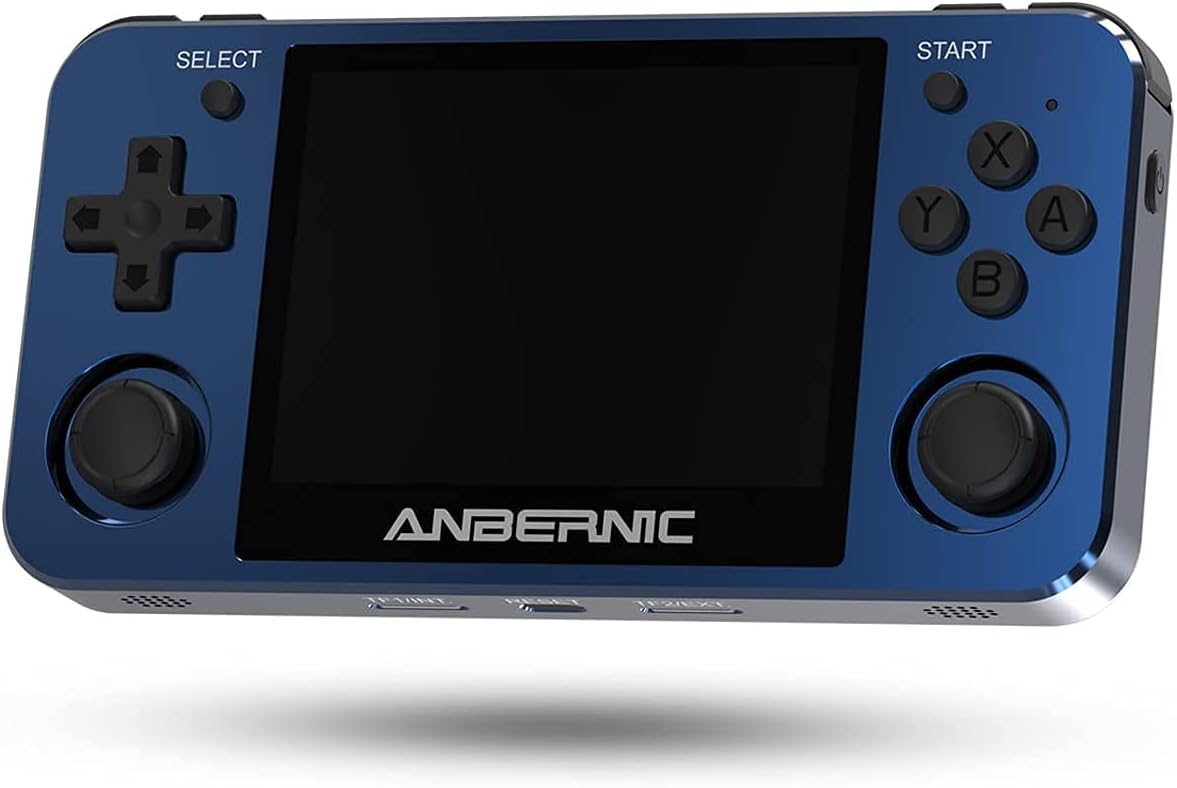
Obrázek 4.1: Přední strana View. This image displays the front of the ANBERNIC RG351MP console, featuring the 3.5-inch IPS screen, D-pad, action buttons (X, Y, A, B), SELECT and START buttons, and dual analog joysticks.

Figure 4.2: Console Layout. This image provides various angles of the console, highlighting the L1/L2/R1/R2 shoulder buttons, OTG and DC ports on the top, volume controls on the side, and TF/EXT, Reset, and TF2/EXT slots on the bottom.

Obrázek 4.3: Zpět View. The rear of the console is shown, displaying the ANBERNIC logo, model number RG351MP, and regulatory markings. This view also indicates the location of the internal Li-Po battery.

Figure 4.4: Screen Display. This image emphasizes the console's 3.5-inch IPS screen with OCA full lamination and 640x480 resolution, providing a clear visual experience.
5. Nastavení
5.1 Nabíjení zařízení
Before initial use, fully charge the console. Connect the provided USB charging cable to the DC port on the top of the console and the other end to a compatible USB power adapter (maximum load 2A). A full charge typically takes approximately 4 hours.
5.2 Vložení TF karty
The console supports dual TF card slots. The primary TF1/EXT slot is for the operating system and pre-installed games. The TF2/EXT slot can be used to expand storage up to 256GB for additional games.
- Vyhledejte slot TF1/EXT na spodní straně konzole.
- Gently insert the pre-installed 64GB TF card into the slot until it clicks into place.
- If using an additional TF card for games, insert it into the TF2/EXT slot.

Figure 5.1: TF Card Insertion. This image illustrates the process of inserting a TF card into the console's expansion slot, demonstrating how to properly seat the card.
5.3 Zapnutí/vypnutí
- Zapnutí: Press and hold the Power button (located on the side) for a few seconds until the screen illuminates.
- Vypnutí: Press and hold the Power button until the power-off menu appears, then select "Shutdown" or "Power Off". Alternatively, a quick press of the Power button may put the device into sleep mode, depending on system settings.
5.4 Connecting the WIFI Module
The console supports an external WIFI module for network connectivity. Insert the provided WIFI module into one of the OTG USB ports (located on the top of the console). Once connected, you can configure network settings within the system menu.
6. Návod k obsluze
6.1 Základní navigace
- D-pad / Analog Joysticks: Use these to navigate through menus and control in-game characters.
- Tlačítko: Confirm selection or perform primary action.
- Tlačítko B: Go back or perform secondary action.
- X / Y Buttons: Perform specific in-game actions as defined by the game.
- Tlačítko Start: Pause game, open in-game menus, or confirm selections.
- Tlačítko VYBRAT: Access system menus or perform specific in-game functions.
- Tlačítka L1/L2/R1/R2: Shoulder buttons for various in-game controls.
6.2 Game Selection and Launching
From the main menu, navigate to the desired game system (e.g., PS1, GBA, NES). Select a game from the list using the D-pad or analog stick and press the A button to launch it.
6.3 Saving and Loading Game States
Most emulators support "save states" which allow you to save your progress at any point in a game, independent of the game's internal save system. Refer to the specific emulator's hotkey combinations (often a combination of SELECT + L1/R1 or similar) for saving and loading states.
6.4 Nastavení systému
Access the system settings menu (usually via the SELECT button or a dedicated menu option) to adjust:
- Jazyk: Změňte jazyk systému.
- Zobrazit: Adjust screen brightness, aspect ratio, and video filters.
- Zvuk: Control volume levels and audio output.
- Síť: Configure Wi-Fi settings (requires external Wi-Fi module).
- Nastavení ovladače: Map buttons or calibrate joysticks.
6.5 Adding New Games
To add new games, you will need to transfer game ROMs to the TF2/EXT card. Ensure the ROMs are in a format supported by the console's emulators. Connect the TF2/EXT card to a computer using a card reader and copy the game files to the appropriate system folders on the card. After reinserting the card into the console, refresh the game list in the system menu.
7. Údržba
7.1 Čištění zařízení
Use a soft, dry, lint-free cloth to clean the console's exterior. For the screen, use a screen-specific cleaning solution and a microfiber cloth. Do not use abrasive cleaners or solvents.
7.2 Péče o baterii
- Vyhněte se častému úplnému vybíjení baterie.
- Pokud zařízení delší dobu nepoužíváte, skladujte jej na chladném a suchém místě.
- Pokud zařízení nebudete delší dobu používat, nabijte jej před uskladněním přibližně na 50 %.
7.3 Aktualizace softwaru
Periodically check the official ANBERNIC website or community forums for firmware updates. Updates can improve performance, add features, or fix bugs. Follow the provided instructions carefully when performing any software updates.
8. Řešení problémů
| Problém | Možná příčina | Řešení |
|---|---|---|
| Zařízení se nezapne. | Low battery; TF card not properly inserted; System crash. | Charge the device for at least 30 minutes. Ensure TF1/EXT card is correctly inserted. Press the Reset button (located on the bottom of the console) with a thin object. |
| Hry se nenačítají nebo padají. | Corrupt game file; Incorrect emulator settings; TF card issue. | Verify game file integrity. Check emulator settings (e.g., core, video driver). Reinsert or try a different TF card. |
| Obrazovka je prázdná nebo bliká. | Software issue; Hardware malfunction. | Restartujte zařízení. Pokud problém přetrvává, kontaktujte zákaznickou podporu. |
| Žádný zvuk. | Volume too low; Muted; Headphone jack issue. | Increase volume using the side buttons. Check system sound settings. Ensure no headphones are partially inserted. |
9. Specifikace
| Funkce | Detail |
|---|---|
| Model | RG351MP |
| Materiál | Aluminum alloy shell, CNC process |
| Obrazovka | 3.5palcový IPS displej, plná laminace OCA, rozlišení 640*480 |
| CPU | Čtyřjádrový procesor RK3326 s frekvencí 1.5 GHz |
| GPU | Mali-G31 MP2 |
| BERAN | DDR3L 1GB |
| Vnitřní paměť | 16GB (for system) |
| Systém | Open source Linuxový systém |
| Herní podpora | Vibrating motor, supports 20+ game formats. Users can download relevant game formats. |
| Reproduktor | Vysoce kvalitní stereofonní reproduktor s dvojitým hornem |
| Baterie | Li-polymer 3500 mAh, lasting approximately 6 hours |
| Nabíjení | 1.3A charging, matching maximum load 2A, USB charging cable, 4 hours for full charge |
| Podpora TF karet | Supports TF card max to 256GB (dual TF card slots) |
| Další funkce | Support external network card WIFI, Double OTG, Double 3D rocker, Support 3.5mm stereo earphones. |
| Rozměry | 6.6 x 3.8 x 1.9 palce (rozměry balení) |
| Hmotnost položky | 15.2 unce |
10. Záruka a podpora
10.1 Informace o záruce
ANBERNIC products are covered by a limited warranty. Please refer to the warranty card included in your package or visit the official ANBERNIC webPodrobné záruční podmínky naleznete na webových stránkách. Uschovejte si doklad o koupi pro případ reklamace.
10.2 Zákaznická podpora
If you encounter any issues or have questions not covered in this manual, please contact ANBERNIC customer support. You can usually find contact information on the official ANBERNIC webwebu nebo prostřednictvím prodejce, u kterého jste produkt zakoupili.


