1. Úvod
Thank you for choosing the PRITOM Tronpad 7-inch Android 10 Tablet PC. This manual provides essential information to help you set up, operate, and maintain your new device. Please read these instructions carefully before use to ensure optimal performance and longevity of your tablet.
2. Konec produktuview
The PRITOM Tronpad tablet features a 7-inch HD IPS display, a Quad-Core processor, 32GB of internal storage, and runs on Android 10. It includes dual cameras, Wi-Fi, and Bluetooth connectivity, designed for general use and entertainment.
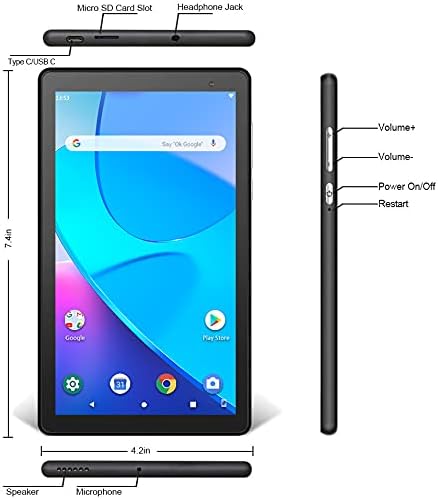
Obrázek: Přední a boční view of the PRITOM Tronpad tablet, highlighting the location of its ports and buttons. These include the Micro SD Card Slot, Headphone Jack, Type C/USB C port, Speaker, Microphone, Volume Up and Down buttons, Power On/Off button, and a dedicated Restart button.
Fyzické komponenty:
- Slot pro kartu Micro SD: Pro rozšíření úložné kapacity.
- Sluchátkový jack: Pro připojení drátových sluchátek.
- Type C/USB C Port: Pro nabíjení a přenos dat.
- Reproduktor: Audio výstup.
- Mikrofon: Pro audio vstup.
- Tlačítka hlasitosti (+/-): Pro nastavení hlasitosti zvuku.
- Tlačítko zapnutí / vypnutí: To power the device on or off, or to put it to sleep/wake it up.
- Tlačítko Restart: A dedicated button for restarting the tablet if it becomes unresponsive.
3. Nastavení
3.1 Počáteční nabíjení
Before first use, fully charge your tablet. Connect the provided USB-C cable to the tablet's USB-C port and the other end to a compatible power adapter. The charging indicator will typically show the charging status on the screen.
3.2 Zapnutí/vypnutí
- Zapnutí: Press and hold the Power On/Off button until the PRITOM logo appears.
- Vypnutí: Stiskněte a podržte tlačítko Zapnutí/Vypnutí, dokud se na obrazovce nezobrazí nabídka napájení. Vyberte možnost „Vypnout“ a potvrďte.
- Spánek/probuzení: Briefly press the Power On/Off button to put the tablet to sleep or wake it up.
3.3 Průvodce počátečním nastavením
Po prvním zapnutí vás tablet provede procesem počátečního nastavení:
- Výběr jazyka: Vyberte preferovaný jazyk.
- Wi-Fi připojení: Vyberte svou síť Wi-Fi a zadejte heslo pro připojení k internetu.
- Účet Google: Sign in with your existing Google account or create a new one. This is necessary to download apps from the Google Play Store.
- Datum a čas: Nastavte správné datum a čas nebo nechte síť, aby je nastavila automaticky.
- Zabezpečení: Pro zabezpečení si nastavte zámek obrazovky (PIN, vzorec nebo heslo).
4. Návod k obsluze
4.1 Základní navigace
Tablet používá pro navigaci dotyková gesta:
- Klepněte na: Výběr položky nebo otevření aplikace.
- Klepnutí a podržení: Pro přístup k kontextovým nabídkám nebo přesun ikon.
- Výpad: Procházení stránek nebo seznamů.
- Štípání: Pro přiblížení nebo oddálení obrázků a web stránky.
4.2 Wi-Fi připojení
- Přejít na Nastavení > Síť a internet > Wi-Fi.
- Přepnout Wi-Fi On.
- Vyberte požadovanou síť ze seznamu a v případě potřeby zadejte heslo.
4.3 Párování Bluetooth
- Přejít na Nastavení > Připojená zařízení > Bluetooth.
- Přepnout Bluetooth On.
- Ensure the device you want to pair is in pairing mode.
- Vyberte zařízení ze seznamu dostupných zařízení a dokončete párování podle pokynů na obrazovce.
4.4 Používání fotoaparátu
The tablet is equipped with dual cameras (front and rear).

Image: The PRITOM Tronpad tablet being used to capture a moment with its dual camera functionality.
- Otevřete Fotoaparát aplikace
- Klepnutím na ikonu fotoaparátu přepínáte mezi předním a zadním fotoaparátem.
- Klepnutím na tlačítko spouště pořídíte fotografii nebo spustíte/zastavíte nahrávání videa.
4.5 Správa aplikací
- Instalace aplikací: Otevřete Obchod Google Play app, search for your desired app, and tap "Install".
- Odinstalace aplikací: Tap and hold the app icon on the home screen or app drawer, then drag it to "Uninstall" or select "App info" and then "Uninstall". Alternatively, go to Nastavení > Aplikace a oznámení, vyberte aplikaci a klepněte na „Odinstalovat“.
4.6 Správa úložiště
The tablet comes with 32GB of internal storage. You can expand this using a Micro SD card.
- To Insert Micro SD Card: Gently insert the Micro SD card into the designated slot until it clicks into place.
- To Manage Storage: Přejít na Nastavení > Skladování na view využití a správa úložiště files.
4.7 Správa baterie
Chcete-li optimalizovat životnost baterie:
- Upravte jas obrazovky na pohodlnou úroveň.
- Vypněte Wi-Fi a Bluetooth, když je nepoužíváte.
- Zavřete nepoužívané aplikace běžící na pozadí.
- Povolte režim úspory baterie v Nastavení > Baterie.
5. Údržba
5.1 Čištění tabletu
Use a soft, lint-free cloth to clean the screen and body of the tablet. Avoid using harsh chemicals or abrasive materials, which can damage the screen or finish.
5.2 Aktualizace softwaru
Periodically check for software updates to ensure your tablet has the latest features and security patches. Go to Nastavení > Systém > Aktualizace systému.
5.3 Zálohování dat
Regularly back up important data to a cloud service (like Google Drive) or an external storage device to prevent data loss.
6. Řešení problémů
If you encounter issues with your PRITOM Tronpad tablet, try the following solutions:
- Tablet nereaguje: Press and hold the Power On/Off button for about 10-15 seconds to force a restart. Alternatively, use the dedicated Restart button if available (refer to Product Overview diagram).
- Pomalý výkon: Close unused apps, clear cache (Settings > Storage > Cached data), or restart the tablet. Consider uninstalling rarely used apps to free up storage.
- Problémy s připojením Wi-Fi: Ensure Wi-Fi is enabled. Restart your Wi-Fi router and the tablet. Forget the network and reconnect.
- Baterie se nenabíjí: Ensure the USB-C cable and power adapter are securely connected and functional. Try a different cable or adapter.
- Pády aplikací: Clear the app's cache and data (Settings > Apps & notifications > [App Name] > Storage & cache). If the issue persists, uninstall and reinstall the app.
If these steps do not resolve the issue, please contact PRITOM customer support for further assistance.
7. Specifikace
| Funkce | Specifikace |
|---|---|
| Značka | PRITOM |
| Název modelu | Tronpad Tablet |
| Velikost obrazovky | 7 palce |
| Rozlišení obrazovky | 1024x600 |
| Operační systém | Android 10 |
| Procesor | Čtyřjádro |
| BERAN | 1 GB |
| Velikost pevného disku / flash paměti | 32 GB |
| Bezdrátový typ | 802.11bgn (Wi-Fi) |
| Zadní WebRozlišení vačky | 2.2 MP |
| Hmotnost položky | 8.8 unce |
| Rozměry produktu | 7.5 x 4.3 x 0.4 palce |
| Průměrná životnost baterie | 6 hodiny |
8. Záruka a podpora
8.1 Informace o záruce
PRITOM products are designed for quality and reliability. For specific warranty terms and conditions, please refer to the warranty card included with your product or visit the official PRITOM webmísto.
8.2 Zákaznická podpora
If you have any questions, issues, or require technical assistance, please contact PRITOM customer support. The PRITOM team aims to provide attentive service and will respond to inquiries promptly, typically within 24 hours.
You can often find support contact information (such as email) on the PRITOM brand store page or within the product packaging.


