1. Úvod
This user manual provides detailed instructions for the operation and maintenance of your Sunbuck AS-60BU Home Audio Amplifier Stereo Receiver. This 2-channel amplifier is designed to enhance your home audio experience, offering versatile input options including Bluetooth 5.0, USB, SD card, AUX, CD, Line-in, and microphone inputs. Please read this manual thoroughly before using the product to ensure proper function and safety.

Figure 1: Sunbuck AS-60BU Amplifier and Remote Control
2. Bezpečnostní pokyny
- Nevystavujte toto zařízení dešti nebo vlhkosti.
- Neodstraňujte kryt. Uvnitř nejsou žádné součásti, které by mohl uživatel opravit. Servis svěřte kvalifikovanému personálu.
- Zajistěte dostatečné větrání kolem jednotky. Neblokujte větrací otvory.
- Connect only to a grounded AC power outlet.
- Nepřetěžujte elektrické zásuvky ani prodlužovací kabely.
- Neumisťujte jednotku do blízkosti zdrojů tepla nebo na přímé sluneční světlo.
- Odpojte napájení během bouřek s blesky nebo pokud jej delší dobu nepoužíváte.
- Uchovávejte mimo dosah dětí.
3. Obsah balení
Ověřte, zda je v balení obsaženo vše:
- Sunbuck AS-60BU Amplifier přijímač
- AC napájecí kabel
- Uživatelská příručka (tento dokument)
- Dálkové ovládání

Obrázek 2: Co je v krabici
4. Konec produktuview
4.1 Přední panel

Obrázek 3: Rozložení předního a zadního panelu
| Funkce | Popis |
|---|---|
| NAPÁJENÍ (ON/OFF) | Hlavní vypínač pro jednotku. |
| VSTUP AUX | 3.5mm jack pro připojení externích audio zařízení. |
| Volič vstupu | Rotary knob to select audio input source: LINE, CD, AUX, MEDIA PLAYER. |
| Ovládání BASS | Upravuje nízkofrekvenční zvukový výstup. |
| Ovládání TREBLE | Upravuje vysokofrekvenční zvukový výstup. |
| Kontrola ECHO | Upravuje efekt ozvěny pro mikrofonní vstupy. |
| M.TONE Control | Adjusts the microphone tone. |
| Ovládání hlasitosti mikrofonu | Adjusts the volume of the microphone inputs. |
| HLAVNÍ HLASITOST | Hlavní ovládání hlasitosti pro všechny zvukové výstupy. |
| USB/SD/MMC Port | Input for USB flash drives and SD/MMC cards for media playback. |
| MEDIA PLAYER Display & Buttons | Digital display and controls (MODE, Play/Pause, Previous, Next) for USB/SD/Bluetooth playback. |
| MIC 1 / MIC 2 | 6.35 mm mikrofonní vstupní jacky. |
4.2 Zadní panel
| Funkce | Popis |
|---|---|
| CD L/R IN | RCA stereo input for CD players. |
| LINE L/R IN | RCA stereo input for general line-level audio sources. |
| FM anténa | Připojovací bod pro anténu FM rádia. |
| DC napájecí vstup | Příkon pro ampživější. |
| Výstup reproduktoru (L/P) | Binding posts for connecting passive speakers (4-16 ohms). |
5. Nastavení
Follow these steps to set up your Sunbuck AS-60BU ampživější:
- Připojení reproduktorů: Connect your passive speakers to the "Speaker Output (L/R)" binding posts on the rear panel. Ensure correct polarity (+ to + and - to -) for optimal sound. This amplifier supports speakers with an impedance range of 4 to 16 ohms.
- Připojení zdroje zvuku:
- For CD players, connect RCA cables from the CD player's output to the "CD L/R IN" on the ampživější.
- For other line-level devices (e.g., tape drive, tuner), connect RCA cables to the "LINE L/R IN".
- For devices with a 3.5mm output (e.g., smartphones, tablets), use a 3.5mm audio cable to connect to the "AUX INPUT" on the front panel.
- For PC connection, use appropriate cables to connect your PC's audio output to either the LINE IN or AUX IN.

Obrázek 4: Schéma zapojení
- Připojení FM antény: If you plan to use the FM radio function, connect an FM antenna to the "FM Antenna" terminal on the rear panel.
- Připojení napájení: Zajistěte amplifier's POWER switch is in the OFF position. Connect the supplied AC power cord to the "DC Power Input" on the rear panel and then to a suitable wall outlet.
6. Návod k obsluze
6.1 Zapnutí/vypnutí
Chcete-li zapnout ampzáchranář, stiskněte tlačítko MOC switch to the ON position. The LED display will illuminate. To turn off, press the MOC přepněte do polohy OFF.
6.2 Výběr vstupu
Otočte Volič vstupu knob on the front panel to choose your desired audio source (LINE, CD, AUX, MEDIA PLAYER). When selecting MEDIA PLAYER, you can then use the MODE button on the front panel or remote to switch between USB, SD, and Bluetooth modes.
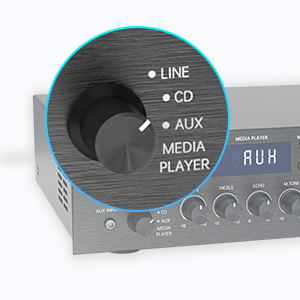
Figure 5: Input Selector
6.3 Připojení Bluetooth
Pro připojení přes Bluetooth:
- Nastavte Volič vstupu to MEDIA PLAYER.
- Stiskněte tlačítko MODE button until "BLUETOOTH" or "BT" appears on the display.
- Na svém mobilním zařízení (chytrý telefon, tablet, notebook) povolte Bluetooth a vyhledejte dostupná zařízení.
- Select "SUNBUCK" or "AS-60BU" from the list to pair.
- Po spárování můžete bezdrátově streamovat zvuk ze zařízení do ampživější.
The Bluetooth range is approximately 40+ feet, but can be affected by obstacles and interference.

Obrázek 6: Připojení Bluetooth
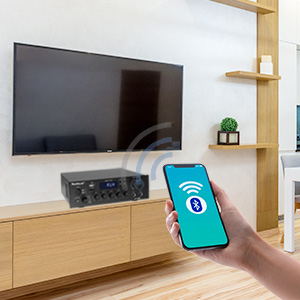
Figure 7: Bluetooth Connection Indicator
6.4 Přehrávání z USB/SD karty
To play media from a USB drive or SD/MMC card:
- Insert your USB flash drive or SD/MMC card into the corresponding port on the front panel.
- Nastavte Volič vstupu to MEDIA PLAYER.
- The amplifier will automatically detect and begin playing supported audio files (MP3, WAV, WMA, APE, FLAC).
- Use the Play/Pause, Previous, and Next buttons on the front panel or remote to control playback.
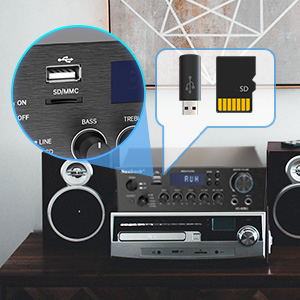
Figure 8: USB/SD Card Slots
6.5 Použití mikrofonu
Connect up to two microphones to the MIC 1 and MIC 2 jacks on the front panel. Adjust the OBJEM MIC, ECHOa M.TONE controls to achieve your desired sound for karaoke or public address.

Figure 9: Ideal for Karaoke and Home Entertainment
6.6 FM rádio
Chcete-li používat rádio FM:
- Ensure an FM antenna is connected to the rear panel.
- Nastavte Volič vstupu to MEDIA PLAYER.
- Stiskněte tlačítko MODE tlačítko, dokud se na displeji nezobrazí „FM“.
- Use the Previous/Next buttons to scan for stations. Note that this model cannot fix and save FM stations.

Figure 10: FM Mode Display
6.7 Nastavení zvuku
Použijte BASS, ZTROJNÁSOBITa HLAVNÍ HLASITOST knobs on the front panel to fine-tune your audio output. The HLAVNÍ HLASITOST controls the overall sound level.
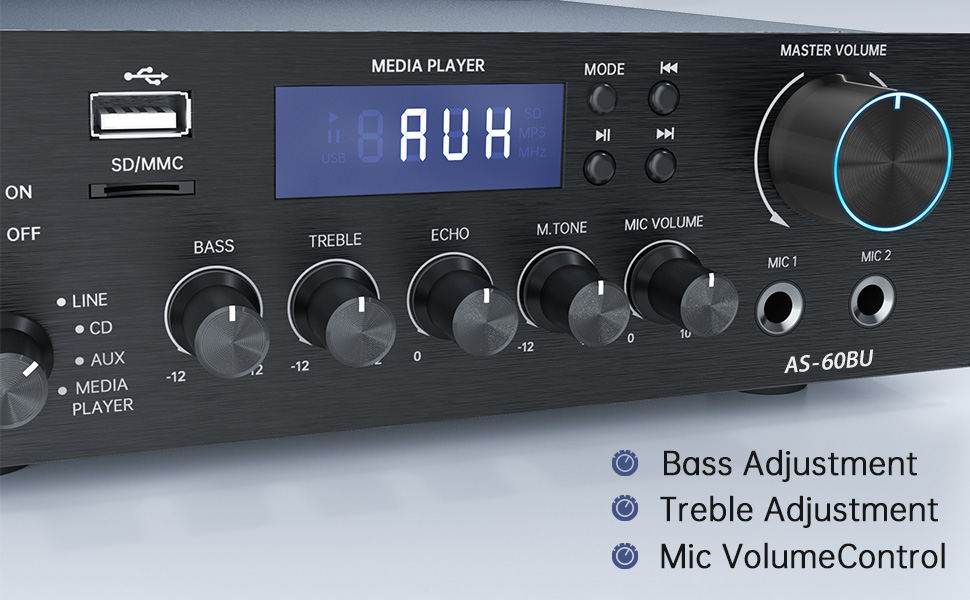
Figure 11: Audio Adjustment Controls
Video 1: Demonstration of Sunbuck AS-60BU amplifier features and sound quality.
7. Údržba
- Čištění: K čištění vnějších částí používejte měkký, suchý hadřík ampNepoužívejte tekuté čisticí prostředky ani aerosoly.
- Skladování: Pokud se přístroj delší dobu nepoužívá, uložte jej ampUchovávejte na chladném a suchém místě mimo dosah přímého slunečního záření a extrémních teplot.
- Větrání: Ujistěte se, že větrací otvory jsou čisté od prachu a nečistot, aby nedošlo k přehřátí.
8. Řešení problémů
| Problém | Možná příčina | Řešení |
|---|---|---|
| Žádný zvukový výstup. | Incorrect input selected, loose speaker connections, low volume. | Verify input selection, check speaker wiring polarity and tightness, increase MASTER VOLUME. |
| Bluetooth connection unstable or short range. | Obstacles between device and amplifier, interference, device too far. | Reduce distance between devices, remove obstacles, avoid other wireless devices. |
| Dálkové ovládání nefunguje. | Dead batteries, line of sight blocked. | Replace batteries, ensure clear path to ampIR přijímač zařízení Liferier. |
| Settings not saved after power off. | This is normal behavior for some settings (e.g., input mode). | Re-select desired input mode after powering on. |
| Zkreslený zvuk. | Input signal too high, speaker impedance mismatch, faulty cables. | Reduce source volume, ensure speakers are within 4-16 ohm range, check/replace cables. |
9. Specifikace
- Model: AS-60BU
- Výkon: MAX 400W x 2 (RMS 70W x 2)
- kanály: 2-kanál
- Impedance reproduktoru: 4-16 ohmů
- Výstupní impedance: 0.1 ohmů
- Vstupy: 2 x RCA Audio (CD, Line), 2 x Microphone (6.35mm), USB 2.0, SD Card, Bluetooth 5.0, AUX In (3.5mm), FM Radio
- Podporované audio formáty (USB/SD): MP3, WAV, WMA, APE, FLAC
- Rozměry produktu: 8.27 x 7.68 x 2.44 palce
- Hmotnost: 3.24 libry
- Výrobce: JS Electronics Limited
- První k dispozici: 9. září 2021
10. Záruka a podpora
Sunbuck products are designed for reliability and performance. For warranty information or technical support, please refer to the contact details provided with your purchase documentation or visit the official Sunbuck webUschovejte si účtenku jako doklad o koupi pro případ reklamace.
For further assistance, you may contact the manufacturer, JS Electronics Limited.


