Zavedení
This manual provides detailed instructions for the setup, operation, and maintenance of your Moultrie W800 All-Purpose Series A Trail Camera. Please read this guide thoroughly to ensure proper use and optimal performance of your device.
Konec produktuview
The Moultrie W800 is a high-performance trail camera designed for capturing images and videos of wildlife. It features an Illumi-Night Sensor for clear nighttime captures and a robust design for outdoor use.
Klíčové vlastnosti:
- Captures 26 Megapixel images for high clarity.
- 70-foot flash and detection range.
- Fast 0.5 second trigger speed.
- Moultrie Smokescreen Camo Pattern for discreet placement.
Co je v krabici:
- Moultrie W800 Trail Camera
- 8 AA baterie
- Montážní popruh

Image: Moultrie W800 Trail Camera in its retail packaging, showing the camera, batteries, and key features on the box.
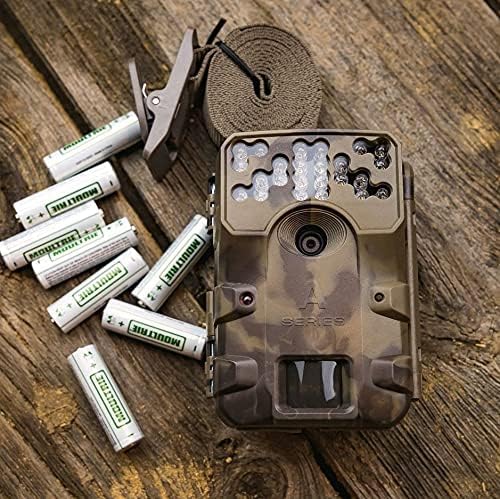
Image: The Moultrie W800 trail camera displayed with the included 8 AA batteries and a mounting strap, ready for setup.
Nastavení
1. Instalace baterie
- Otevřete západku krytu kamery.
- Insert 8 AA batteries into the battery compartment, ensuring correct polarity (+/-).
- Close the camera housing latch securely.
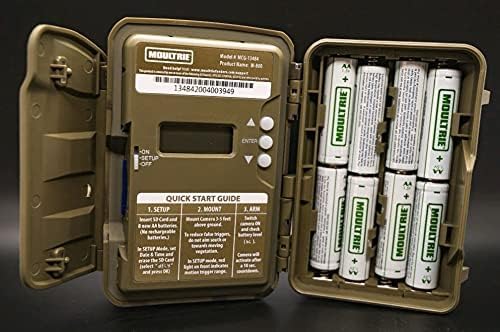
Image: An open Moultrie W800 camera, revealing the battery compartment on the right, the control panel with a small screen, and buttons on the left. This view is essential for battery and SD card installation.
2. Instalace SD karty
- S otevřeným krytem kamery vyhledejte slot pro SD kartu.
- Insert a standard SD card (up to 32GB) into the slot until it clicks into place. Ensure the card is inserted in the correct orientation.
- It is recommended to format the SD card using the camera's menu settings before first use.
3. Montáž kamery
- Select a suitable location, typically a tree or post, where the camera can capture the desired area.
- Mount the camera approximately 3-5 feet above the ground.
- Use the provided mounting strap to secure the camera firmly. Thread the strap through the camera's mounting slots and tighten it around the object.
- Angle the camera to avoid direct sunlight and to minimize false triggers from swaying branches.

Image: A Moultrie W800 trail camera, in its camouflage casing, securely mounted to a tree trunk using a strap, demonstrating a typical field setup.
Návod k obsluze
Základní operace
- Zapnutí/vypnutí: Locate the power switch inside the camera housing. Slide it to the 'ON' position to power on the camera. Slide to 'OFF' to power off.
- Režim nastavení: After powering on, the camera will typically enter 'SETUP' mode. In this mode, you can adjust settings such as date, time, photo/video mode, resolution, and trigger delay using the control buttons and display.
- Arming the Camera: Once settings are configured, slide the power switch to the 'ARM' position. The camera will initiate a countdown (e.g., 10 seconds) to allow you to leave the area without triggering a capture. After the countdown, the camera will be active and ready to detect motion.
- Kontrola stavu: The small display inside the camera housing provides status information, including battery level, SD card status, and current mode.
Údržba
- Čištění: Periodically clean the camera lens and sensor window with a soft, lint-free cloth. Avoid abrasive materials or harsh chemicals.
- Kontrola baterie: Regularly check battery levels, especially before extended deployment. Replace all batteries simultaneously to ensure consistent power.
- Správa SD karet: Format the SD card regularly to prevent data corruption and ensure optimal performance. Back up important images/videos before formatting.
- Integrita bydlení: Ensure the camera housing latch is always securely closed to protect against moisture and dust.
Odstraňování problémů
- Camera not taking pictures:
- Check if the camera is in 'ARM' mode.
- Ujistěte se, že je SD karta správně vložena a má dostatek volného místa.
- Verify that batteries have adequate charge.
- Check camera settings for trigger delay or sensitivity.
- Naformátujte kartu SD.
- Špatná kvalita obrazu:
- Vyčistěte objektiv fotoaparátu a okénko senzoru.
- Ensure the camera is mounted at the recommended height and angle.
- Zkontrolujte, zda se před kamerou nenacházejí překážky.
- Krátká výdrž baterie:
- Use fresh, high-quality alkaline or lithium AA batteries.
- Extrémní teploty mohou ovlivnit výkon baterie.
- Frequent video recording or high trigger frequency can consume more power.
Specifikace
Detailed technical specifications for the Moultrie W800 Trail Camera:
| Funkce | Specifikace |
|---|---|
| Efektivní rozlišení | 26 MP |
| Rychlost spouštění | 0.5 sekund |
| Rozsah blesku | 70 stop |
| Rozsah detekce | 70 stop |
| Technologie nízkého osvětlení | Illumi-Night Sensor (Night Color) |
| Rozlišení záznamu videa | 720p |
| Formát záznamu videa | MPEG-4 |
| Typ paměti Flash | SD (až 32 GB) |
| Zdroj napájení | 8 AA baterie |
| Technologie připojení | Bezdrátové (Wi-Fi) |
| Kontrolní metoda | App |
| Speciální funkce | Pohybový senzor, noční vidění |
| Hodnocení mezinárodní ochrany | IP54 |
| Hmotnost položky | 1.12 libry |
| Rozměry balení | 8.62 x 5.39 x 3.43 palce |
| UPC | 053695134840 |

Image: The back of the Moultrie W800 retail box, detailing performance specifications such as trigger speed, detection range, flash range, battery life, and SD card compatibility.
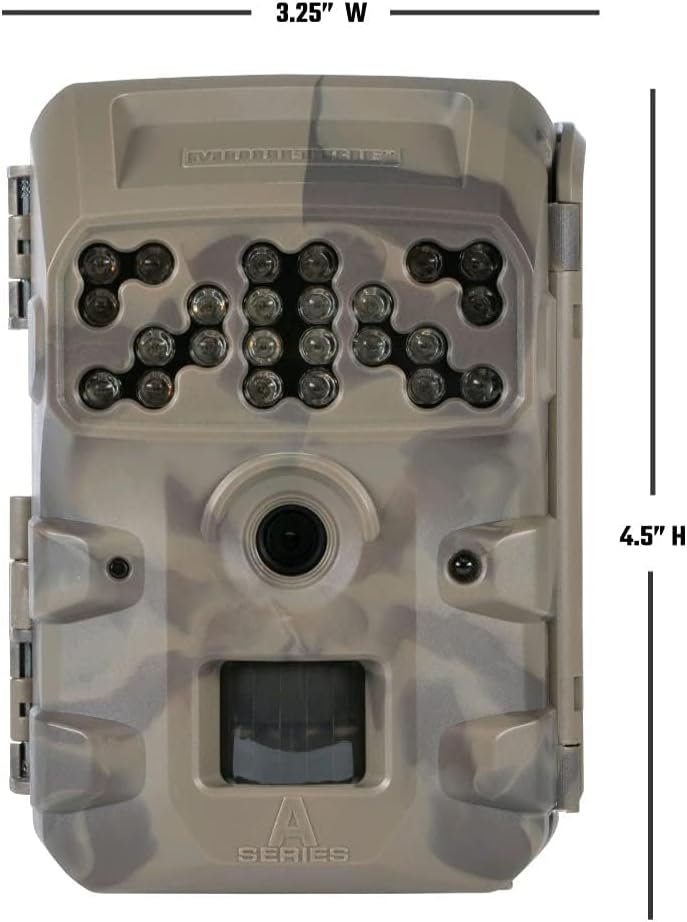
Obrázek: Přední strana view of the Moultrie W800 trail camera with its dimensions clearly labeled: 3.25 inches wide and 4.5 inches high.
Záruka a podpora
Informace o záruce:
The Moultrie W800 Trail Camera comes with a 2-letá záruka od data nákupu, která se vztahuje na výrobní vady. Uschovejte si prosím doklad o koupi pro případné reklamace.
Zákaznická podpora:
For technical assistance, troubleshooting, or warranty inquiries, please visit the official Moultrie support webmísto:


