1. Úvod
Thank you for choosing the Hama Digital Radio DR7 USB. This manual provides essential information for the safe and efficient operation of your new radio. Please read it thoroughly before use and keep it for future reference. This portable radio supports DAB/DAB+ digital radio and conventional FM reception, offering clear sound quality and portability.
2. Bezpečnostní pokyny
- Protect the product from dirt, moisture, and overheating. Use it only in dry environments.
- Nenechávejte výrobek upadnout ani jej nevystavujte silným nárazům.
- Pokud se výrobek poškodí, neotevírejte jej a nepokračujte v jeho provozu.
- Nepokoušejte se sami provádět servis nebo opravy produktu. Veškeré servisní práce přenechejte kvalifikovaným odborníkům.
- Tento výrobek, stejně jako všechny elektrické výrobky, uchovávejte mimo dosah dětí.
- Obalový materiál okamžitě zlikvidujte v souladu s místně platnými předpisy.
- Baterie musí být vloženy se správnou polaritou.
- Remove batteries from the product if it is not to be used for an extended period.
3. Obsah balení
- Hama Digital Radio DR7 USB
- 4 x AA baterie
- Návod k použití
4. Nastavení
4.1 napájecí zdroj
The Hama Digital Radio DR7 USB can be powered by either batteries or an external USB power source.
4.1.1 Instalace baterie
To use the radio with batteries, open the battery compartment cover located on the back of the device. Insert 4 AA alkaline batteries, ensuring correct polarity (+/-). Close the battery compartment cover securely.

Obrázek: Zpět view of the radio with the battery compartment open, showing battery insertion.
4.1.2 Připojení externího napájení
For continuous operation, connect the radio to a USB power source using a compatible USB 2.0 cable. The DC IN port requires 5.0V-0.5A. The USB port is located on the back of the radio.
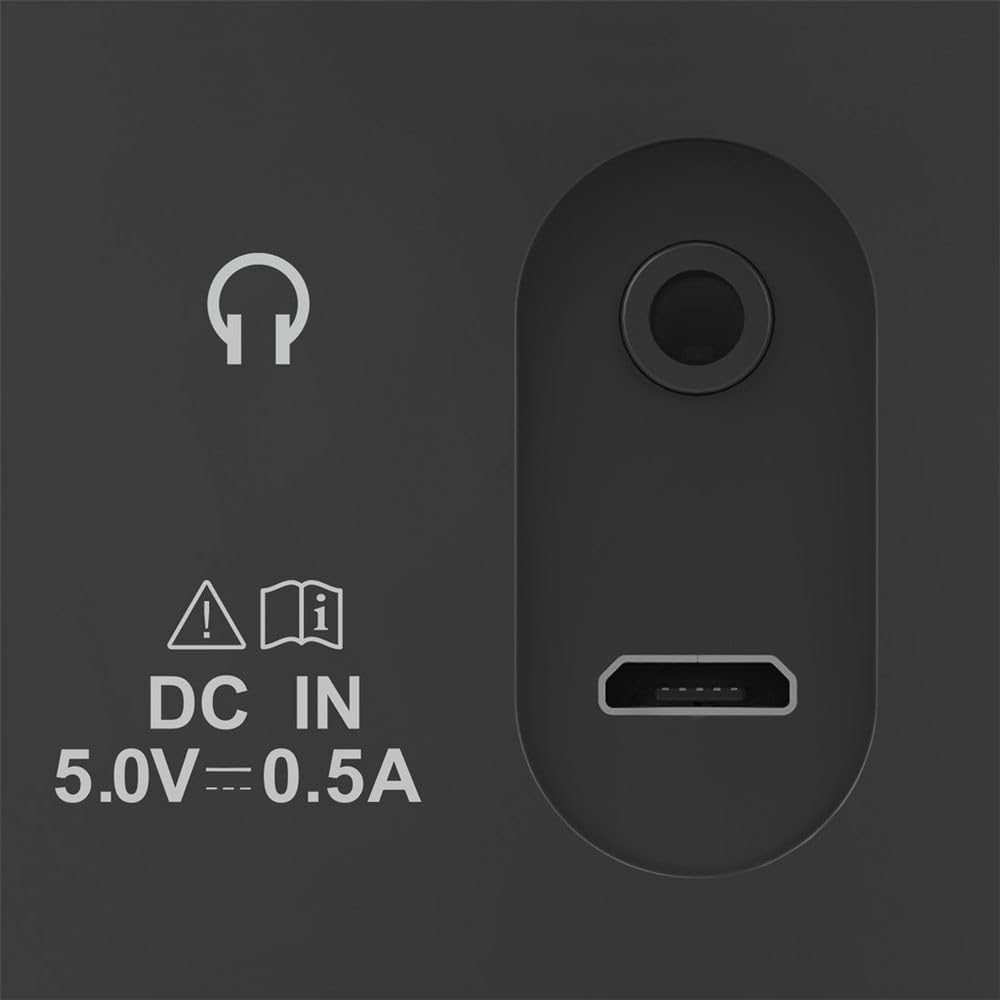
Image: Close-up of the radio's rear ports, including DC IN and USB.
4.2 Anténa
Extend the telescopic antenna fully for optimal radio reception. Adjust its position to improve signal strength if needed.

Obrázek: Zpět view of the radio with the antenna extended.
5. Návod k obsluze
5.1 Zapnutí/vypnutí
Stiskněte tlačítko Moc button (usually marked with a circle and a vertical line) to turn the radio on or off.
5.2 Výběr režimu (DAB/DAB+ a FM)
Použijte Režim or Zdroj button to switch between DAB/DAB+ digital radio and FM radio modes.
5.3 Station Tuning
5.3.1 Automatic Scan (DAB/DAB+)
In DAB/DAB+ mode, press the Skenovat button to automatically search for available digital radio stations. The radio will store all found stations.
5.3.2 Manual Tuning (FM)
V režimu FM použijte Naladit +/- buttons or the rotary knob (if available) to manually adjust the frequency. Press and hold the Naladit +/- buttons for automatic station seeking.

Obrázek: Přední strana view of the radio, highlighting the display and controls.
5.4 přednastavených stanic
The radio features two direct selection buttons and allows for storing up to 10 preset stations.
- Zachránit: Tune to the desired station. Press and hold a preset button (e.g., 1 or 2) or the Přednastaveno button until the display confirms the station is saved.
- Připomeňme: Briefly press the corresponding preset button to quickly switch to a saved station.
5.5 Ovládání hlasitosti
Upravte hlasitost pomocí Objem rotary knob or dedicated volume buttons.
5.6 Funkce budíku
The radio includes an alarm clock feature. Refer to the detailed instructions in the printed manual for setting and managing alarms.
5.7 Použití sluchátek
Connect standard 3.5mm headphones to the headphone jack on the back of the radio for private listening. The internal speaker will mute automatically.
6. Údržba
- Tento výrobek čistěte pouze jemným damp, hadřík nepouštějící vlákna a nepoužívejte agresivní čisticí prostředky.
- Zajistěte, aby se do výrobku nedostala voda.
- When replacing batteries, always replace all batteries at once.
- Pokud rádio delší dobu nepoužíváte, skladujte ho na chladném a suchém místě.
7. Řešení problémů
| Problém | Možná příčina | Řešení |
|---|---|---|
| Žádná síla | Batteries are depleted or incorrectly inserted; power cable is disconnected. | Replace batteries, check polarity; ensure power cable is securely connected. |
| Špatný nebo žádný příjem | Anténa není vysunutá; slabý signál; rušení. | Fully extend and adjust the telescopic antenna; try moving the radio to a different location; perform a new station scan. |
| Žádný zvuk | Volume too low; headphones connected. | Increase volume; disconnect headphones if you want to use the speaker. |
8. Specifikace
- Model: 00054242
- Rozměry (D x Š x V): 16.5 x 5.5 x 10.5 cm
- Hmotnost: 448.54 g
- Technologie tuneru: DAB, DAB+, FM
- Frekvence (FM): 87.5 MHz
- Zdroj napájení: 4 x AA Alkaline Batteries, USB 2.0 (DC IN 5.0V-0.5A)
- Materiál: Plast
- Speciální vlastnosti: Alarm clock, 2 direct selection buttons, 10 preset stations
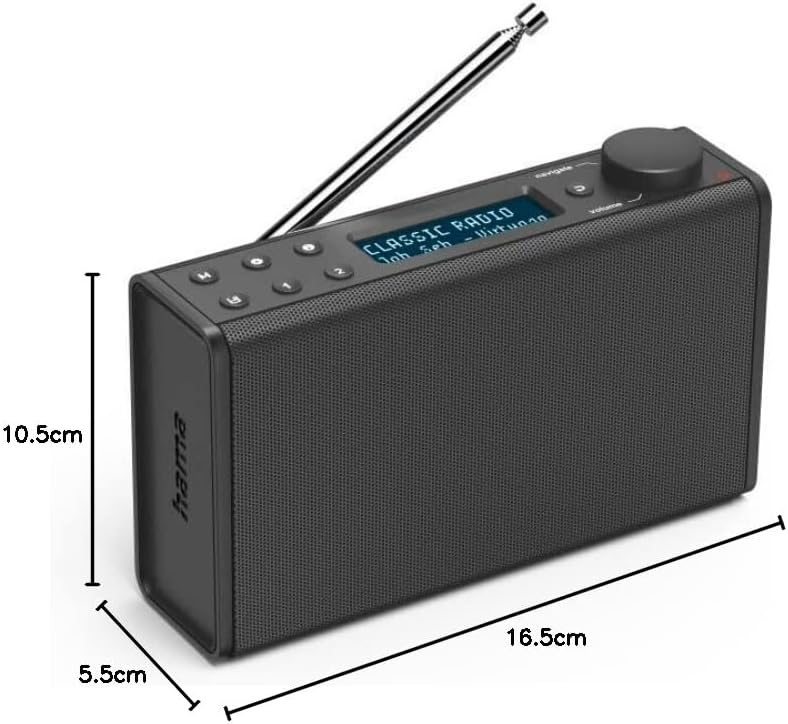
Image: Dimensions of the Hama Digital Radio DR7 USB.
9. Záruka a podpora
Hama GmbH & Co KG assumes no liability and provides no warranty for damage resulting from improper installation/mounting, improper use of the product, or from failure to observe the operating instructions and/or safety notes. For further support, please visit the official Hama webnebo kontaktujte jejich zákaznický servis.


