Zavedení
Děkuji za nákupasing the AMIR Digital LED Alarm Clock. This clock features a large LED display, adjustable brightness, temperature display, voice control, and multiple alarm modes. This manual provides detailed instructions on how to set up, operate, and maintain your new alarm clock.

Obrázek 1: Přední strana view of the AMIR Digital LED Alarm Clock. The clock features a large, clear red LED display.
Obsah balení
- 1 x AMIR Digital LED Alarm Clock
- 1 x USB Power Cable (1 meter)
- 1 x Uživatelská příručka
Note: AAA batteries and AC adapter are not included.

Figure 2: The AMIR Digital LED Alarm Clock, its USB power cable, and the user manual as found in the package.
Nastavení
1. Napájení zařízení
Hodiny lze napájet dvěma způsoby:
- USB Cable Power: Connect the provided USB cable to the clock's power input and plug the other end into a USB power adapter (not included) or a USB port on a computer. The display will remain continuously on when powered by USB.
- Napájení baterie: Insert 3 x AAA batteries (not included) into the battery compartment on the back of the clock. When powered by batteries, the display will automatically turn off after 16 seconds to conserve energy. You can activate the display by making a sound (voice control) or touching the clock.
Note: Using both USB power and batteries provides a memory function, retaining time settings during power outages.
2. Funkce tlačítek
Familiarize yourself with the buttons located on the back of the clock:
- DOLŮ: Decreases values, adjusts brightness.
- NAHORU: Increases values, adjusts brightness.
- SVĚTLO/ODLOŽIT: Adjusts brightness, activates snooze function.
- REŽIM: Switches between clock, date, and temperature modes.
- POPLACH: Vstupuje do režimu nastavení budíku.
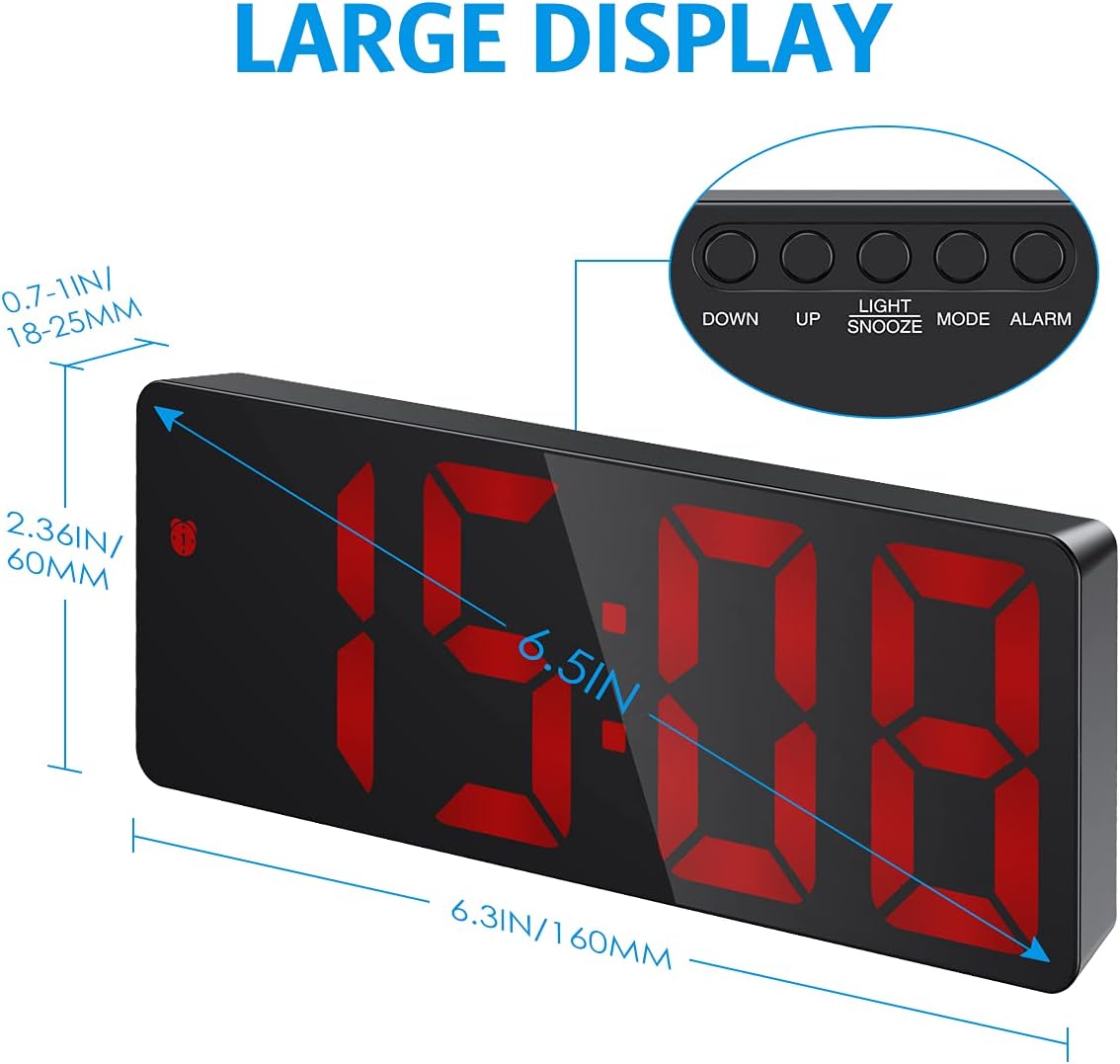
Obrázek 3: Přesview of the clock's dimensions and button layout.
3. Počáteční nastavení času
- Stiskněte a podržte MODE po dobu 3 sekund pro vstup do režimu nastavení času. Číslice hodin budou blikat.
- Použijte UP or DOLŮ tlačítka pro nastavení hodiny.
- Stiskněte MODE znovu pro přepnutí na nastavení minut. Číslice minut budou blikat.
- Použijte UP or DOLŮ tlačítka pro nastavení minut.
- Stiskněte MODE pro potvrzení a ukončení nastavení času.
4. 12/24H Format Selection
While in time setting mode (after step 1 above), press the UP tlačítko pro přepínání mezi 12hodinovým a 24hodinovým formátem času.
5. Zobrazení teploty
The clock automatically displays the temperature. To switch between Celsius (°C) and Fahrenheit (°F), press the DOLŮ button while in temperature display mode (press MODE until temperature is shown).
Návod k obsluze
1. Nastavení jasu
The clock offers three levels of brightness (Bright, Medium, Low) and a Night Mode.
- Ruční nastavení: Stiskněte tlačítko UP or DOLŮ buttons (not in setting mode) to cycle through Bright, Medium, and Low brightness levels.
- Noční režim: In Night Mode, the display automatically dims between 18:00 (6 PM) and 6:00 (6 AM). To activate/deactivate Night Mode, press and hold the MODE button until "OFF" or "ON" appears. You can also customize the night mode time period by pressing MODE again after activating Night Mode.
- Displej vypnutý: To completely turn off the display while sleeping, press and hold the SVĚTLO / SNOOZE button for more than 3 seconds. Press any button to turn it back on.
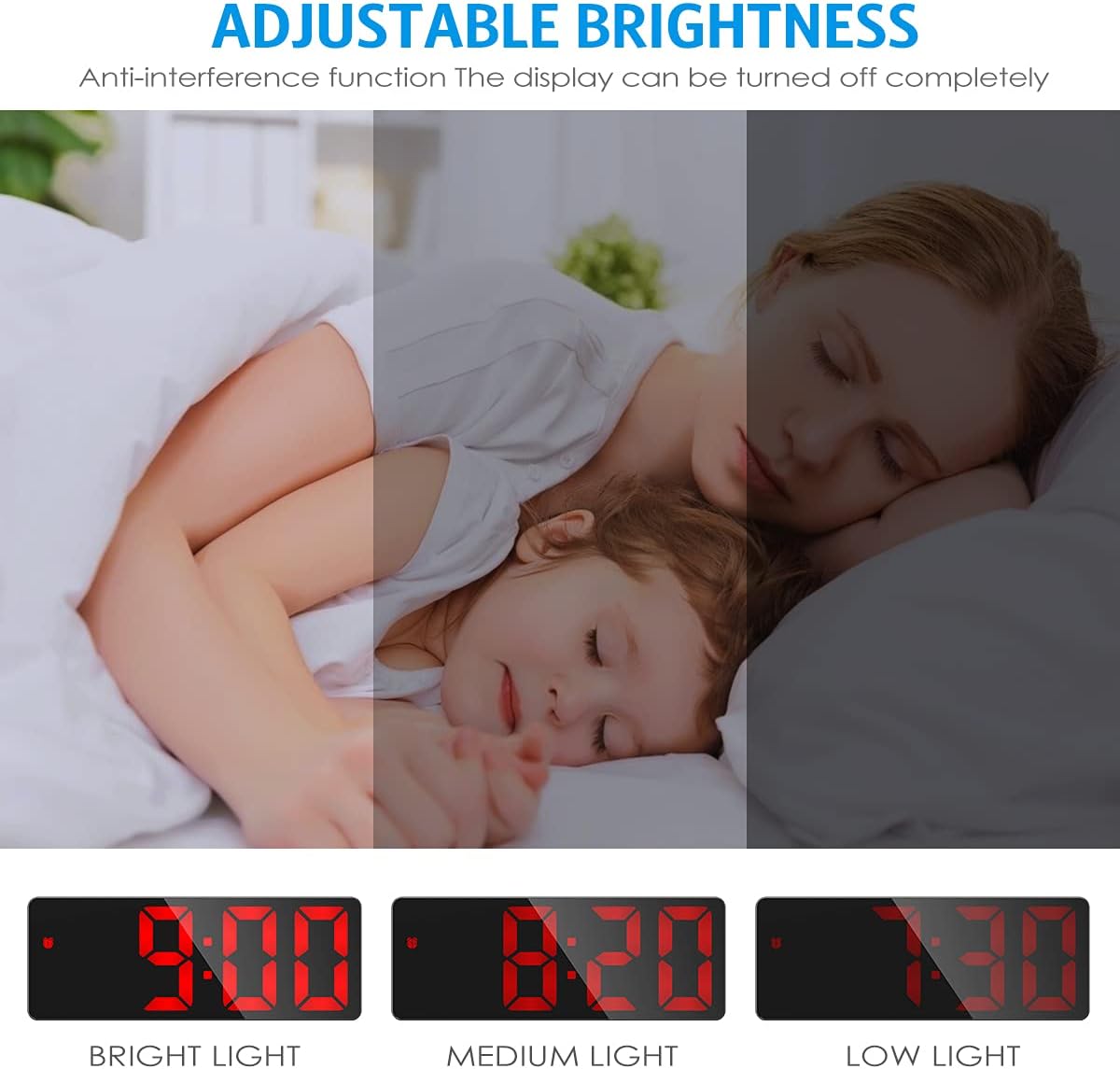
Figure 4: Visual representation of the three adjustable brightness levels.
2. Nastavení alarmu
The clock supports three alarm modes: Monday-Friday, Monday-Saturday, and Everyday.
- Stiskněte a podržte POPLACH button for 3 seconds to enter alarm setting mode. The hour digits will flash.
- Použijte UP or DOLŮ tlačítka pro nastavení hodiny budíku.
- Stiskněte POPLACH znovu pro přepnutí na nastavení minut. Číslice minut budou blikat.
- Použijte UP or DOLŮ tlačítka pro nastavení minuty budíku.
- Stiskněte POPLACH again to select the snooze duration (1-60 minutes). Use UP or DOLŮ upravit.
- Stiskněte POPLACH again to select the alarm mode:
- 1-5: pondělí až pátek
- 1-6: pondělí až sobota
- 1-7: Každodenní
- Stiskněte POPLACH pro potvrzení a ukončení nastavení budíku.

Figure 5: The three available alarm modes for customized wake-up schedules.
3. Funkce odložení buzení
Když zazní alarm, stiskněte SVĚTLO / SNOOZE button to activate the snooze function. The alarm will sound again after the set snooze duration (1-60 minutes). To cancel the alarm completely, press any other button.

Figure 6: The snooze function allows for additional sleep time after the alarm sounds.
4. Voice Control & Power Saving Mode (Battery Powered Only)
When the clock is powered solely by AAA batteries, it enters a power-saving mode where the display turns off after 16 seconds of inactivity. You can activate the display by:
- Making a sound (e.g., clapping hands, knocking on the table).
- Touching the clock.
The clock's internal time and temperature tracking continue even when the display is off in power-saving mode.

Figure 7: The clock's display can be activated by sound or touch when running on battery power.
Údržba
- Čištění: Povrch hodin otřete měkkým, suchým hadříkem. Nepoužívejte abrazivní čisticí prostředky ani rozpouštědla.
- Výměna baterie: If using batteries, replace them when the display becomes dim or the clock functions become erratic. Ensure correct polarity when inserting new batteries.
- Skladování: Pokud hodiny skladujete delší dobu, vyjměte baterie, abyste zabránili vytečení.
Odstraňování problémů
| Problém | Možná příčina | Řešení |
|---|---|---|
| Displej je vypnutý nebo tlumený. |
|
|
| Alarm se nespustí. |
|
|
| Hlasové ovládání nefunguje. |
|
|
Specifikace
| Značka | AMIR |
| Model | B09F5SL8K6 |
| Typ zobrazení | Digitální LED |
| Barva | Red (LED display) |
| Zdroj napájení | Wired Electric (USB) and Battery Powered (3x AAA, not included) |
| Speciální funkce | Alarm, Adjustable Brightness, Temperature Display, Night Mode, Snooze, Voice Control |
| Rozměry produktu | 16L x 6H cm (approx. 6.3 x 2.36 inches) |
| Hmotnost | 160 g (přibližně 0.35 libry) |
Záruka a podpora
This product comes with a standard manufacturer's warranty. For warranty claims or technical support, please contact the retailer or manufacturer directly. Keep your purchase receipt as proof of purchase.
For further assistance, please visit the AMIR official webnebo kontaktujte jejich zákaznický servis.


