1. Úvod
This manual provides essential instructions for the safe and efficient operation of your Crosley Cruiser Portable Bluetooth Turntable. Please read this manual thoroughly before use and retain it for future reference.
The Crosley Cruiser is a portable, belt-driven turntable designed to play 33 1/3, 45, and 78 RPM records. It features built-in stereo speakers, Bluetooth receiver functionality for streaming music to the turntable, and Bluetooth transmitter functionality to stream your records to external Bluetooth speakers or headphones. Additional features include an auxiliary input, headphone jack, RCA audio out, and adjustable pitch control.
2. Obsah balení
- Crosley Cruiser Portable Bluetooth Turntable (Model CR8005F-WS4)
- Napájecí adaptér
- Adaptér 45 RPM
- Návod k použití
3. Konec produktuview
Familiarize yourself with the components of your turntable:
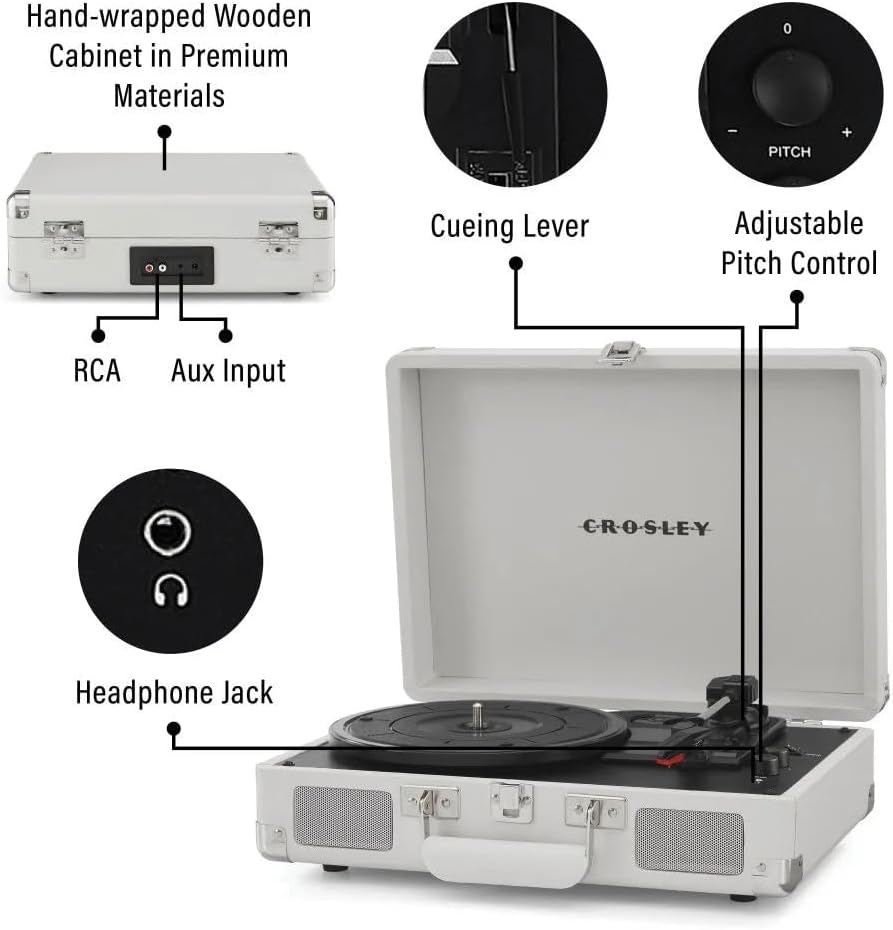
Obrázek 1: Nadview of the Crosley Cruiser Portable Bluetooth Turntable, highlighting key features such as RCA and Aux Input ports, the cueing lever, adjustable pitch control, and the headphone jack.
- Talíř talíře: Kam jsou uloženy záznamy.
- Rameno: Drží stylus (jehlu).
- Stylus: Čte drážky desky.
- Spouštěcí páka: Lifts and lowers the tonearm.
- Volič rychlosti: Upravuje rychlost přehrávání (33 1/3, 45, 78 ot./min).
- Ovládání výšky: Fine-tunes playback speed.
- Function Switch (Phono/Bluetooth/Aux): Vybírá vstupní zdroj.
- Volume Control/Power Knob: Zapíná/vypíná přístroj a upravuje hlasitost.
- Sluchátkový jack: Pro soukromý poslech.
- Pomocný vstup: Připojte externí audio zařízení.
- Audio výstup RCA: Připojte k externímu amplifier/reproduktory.
- Vestavěné reproduktory: Pro přímé přehrávání zvuku.
4. Nastavení
4.1 Vybalení a umístění
- Opatrně vyjměte gramofon z obalu.
- Place the unit on a flat, stable surface away from direct sunlight, heat sources, or excessive vibration.
- Odstraňte veškeré ochranné materiály z talíře gramofonu a raménka.
4.2 Připojení napájení
- Connect the power adapter to the DC input jack on the back of the turntable.
- Zapojte napájecí adaptér do standardní zásuvky.
4.3 Počáteční nastavení raménka
- Uvolněte zámek raménka.
- Před přehráváním desky se ujistěte, že je z jehly odstraněn chránič hrotu.
5. Návod k obsluze
5.1 Přehrávání desky
- Otevřete víko otočného talíře.
- Umístěte desku na gramofonový talíř. Pokud přehráváte singl s rychlostí 45 otáček za minutu, použijte přiložený adaptér na 45 otáček za minutu.
- Vyberte vhodnou rychlost (33 1/3, 45 nebo 78 ot./min.) pomocí přepínače rychlosti.
- Otočením knoflíku hlasitosti/napájení ve směru hodinových ručiček zapněte zařízení.
- Set the Function Switch to "PHONO".
- Zvedněte raménko přenosky pomocí páčky pro nastavení tónu.
- Position the tonearm over the desired starting point of the record.
- Gently lower the tonearm onto the record using the cueing lever. The record will begin to play.
- Nastavte hlasitost na požadovanou úroveň.
- To stop playback, lift the tonearm using the cueing lever and return it to the tonearm rest. Secure the tonearm lock.

Obrázek 2: The Crosley Cruiser Turntable in operation, with a record spinning on the platter and the tonearm engaged.
5.2 Bluetooth Receiver Mode (Streaming to Turntable)
- Otočením knoflíku hlasitosti/napájení ve směru hodinových ručiček zapněte zařízení.
- Set the Function Switch to "Bluetooth". The Bluetooth indicator light will flash.
- Enable Bluetooth on your external device (e.g., smartphone, tablet) and search for "Crosley Cruiser".
- Select "Crosley Cruiser" to pair. Once paired, the indicator light will stop flashing and remain solid.
- Nyní můžete streamovat zvuk ze svého zařízení do vestavěných reproduktorů gramofonu.
5.3 Bluetooth Transmitter Mode (Streaming Records to External Speakers/Headphones)
- Ujistěte se, že váš externí Bluetooth reproduktor nebo sluchátka jsou v režimu párování.
- Set the Function Switch to "PHONO".
- Start playing a record as described in Section 5.1.
- Press and hold the Bluetooth pairing button (if available, otherwise the unit may automatically search). The turntable will search for nearby Bluetooth devices.
- Once connected, the audio from the record will stream to your external Bluetooth device.
5.4 Pomocný vstup
- Connect an external audio device (e.g., MP3 player) to the AUX IN jack using a 3.5mm audio cable.
- Set the Function Switch to "AUX".
- Play audio from your external device. The sound will play through the turntable's speakers.
5.5 Sluchátkový výstup
- Pro soukromý poslech zapojte sluchátka s 3.5mm konektorem do sluchátek. Vestavěné reproduktory budou ztlumené.
5.6 Ovládání výšky tónu
- Use the Pitch Control knob to slightly increase or decrease the playback speed of a record, allowing for fine-tuning.
6. Údržba
6.1 Čištění gramofonu
- Vnější povrch jednotky otřete měkkým, suchým hadříkem. Nepoužívejte abrazivní čisticí prostředky ani rozpouštědla.
- Keep the stylus clean. Use a soft brush (not included) to gently brush the stylus from back to front.
- Regularly clean your records to prevent dust buildup, which can affect sound quality and stylus life.
6.2 Výměna stylusu
The stylus is a consumable part and will wear out over time. A worn stylus can damage records and degrade sound quality. Replace the stylus after approximately 200-300 hours of playback. Refer to the Crosley website or your retailer for replacement stylus information.
7. Řešení problémů
| Problém | Možná příčina | Řešení |
|---|---|---|
| Žádná síla | Napájecí adaptér není připojen; zásuvka není aktivní. | Ensure power adapter is securely connected and plugged into a working outlet. Check if the Volume/Power knob is turned on. |
| Žádný zvuk z reproduktorů | Volume too low; Function Switch incorrect; headphones plugged in. | Increase volume. Set Function Switch to PHONO or Bluetooth/AUX. Unplug headphones. |
| Record skips or repeats | Record is dirty or damaged; stylus is worn or dirty; turntable not level. | Clean the record. Clean or replace the stylus. Ensure the turntable is on a flat, stable surface. |
| Problémy s párováním pomocí rozhraní Bluetooth | Device too far; incorrect mode; device already paired. | Ensure devices are within range. Set turntable to Bluetooth mode (receiver) or ensure external device is in pairing mode (transmitter). Forget previous pairings on your device. |
8. Specifikace
- Model: CR8005F-WS4
- Značka: Crosley
- Rozměry produktu: 10.51 x 14.02 x 4.65 palce
- Hmotnost položky: 5.48 liber (2.49 kilogramů)
- Rychlosti: 33 1/3, 45, 78 ot./min
- Konektivita: Bluetooth (Receiver & Transmitter), Auxiliary Input, Headphone Jack, RCA Audio Out
- Speciální funkce: Přenosný
- Materiál: Dřevo
- Zahrnuté komponenty: 1 x Crosley Cruiser Portable Bluetooth Turntable, White Sands
9. Záruka a podpora
Informace o záruce a technickou podporu získáte od oficiálního prodejce Crosley. webnebo se obraťte na prodejce. Uschovejte si doklad o koupi pro případné reklamace.
Pro další pomoc navštivte stránku Obchod Crosley na Amazonu.


