Zavedení
The Dune HD SmartBox 4K Plus is an advanced media player and Smart Android TV box designed for high-quality video and audio playback. It supports Ultra HD 4K video at up to 60 frames per second, High Dynamic Range (HDR) for superior contrast, and 10-bit color coding for a vast color palette. This device integrates the classic Dune HD user interface with the Android operating system, offering a comprehensive media experience. It is equipped with dual-band Wi-Fi, Bluetooth, and various connectivity options for seamless integration into your home entertainment system.
Co je v krabici
- Dune HD SmartBox 4K Plus unit
- Dune HD Slim IR Remote Control
- 2 x AAA baterie (pro dálkové ovládání)
- Napájecí zdroj (12V 1A)
- A/V Cable (3.5mm to 3RCA)
- HDMI kabel
- Průvodce rychlou instalací
Konec produktuview



Nastavení
1. Připojení zařízení
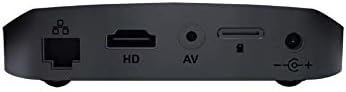
- Připojení napájení: Connect the provided power adapter to the DC 12V input port on the rear of the Dune HD SmartBox 4K Plus, then plug the adapter into a wall outlet.
- Připojení HDMI: Use the included HDMI cable to connect the HDMI output port on the media player to an HDMI input port on your TV or display. Ensure your TV is set to the correct HDMI input source.
- Síťové připojení (volitelné):
- Kabelové: For a stable connection, connect an Ethernet cable from your router to the Ethernet port on the rear of the device.
- Bezdrátový: The device supports dual-band Wi-Fi (2.4 GHz / 5 GHz). You will configure the wireless connection during the initial setup wizard.
- Audio/Video Connection (Optional): If your display does not support HDMI, use the provided A/V cable to connect the A/V output port on the player to the corresponding RCA inputs on your TV.
- Zařízení USB (volitelné): Connect external hard drives, USB flash drives, or other USB peripherals to the USB ports on the side of the device.
2. Průvodce počátečním nastavením
Upon first power-on, the Dune HD SmartBox 4K Plus will guide you through an initial setup wizard. Follow the on-screen prompts to:
- Vyberte preferovaný jazyk.
- Nakonfigurujte nastavení sítě (Wi-Fi nebo Ethernet).
- Adjust display resolution and refresh rate.
- Log in to your Google account (optional, for Android features and app downloads).
- Perform system updates if available.
Ensure the remote control batteries are inserted correctly before starting the setup process.
Návod k obsluze
Navigace v uživatelském rozhraní
The Dune HD SmartBox 4K Plus features a hybrid user interface combining the classic Dune HD experience with Android OS. Use the included IR remote control or the Dune Control App (available for iOS/Android) to navigate.

- Domovská obrazovka: Provides access to installed applications, media sources, and system settings.
- Zdroje médií: Browse content from connected USB drives, network shares (SMB, NFS, UPnP/DLNA), or the built-in micro SD card slot.
- Aplikace: Access pre-installed apps or download new ones from the Google Play Store.
- Nastavení: Configure network, display, audio, and other system preferences.
Přehrávání médií
The Dune HD SmartBox 4K Plus supports a wide range of video and audio formats:
- Video kodeky: MPEG2, MPEG4, XVID, WMV9, VC1, H.264, H.265, H.265 10-bit. Supports very high bitrate video up to 100 Mbit/s and higher.
- Video File Formáty: MKV, MPEG-TS, MPEG-PS, M2TS, VOB, AVI, MOV, MP4, QT, ASF, WMV, BD ISO, BDMV, DVD-ISO, VIDEO_TS.
- 4K Video Formats: H.265 up to 4Kp60 HDR, H.265 10-bit up to 4Kp60 HDR, H.264 up to 4Kp30.
- Zvukové formáty: Supports various audio codecs for high-fidelity sound.
To play media, navigate to your desired source (e.g., USB drive, network share), select the file, and press the Play button on your remote.
Údržba
Čištění
To maintain the device's appearance and performance:
- Před čištěním odpojte zařízení ze zásuvky.
- K otírání vnějšku jednotky použijte měkký, suchý hadřík.
- Do not use liquid cleaners, aerosols, or abrasive chemicals, as these may damage the surface or internal components.
- Udržujte větrací otvory čisté od prachu a nečistot.
Aktualizace firmwaru
Periodically check for firmware updates to ensure optimal performance, new features, and bug fixes. Updates can typically be found in the system settings menu under "About" or "System Update." Ensure a stable internet connection during updates and do not power off the device until the update process is complete.
Odstraňování problémů
| Problém | Možná příčina | Řešení |
|---|---|---|
| Žádná síla | Napájecí kabel není připojen; problém se zásuvkou. | Ujistěte se, že je napájecí adaptér bezpečně připojen k zařízení a k funkční zásuvce. |
| Žádný obraz na televizi | Incorrect HDMI/AV connection; wrong TV input selected. | Check HDMI/AV cable connections. Select the correct HDMI/AV input on your TV. Try a different HDMI port or cable. |
| Žádný zvuk | TV/receiver volume too low; audio settings incorrect. | Increase volume on TV/receiver. Check audio output settings on the Dune HD SmartBox 4K Plus. |
| Dálkové ovládání nefunguje | Batteries depleted or incorrectly inserted; IR sensor blocked. | Replace batteries. Ensure line of sight between remote and device's IR sensor. |
| Nelze se připojit k Wi-Fi | Nesprávné heslo; problémy s routerem; rušení signálu. | Verify Wi-Fi password. Restart your router. Move device closer to router or reduce interference. |
| Playback issues (stuttering, freezing) | Network speed insufficient; corrupted media file; external drive issues. | For network content, ensure stable and fast connection. Try playing a different file. Check external drive connection and integrity. |
Specifikace
- Název modelu: SmartBox 4K Plus
- Číslo modelu položky: TV-175N
- Značka: Duna HD
- Barva: Černý
- Rozměry: 4 x 4 x 1 palce
- Hmotnost položky: 1.12 libry
- Rezoluce: Až 4K (3840 x 2160) při 60 snímcích za sekundu s HDR
- Technologie připojení: Wireless (Wi-Fi ac 2.4 GHz / 5 GHz), Ethernet, Bluetooth
- Typy konektorů: HDMI 2.0a, 2 x USB, A/V, Ethernet, DC Power Input, Micro SD card slot
- Podporované internetové služby: Google Play, Dune APP, IPTV, YouTube (via Android OS)
- Typ ovladače: Dálkové ovládání, ovládání aplikací
- Baterie: 2 baterie AAA (součástí balení pro dálkový ovladač)
- Video kodeky: MPEG2, MPEG4, XVID, WMV9, VC1, H.264, H.265, H.265 10-bit
- Video File Formáty: MKV, MPEG-TS, MPEG-PS, M2TS, VOB, AVI, MOV, MP4, QT, ASF, WMV, BD ISO, BDMV, DVD-ISO, VIDEO_TS
Záruka a podpora
Informace o záruce
For detailed warranty information regarding your Dune HD SmartBox 4K Plus, please refer to the warranty card included in your product packaging or visit the official Dune HD webZáruční podmínky se mohou lišit v závislosti na regionu.
Zákaznická podpora
If you encounter any issues or have questions not covered in this manual, please contact Dune HD customer support. You can typically find support contact information, FAQs, and additional resources on the official Dune HD webmísto:
Visit Dune HD Official Webmísto
For community support and discussions, you may also find helpful information on dedicated A/V forums, such as AVSForum, where Dune HD products are often discussed.


