1. Úvod
The Sonel CMM 30 is an advanced industrial multimeter engineered for versatility, modern functionality, and exceptional durability. This device integrates 11 fundamental measurement functions along with additional features, providing a broad spectrum of applications for professionals. Its robust design includes drop protection and an IP67 rated casing, ensuring reliable performance even in challenging environments.
Key features include a smartphone application for remote reading and data saving via wireless communication, an automatically adjusting backlight for optimal screen visibility, and a built-in flashlight for illumination in dark conditions. This manual provides essential information for the safe and effective use of your CMM 30 multimeter.
2. Bezpečnostní informace
Always adhere to the following safety precautions to prevent electric shock, injury, or damage to the meter or equipment under test.
- Před použitím měřiče si přečtěte a pochopte všechny pokyny a bezpečnostní informace v této příručce.
- Nepoužívejte měřicí přístroj, pokud se jeví poškozený nebo pokud je narušena izolace měřicích vodičů.
- Vždy odpojte napájení obvodu a vybijte všechny vysokonapěťovétage capacitors before making resistance, continuity, diode, or capacitance measurements.
- Buďte opatrní při práci s objtagnad 30 V AC RMS, 42 V peak nebo 60 V DC. Tyto objemytages představují nebezpečí úrazu elektrickým proudem.
- Nepřekračujte maximální vstupní limity pro žádnou funkci.
- Před připojením měřicích vodičů k obvodu se ujistěte, že je přepínač funkcí ve správné poloze pro požadované měření.
- Vyměňte baterie, jakmile se zobrazí indikátor slabé baterie, abyste zajistili přesné měření.
- Nepoužívejte měřič v prostředí s výbušnými plyny, parami nebo prachem.
3. Obsah balení
Po otevření balení ověřte, zda jsou všechny níže uvedené položky přítomny a nepoškozené:
- Sonel CMM 30 Industrial Multimeter
- Měřicí kabely (červený a černý)
- Teplotní sonda (termočlánek typu K)
- 4 x AAA baterie (předinstalované nebo samostatné)
- Uživatelská příručka (tento dokument)
Pokud některé položky chybí nebo jsou poškozené, ihned kontaktujte svého dodavatele.
4. Konec produktuview
Familiarize yourself with the components of your Sonel CMM 30 multimeter:
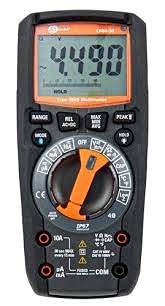
Obrázek 4.1: Přední strana view of the Sonel CMM 30 Industrial Multimeter. This image displays the device's main components, including the digital display, the central rotary function switch, and the various input terminals for test leads.
4.1. Displej
The large LCD shows measurement readings, units, function indicators, and battery status. It features an automatic backlight that adjusts to ambient light conditions for optimal visibility.
4.2. Otočný přepínač funkcí
This central switch is used to select the desired measurement function (e.g., Voltage, Current, Resistance, Capacitance, Temperature, Frequency).
4.3. Funkční tlačítka
Various buttons provide additional controls and features:
- ROZSAH: Toggles between manual and automatic ranging.
- REŽIM: Selects sub-functions within a main rotary switch position (e.g., AC/DC voltagnapř. dioda/kontrola vodivosti).
- DRŽET: Zmrazí aktuální údaj na displeji.
- MAX/MIN/AVG: Records maximum, minimum, and average readings.
- REL: Relative mode, subtracts a stored value from subsequent measurements.
- Bluetooth/Light: Activates Bluetooth connectivity for the smartphone app and controls the built-in flashlight.
4.4. Vstupní konektory
These are the connection points for the test leads:
- COM: Common terminal for the black test lead.
- VΩHzCAP°C: Vstup pro svtage, resistance, frequency, capacitance, and temperature measurements (red test lead).
- mAµA: Vstup pro miliampzde a mikroampměření proudu (červený měřicí vodič).
- 10A: Input for up to 10 Ampměření proudu (červený měřicí vodič).
5. Nastavení
5.1. Instalace baterie
The Sonel CMM 30 requires 4 AAA batteries. These may be pre-installed or included separately.
- Ujistěte se, že je multimetr VYPNUTÝ.
- Vyhledejte přihrádku na baterie na zadní straně měřiče.
- Pomocí šroubováku povolte šroub(y) zajišťující kryt baterie.
- Odstraňte kryt baterie.
- Insert the 4 AAA batteries, observing the correct polarity (+ and -) as indicated inside the compartment.
- Nasaďte kryt baterie a pevně utáhněte šroub(y).
Poznámka: Always use fresh batteries of the same type. Remove batteries if the meter is not used for an extended period to prevent leakage.
6. Návod k obsluze
6.1. Zapnutí/vypnutí
Turn the rotary function switch from the OFF position to any desired measurement function to power on the meter. To power off, turn the switch back to the OFF position.
6.2. Basic Measurement Procedures
Before any measurement, ensure the test leads are correctly inserted into the appropriate input jacks for the selected function.
6.2.1. svtagMěření (AC/DC)
- Insert the black test lead into the COM jack and the red test lead into the VΩHzCAP°C jack.
- Otočte otočný přepínač do polohy V~ (AC Voltage) nebo V- (DC Voltage) position. If both are combined, use the MODE button to select AC or DC.
- Připojte měřicí vodiče paralelně k měřenému obvodu nebo součástce.
- Přečtěte si svtage hodnota na displeji.
6.2.2 Měření proudu (AC/DC)
Pozor: Never connect the meter in parallel for current measurement. Always connect in series with the circuit.
- Insert the black test lead into the COM jack. For currents up to 10A, insert the red test lead into the 10A jack. For smaller currents (mA/µA), insert the red test lead into the mAµA jack.
- Turn the rotary switch to the A~ (AC Current) or A- (DC Current) position, or the mA/µA position as appropriate. Use the MODE button to select AC or DC if needed.
- Otevřete obvod, kde má být měřen proud, a zapojte měřič do série.
- Odečtěte aktuální hodnotu na displeji.
6.2.3. Měření odporu
- Insert the black test lead into the COM jack and the red test lead into the VΩHzCAP°C jack.
- Otočte otočný přepínač do polohy Ω (odpor).
- Ensure the circuit or component is de-energized before connecting the test leads across it.
- Odečtěte hodnotu odporu na displeji.
6.2.4. Měření kapacity
- Insert the black test lead into the COM jack and the red test lead into the VΩHzCAP°C jack.
- Turn the rotary switch to the CAP (Capacitance) position.
- Před připojením měřicích vodičů se ujistěte, že je kondenzátor zcela vybitý.
- Odečtěte hodnotu kapacity na displeji.
6.2.5. Měření teploty
- Insert the temperature probe into the VΩHzCAP°C and COM jacks, observing polarity if applicable.
- Turn the rotary switch to the °C/°F (Temperature) position.
- Umístěte hrot teplotní sondy na předmět, jehož teplotu chcete měřit, nebo do jeho blízkosti.
- Odečtěte hodnotu teploty na displeji.
6.3. Pokročilé funkce
6.3.1. Měření skutečné efektivní hodnoty (TRM)
The CMM 30 features True RMS for AC voltage and current measurements, providing accurate readings for non-sinusoidal waveforms.
6.3.2. Wireless Communication and Smartphone App
The CMM 30 can connect wirelessly to a smartphone application, allowing for remote reading and saving of measurements. This is particularly useful in hard-to-reach or hazardous locations.
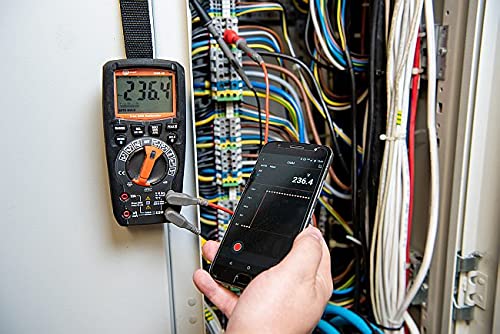
Figure 6.1: The Sonel CMM 30 Multimeter connected to an electrical panel, demonstrating its wireless communication feature. A smartphone displays the measurement reading remotely, highlighting the convenience for inaccessible areas.
Chcete-li použít tuto funkci:
- Download the official Sonel CMM app from your smartphone's app store.
- Povolte na svém smartphonu Bluetooth.
- Press the Bluetooth button on the multimeter to activate its wireless communication.
- Follow the app's instructions to pair with your CMM 30 and begin remote monitoring.
6.3.3. Vestavěná svítilna
The integrated flashlight assists in illuminating measurement areas, especially in low-light conditions. Activate it by pressing the dedicated light button.
6.4. Durability and IP67 Rating
The CMM 30 is designed with an IP67 rating, signifying its protection against dust ingress and immersion in water up to 1 meter for 30 minutes. This makes it suitable for demanding industrial environments.
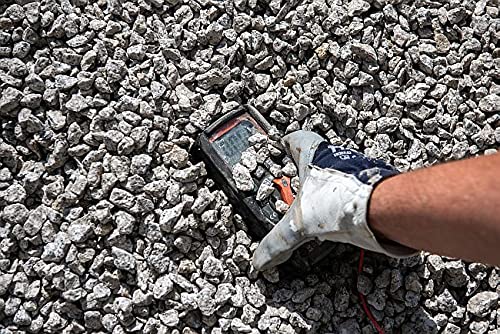
Figure 6.2: The Sonel CMM 30 Multimeter partially submerged in gravel, illustrating its robust construction and resistance to dust and debris, a testament to its IP67 rating.
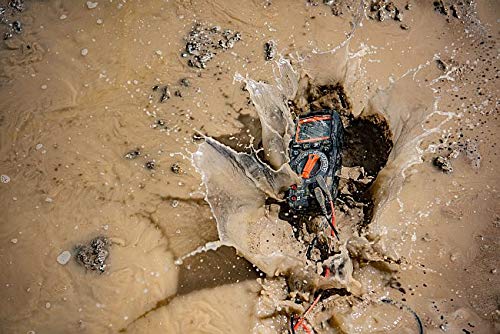
Figure 6.3: The Sonel CMM 30 Multimeter creating a splash as it impacts a muddy puddle, demonstrating its exceptional water resistance and ability to withstand harsh, wet conditions.
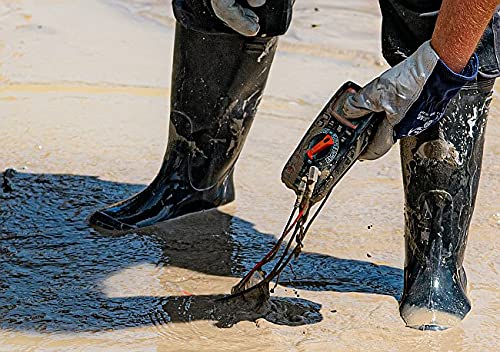
Figure 6.4: A person, wearing protective boots and gloves, retrieves the Sonel CMM 30 Multimeter from a muddy environment. This image emphasizes the device's resilience and ease of handling even after exposure to challenging conditions.
7. Údržba
7.1. Čištění
Otřete c měřičeasing s reklamouamp hadříkem a jemným čisticím prostředkem. Nepoužívejte abrazivní prostředky ani rozpouštědla. Před použitím se ujistěte, že je měřič zcela suchý.
7.2. Výměna baterie
Pokyny k výměně baterií naleznete v části 5.1. Baterie ihned vyměňte, jakmile se na displeji zobrazí indikátor slabé baterie.
7.3. Skladování
When not in use for extended periods, store the multimeter in a dry, cool place, away from direct sunlight and extreme temperatures. Remove the batteries to prevent leakage.
8. Řešení problémů
| Problém | Možná příčina | Řešení |
|---|---|---|
| Měřič se nezapne. | Vybité nebo nesprávně vložené baterie. | Zkontrolujte polaritu baterií nebo je vyměňte. |
| Nezobrazuje se žádný údaj nebo se zobrazuje „OL“ (přetížení). | Zvolena nesprávná funkce; rozpojený obvod; měření překračuje rozsah. | Select correct function; check circuit continuity; switch to a higher range or auto-range. |
| Nepřesné údaje. | Low battery; dirty test leads/jacks; external interference. | Replace batteries; clean leads/jacks; move away from strong electromagnetic fields. |
| Problémy s připojením Bluetooth. | Bluetooth not enabled on meter/phone; app issues; distance. | Ensure Bluetooth is on; restart app/phone; reduce distance between devices. |
9. Specifikace
| Funkce | Specifikace |
|---|---|
| Značka | Sonel |
| Číslo modelu | SON001 |
| Barva | Černý |
| Hmotnost položky | 418 g |
| Rozměry balení | 30 x 15 x 10 cm |
| Baterie | Vyžaduje 4 AAA baterie (součástí balení) |
| Funkce měření | AC/DC Voltage, AC/DC Current, Resistance, Capacity, Temperature, Duty Cycle, Frequency |
| Rozsah | Ruční a automatické |
| Skutečné RMS | Yes (for AC voltage a aktuální) |
| Hodnocení ochrany proti vniknutí (IP). | IP67 |
| Konektivita | Wireless (Smartphone App) |
| Další funkce | HOLD function, Built-in flashlight, Backlight auto-adjustment |
10. Záruka a podpora
10.1. Informace o záruce
Sonel products are manufactured to high standards and are warranted against defects in materials and workmanship for a period specified by your regional distributor from the date of purchase. This warranty does not cover damage caused by misuse, unauthorized modification, accident, or neglect. Please retain your proof of purchase for warranty claims.
10.2. Technická podpora
For technical assistance, troubleshooting beyond this manual, or warranty inquiries, please contact your local Sonel distributor or the authorized service center. Contact information can typically be found on the Sonel official webna webu nebo prostřednictvím vašeho nákupního místa.
When contacting support, please have your product model number (SON001) and purchase date readily available.


