1. Úvod
Děkuji za nákupasing the SZELAM 7-inch LED Mirror Digital Alarm Clock. This device combines a clear digital time display with a reflective mirror surface, dual USB charging ports, and adjustable brightness settings. Please read this manual carefully to ensure proper use and optimal performance.
2. Konec produktuview
Seznamte se s komponenty a ovládacími prvky budíku.

Obrázek 1: Přední strana view of the SZELAM Digital Alarm Clock. The large LED display shows the time 10:05, and the mirror surface reflects a modern living room interior.
2.1 Součásti a ovládací prvky

Figure 2: Detailed diagram of the alarm clock's features and controls.
- Světelný senzor: Automaticky upravuje jas displeje.
- Tlačítko M: Mode button for setting time and alarm.
- + Tlačítko: Increase value / 12/24H format switch.
- - Tlačítko: Decrease value / Alarm ON/OFF.
- Tlačítko "Odložit: Activates snooze function / Adjusts brightness.
- 2 nabíjecí porty USB: Pro nabíjení externích zařízení.
- Připojení napájecího kabelu: DC-5V/1A USB power input.
- Prostor pro baterie CR2032: For memory backup (time/alarm settings).
- Odnímatelný stojan: For desktop use.
- Otvor pro zavěšení na zeď: Pro montáž na stěnu.
3. Nastavení
3.1 Připojení napájení
- Connect the provided USB power cable to the power cable connection port on the back of the alarm clock.
- Plug the other end of the USB cable into a DC-5V/1A USB power adapter (not included) or a compatible USB port.
- Displej se rozsvítí, což znamená, že hodiny jsou zapnuté.
3.2 Memory Battery Installation
The clock uses a CR2032 button cell battery (not included) for memory backup. This battery preserves time and alarm settings during a power outage, but the display will not be visible without USB power.
- Locate the CR2032 battery compartment on the back of the clock.
- Otevřete kryt přihrádky.
- Insert a CR2032 battery with the positive (+) side facing up.
- Bezpečně zavřete kryt přihrádky.
3.3 Odstranění ochranné fólie
Before first use, please remove the protective film from the mirror display surface for optimal clarity.

Figure 3: Gently peel off the protective film from the display surface to reveal the clear mirror.
4. Návod k obsluze
4.1 Nastavení času
- Stiskněte a podržte M po dobu 3 sekund pro vstup do režimu nastavení času. Číslice hodin budou blikat.
- Použijte + or - tlačítka pro nastavení hodiny.
- Stiskněte tlačítko M znovu stiskněte tlačítko pro potvrzení hodin a přechod k nastavení minut. Číslice minut budou blikat.
- Použijte + or - tlačítka pro nastavení minut.
- Stiskněte tlačítko M znovu stiskněte tlačítko pro potvrzení a ukončení režimu nastavení času.
4.2 12/24hodinový formát
V normálním režimu zobrazení času stiskněte + button to switch between 12-hour and 24-hour formats. In 12-hour format, 'AM' or 'PM' will be displayed.
4.3 Nastavení alarmu
- Stiskněte tlačítko M button once to enter alarm setting mode. The alarm icon and hour digits will flash.
- Použijte + or - tlačítka pro nastavení hodiny budíku.
- Stiskněte tlačítko M button again to confirm the alarm hour and move to minute setting. The minute digits will flash.
- Použijte + or - tlačítka pro nastavení minut budíku.
- Stiskněte tlačítko M znovu stiskněte tlačítko pro potvrzení a ukončení režimu nastavení budíku.
4.4 Alarm ZAP/VYP
V normálním režimu zobrazení času stiskněte - button to toggle the alarm ON or OFF. When the alarm is ON, an alarm icon will appear on the display.
4.5 Funkce odložení
Když zazní budík:
- Stiskněte velký PODŘIMOVAT button on the top of the clock. The alarm will pause and sound again after 5 minutes (default snooze time).
- To adjust the snooze duration (5-60 minutes), press and hold the PODŘIMOVAT button during the snooze period, then use the + or - pomocí tlačítek nastavte požadovaný čas.
- To turn off the alarm completely, press any other button (M, +, -) on the back of the clock.

Figure 4: Activating the snooze function by pressing the large button on top.
4.6 Nastavení jasu
The clock offers three brightness levels (Low, Medium, High) and an automatic dimming feature.
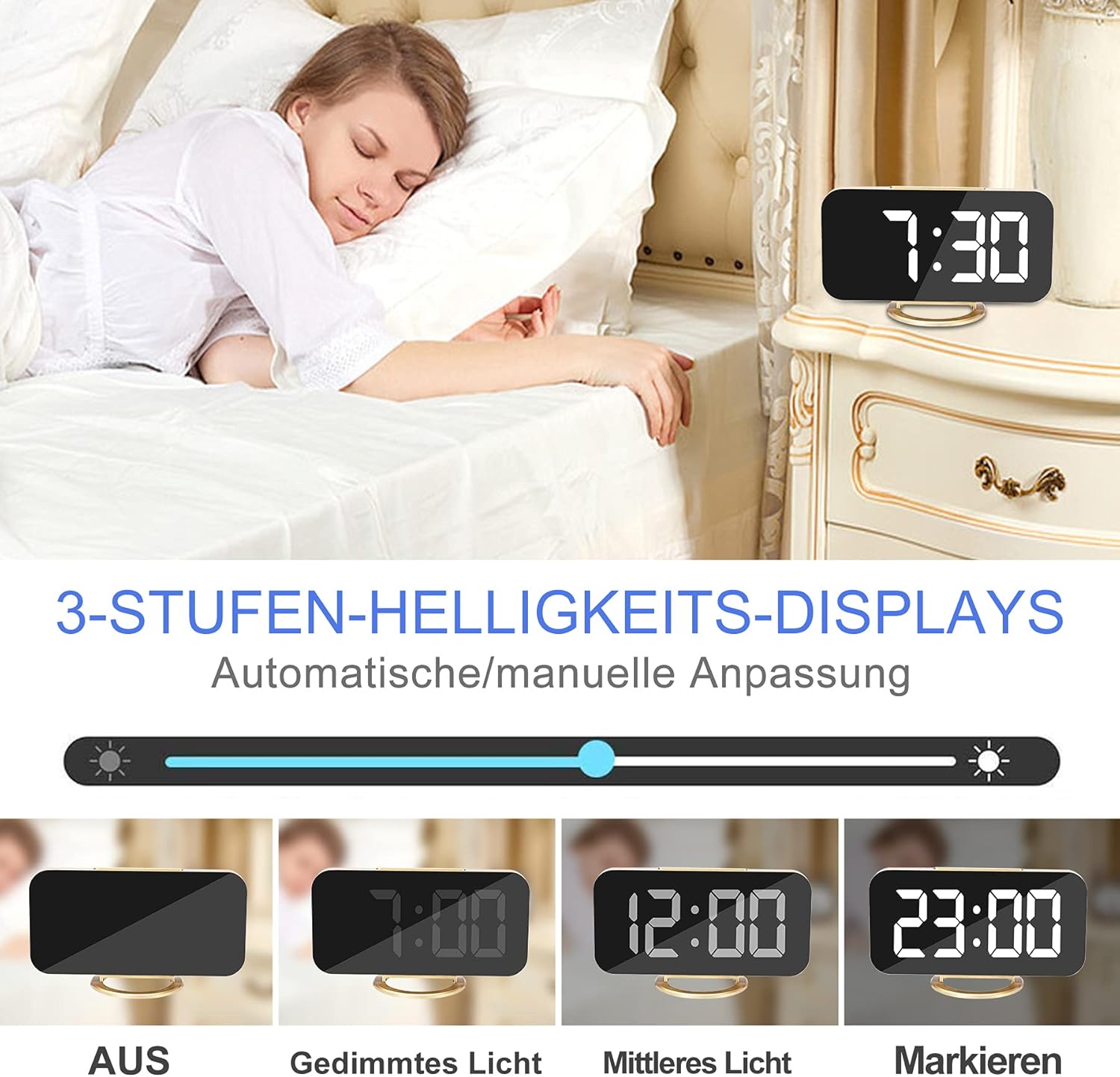
Figure 5: Visual representation of the different brightness settings: Off, Dimmed Light, Medium Light, and Highlight.
- Ruční nastavení: In normal time display mode, short press the PODŘIMOVAT button to cycle through Low, Medium, High brightness levels.
- Automatické nastavení: The clock is equipped with a photosensitive sensor that automatically adjusts the display brightness based on ambient light conditions. This feature ensures optimal visibility without being too bright in dark environments.
4.7 Noční režim
The night mode automatically switches the LED display to its lowest brightness level during a set period to avoid disturbing sleep. To activate and set Night Mode:
- Stiskněte tlačítko M button twice to enter Night Mode setting. The display will show 'ON' or 'OFF'.
- Použijte + or - buttons to toggle Night Mode ON/OFF.
- If ON, press M again to set the start hour, then minutes.
- Stiskněte M again to set the end hour, then minutes.
- Stiskněte M pro potvrzení a ukončení.
4.8 nabíjecí porty USB
The alarm clock features two USB ports (DC-5V/1A output) on the side, allowing you to charge your mobile phone, tablet, or other USB-powered devices.

Figure 6: Two smartphones charging simultaneously via the clock's USB ports.
Simply connect your device's USB charging cable to one of the clock's USB ports. Ensure the alarm clock is powered via its main USB input for the charging ports to function.
5. Možnosti umístění
The versatile design allows for various placement options.
5.1 Desktop / Bedside Placement
Attach the removable stand to the bottom of the clock for stable placement on a desk, bedside table, or shelf.

Figure 7: The alarm clock positioned on a bedside table, showing the time 6:00.
5.2 Montáž na stěnu
Remove the stand to use the clock as a wall-mounted display. Use the hanging hole on the back of the clock to secure it to a wall hook or screw.
5.3 Funkce zrcadla
The clock's display surface doubles as a mirror, which can be used for quick checks or makeup application.

Figure 8: The clock's reflective surface can be used as a convenient mirror.
6. Údržba
To maintain your alarm clock in good condition:
- Wipe the display and body with a soft, dry cloth.
- Nepoužívejte abrazivní čisticí prostředky nebo rozpouštědla, protože mohou poškodit povrch.
- Keep the device away from excessive heat, direct sunlight, and moisture.
7. Řešení problémů
| Problém | Možná příčina | Řešení |
|---|---|---|
| Displej je prázdný. | Žádné napájení nebo uvolněné připojení. | Ensure the USB power cable is securely connected to both the clock and a working power source. |
| Time/Alarm settings reset after power loss. | Chybí paměťová baterie CR2032 nebo je vybitá. | Install a new CR2032 battery. |
| Alarm se nespustí. | Alarm is turned OFF or set incorrectly. | Check if the alarm icon is displayed. Re-set the alarm time. |
| Nabíjecí porty USB nefungují. | Clock is not powered via its main USB input. | Ensure the clock is connected to a power source via its main USB input. |
| Displej je příliš jasný/tmavý. | Brightness setting needs adjustment or Night Mode is active. | Manually adjust brightness using the SNOOZE button. Check Night Mode settings. |
8. Specifikace
| Funkce | Detail |
|---|---|
| Značka | SZELAM |
| Číslo modelu | 3S-51Q0-6DMM |
| Typ zobrazení | 7-inch LED Digital |
| Materiál | Glass (Mirror Surface) |
| Rozměry (D x Š x V) | 15.24 x 0.03 x 17.78 cm (přibližně 6.0 x 0.01 x 7.0 palce) |
| Hmotnost | 220 g |
| Zdroj napájení | USB DC-5V/1A |
| Paměťová baterie | CR2032 (není součástí dodávky) |
| USB výstup | 2 x DC-5V/1A Ports |
| Speciální funkce | Alarm, Large Display, Adjustable Brightness, USB Charging Ports, Snooze, Mirror Surface, Automatic Dimming, Night Mode, Wall Mountable |
9. Záruka a podpora
This product is covered by a standard manufacturer's warranty. For specific warranty details, please refer to the documentation provided at the time of purchase or contact your retailer. For technical support or inquiries, please reach out to SZELAM customer service through your purchase platform.


