1. Konec produktuview
The FEONAL 10.1-inch Android 12 Tablet is designed for versatile use, offering a responsive touch experience and robust performance. Featuring an Octa-Core processor, 4GB RAM, and 64GB internal storage (expandable up to 512GB), it is suitable for entertainment, browsing, and productivity. The tablet includes dual cameras (13MP rear, 5MP front), Wi-Fi, Bluetooth, and GPS capabilities.

Figure 1: FEONAL 10.1-inch Android 12 Tablet
2. Průvodce nastavením
2.1 Počáteční zapnutí
- Press and hold the Power button (located on the side) for a few seconds until the FEONAL logo appears on the screen.
- Postupujte podle pokynů na obrazovce a vyberte jazyk a region.
2.2 Připojení k Wi-Fi
- Na domovské obrazovce přejetím prstem shora dolů otevřete panel Rychlé nastavení.
- Klepnutím a podržením ikony Wi-Fi otevřete nastavení Wi-Fi.
- Vyberte ze seznamu požadovanou síť Wi-Fi a v případě potřeby zadejte heslo.
- Klepněte na „Připojit“.
2.3 Nastavení účtu Google
The tablet is GMS Certified, allowing full access to Google services.
- During initial setup or via Settings > Accounts, sign in with your existing Google account or create a new one.
- This enables access to Google Play Store, Gmail, YouTube, and other Google services.
2.4 Nabíjení tabletu
Use the provided Type-C charging cable and wall adapter to charge the tablet. Connect the cable to the tablet's USB-C port and the adapter to a power outlet. A full charge provides up to 8 hours of usage.

Figure 2: Tablet battery capacity and usage time.
3. Návod k obsluze
3.1 Základní navigace
- Výpad: Move your finger across the screen to scroll through content or switch between home screens.
- Klepněte na: Krátkým dotykem obrazovky vyberte položku nebo otevřete aplikaci.
- Přiblížení/zvětšení prsty: Položte dva prsty na obrazovku a jejich přiblížením nebo oddálením můžete obraz přiblížit nebo oddálit.
3.2 Stahování aplikací
Access the Google Play Store to download a wide variety of applications, including streaming services like Netflix and YouTube, games, and productivity tools.
- Otevřete aplikaci „Obchod Play“ z domovské obrazovky nebo ze složky s aplikacemi.
- Hledat požadovanou aplikaci.
- Tap 'Install' and follow the on-screen instructions.

Figure 3: Android 12 OS with pre-installed and downloadable apps.
3.3 Používání kamer
The tablet features a 13MP rear camera and a 5MP front camera for photos and video calls.
- Otevřete aplikaci „Fotoaparát“.
- Klepnutím na tlačítko spouště pořídíte fotografii nebo přepnete do režimu videa.
- Pro přepínání mezi předním a zadním fotoaparátem použijte ikonu přepínače fotoaparátu.
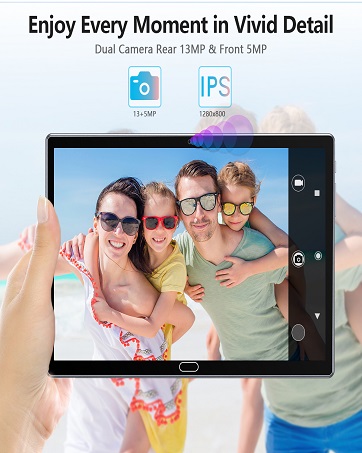
Figure 4: Capturing moments with the tablet's camera.
3.4 Media Consumption and Browsing
Enjoy a superior watching experience on the 10.1-inch IPS Full HD display (1920x1200 resolution).
- videa: Stream content from platforms like YouTube and Netflix.
- E-knihy: Read comfortably for extended periods.
- Procházení: Navigujte na web efficiently with the Octa-Core processor.

Figure 5: Tablet in various usage scenarios.
3.5 GPS and Bluetooth
- GPS: Utilize built-in GPS for navigation and location-based services.
- Bluetooth: Connect wireless accessories such as headphones or keyboards.

Figure 6: GPS navigation and Bluetooth connectivity.
4. Údržba
4.1 Péče o baterii
- Pro prodloužení životnosti baterie se vyhněte extrémním teplotám.
- Charge the tablet regularly, but avoid leaving it plugged in for extended periods after reaching 100%.
4.2 Správa úložiště
The tablet comes with 64GB of internal storage and supports expansion up to 512GB via a Micro SD card.
- Pravidelně odstraňujte nepotřebné files and apps to free up internal storage.
- Insert a Micro SD card into the designated slot to expand storage for media and documents.

Obrázek 7: Úložná kapacita a možnosti rozšíření.
4.3 Aktualizace softwaru
Ensure your tablet is running the latest Android 12 updates for optimal performance and security.
- Go to Settings > System > System update to check for and install available updates.
4.4 Čištění zařízení
- K čištění obrazovky a těla tabletu použijte měkký hadřík, který nepouští vlákna.
- Vyhněte se používání agresivních chemikálií nebo abrazivních materiálů.
5. Řešení problémů
- Tablet se nezapíná: Ensure the tablet is charged. Connect it to the charger and try powering it on after a few minutes.
- Problémy s připojením k Wi-Fi: Restartujte Wi-Fi router a tablet. V nastavení Wi-Fi zapomeňte na síť a znovu se připojte.
- Aplikace padá nebo zamrzá: Vymažte mezipaměť problematické aplikace (Nastavení > Aplikace > [Název aplikace] > Úložiště > Vymazat mezipaměť). Pokud problém přetrvává, znovu nainstalujte aplikaci.
- Pomalý výkon: Close unused apps, clear cache, and ensure sufficient storage space. Consider a factory reset as a last resort (Settings > System > Reset options > Erase all data).
- Screen rotation not working: Check if auto-rotate is enabled in Quick Settings. If it is, restart the tablet.
If you encounter any persistent issues, please contact FEONAL customer service for assistance.
6. Specifikace
| Funkce | Specifikace |
|---|---|
| Značka | FEONÁLNÍ |
| Název modelu | 2024 Latest Stable Android 12.0 Tablet |
| Operační systém | Android 12 |
| Procesor | Octa-Core ARM CortexTM A55 MP8 1.6GHz |
| BERAN | 4 GB |
| Interní úložiště (ROM) | 64 GB |
| Rozšiřitelné úložiště | Až 512 GB (micro SD karta) |
| Velikost obrazovky | 10.1 palce |
| Rozlišení obrazovky | 1920 x 1200 pixelů (Full HD) |
| Zadní kamera | 13 MP |
| Přední kamera | 5 MP |
| Kapacita baterie | 6000 XNUMX mAh |
| Průměrná životnost baterie | Až 8 hodin |
| Bezdrátový typ | 802.11ax (Wi-Fi) |
| Konektivita | Bluetooth, GPS |
| Hmotnost položky | 1.8 libry |
| Rozměry produktu | 12.2 x 7.8 x 1.2 palce |
7. Záruka a podpora
The FEONAL Tablet typically comes with a 1-year warranty. For any product-related issues, technical support, or warranty claims, please contact FEONAL customer service.
You can find contact information on the official FEONAL webwebu nebo prostřednictvím vaší nákupní platformy.
8. Produktová videa
8.1 FEONAL Tablet Overview a Nastavení
Video 1: Komplexní přehledview of the FEONAL 10.1-inch Android tablet, demonstrating its ease of setup and key features.
8.2 Easy to Use Tablet Features
Video 2: Demonstrates the user-friendly interface and various functionalities of the FEONAL 10.1-inch Android tablet.
8.3 Storage and Performance Highlights
Video 3: Highlights the 64GB large memory and overall performance of the FEONAL 10.1-inch tablet.


