Zavedení
Děkuji za nákupasing the Muse MT-110DAB Turntable with Integrated Stereo System. This versatile audio device combines vintage vinyl playback with modern digital features, including Bluetooth connectivity, CD player, DAB/DAB+ and FM radio, and USB playback/encoding. This manual provides essential information for the safe and efficient operation of your new system. Please read it thoroughly before use and retain it for future reference.
Bezpečnostní pokyny
Pro zajištění bezpečného provozu a prevenci poškození dodržujte prosím následující bezpečnostní opatření:
- Nevystavujte jednotku dešti nebo vlhkosti.
- Neblokujte žádné ventilační otvory.
- Ujistěte se, že napájecí kabel není přiskřípnut nebo po něm nešlape.
- Odpojte jednotku během bouřky s blesky nebo pokud se delší dobu nepoužívá.
- Veškeré opravy svěřte kvalifikovanému servisnímu personálu.
Konec produktuview
Familiarize yourself with the components of your Muse MT-110DAB system.

Obrázek 1: Přední view of the Muse MT-110DAB Turntable with the dust cover open, revealing a vinyl record on the platter and the tonearm. The front panel features the display, control buttons, and volume knobs.
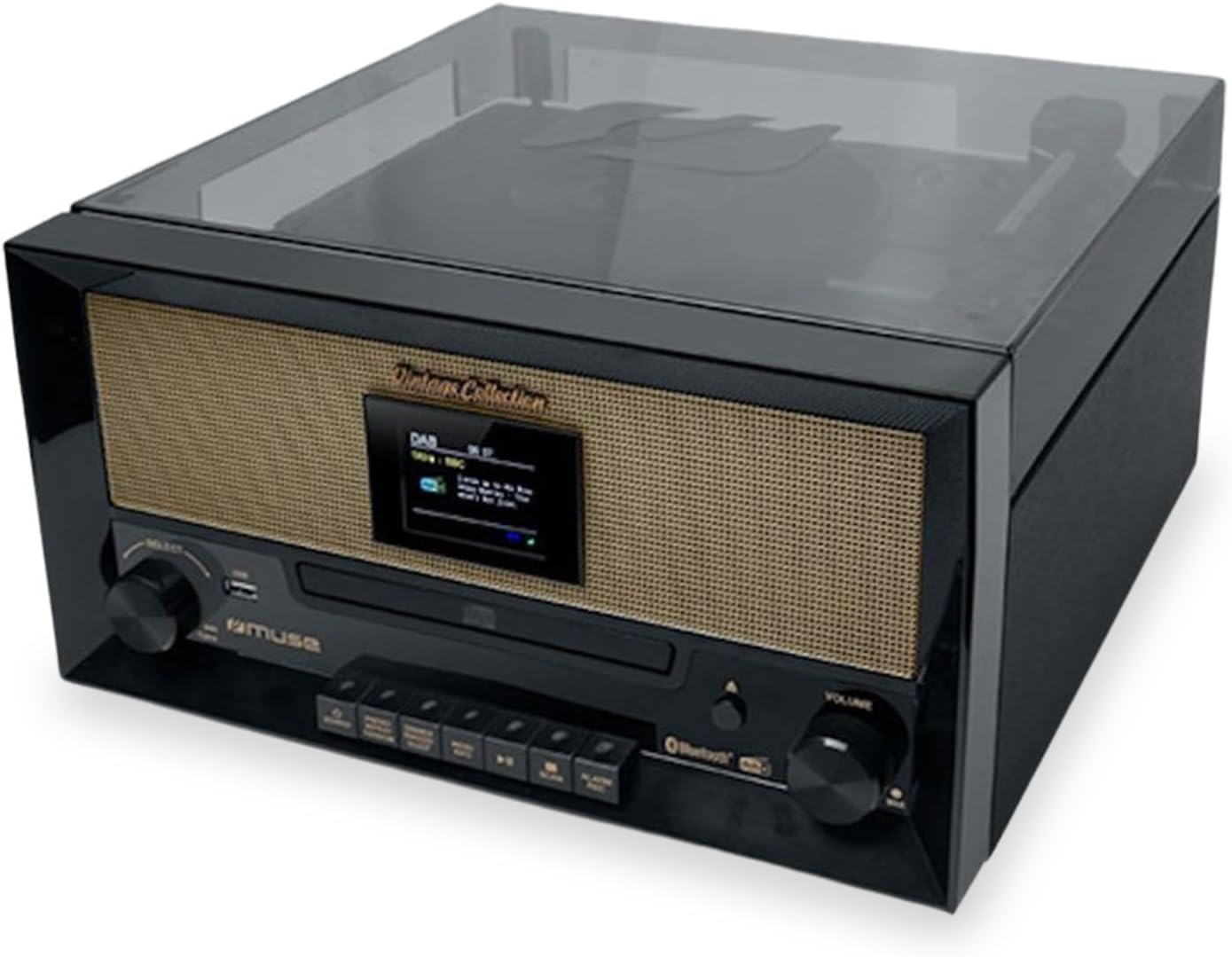
Obrázek 2: The Muse MT-110DAB Turntable with its dust cover closed, showcasing its compact and retro design. The front panel with the display and controls is clearly visible.

Obrázek 3: The Muse MT-110DAB Turntable positioned on a wooden surface, highlighting its elegant integration into a home environment. The dust cover is open, and a vinyl record is on the platter.
Nastavení
1. Vybalování
Carefully remove the unit from its packaging. Ensure all components are present: the main unit, AC adapter, and an additional stylus. Retain the packaging for future transport or storage.
2. Připojení napájení
Connect the supplied AC adapter to the DC input jack on the back of the unit, then plug the adapter into a standard AC outlet (100-240V, 50/60Hz).
3. Antenna (for Radio)
Extend the telescopic antenna fully for optimal DAB/DAB+ and FM radio reception. Adjust its position for the best signal quality.
Návod k obsluze
1. Obsluha gramofonu
- Výběr rychlosti: Select the desired playback speed (33, 45, or 78 RPM) using the speed selector switch. For 45 RPM records, place the included 45 RPM adapter on the spindle.
- Přehrávání nahrávky: Place a record on the platter. Lift the tonearm using the cueing lever and position the stylus over the desired track. Lower the tonearm gently.
- Automatické zastavení: The turntable features an auto-stop function. When enabled, the platter will stop rotating automatically at the end of a record. Use the ON/OFF switch for auto-stop.
2. Připojení Bluetooth
To stream music wirelessly from your smartphone, tablet, or laptop:
- Switch the unit to Bluetooth mode. The display will indicate Bluetooth pairing mode.
- Enable Bluetooth on your external device and search for "MT-110DAB" (or similar).
- Select the unit to pair. Once connected, you can play audio from your device through the turntable's speakers.
3. CD přehrávač
The integrated CD compartment supports CD, CD-R/RW, and MP3 formats.
- Press the CD mode button.
- Open the CD tray, insert a disc with the label side up, and close the tray.
- Playback will begin automatically or can be controlled using the playback buttons.
4. DAB/FM rádio
Enjoy digital and analog radio broadcasts. The unit supports 60 preset stations (30 FM + 30 DAB).
- Switch to DAB or FM mode.
- Perform an auto-scan to find available stations.
- Save your favorite stations to the preset memory for quick access.
5. USB Playback and Encoding
Insert a USB drive into the USB port for MP3 playback or to encode audio from vinyl/CDs to MP3 format.
- Přehrávání: Select USB mode and navigate through your audio files pomocí ovládacích prvků.
- Kódování: Follow the instructions on the display to record audio from the turntable or CD player directly to a connected USB drive.
6. Externí připojení
- Vstup Aux: Connect external audio devices (e.g., non-Bluetooth phones, MP3 players) to the 3.5mm Aux-in female jack.
- RCA výstup: Use the RCA output jacks to connect the system to an external ampzesilovač nebo aktivní reproduktory pro vylepšený zvuk.
Údržba
1. Čištění
Wipe the unit with a soft, dry cloth. Do not use abrasive cleaners or solvents. Keep the dust cover closed when not in use to protect the turntable components.
2. Výměna stylusu
The stylus (needle) is a consumable part and will wear out over time. Replace the stylus when you notice a decrease in sound quality or skipping. An additional stylus is included with your purchase. Refer to the specific instructions for stylus replacement in the full manual (if available) or consult a qualified technician.
Odstraňování problémů
If you experience issues with your MT-110DAB, please refer to the following common problems and solutions:
| Problém | Možná příčina | Řešení |
|---|---|---|
| Žádná síla | Napájecí kabel není připojen; zásuvka není aktivní. | Ujistěte se, že je síťový adaptér bezpečně zapojený do zařízení a do funkční elektrické zásuvky. |
| Žádný zvuk | Volume too low; incorrect input mode; external speakers not connected (if using RCA out). | Increase volume; select correct input mode (Phono, CD, Bluetooth, DAB/FM, USB, Aux); check external speaker connections. |
| Turntable Skipping | Record is dirty or scratched; stylus is worn or dirty; unit is not level; excessive vibration. | Clean record; clean or replace stylus; place unit on a stable, level surface; avoid placing near vibrating sources. |
| Špatný příjem rádia | Antenna not extended or positioned correctly; weak signal. | Zcela vysuňte a nastavte teleskopickou anténu. Zkuste jednotku přemístit. |
Specifikace
| Značka | MÚZA |
| Číslo modelu | MT-110 DAB |
| Rozměry (V x Š x D) | 171 mm x 343 mm x 324 mm |
| Čistá hmotnost | 3.83 kg |
| Napájení | AC: 100-240 V, 50/60 Hz |
| Konektivita | Bluetooth, USB, RCA Output, 3.5mm Aux-in |
| Rychlosti gramofonu | 33/45/78 ot./min |
| Zobrazit | 2.4" TFT displej |
| CD kompatibilita | CD, CD-R/RW, MP3 |
| Rádio | DAB/DAB+, FM (60 presets: 30 FM + 30 DAB) |
| Speciální funkce | USB Playback & Encoding, Auto-Stop Turntable, Wooden Cabinet |
| Zahrnuté příslušenství | AC Adapter, Additional Stylus, 45 RPM Adapter |
Záruka a podpora
Information regarding product warranty, spare parts availability, and software updates is not provided in the available product data. For specific warranty terms or technical support, please refer to the official Muse webwebu nebo se přímo obraťte na jejich zákaznický servis.
- Dostupnost náhradních dílů: Informace nejsou k dispozici.
- Aktualizace softwaru: Informace nejsou k dispozici.


