Uživatelská příručka k Amazon Echo Show 5 (3. generace)
Model: Echo Show 5 (3rd Gen) | Brand: Amazon
Zavedení
The Amazon Echo Show 5 (3rd Gen) is a compact smart display designed to enhance your daily life with Alexa. Featuring a 5.5-inch screen, improved audio with deeper bass and clearer vocals, and a 2 MP camera, it allows you to view news and weather, make video calls, control smart home devices, stream entertainment, and display your favorite photos. This manual provides essential information for setting up, operating, maintaining, and troubleshooting your device.
Bezpečnostní informace
Please read all safety instructions before using your Echo Show 5 to prevent injury or damage. Keep the device away from water and heat sources. Use only the included power adapter. Do not attempt to disassemble or modify the device. Ensure proper ventilation around the device. For privacy, utilize the built-in camera shutter and microphone/camera off button.
Co je v krabici
- Echo Show 5 (3rd Gen) device
- Glacier White power adapter (22W) with cable (4.9ft)
- Rychlý průvodce
Fyzické přesview

Přední View: The 5.5-inch touch screen is the primary interface for visual information and interaction. The camera is located at the top right of the screen.

Rozměry: The device measures 5.8 inches wide, 3.6 inches deep, and 3.2 inches high, making it suitable for various spaces.
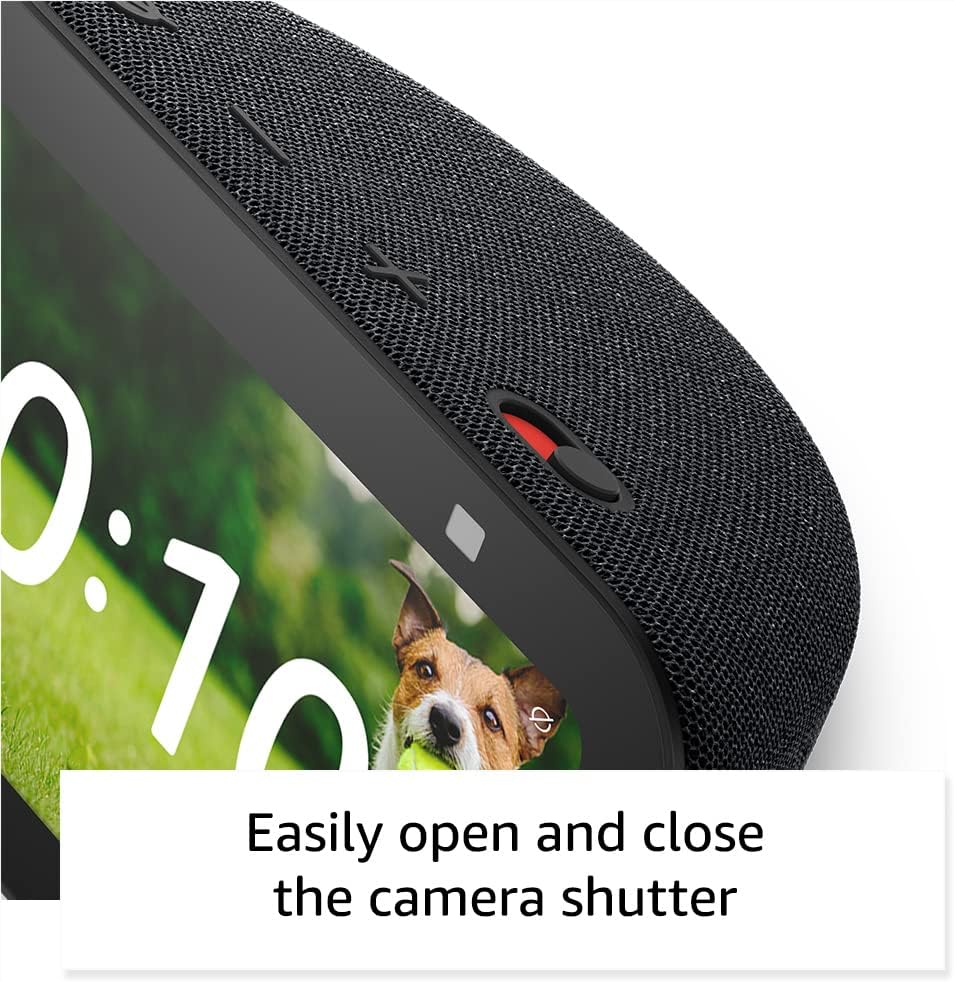
Závěrka fotoaparátu: A physical slider located on the top edge allows you to easily open and close the camera shutter for privacy.
Top Controls: On the top edge, you will find volume buttons and a microphone/camera off button for quick control over audio and privacy.
Nastavení
- Plug In Your Device: Connect the included power adapter to the Echo Show 5 and then plug it into a wall outlet. The device will power on automatically.
- Postupujte podle pokynů na obrazovce: The Echo Show 5 will guide you through the initial setup process on its display. This includes selecting your language, connecting to your Wi-Fi network, and logging in with your Amazon account.
- Stáhněte si aplikaci Alexa: For full functionality and advanced settings, download the Amazon Alexa app on your smartphone or tablet (compatible with Fire OS, Android, and iOS devices). Use the app to manage settings, enable skills, and customize your device.
- Prozkoumat funkce: Once connected, you can begin interacting with Alexa using voice commands or the touch screen.
Ovládání Echo Show 5
Voice Control and Touch Screen
The Echo Show 5 responds to the wake word "Alexa." Simply say "Alexa," followed by your command. You can also interact directly with the 5.5-inch touch screen by tapping, swiping, and pinching to navigate menus, view content, and control features.
Music and Entertainment

Stream music, podcasts, and audiobooks from services like Amazon Music, Spotify, and Audible. The display shows album art, lyrics, or audiobook progress. Use commands like "Alexa, play pop music" or "Alexa, resume my audiobook."
Enjoy clearer vocals and deeper bass for an enhanced audio experience. You can also stream videos from Prime Video and other supported services.
Smart Home Control

Control compatible smart home devices such as lights, thermostats, and plugs. Say "Alexa, turn on the living room lights" or use the on-screen smart home dashboard to manage devices.
Vlastnosti fotoaparátu

Use the 2 MP camera for video calls with friends and family who have the Alexa app or an Echo device with a screen. Say "Alexa, call Mom."

Monitor your home by checking in on family or pets using the built-in camera. You can also view feeds from compatible video doorbells or security cameras by saying "Alexa, show me the front door."
Zobrazení fotografií

When not in use, set your Echo Show 5 to display a rotating slideshow of your favorite photos from Amazon Photos. Prime members receive unlimited cloud photo storage.
Údržba
To clean your Echo Show 5, unplug the device and use a soft, lint-free cloth. Do not use abrasive cleaners or sprays directly on the screen or device. Keep the device free from dust and debris to ensure optimal performance of microphones and speakers.
Odstraňování problémů
| Problém | Možné řešení |
|---|---|
| Device not responding to voice commands | Ensure the microphone is not muted (red light indicates mute). Speak clearly and be within range. Check Wi-Fi connection. |
| Žádný zvuk nebo zkreslený zvuk | Check volume levels. Ensure no Bluetooth speaker is connected if you intend to use the internal speaker. Restart the device. |
| Screen is black or unresponsive | Ensure the device is plugged in and powered on. Try unplugging and re-plugging the power adapter. |
| Nelze se připojit k Wi-Fi | Verify your Wi-Fi password. Ensure your router is working. Try restarting your router and the Echo Show 5. The device supports dual-band 802.11a/b/g/n/ac Wi-Fi networks. |
| Kamera nefunguje | Ensure the physical camera shutter is open. Check that the camera is not disabled in settings. |
Specifikace
| Funkce | Detail |
|---|---|
| Velikost | 5.8’’W x 3.6’’D x 3.2’’H (147mm x 91mm x 82mm) |
| Hmotnost | 16.1 unce (456 gramů) |
| Zobrazit | 5.5'' dotykový displej |
| Fotoaparát | 2MP fotoaparát s vestavěnou závěrkou |
| Připojení k WiFi | Dual-band 802.11a/b/g/n/ac (does not support ad-hoc networks) |
| Připojení Bluetooth | A2DP support for audio streaming, AVRCP for voice control of connected mobile devices |
| Zvuk | Full range 1.75’’ built-in speaker |
| Procesor | MediaTek MT 8169 B |
| Generace | Echo Show 5 (3rd Gen) - 2023 release |
| Jazyk | Alexa mluví anglicky a španělsky |
| Kompatibilita Smart Home | WiFi, Bluetooth Low Energy Mesh, and Matter |
Záruka a podpora
Your Echo Show 5 (3rd Gen) comes with a 1-year limited warranty and service. Optional extended warranties (1-year, 2-year, and 3-year) are available for U.S. customers and sold separately. Use of the device is subject to Amazon's terms and conditions.
For further assistance, visit the Alexa app or Amazon's official support website. You can also learn more about how Amazon Echo devices are designed to protect your privacy by visiting the Alexa Privacy Hub.


