1. Úvod
This manual provides essential information for the safe and effective use of your Matrix Fitness TF30 Treadmill with XIR Console. Please read this manual thoroughly before assembly, operation, or maintenance to ensure proper function and longevity of your equipment.
2. Nastavení a montáž
The Matrix Fitness TF30 Treadmill requires assembly upon delivery. It is recommended to have assistance for assembly due to the size and weight of the components. Ensure you have adequate space for both operation and storage.
2.1 Vybalení a kontrola součástí
- Opatrně vyjměte všechny součásti z obalu.
- Verify all included components are present: Treadmill Frame, Masts, Mast Boots, Console Base, Handlebar, Handlebar Sleeves, Handlebar Caps, Frame Cover Sets, Back Cover, Power Cord, Safety Key, Hardware Kit.
- Zkontrolujte všechny díly, zda nevykazují známky poškození. Pokud některé díly chybí nebo jsou poškozené, okamžitě kontaktujte zákaznickou podporu.
2.2 Space Requirements and Placement
The TF30 Treadmill has dimensions of 77 inches (D) x 35 inches (W) x 62 inches (H). When folded, its dimensions are 42 inches (D) x 35 inches (W) x 71 inches (H). Ensure sufficient clearance around the treadmill for safe operation and access.

Image: Dimensions of the Matrix Fitness TF30 Treadmill, showing 77 inches length, 35 inches width, and 62 inches height.
2.3 Skládací mechanismus
The treadmill features a near 90-degree fold for space-saving storage. Wheels are located at the front for easy movement of the folded unit.
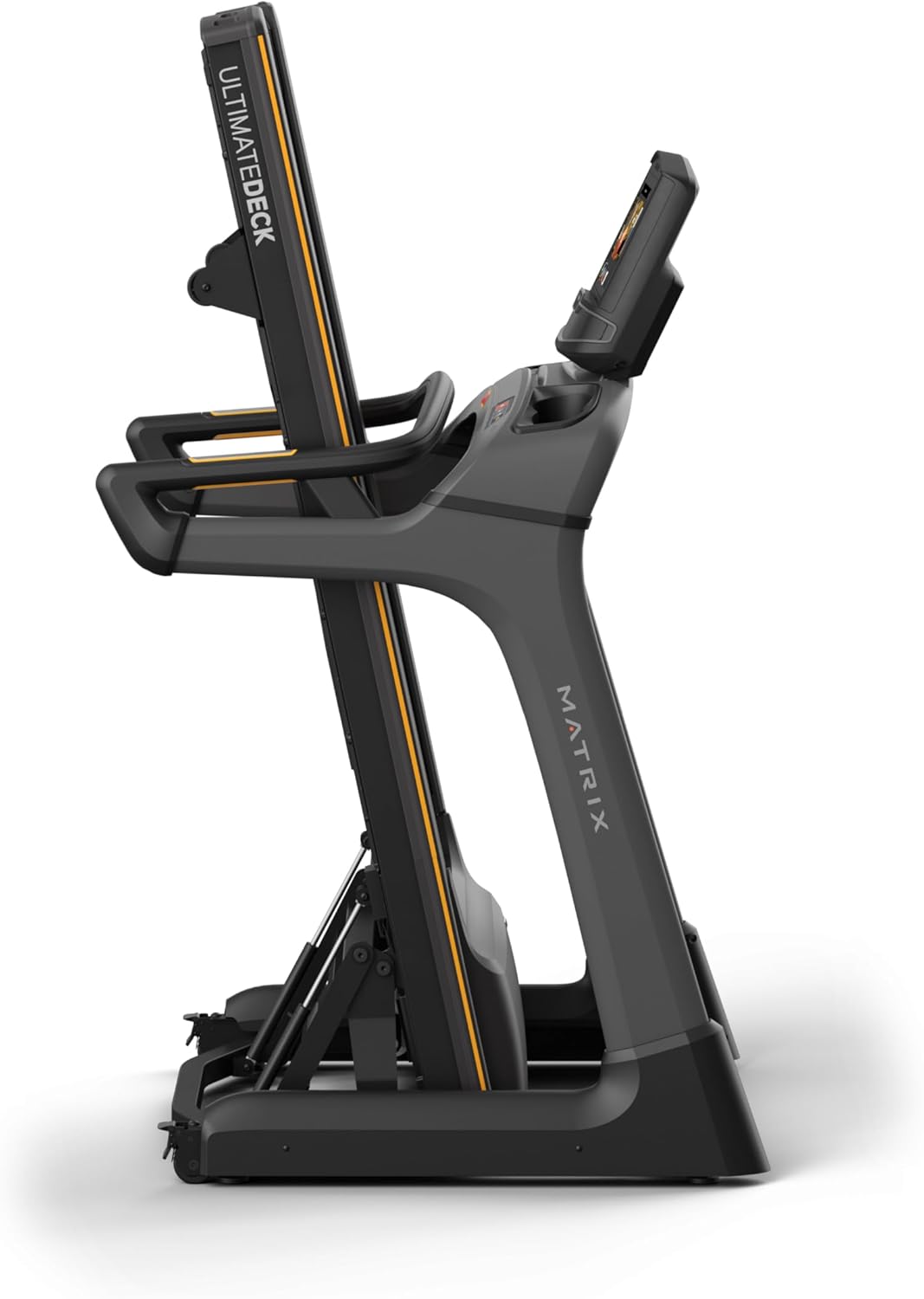
Image: Matrix Fitness TF30 Treadmill shown in its upright, folded position, demonstrating its space-saving design.
3. Návod k obsluze
Před zahájením tréninku se seznamte s konzolí a ovládacími prvky.
3.1 XIR Console Overview
The 16-inch touchscreen console provides access to various workout programs, entertainment apps, and performance metrics. It features a responsive interface for easy navigation.

Image: Close-up of the XIR Console highlighting its large HD touchscreen, streaming app capabilities (Netflix, YouTube, Spotify), Virtual Active and iFIT integration, Bluetooth FTMS, integrated HDMI, 13 metric-driven programs, and Bluetooth HR connectivity.
3.2 Zahájení tréninku
- Ujistěte se, že je bezpečnostní klíč správně připevněn ke konzoli a připevněn k vašemu oblečení.
- Select your desired workout program or app from the touchscreen.
- Adjust speed (0.5–12.5 mph) and incline (0–15%) using the console controls or quick-access buttons on the handlebars.
- The console measures distance and other metrics during your workout.

Image: The XIR Console displaying various application icons for entertainment and workout programs, including Netflix, Hulu, YouTube, Spotify, and iFIT.
3.3 Key Features for Enhanced Performance
- Systém pohonu Johnson: This quiet, durable, and responsive continuous-duty drive system helps maintain a consistent rhythm during your workout.
- Systém Ultimate Deck: The heavy-duty frame, extra-thick deck, and industrial-grade cushions provide a comfortable and low-impact running surface, reducing stress on joints.
- iFIT a Virtual Active: Explore virtual routes and guided workouts from around the world. A 30-day iFIT membership is included.

Image: Diagram illustrating the internal components of the Johnson Drive System, emphasizing its quiet and durable design.

Image: Diagram showing the cushioning points of the Ultimate Deck System, designed for reduced impact.
4. Údržba
Pravidelná údržba zajistí dlouhou životnost a optimální výkon vašeho běžeckého pásu.
- Čištění: After each use, wipe down the console and running deck with a damp hadříkem, abyste odstranili pot a prach. Nepoužívejte abrazivní čisticí prostředky.
- Mazání: Refer to the specific lubrication schedule in your detailed product manual (not provided here) to maintain the running belt.
- Seřízení a napnutí řemene: Periodically check the running belt for proper alignment and tension. Adjust as needed according to detailed instructions in the full product manual.
- Generální inspekce: Regularly inspect all bolts and connections to ensure they are secure.
5. Řešení problémů
This section addresses common issues you might encounter with your Matrix Fitness TF30 Treadmill.
| Problém | Možná příčina / řešení |
|---|---|
| Treadmill deck catch not engaging/disengaging properly. | Ensure the release handle is fully pulled/pushed. Check for any obstructions in the folding mechanism. |
| iFIT or other console apps not functioning as expected. | Ensure the console is connected to a stable internet connection. Check for available software updates. Restart the console. |
| Bluetooth audio connection issues. | Ensure your device's Bluetooth is enabled and discoverable. Try re-pairing the device. Note that direct phone audio mirroring to built-in speakers via Bluetooth may not be supported; use the 3.5mm audio input if available. |
| Console touchscreen unresponsive or activating randomly. | Wipe the screen clean and dry. Use the 'disable touchscreen' feature if available during intense workouts to prevent accidental inputs from sweat. |
| Safety pin triggering randomly. | Ensure the safety key is securely in place and the magnet is making full contact. Inspect the safety key and its receptacle for damage. |
| Rattling noise from the deck. | Check all assembly bolts for tightness. Ensure the treadmill is on a level surface. |
| Water bottle pockets accumulating condensation. | Wipe out the pockets after each use to prevent moisture buildup. |
6. Specifikace
| Funkce | Detail |
|---|---|
| Značka | Matice |
| Název modelu | Běžecký pás Matrix Fitness TF30 |
| Styl | TF30 Treadmill with XIR Console |
| Rozměry produktu (DxŠxV) | 77 cm x 35 cm x 62 cm |
| Složená velikost | 42 cm x 35 cm x 71 cm |
| Hmotnost položky | 294 libry |
| Materiál | Legovaná ocel |
| Běžící povrch | 20" x 55" |
| Rozsah rychlosti | 0.5–12.5 mph |
| Sklon rozsahu | 0–15 % |
| Maximální výkon | 3.25 koňské síly |
| Doporučená maximální hmotnost | 350 libry |
| Typ zobrazení | LCD (16" dotyková obrazovka) |
| Počet programů | 13 |
| Zdroj napájení | Elektrický kabel |
| Speciální funkce | Easy-Folding Design, Exclusive Johnson Drive System, Ultimate Deck System |
| Doporučená použití | Domácí fitness |
7. Informace o záruce
Your Matrix Fitness TF30 Treadmill is covered by the manufacturer's warranty:
- Utěšit: 5 years parts / 1 year labor
- Rám: 5 years parts / 2 years labor
- Životnost: Frame, motor, and cushioning
Please retain your proof of purchase for warranty claims. For detailed terms and conditions, refer to the official warranty document provided with your product or contact Matrix Fitness customer support.
8. Zákaznická podpora
For any questions, technical assistance, or service requests, please contact Matrix Fitness USA customer support. You can find contact information on the official Matrix Fitness webwebu nebo prostřednictvím svého prodejce.
Pro více informací navštivte Obchod Matrix na Amazonu.


