1. Úvod
Thank you for choosing the iPega PG-9076 Wireless Bluetooth Gamepad. This versatile controller is designed to provide an immersive gaming experience across multiple platforms. It supports both Bluetooth and 2.4GHz wireless connections, making it compatible with Android smartphones, tablets, Smart TVs, TV boxes, and Windows PCs (XP/7/8/10).
Please read this manual carefully before using the product to ensure proper operation and to maximize your gaming enjoyment.
2. Obsah balení
- 1 x iPega PG-9076 Wireless Bluetooth Gamepad
- 1 x USB nabíjecí kabel
- 1 x 2.4G Wireless Receiver (USB Dongle)
- 1 x Uživatelská příručka
3. Konec produktuview
Familiarize yourself with the layout and functions of your gamepad.

Obrázek 3.1: Shora dolů view of the iPega PG-9076 Gamepad. This image displays the directional pad (D-pad) on the left, two analog joysticks, action buttons (A, B, X, Y) on the right, and central function buttons including TURBO, START, SELECT, NEW, iCADE, and ANDROID mode buttons.
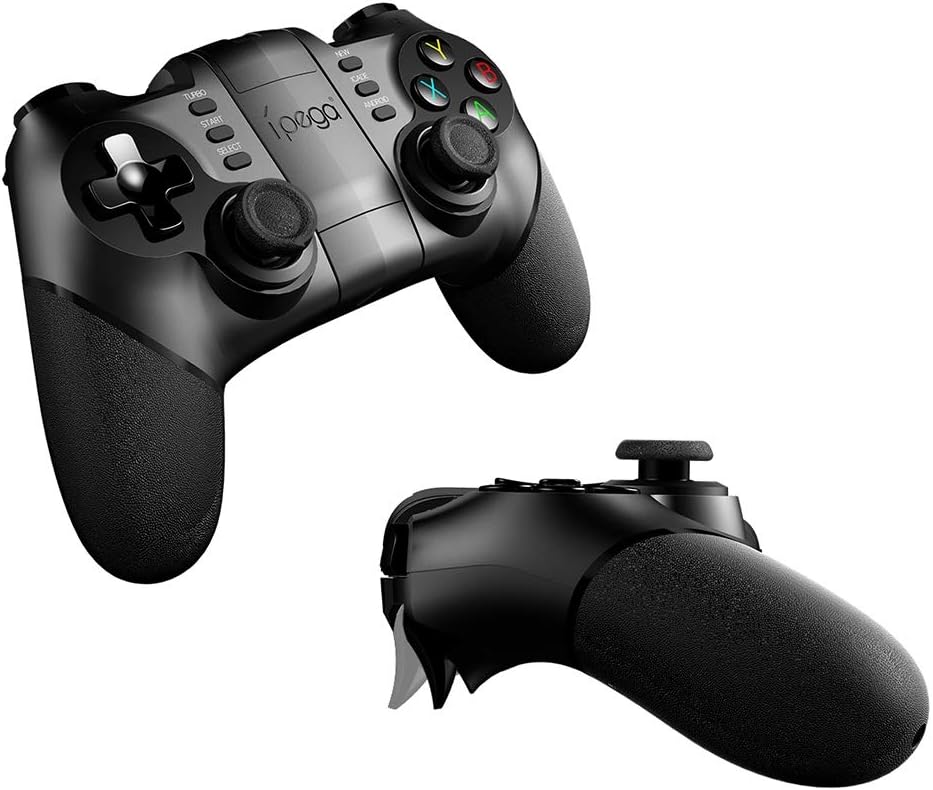
Obrázek 3.2: Úhlové view of the iPega PG-9076 Gamepad. This perspective emphasizes the ergonomic grips and the overall shape of the controller, designed for comfortable handling during extended gaming sessions.
- D-Pad: Směrová podložka pro přesný pohyb.
- Levé/pravé analogové páčky: For 360-degree movement and camera control.
- Akční tlačítka (A, B, X, Y): Pro akce ve hře.
- L1/L2/R1/R2 Triggers/Shoulder Buttons: Located on the top of the gamepad.
- Tlačítka START/SELECT: Standardní tlačítka pro ovládání hry.
- Tlačítko TURBO: Activates continuous firing for assigned buttons.
- Mode Buttons (NEW, iCADE, ANDROID): Slouží k přepínání mezi různými provozními režimy.
- Tlačítko Domů: Central button for system functions.
- Držák telefonu: Integrated adjustable holder for smartphones.
4. Nastavení
4.1. Nabíjení gamepadu
Before first use, fully charge the gamepad. Connect the supplied USB charging cable to the gamepad's charging port and the other end to a USB power source (e.g., computer USB port, USB wall adapter).
- The LED indicator will typically show charging status (e.g., red light on while charging, off when fully charged).
- Plné nabití obvykle trvá přibližně 2–3 hodiny.
4.2. Režimy připojení
The PG-9076 supports multiple connection modes for various devices.
4.2.1. Bluetooth Connection (for Android/iOS/Smart TV/TV Box)
- Ujistěte se, že je gamepad vypnutý.
- Stiskněte a podržte Android button (or relevant mode button for your device, e.g., iCADE for iOS if supported) and the DOMOV button simultaneously until the LED indicator flashes rapidly. This puts the gamepad into pairing mode.
- On your device (smartphone, tablet, Smart TV, TV Box), go to Bluetooth settings and turn Bluetooth on.
- Hledat available devices. You should see "PG-9076" or a similar name appear in the list.
- Select "PG-9076" to pair. The LED indicator on the gamepad will become solid once successfully connected.
- For iOS devices, some games may require specific iCADE mode. Refer to game instructions.

Obrázek 4.1: The iPega PG-9076 Gamepad with a smartphone securely mounted in its integrated holder, ready for mobile gaming. This image demonstrates the convenience of playing on a phone with a physical controller.
4.2.2. 2.4G Wireless Connection (for PC/Smart TV/TV Box)
- Plug the 2.4G wireless receiver (USB dongle) into an available USB port on your PC, Smart TV, or TV Box.
- Ujistěte se, že je gamepad vypnutý.
- Stiskněte a podržte NOVÝ button (or a specific PC mode button if available) and the DOMOV button simultaneously until the LED indicator flashes rapidly.
- The gamepad should automatically connect to the receiver. The LED indicator will become solid when connected.
- Your system may automatically install necessary drivers.

Obrázek 4.2: The iPega PG-9076 Gamepad with a smartphone attached, and the 2.4G USB wireless receiver prominently displayed in the foreground. This illustrates the wireless connectivity option for devices like PCs and TV boxes.
5. Návod k obsluze
5.1. Zapnutí/vypnutí
- Zapnutí: Stiskněte tlačítko DOMOV button. The gamepad will attempt to connect to the last paired device.
- Vypnout: Stiskněte a podržte DOMOV button for approximately 3 seconds until the LED indicator turns off. The gamepad will also automatically power off after a period of inactivity.
5.2. Gamepad Modes
The PG-9076 supports different modes to ensure compatibility with various games and platforms. Switch modes by holding the corresponding button (e.g., ANDROID, NEW, iCADE) and then pressing the HOME button to power on.
- Standardní režim Android: For most Android games.
- Režim PC X-Input: For Windows PC games that support X-Input (common for modern PC games).
- iCADE Mode: For some older iOS games that specifically support iCADE protocol.
5.3. Funkce TURBO
The TURBO function allows a button to continuously fire when held down, useful for certain games.
- Press the button you wish to set to TURBO (e.g., A button).
- While holding that button, press the TURBO button once. The LED indicator may flash to confirm.
- To cancel TURBO for that button, repeat the process.
6. Údržba
- Čištění: Use a soft, dry cloth to clean the gamepad. Do not use harsh chemicals or abrasive cleaners.
- Skladování: Gamepad skladujte na chladném a suchém místě mimo dosah přímého slunečního záření a extrémních teplot.
- Péče o baterie: To prolong battery life, avoid fully discharging the battery frequently. Charge the gamepad regularly, even if not in use for extended periods (e.g., once every three months).
- Vyhněte se kapkám: Nenechávejte gamepad upustit ani jej nevystavujte silným nárazům, mohlo by dojít k poškození vnitřních součástí.
7. Řešení problémů
7.1. Gamepad se nepřipojuje
- Zkontrolujte napájení: Ujistěte se, že je gamepad nabitý a zapnutý.
- Správný režim: Verify you are in the correct connection mode (Bluetooth for mobile/TV, 2.4G for PC with dongle).
- Opravit: Delete the gamepad from your device's Bluetooth list and attempt to re-pair.
- Rušení: Move closer to your device and away from other wireless devices that might cause interference.
- Dongle Check: If using 2.4G, ensure the USB dongle is securely plugged in and recognized by your device.
7.2. Tlačítka nereagují
- Úroveň baterie: Low battery can cause erratic behavior. Charge the gamepad.
- Restartovat: Power off the gamepad and your device, then restart both and try connecting again.
- Kompatibilita hry: Some games may not fully support external controllers or may require specific mapping. Check game settings.
7.3. Problémy s nabíjením
- Cable/Port: Zkuste jiný kabel USB nebo nabíjecí port.
- Zdroj napájení: Ensure the USB power source is functioning correctly.
8. Specifikace
| Funkce | Detail |
|---|---|
| Model | PG-9076 |
| Konektivita | Bluetooth, bezdrátové připojení 2.4 G |
| Kompatibilita | Android (Phones, Tablets, Smart TV, TV Box), Windows (XP/7/8/10) |
| Rozměry (doprava) | 17.8 x 13.4 x 6.8 cm |
| Hmotnost (přeprava) | 302 gramů |
| Reference výrobce | 2724709426067 |
9. Záruka a podpora
Tento produkt je dodáván se standardní zárukou výrobce. Konkrétní záruční podmínky naleznete v záruční kartě, která je součástí balení, nebo se obraťte na svého prodejce.
For technical support or further assistance, please contact the customer service department of your place of purchase or visit the official iPega webmísto pro zdroje podpory.


