Zavedení
Thank you for choosing the CORN HB001 Bluetooth Wireless Headphones. This manual provides essential information for setting up, operating, and maintaining your headphones. Please read it carefully before use to ensure optimal performance and longevity of your device. Keep this manual for future reference.
Konec produktuview
The CORN HB001 headphones offer a comfortable on-ear design with wireless Bluetooth connectivity, allowing you to enjoy high-quality audio without the constraints of cables. They also feature a 3.5mm audio jack for wired connection when wireless is not preferred or battery is low.
Komponenty sluchátek
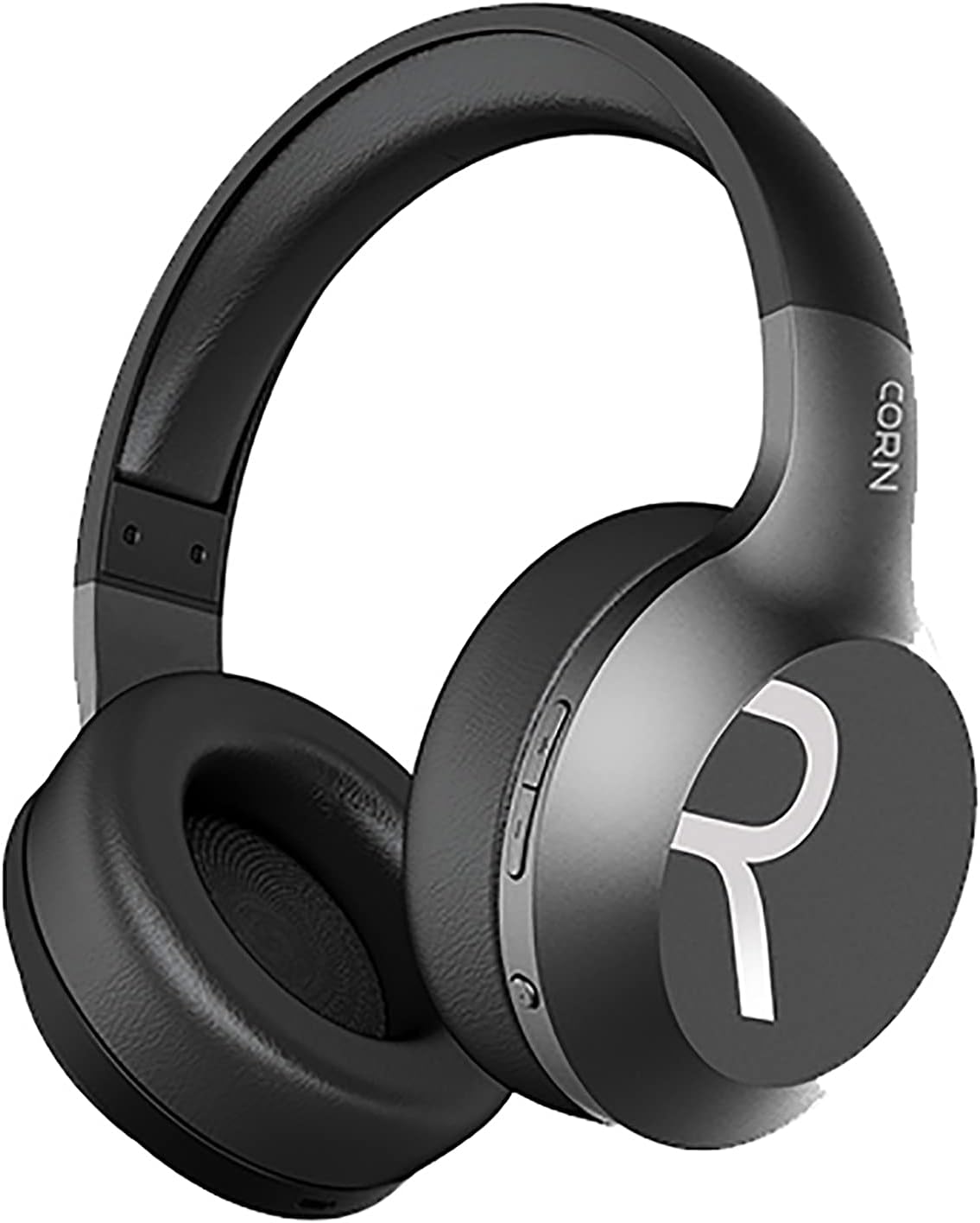
Obrázek 1: Celkově view of the CORN HB001 Bluetooth Wireless Headphones. The image displays the black on-ear headphones with adjustable headband and earcups, featuring the 'CORN' brand logo on the side.
Rozložení ovládacích prvků

Obrázek 2: Close-up of the control buttons located on the right earcup. These typically include volume up/down and a multi-function button for power, play/pause, and call management.
Familiarize yourself with the buttons and ports on your headphones. Typically, you will find a power/multi-function button, volume controls, a charging port (e.g., USB-C), and a 3.5mm audio jack.
Nastavení
1. Nabíjení sluchátek
Before first use, fully charge your headphones. Connect the charging cable (usually USB) to the charging port on the headphones and the other end to a USB power source (e.g., computer, wall adapter). The LED indicator will typically show red during charging and turn off or blue when fully charged.
- Doba nabíjení: Přibližně 2 hodiny.
- Kapacita baterie: 300 mAh.
2. Párování Bluetooth
Chcete-li bezdrátově připojit sluchátka k zařízení:
- Ujistěte se, že jsou sluchátka nabitá a vypnutá.
- Stiskněte a podržte tlačítko Napájení/Multifunkční tlačítko přibližně 5–7 sekund, dokud LED indikátor nezačne střídavě blikat modře a červeně, což signalizuje režim párování.
- Na svém zařízení (chytrý telefon, tablet, počítač) povolte Bluetooth a vyhledejte nová zařízení.
- Select "CORN HB001" from the list of available devices.
- Once connected, the LED indicator will usually flash blue slowly or turn solid blue.
- Sluchátka se po zapnutí automaticky pokusí znovu připojit k poslednímu spárovanému zařízení.
Návod k obsluze
Zapnutí/vypnutí
- Zapnutí: Press and hold the Power/Multi-function button for about 3 seconds until the LED indicator lights up blue.
- Vypnout: Press and hold the Power/Multi-function button for about 3-5 seconds until the LED indicator turns red and then off.
Přehrávání hudby
- Přehrát/pozastavit: Stiskněte jednou tlačítko napájení/multifunkční tlačítko.
- Zvýšit hlasitost: Stiskněte tlačítko „+“.
- Snížit hlasitost: Stiskněte tlačítko „-“.
- Další skladba: Stiskněte a podržte tlačítko „+“.
- Předchozí skladba: Stiskněte a podržte tlačítko „-“.
Správa hovorů
- Přijmout/ukončit hovor: Stiskněte jednou tlačítko napájení/multifunkční tlačítko.
- Odmítnout hovor: Press and hold the Power/Multi-function button for about 2 seconds.
- Znovu vytočit poslední číslo: Dvakrát stiskněte tlačítko napájení/multifunkční tlačítko.
Wired Mode (3.5mm Audio Jack)
You can use the headphones in wired mode even if the battery is depleted. Simply connect one end of a 3.5mm audio cable (not always included) to the headphone's 3.5mm jack and the other end to your audio source. In wired mode, Bluetooth functions are disabled, and controls on the headphones may not function.
Údržba
Proper maintenance ensures the longevity of your headphones.
- Čištění: Use a soft, dry cloth to wipe the headphones. Do not use abrasive cleaners or solvents. For ear cushions, gently wipe with a damp hadříkem a nechte zcela uschnout na vzduchu.
- Skladování: Store the headphones in a cool, dry place away from direct sunlight and extreme temperatures. If your headphones are foldable, fold them carefully to prevent damage.
- Vystavení vodě: These headphones are not waterproof. Avoid exposure to water, moisture, or rain.
Odstraňování problémů
Pokud narazíte na problémy, vyzkoušejte následující řešení:
| Problém | Řešení |
|---|---|
| Sluchátka se nezapnou | Ensure the headphones are fully charged. Press and hold the Power button for a few seconds. |
| Nelze spárovat se zařízením | Ensure headphones are in pairing mode (flashing blue/red). Turn off and on Bluetooth on your device. Forget previous pairings and try again. Ensure headphones are within 10m range. |
| Žádný zvuk | Check volume levels on both headphones and your device. Ensure headphones are properly paired. Try wired connection if available. |
| Špatná kvalita zvuku | Move closer to your device to reduce interference. Ensure no physical obstructions between headphones and device. |
Specifikace
| Funkce | Detail |
|---|---|
| Název modelu | HB001 |
| Název značky | KUKUŘICE |
| Technologie připojení | Bezdrátové, Bluetooth |
| Bezdrátová verze | V5.0 |
| Provozní vzdálenost | 10 metrů |
| Velikost ovladače reproduktoru | Φ40 mm |
| Impedance reproduktoru | 32Ω |
| Výkon reproduktoru | 15 mW |
| Kapacita baterie | 300 XNUMX mAh |
| Doba nabíjení | Přibližně 2 hodiny |
| Pracovní doba | Přibližně 8 hodiny |
| Tvarový faktor sluchátek | On-Ear |
| Jack pro sluchátka | 3.5mm Jack (for wired use) |
| Zahrnuté komponenty | Ušní polštářky |
| Popis věkového rozmezí | Dospělý |
| Materiál | Plast |
| Barva | Černý |
Záruka a podpora
For warranty information or technical support, please refer to the documentation included with your purchase or contact the manufacturer directly through their official webnebo kanály zákaznického servisu. Uschovejte si doklad o koupi pro případ reklamace.


