Zavedení
Thank you for choosing the APEMAN ZX-ID75-UK WiFi Camera. This manual provides essential information for setting up, operating, and maintaining your home security camera. Please read these instructions carefully before use and retain them for future reference.
Obsah balení
Po otevření zkontrolujte obsah balení. Pokud některé položky chybí nebo jsou poškozené, kontaktujte zákaznickou podporu.
- APEMAN ZX-ID75-UK WiFi Camera
- Napájecí adaptér
- USB kabel
- Montážní konzola
- Šrouby a hmoždinky
- Uživatelská příručka
Konec produktuview
The APEMAN ZX-ID75-UK is a 1080P Full HD wireless indoor security camera designed for comprehensive home surveillance. It features a 355° horizontal pan and 110° vertical tilt for a wide viewing angle, night vision, motion detection, and body tracking capabilities.

Obrázek: Přední strana view of the APEMAN ZX-ID75-UK WiFi Camera, showing the lens and base.
Key components include the camera lens, microphone, speaker, status indicator light, power port, and a reset button. The camera supports local storage via an SD card and cloud storage options.
Nastavení
1. Zapnutí fotoaparátu
- Připojte kabel USB k napájecímu portu fotoaparátu.
- Zapojte napájecí adaptér do standardní elektrické zásuvky.
- Kamera se zapne a kontrolka stavu začne blikat, což znamená, že je připravena k nastavení.
2. Instalace aplikace a registrace účtu
- Download the 'APEMAN Smart' or 'Smart Life' app from your mobile device's app store (iOS or Android).
- Open the app and register for a new account using your email address or phone number.
- Follow the on-screen prompts to complete the registration process and log in.
3. Přidání zařízení do aplikace
- Ujistěte se, že je vaše mobilní zařízení připojeno k síti Wi-Fi s frekvencí 2.4 GHz. Kamera nepodporuje Wi-Fi s frekvencí 5 GHz.
- V aplikaci klepněte na ikonu „+“ (obvykle v pravém horním rohu) pro přidání zařízení.
- Select 'Security Camera' or 'Smart Camera' from the device list.
- Confirm that the camera's indicator light is flashing rapidly. If not, reset the camera by pressing the reset button for 5 seconds until it flashes.
- Po zobrazení výzvy zadejte heslo k síti Wi-Fi 2.4 GHz.
- The app will generate a QR code. Hold your phone approximately 15-20 cm (6-8 inches) in front of the camera lens until you hear a prompt from the camera.
- Once connected, the indicator light will turn solid blue, and the camera will appear in your app's device list.
4. Montáž kamery
Kameru lze umístit na rovný povrch nebo připevnit na zeď či strop pomocí dodaného držáku.
- Umístění na počítači: Jednoduše umístěte kameru na stabilní, rovný povrch.
- Montáž na stěnu/strop:
- Attach the mounting bracket to the desired location using the screws and wall plugs.
- Align the camera with the bracket and twist to secure it in place.
- If mounting upside down, use the app settings to flip the image orientation.
Návod k obsluze
1. Živě View
Open the app and tap on the camera's name in your device list to access the live video feed. You can view foo v reálném časetage z vašeho fotoaparátu.
2. Ovládání otáčení a náklonu
The camera offers a 355° horizontal pan and 110° vertical tilt for comprehensive coverage.
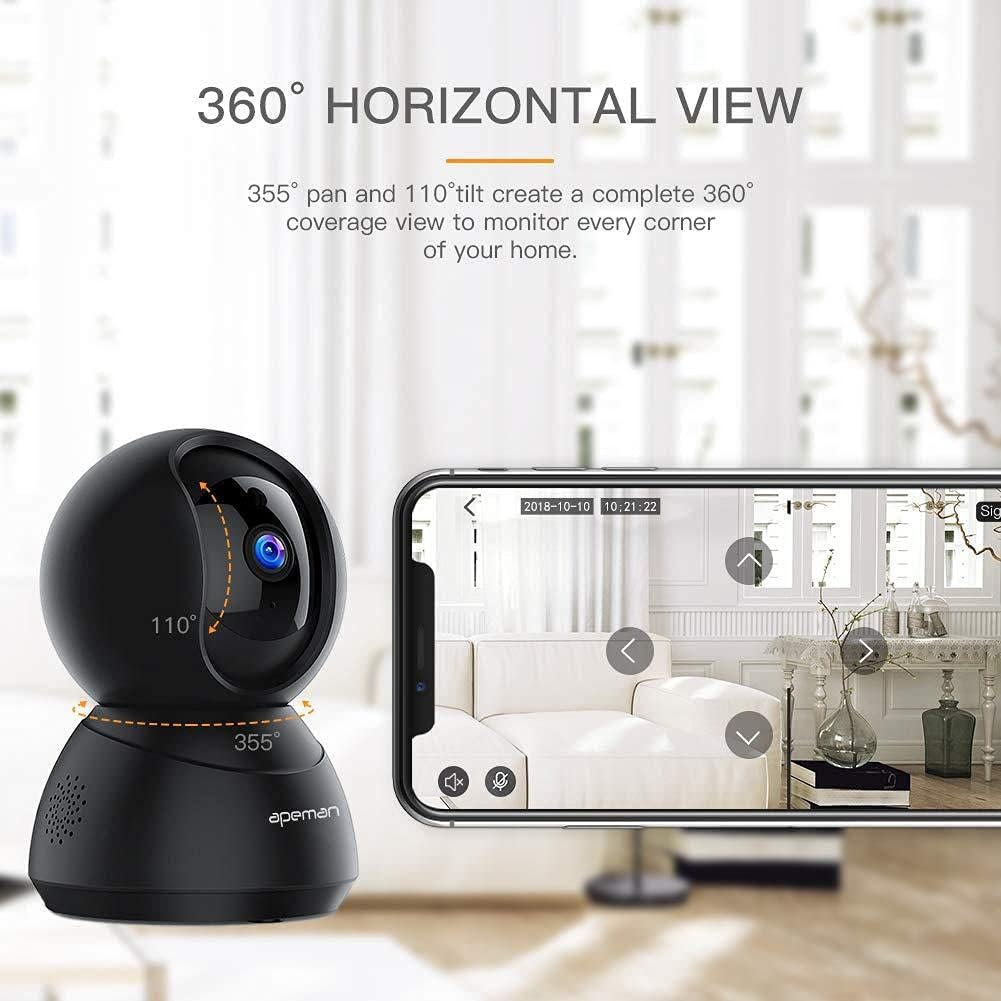
Image: The APEMAN ZX-ID75-UK camera illustrating its 355° pan and 110° tilt capabilities for a wide viewoblast.
- V přímém přenosu view interface, swipe your finger across the screen to remotely adjust the camera's viewúhel.
- Use the directional controls within the app for precise adjustments.
3. Motion Detection and Body Tracking
The camera can detect motion and track human bodies, sending alerts to your phone.
- V aplikaci přejděte do nastavení fotoaparátu.
- Enable 'Motion Detection' and adjust sensitivity levels as needed.
- Activate 'Body Tracking' to allow the camera to automatically follow detected human movement.
4. Noční vidění
Kamera se při slabém osvětlení automaticky přepne do režimu nočního vidění a poskytne tak jasný černobílý obraz.tage.
- Night vision is typically automatic and does not require manual activation.
- Ensure the camera lens is unobstructed for optimal night vision performance.
5. Obousměrný zvuk
Communicate with individuals near the camera using the built-in microphone and speaker.
- V přímém přenosu view, klepněte na ikonu mikrofonu a mluvte přes kameru.
- Klepnutím na ikonu reproduktoru si můžete poslechnout zvuk z okolí kamery.
6. Nahrávání a přehrávání
Recordings can be stored locally on an SD card or via cloud service.
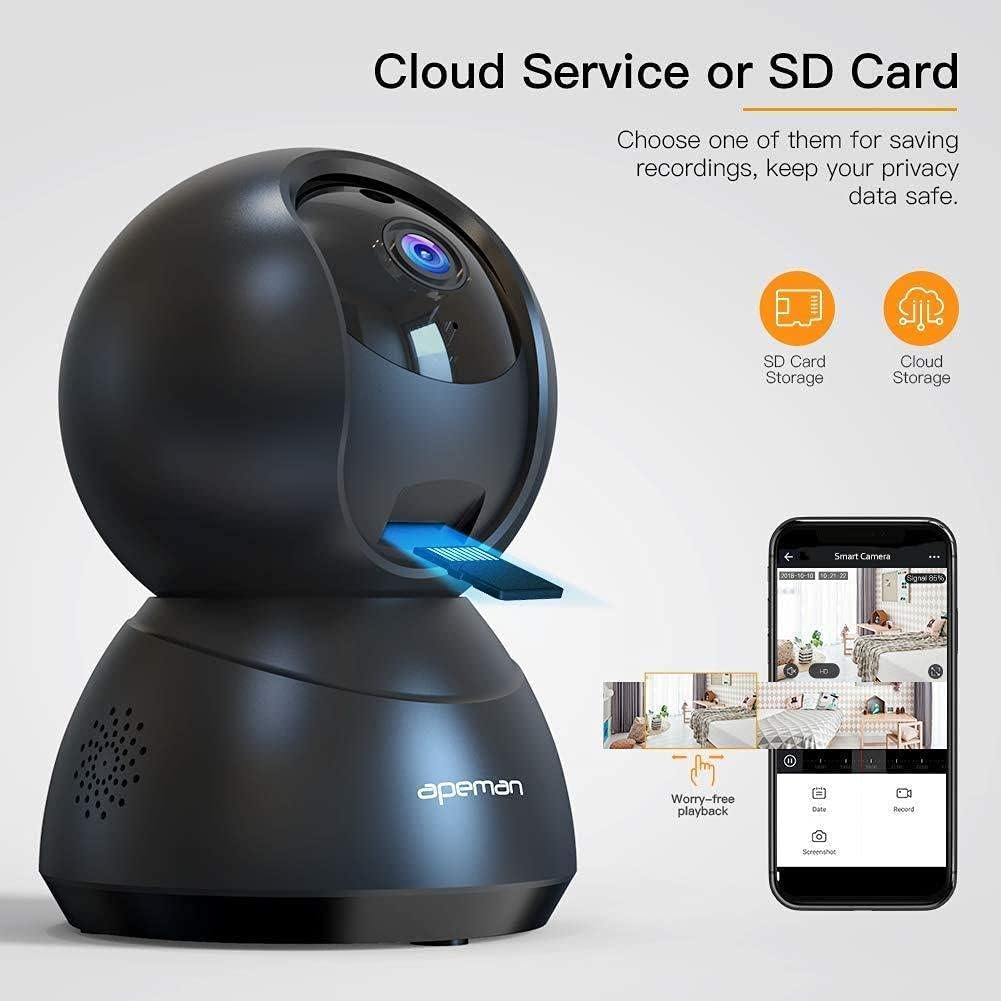
Image: The APEMAN ZX-ID75-UK camera highlighting options for SD card storage and cloud service for recording playback.
- Úložiště SD karty: Insert a microSD card (up to 128GB, Class 10 recommended) into the camera's SD card slot. The camera will automatically begin recording.
- Cloudová služba: Subscribe to the cloud storage service through the app for secure, remote storage of your recordings.
- Na view recordings, go to the 'Playback' section in the app and select the desired date and time.
Údržba
1. Čištění fotoaparátu
- Jemně otřete objektiv a tělo fotoaparátu měkkým, suchým hadříkem, který nepouští vlákna.
- Avoid using harsh chemicals, cleaning solvents, or abrasive materials, as these can damage the camera.
2. Aktualizace firmwaru
- Pravidelně kontrolujte aplikaci, zda nejsou k dispozici aktualizace firmwaru.
- Follow the in-app instructions to update the camera's firmware to ensure optimal performance and access to new features.
3. Správa SD karty
- If using an SD card, ensure it is formatted correctly through the app settings.
- Regularly back up important recordings from the SD card to prevent data loss.
Odstraňování problémů
| Problém | Možné řešení |
|---|---|
| Kamera je offline | Check Wi-Fi connection, ensure camera is powered on, restart camera, or reset and re-add to app. |
| Nelze nahrávat na SD kartu | Ensure SD card is inserted correctly, formatted, and not full. Check recording settings in the app. |
| Špatná kvalita obrazu | Clean the camera lens. Ensure sufficient lighting. Check network stability. |
| Nelze se připojit k Wi-Fi | Ensure you are connecting to a 2.4GHz Wi-Fi network. Verify Wi-Fi password. Move camera closer to router. Reset camera. |
| Detekce pohybu nefunguje | Enable motion detection in app settings. Adjust sensitivity. Ensure camera view není bráněno. |
Specifikace
- Model: ZX-ID75-UK
- Rezoluce: 1080P Full HD
- Konektivita: 2.4 GHz Wi-Fi
- Rozsah otáčení/náklonu: 355° horizontálně, 110° vertikálně
- Noční vidění: Ano
- Detekce pohybu: Ano
- Sledování těla: Ano
- Obousměrný zvuk: Ano
- Skladování: Karta MicroSD (až 128 GB), cloudové úložiště
- Příkon: 5V/1A (přes USB)
- Rozměry: Přibližně 16.8 x 9.4 x 9.4 cm
- Hmotnost: Přibližně 400 g
Záruka a podpora
APEMAN products typically come with a limited warranty. For specific warranty details, please refer to the warranty card included in your package or visit the official APEMAN website. If you encounter any issues or require technical assistance, please contact APEMAN customer support through their official webwebu nebo kontaktních informací uvedených v aplikaci.
Nejnovější informace a podporu naleznete na adrese: www.apeman.com


