1. Úvod
Thank you for choosing the EDIS 40W Speakers, Model EA014. This manual provides essential information for the safe and efficient use of your new speaker system. Please read this manual thoroughly before installation and operation, and retain it for future reference.
2. Bezpečnostní informace
Pro zajištění bezpečného provozu a prevenci poškození dodržujte prosím následující bezpečnostní opatření:
- Nevystavujte reproduktory vodě ani vlhkosti.
- Nezakrývejte ventilační otvory.
- Place the speakers on a stable surface to prevent falling.
- Používejte pouze napájecí adaptér dodaný s jednotkou.
- Uchovávejte mimo dosah dětí.
- Odpojte napájení během bouřek s blesky nebo pokud jej delší dobu nepoužíváte.
3. Obsah balení
Zkontrolujte prosím, zda jsou v balení přítomny všechny položky:
- EDIS 40W Speakers (2 units)
- Infračervené dálkové ovládání
- Napájecí kabel
- Audio připojovací kabely
- Uživatelská příručka (tento dokument)
4. Konec produktuview
The EDIS 40W Speakers are designed to deliver clear audio. They feature a robust design with a steel grille for protection and offer multiple input options.
4.1 Reproduktorové jednotky

Obrázek 1: Přední strana view of the EDIS 40W Speakers. Each speaker unit features two drivers and a protective steel grille.
4.2 Dálkové ovládání
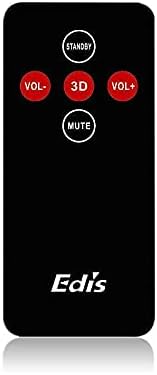
Figure 2: The infrared remote control for the EDIS 40W Speakers. It includes buttons for power, volume adjustment, 3D audio mode, and mute.
4.3 Media Player Panel

Figure 3: The integrated USB and SD Card Media Player panel. This panel allows direct playback from USB drives and SD/MMC memory cards.
5. Nastavení
Follow these steps to set up your EDIS 40W Speakers:
- Umístění: Position the speakers on a flat, stable surface or mount them securely to a wall. Ensure adequate space for ventilation.
- Připojení zdroje zvuku: Connect your audio source (e.g., computer, TV, interactive whiteboard) to the speaker system using the appropriate audio cables.
- Připojení napájení: Connect the power cable to the main speaker unit and then plug it into a standard electrical outlet.
- Zapnutí: Press the power button on the main speaker unit or the 'STANDBY' button on the remote control to turn on the speakers.
6. Návod k obsluze
Your EDIS 40W Speakers can be operated using the integrated controls or the infrared remote control.
6.1 Používání dálkového ovladače
- POHOTOVOSTNÍ: Press to turn the speakers on or off (standby mode).
- VOL+: Zvyšte hlasitost.
- VOL-: Snižte hlasitost.
- ZTLUMIT: Ztlumení nebo zapnutí zvukového výstupu.
- 3D: Activate or deactivate the 3D audio effect.
6.2 Using the Media Player Panel
Insert a USB drive or SD/MMC card into the respective slot on the media player panel.
- REŽIM: Press to switch between input sources (e.g., AUX, USB, SD Card).
- PREVIOUS (◀◀): Přechod na předchozí skladbu.
- PLAY/PAUSE (►▌▌): Přehrajte nebo pozastavte aktuální skladbu.
- NEXT (►►): Přejít na další skladbu.
- LED: Indicates power status or playback activity.
7. Údržba
Proper maintenance ensures the longevity of your speakers:
- Čištění: K čištění povrchů reproduktorů používejte měkký, suchý hadřík. Nepoužívejte tekuté čisticí prostředky ani abrazivní materiály.
- Skladování: Pokud budete reproduktory skladovat delší dobu, odpojte je od napájení a uložte je na chladném a suchém místě.
- Větrání: Ensure that the speaker's ventilation openings are not obstructed to prevent overheating.
8. Řešení problémů
If you encounter issues with your EDIS 40W Speakers, refer to the following common problems and solutions:
| Problém | Možná příčina | Řešení |
|---|---|---|
| Žádná síla | Power cable not connected; power outlet not working | Zkontrolujte připojení napájecího kabelu; zkuste jinou zásuvku. |
| Žádný zvuk | Volume too low; incorrect input source; audio cable loose/faulty | Increase volume; press MODE to select correct input; check audio cable connections. |
| Dálkové ovládání nefunguje | Batteries depleted; obstruction between remote and speaker; remote not pointed correctly | Replace remote batteries; remove obstructions; point remote directly at the speaker's IR receiver. |
| USB/SD karta se nepřehrává | Nesprávný file format; card/drive not inserted correctly; corrupted media | Zajistit files are compatible (e.g., MP3); reinsert media; try a different USB drive/SD card. |
9. Specifikace
| Funkce | Specifikace |
|---|---|
| Značka | EDIS |
| Číslo modelu | EA014 |
| Maximální výstupní výkon reproduktoru | 40 wattů |
| Barva | Šedá |
| Hmotnost položky | 8 kg |
| Kontrolní metoda | Vzdálený |
| Technologie připojení | Kabelové |
| Zdroj napájení | Elektrický kabel |
| Režim zvukového výstupu | Surround |
| Typ montáže | Stojící na podlaze |
| Materiál | Dřevo |
| Typ reproduktoru | Venkovní |
| Speciální funkce | Ampdoživotní |
| Kompatibilní zařízení | Všechna zařízení |
| Konfigurace kanálů prostorového zvuku | 2 |
10. Záruka a podpora
Informace o záruce a zákaznické podpoře naleznete v dokumentaci dodané při nákupu nebo se obraťte na svého prodejce. Uschovejte si doklad o koupi pro případné reklamace.