1. Úvod
This manual provides detailed instructions for the setup, operation, maintenance, and troubleshooting of your A4Tech FSTYLER FG30S Wireless Mouse. Please read this guide thoroughly before using the device to ensure optimal performance and longevity.

Image 1.1: The A4Tech FSTYLER FG30S Wireless Mouse with its accompanying USB receiver.
2. Obsah balení
- A4Tech FSTYLER FG30S Wireless Mouse
- USB 2.4GHz přijímač
- Uživatelská příručka (tento dokument)
Note: Batteries are not included and must be purchased separately. The mouse requires one AA battery.
3. Nastavení
3.1 Instalace baterie
- Najděte přihrádku na baterie na spodní straně myši.
- Otevřete kryt bateriového prostoru.
- Vložte jednu baterii typu AA a dbejte na správnou polaritu (+/-).
- Bezpečně zavřete kryt bateriového prostoru.
3.2 Připojení přes bezdrátové připojení 2.4 GHz
- Remove the USB 2.4GHz receiver from its storage slot, usually located within the battery compartment.
- Zapojte USB přijímač do volného USB portu na vašem počítači.
- Zapněte myš pomocí vypínače, který se nachází na spodní straně.
- Your computer should automatically detect and install the necessary drivers. The mouse will be ready for use.
3.3 Připojení přes Bluetooth
- Turn on the mouse using the On/Off switch on the underside.
- Press and hold the Bluetooth pairing button (refer to the mouse diagram for location, typically near the On/Off switch) until the indicator light begins to flash, signifying pairing mode.
- V počítači přejděte do nastavení Bluetooth.
- Hledat new devices and select "A4Tech FG30S" or a similar identifier from the list.
- Postupujte podle pokynů na obrazovce a dokončete proces párování. Po úspěšném připojení bude kontrolka na myši svítit nepřerušovaně.
4. Návod k obsluze

Obrázek 4.1: Nahoře view of the mouse, highlighting primary buttons and scroll wheel.
4.1 Základní použití
- Levé kliknutí: Primární výběr a aktivace.
- Klikněte pravým tlačítkem myši: Zpřístupňuje kontextové nabídky.
- Rolovací kolečko: Posouvá obsah svisle. Lze také kliknout pro funkci kliknutí prostředním tlačítkem myši.
- Boční tlačítka: Typically function as 'Forward' and 'Back' in web prohlížeče a file průzkumníci.
4.2 Nastavení DPI
The A4Tech FG30S mouse features 3 adjustable DPI (Dots Per Inch) levels: 1000, 1600, and 2000 DPI. DPI controls the sensitivity of the mouse cursor. To change the DPI setting:
- Locate the DPI switch button, usually positioned behind the scroll wheel.
- Press the DPI button to cycle through the available sensitivity levels. The mouse may have an indicator light that changes color or flashes to show the current DPI setting.
4.3 Řízení spotřeby
- Vypínač: A physical switch on the underside of the mouse allows you to conserve battery power when the mouse is not in use.
- Auto-Sleep Power Saving: The mouse is designed with an adjustable 4-level power-saving mode. It will automatically enter a sleep state after 0.2 seconds of inactivity to extend battery life. Move the mouse or click a button to wake it up.
5. Pokročilé funkce
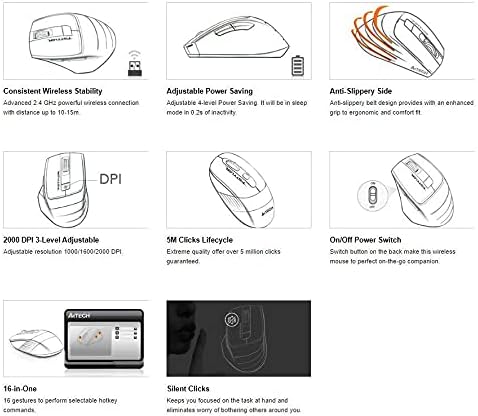
Image 5.1: Feature overview of the A4Tech FSTYLER FG30S mouse.
5.1 Consistent Wireless Stability
The mouse utilizes advanced 2.4 GHz wireless technology, providing a stable and reliable connection with a range of up to 10-15 meters, minimizing interference and lag.
5.2 Silent Clicks
The A4Tech FG30S features silent click technology, reducing click noise by up to 90%. This allows for a quieter working environment, minimizing distractions for both the user and those nearby.
5.3 Anti-Slippery Side Design
The mouse incorporates an anti-slippery side design, enhancing grip and providing a more ergonomic and comfortable experience during extended use.
5.4 16-in-One Gestures
The mouse supports 16 customizable gestures, allowing users to perform various hotkey commands for increased productivity. Specific software may be required for full customization, typically available from the manufacturer's webmísto.
5.5 5 Million Clicks Lifecycle
The mouse buttons are engineered for durability, guaranteeing over 5 million clicks throughout the product's lifespan.
6. Údržba
6.1 Čištění
- Před čištěním se ujistěte, že je myš vypnutá.
- K otření povrchu myši použijte měkký, suchý hadřík, který nepouští vlákna.
- Na odolné nečistoty lehce damphadřík vodou nebo jemným čisticím roztokem. Zabraňte nadměrné vlhkosti.
- Nepoužívejte agresivní chemikálie, abrazivní čisticí prostředky ani rozpouštědla.
- Use a cotton swab or compressed air to clean around the scroll wheel and optical sensor.
6.2 Výměna baterie
When the mouse performance degrades or the indicator light signals low battery, replace the AA battery by following the steps outlined in Section 3.1.
7. Řešení problémů
- Myš nereaguje:
- Ujistěte se, že je myš zapnutá.
- Zkontrolujte stav baterie a v případě potřeby ji vyměňte.
- For 2.4GHz connection, ensure the USB receiver is securely plugged into a working USB port. Try a different port.
- For Bluetooth connection, ensure Bluetooth is enabled on your computer and the mouse is properly paired. Try re-pairing the device.
- Move the mouse closer to the receiver/computer to rule out range issues.
- Pohyb kurzoru je nepravidelný nebo trhaný:
- Vyčistěte optický senzor na spodní straně myši.
- Ujistěte se, že myš používáte na vhodném povrchu. Vyhněte se vysoce reflexním nebo průhledným povrchům.
- Nastavení DPI se nemění:
- Ujistěte se, že stisknete správné tlačítko DPI.
- Zkontrolujte stav baterie.
8. Specifikace
| Funkce | Specifikace |
|---|---|
| Číslo modelu | FG30S |
| Značka | A4tech |
| Konektivita | Bluetooth & 2.4GHz Wireless |
| Úrovně DPI | 1000 / 1600 / 2000 (3-level adjustable) |
| Detekce pohybu | Optický |
| Orientace rukou | Obouruký |
| Kompatibilita operačního systému | Linux, Windows XP (and newer OS versions) |
| Typ baterie | 1x AA (není součástí balení) |
| Hmotnost položky | 150 g |
| Rozměry balení | 17.5 x 12 x 7.3 cm |
| Klikněte na Životní cyklus | Více než 5 miliony kliknutí |
9. Záruka a podpora
For warranty information and technical support, please refer to the official A4Tech webnebo se obraťte na místního prodejce. Uschovejte si účtenku jako doklad o koupi pro případ reklamace.
Online zdroje:
- A4Tech Official Webmísto: www.a4tech.com


