1. Úvod
This manual provides instructions for the installation, operation, and troubleshooting of your ARRIS Touchstone TM804G DOCSIS 3.0 Telephone Modem. The TM804G is designed to provide high-speed data access and up to four lines of Voice over IP (VoIP) telephone service over your cable network. It features DOCSIS 3.0 technology for enhanced internet speeds and reliability.
2. Klíčové vlastnosti
- DOCSIS 3.0 compliant for high-speed internet.
- Four (4) dedicated VoIP telephone ports.
- Supports download speeds up to 343 Mbps.
- Two independent 96MHz RF tuners.
- Ethernet connectivity for network devices.
3. Obsah balení
Ověřte, zda váš balíček obsahuje následující položky:
- ARRIS Touchstone TM804G Telephone Modem
- Napájecí adaptér
- Ethernetový kabel
- Dokumentace (Stručný průvodce, Bezpečnostní informace)
Note: A backup battery is sold separately and is not included in the standard package.
4. Fyzikální vlastnosti
4.1 Indikátory na předním panelu
The front panel of the TM804G modem features several LED indicators that provide status information.

Obrázek 1: Přední view of the ARRIS Touchstone TM804G Telephone Modem. This image shows the modem's black casing with ventilation holes on top and a row of green LED indicator lights on the right side of the front panel.
| Indikátor | Postavení | Popis |
|---|---|---|
| MOC | Plně zelená | Modem je zapnutý. |
| DS (po proudu) | Plně zelená | Downstream channel is connected. |
| USA (proti proudu) | Plně zelená | Upstream channel is connected. |
| ONLINE | Plně zelená | The modem is registered and online. |
| ODKAZ | Plně zelená | An Ethernet device is connected. |
| TEL1-4 | Plně zelená | Telephone line is active. |
4.2 Porty na zadním panelu
The rear panel provides all necessary connection ports for the modem.
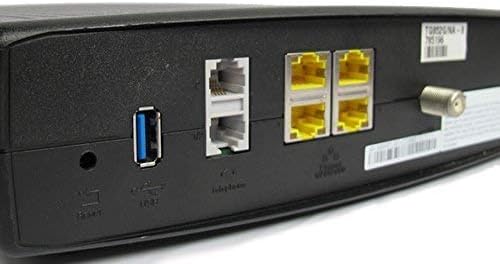
Obrázek 2: Zadní view of the ARRIS Touchstone TM804G Telephone Modem. This image displays the back of the modem, featuring a coaxial cable connector, four yellow Ethernet ports, two grey telephone ports (RJ-11), a USB port, a reset button, and the power input.
- KOAXIÁLNÍ: Connects to the cable wall outlet.
- ETHERNET (LAN): Four (4) RJ-45 ports for connecting to a computer or router.
- TEL1-4 (RJ-11): Four (4) telephone ports for connecting to telephones or a home telephone wiring system.
- USB: (Functionality may vary or be disabled by your service provider).
- RESETOVÁNÍ: Recessed button to reset the modem to factory defaults (use with caution).
- MOC: Připojuje se k napájecímu adaptéru.
5. Nastavení a instalace
Follow these steps to install your ARRIS Touchstone TM804G modem.
- Připojení koaxiálního kabelu: Connect one end of a coaxial cable to the COAXIAL port on the modem and the other end to a cable wall outlet. Ensure the connection is finger-tight.
- Připojení ethernetového kabelu: Connect one end of the Ethernet cable to one of the ETHERNET ports on the modem and the other end to your computer's network port or your wireless router's WAN/Internet port.
- Připojení telefonních linek: If using telephone service, connect your telephone(s) or home telephone wiring to the TEL1, TEL2, TEL3, or TEL4 ports on the modem using standard RJ-11 telephone cables.
- Připojte napájecí adaptér: Connect the power adapter to the POWER port on the modem and then plug the adapter into an electrical outlet.
- Zapnutí: The modem will automatically power on. Observe the front panel indicator lights. The POWER, DS, US, and ONLINE lights should eventually turn solid green, indicating a successful connection to the cable network and internet. The TEL lights will illuminate when telephone lines are active.
- Aktivace služby: Contact your Internet Service Provider (ISP) to activate the modem. You will need to provide them with the MAC address and serial number, typically found on a label on the bottom or back of the modem.
Important: Do not connect the modem to a power outlet until all other connections are made.
6. Návod k obsluze
Once the modem is successfully installed and activated, it operates automatically.
- Přístup na internet: Any device connected via Ethernet to the modem (or through a connected router) should have internet access once the ONLINE light is solid green.
- Telefonní služba: If your service plan includes VoIP, connected telephones will have dial tone and function once the corresponding TEL lights are solid green.
- Stav sledování: Refer to the front panel LED indicators (Section 4.1) to monitor the modem's operational status.
7. Údržba
- Čištění: Keep the modem clean and free of dust. Use a soft, dry cloth to wipe the exterior. Do not use liquid cleaners or aerosols.
- Větrání: Ujistěte se, že je modem umístěn v dobře větraném prostoru, aby nedošlo k jeho přehřátí. Neblokujte větrací otvory.
- Aktualizace firmwaru: Firmware updates are typically managed automatically by your Internet Service Provider. Do not attempt to manually update the firmware unless instructed by your ISP.
- Restarting the Modem: If you experience connectivity issues, try restarting the modem by unplugging the power adapter for 10-15 seconds and then plugging it back in.
- Obnovení továrního nastavení: The recessed RESET button on the rear panel can be used to restore factory default settings. This should only be done if instructed by your ISP, as it will erase all custom configurations. To perform a factory reset, use a paperclip to press and hold the RESET button for at least 10 seconds.
8. Řešení problémů
If you encounter problems with your modem, refer to the following common issues and solutions.
| Problém | Možná příčina | Řešení |
|---|---|---|
| Žádná síla | Napájecí adaptér není připojen nebo je zásuvka vadná. | Ensure power adapter is securely connected to the modem and a working electrical outlet. Check the POWER LED. |
| Žádný přístup k internetu | Coaxial cable loose, modem not activated, or ISP outage. |
|
| Není v telefonu žádný oznamovací tón | Telephone cable loose, TEL light off, or service issue. |
|
| Pomalá rychlost internetu | Network congestion, old router, or ISP issue. |
|
For further assistance, contact your Internet Service Provider's technical support.
9. Specifikace
| Číslo modelu | TM804G |
| Standard DOCSIS | DOCSIS 3.0 |
| Internet Download Speed | Až 343 Mbps (závisí na poskytovateli internetových služeb) |
| VoIP porty | 4 (RJ-11) |
| Ethernetové porty | 4 (RJ-45) |
| Technologie připojení | Ethernet |
| Rozměry (D x Š x V) | Přibližně 11.81 x 9.13 x 2.56 palce |
| Hmotnost | Přibližně 2.16 libry |
| Kompatibilní poskytovatelé internetových služeb | Optimum, Mediacom (and others, check with your provider) |
10. Záruka a podpora
Tento produkt je nabízen jako položka Amazon Renewed. Produkty Amazon Renewed jsou profesionálně kontrolovány a testovány, aby fungovaly a vypadaly jako nové. Pokud nejste s nákupem spokojeni, máte nárok na výměnu nebo vrácení peněz v rámci záruky Amazon Renewed Guarantee.
For technical support, troubleshooting, or service-related inquiries, please contact your Internet Service Provider (ISP) directly. Your ISP is responsible for the activation, configuration, and ongoing support of the modem on their network.