Zavedení
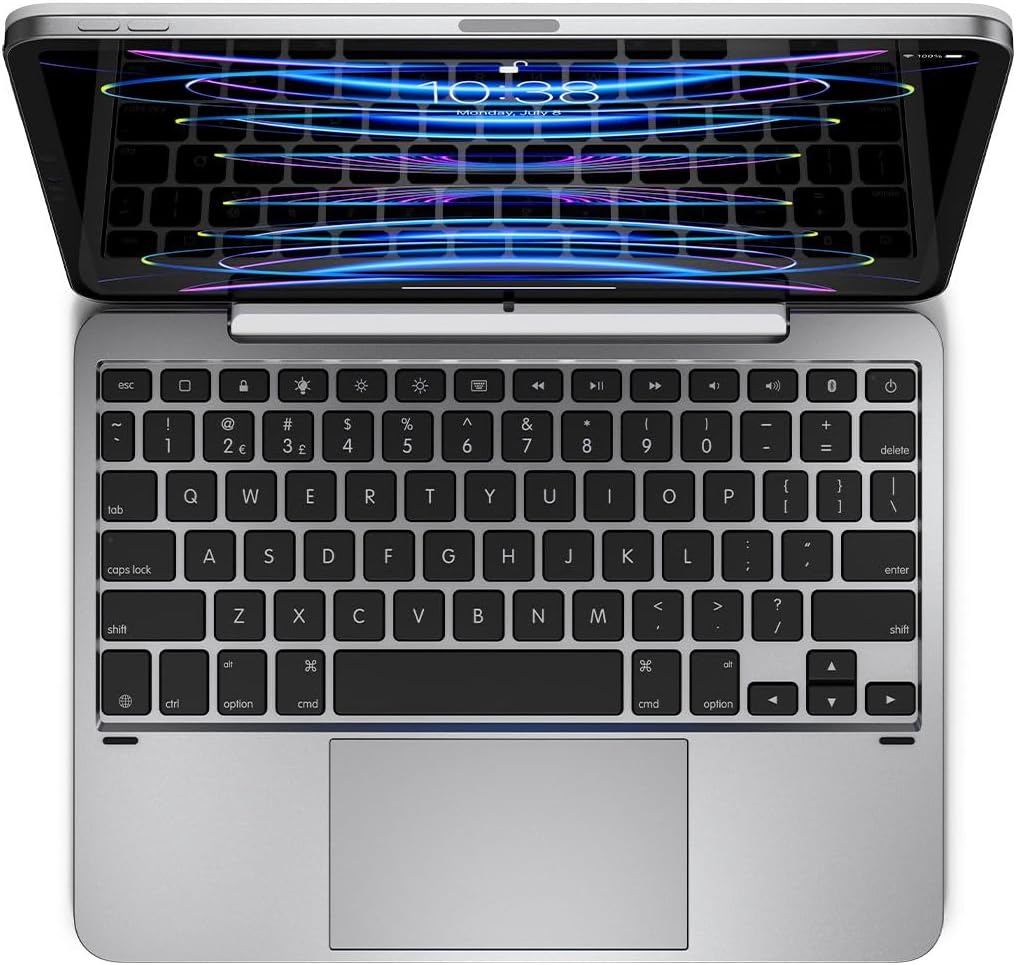
This manual provides detailed instructions for the setup, operation, and maintenance of your Brydge 11 MAX+ Wireless Keyboard Case. Designed to enhance your iPad experience, this keyboard case features a multi-touch trackpad, a magnetic SnapFit case, and Bluetooth 5.0 connectivity for seamless integration.
Co je v krabici
- 1 x Brydge 11 MAX+ Keyboard Case
- 1 x Uživatelská příručka
- Charging Cable (USB-C, may be included depending on region/bundle)

Please ensure all items are present before proceeding with setup.
Kompatibilita
The Brydge 11 MAX+ Wireless Keyboard Case is compatible with the following iPad models:
- 11palcový iPad Pro (1., 2., 3. a 4. generace)
- 11palcový iPad Air (4. a 5. generace a M2)
Poznámka: This keyboard case is not designed for use with the 11-inch iPad Pro (M4).
Nastavení
1. Připojení iPadu
- Align your iPad with the magnetic back cover of the Brydge 11 MAX+ case.
- The iPad will securely snap into place due to the integrated magnets.
- Ensure the iPad is firmly attached before use. The magnetic connection allows for easy attachment and removal, enabling quick transitions between laptop and tablet modes.

2. Párování Bluetooth
- Turn on your Brydge 11 MAX+ keyboard.
- Na iPadu přejděte na Nastavení > Bluetooth.
- Select "Brydge 11.0 MAX+" from the list of available devices.
- V případě potřeby potvrďte párovací kód.

3. Aktualizace firmwaru
To ensure optimal performance and access to the latest features, regularly check for firmware updates using the Brydge Connect app. Download the app from the App Store on your iPad.
Návod k obsluze
1. Používání multidotykového trackpadu
The integrated multi-touch trackpad supports various iPadOS gestures for efficient navigation. Refer to your iPad's iPadOS settings for a complete list of supported gestures and customization options.

2. Adjusting Backlit Keys
The keyboard features adjustable backlit keys with three brightness levels. Use the dedicated backlight keys on the top row of the keyboard to cycle through the brightness settings or turn the backlight off.

3. Životnost baterie a nabíjení
The Brydge 11 MAX+ offers extended battery life, providing up to 3 months of use on a single charge. When the backlight is used consistently, battery life is approximately 40 hours. To charge the keyboard, connect a USB-C cable to the charging port located on the side of the keyboard.

4. Seřizování Viewúhly
The keyboard case allows for a 135° screen rotation, providing flexible viewing angles for various tasks, from typing to media consumption.

Údržba
To maintain your Brydge 11 MAX+ Wireless Keyboard Case, follow these guidelines:
- Vnější povrchy otřete měkkým, damp hadříkem. Nepoužívejte agresivní chemikálie ani abrazivní čisticí prostředky.
- Keep the keyboard free from dust and debris. Use compressed air to clean between keys if necessary.
- Nevystavujte zařízení po delší dobu extrémním teplotám nebo přímému slunečnímu záření.
Odstraňování problémů
If you encounter issues with your Brydge 11 MAX+ keyboard case, consider the following:
- Klávesnice se nepřipojuje: Ensure Bluetooth is enabled on your iPad and the keyboard is powered on. Try unpairing and re-pairing the keyboard.
- Trackpad nereaguje: Check that the keyboard is fully charged. Restart your iPad and the keyboard. Ensure no settings are disabling trackpad functionality in iPadOS.
- Nefunkční klávesy: Verify the keyboard is charged and connected. If specific keys are unresponsive, try cleaning around them.
- Rychlé vybíjení baterie: Reduce backlight brightness or turn it off when not needed. Ensure the keyboard is fully charged before use.
For further assistance, refer to the official Brydge support resources.
Specifikace
| Rozměry produktu | 9.75 x 7.34 x 0.66 palce (9.8"D x 7.3"Š x 0.7"V) |
| Hmotnost položky | 1.65 libry |
| Výrobce | Bridge |
| Číslo modelu položky | 4033 BRY |
| Baterie | Vyžaduje 1 lithium-iontovou baterii (součástí balení) |
| Technologie připojení | Bluetooth 5.0 |
| Speciální funkce | Backlit, Multi-Touch Trackpad |
| Podpora barev podsvícení klávesnice | Single Color (3 brightness levels) |
| Otočení obrazovky | Až 135° |
Záruka a podpora
The Brydge 11 MAX+ Wireless Keyboard Case comes with a 1-year limited hardware warranty. For detailed warranty information, product support, FAQs, and contact options, please visit the official Brydge webmísto.
Oficiální video produktu:


