1. Úvod
Thank you for choosing the AUKEY Sprint Wireless Power Bank PB-Y32. This device is designed to provide portable power for your mobile devices, featuring both wired and wireless fast charging capabilities. Please read this manual carefully before use to ensure optimal performance and safety.
2. Vlastnosti produktu
- Kapacita 10000 mAh: High-capacity battery to charge your devices multiple times.
- Podpora rychlého nabíjení: Supports Quick Charge 3.0 and Power Delivery for rapid charging of compatible devices.
- Bezdrátové nabíjení: Conveniently charge Qi-compatible devices at up to 10W.
- Více výstupních portů: Equipped with USB-C and USB-A ports for versatile charging.
- Kompaktní a přenosný design: Easy to carry for on-the-go power.
- Bezpečnostní funkce: Built-in protections against overcharge, over-discharge, overcurrent, and short circuits.
3. Obsah balení
- AUKEY Sprint Wireless Power Bank PB-Y32
- Kabel USB-A na C
- Uživatelská příručka
4. Nastavení a první použití
4.1 Nabíjení powerbanky
Before first use, fully charge the power bank. It takes approximately 7 hours to fully charge the power bank using a compatible USB-C power adapter.
- Connect the included USB-A to C cable to the power bank's USB-C input port.
- Druhý konec kabelu připojte k USB nabíječce (není součástí balení).
- The LED indicators will light up to show the charging status. All four LEDs will be solid when fully charged.
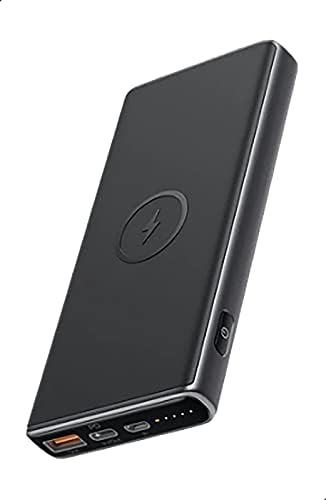
Image: The AUKEY Sprint Wireless Power Bank PB-Y32, showcasing its sleek black design and port layout.
5. Návod k obsluze
5.1 Drátové nabíjení
To charge your device using a cable:
- Connect your device's charging cable to either the USB-A output port or the USB-C output port on the power bank.
- Připojte druhý konec kabelu k zařízení.
- Powerbanka automaticky začne nabíjet vaše zařízení.
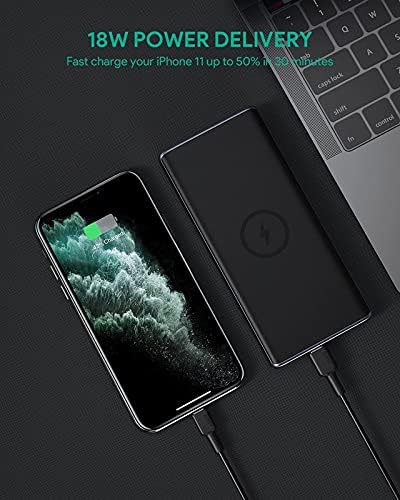
Image: The power bank connected via cable to a smartphone, demonstrating 18W Power Delivery fast charging.

Image: A smartphone connected to the power bank, illustrating Qualcomm Quick Charge 3.0 capabilities for rapid charging.
5.2 Bezdrátové nabíjení
To charge your Qi-compatible device wirelessly:
- Place your Qi-compatible device directly onto the wireless charging pad located on the top surface of the power bank. Ensure the device is centered on the charging symbol.
- Powerbanka automaticky detekuje vaše zařízení a zahájí bezdrátové nabíjení.

Image: A smartphone placed on the power bank's surface, demonstrating the wireless charging feature.

Obrázek: Detailní záběr view of the power bank showing the silicone ring designed to keep the phone stable during wireless charging.
5.3 Low-Current Charging Mode
This mode is ideal for charging low-power devices like wireless earbuds or smartwatches.
- Press and hold the power button for 2 seconds to enter low-current charging mode. The first LED indicator will blink green.
- Connect your low-power device or place it on the wireless charging pad.
- To exit low-current charging mode, press the power button once, or it will automatically exit after 2 hours.
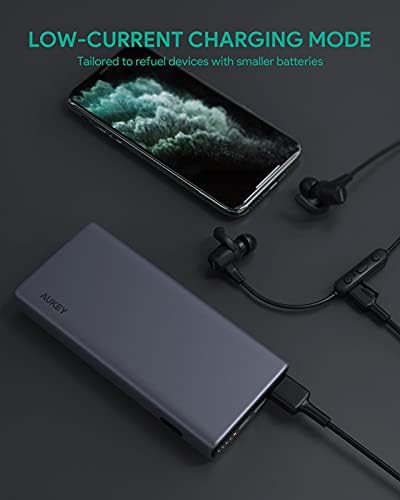
Image: The power bank connected to a smartphone and wireless earbuds, demonstrating its low-current charging mode for smaller devices.

Image: An illustration showing the power bank's broad compatibility with various devices, including smartphones, tablets, and gaming consoles.
6. Údržba
- Keep the power bank away from liquids, extreme heat, and strong magnetic fields.
- Nenechávejte powerbanku upadnout ani ji nevystavujte silným nárazům.
- Clean the power bank with a dry, soft cloth. Do not use corrosive cleaners.
- Pokud powerbanku nepoužíváte, uchovávejte ji na chladném a suchém místě.
- Recharge the power bank at least once every 3 months to maintain battery health.
7. Řešení problémů
7.1 Powerbanka se nenabíjí
- Ujistěte se, že je nabíjecí kabel bezpečně připojen k powerbankě i k nabíječce.
- Zkuste jiný kabel USB-C nebo nabíječku do zásuvky.
- Verify the wall charger's output meets the power bank's input requirements (DC 5V-3A / 9V-2A).
7.2 Zařízení se nenabíjí z powerbanky
- Ujistěte se, že je powerbanka dostatečně nabitá.
- Vyzkoušejte pro své zařízení jiný nabíjecí kabel.
- For wireless charging, ensure your device is Qi-compatible and properly aligned on the charging pad. Remove any thick cases that might interfere.
- If charging a low-power device, ensure low-current charging mode is activated.
7.3 Power Bank Overheating
- Je normální, že se powerbanka během nabíjení nebo vybíjení mírně zahřívá.
- Pokud se nadměrně zahřeje, okamžitě odpojte všechna zařízení a nabíjecí kabel. Před dalším použitím nechte zařízení vychladnout.
- Zajistěte dostatečné větrání a během používání powerbanku nezakrývejte.
8. Specifikace
| Funkce | Detail |
|---|---|
| Název modelu | Sprint |
| Číslo modelu | PB-Y32 |
| Kapacita baterie | 10000 XNUMX mAh |
| Vstup USB typu C. | DC 5V-3A / 9V-2A |
| Výstup USB Type-C | DC 5V-3A / 9V-2A / 12V-1.5A |
| Výstup USB Type-A | 18W |
| Maximální výstupní výkon | 18W |
| Bezdrátový nabíjecí výstup | 5W, 7.5W, 10W |
| Rozměry | 144 x 67 x 17 mm |
| Hmotnost | 210 gramů |
| Složení článků baterie | Lithium Polymer |
| Speciální funkce | Short Circuit Protection, Wireless Charging |
| Barva | Černý |
| Doba nabíjení baterie | 7 hodin |
9. Záruka a podpora
According to the product specifications, this product comes with Bez záruky. For any product-related inquiries or support, please refer to the retailer or manufacturer's official webstránky pro kontaktní informace.


