1. Konec produktuview
The XTRARM Arius TV Stand is a compact and versatile solution designed for mounting televisions ranging from 32 to 65 inches (81-165 cm). This stand is suitable for both professional and private environments, offering adjustable height and a 360° swivel function for optimal viewing angles. Its stable round base includes height-adjustable rubber feet for secure positioning and can be further secured against accidental tipping. The integrated cable management system helps maintain a tidy appearance.

2. Bezpečnostní informace
Please read all safety instructions carefully before assembly and use. Failure to follow these instructions may result in property damage, injury, or death.
- Weight and VESA Compatibility: Before assembly, verify your television's VESA mounting pattern and weight. This stand supports TVs up to 35 kg (77 lbs). Do not exceed this maximum weight capacity.
- Kontrola součástí: Před zahájením montáže se ujistěte, že jsou všechny součásti přítomny a nepoškozené. Nepoužívejte, pokud některé součásti chybí nebo jsou vadné.
- Stabilita: Always ensure the stand is placed on a flat, stable, and level surface. Utilize the adjustable rubber feet to achieve optimal stability.
- Anti-Tip Security: For enhanced safety, especially in households with children or pets, consider securing the stand to the floor or wall using appropriate anti-tip hardware (not included).
- Odborná pomoc: If you are unsure about any installation steps or have concerns about the safety of your setup, consult a qualified professional.
- Správa kabelů: Route all cables securely to prevent tripping hazards and to avoid damage to the cables or the TV.
3. Obsah balení
Zkontrolujte prosím, zda jsou v balení obsaženy všechny následující komponenty:
- TV Stand Column
- Kulatá základna
- TV Mounting Brackets (VESA compatible)
- Standard Mounting Hardware (screws, washers, spacers)
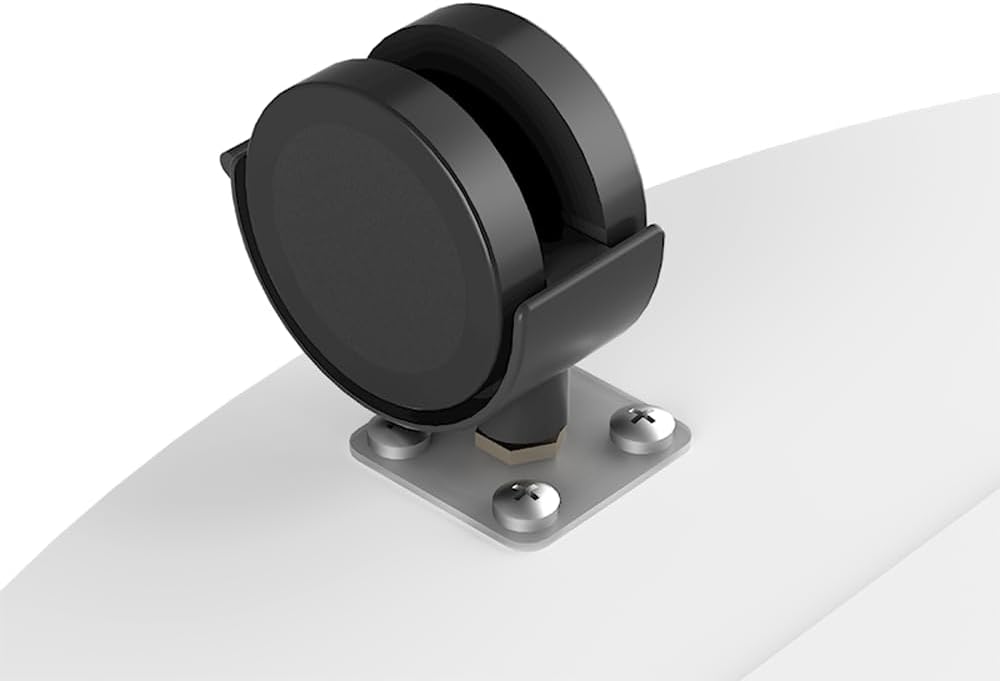
- Adjustable Rubber Feet / Caster Wheels
- Cable Management Clips/System

4. Pokyny k nastavení
Follow these steps to assemble your XTRARM Arius TV Stand:
- Sestavte základnu: Attach the caster wheels or adjustable rubber feet to the bottom of the round base. Ensure they are securely fastened.
- Připevnění sloupu k základně: Insert the main stand column into the center opening of the round base. Secure it using the provided screws and tools.
- Připevnění držáků VESA k televizoru: Carefully place your TV face down on a soft, clean surface. Attach the VESA mounting brackets to the back of your television using the appropriate screws, washers, and spacers from the standard mounting hardware kit. Ensure the brackets are centered and securely tightened.
- Upevnění televizoru na stojan: With assistance, carefully lift the television and hook the VESA brackets onto the mounting plate on the stand column. Secure the TV to the stand using the locking mechanisms or screws as indicated in the detailed diagram.
- Upravit výšku: Loosen the height adjustment mechanism on the stand column. Adjust the TV to your desired viewing height, then securely tighten the mechanism to lock the TV in place.
- Správa kabelů: Route all necessary cables through the integrated cable management system within the column to keep them organized and out of sight.

5. Návod k obsluze
The XTRARM Arius TV Stand offers flexible viewmožnosti:
- Funkce otáčení: The mounted television can be rotated 360° around the central column. To adjust the viewing angle, gently grasp the sides of your television and rotate it to the desired position. Avoid excessive force.
- Nastavení výšky: To change the height of your television, locate the height adjustment mechanism on the stand column. Loosen the mechanism, carefully slide the TV up or down to the preferred height, and then securely tighten the mechanism to lock it in place. Always ensure the TV is stable after adjustment.

6. Údržba
Proper maintenance ensures the longevity and safe operation of your TV stand:
- Pravidelné kontroly: Periodically inspect all screws, bolts, and connections to ensure they remain tight and secure. Retighten any loose fasteners.
- Čištění: Clean the stand with a soft, dry, or slightly damp hadříkem. Nepoužívejte abrazivní čisticí prostředky, rozpouštědla ani agresivní chemikálie, protože by mohly poškodit povrchovou úpravu.
- Správa kabelů: Ensure that cables are properly routed and secured within the cable management system to prevent wear, damage, or entanglement.
7. Řešení problémů
If you encounter issues with your XTRARM Arius TV Stand, refer to the following common problems and solutions:
- TV Stand is Unstable:
- Ujistěte se, že všechny montážní šrouby jsou zcela utažené.
- Verify that the TV's weight and VESA pattern are within the stand's specifications.
- Adjust the rubber feet on the base to ensure the stand is level on the floor.
- Consider using additional anti-tip hardware if stability remains a concern.
- Difficulty Swiveling the TV:
- Check for any cables or obstructions that might be impeding the swivel mechanism.
- Ensure the TV is correctly mounted and not binding against the column.
- Height Adjustment Mechanism Not Working:
- Ensure the locking mechanism is fully disengaged before attempting to adjust the height.
- After adjustment, ensure the mechanism is fully engaged and tightened to secure the TV.
8. Specifikace
| Číslo modelu | XTR-FS2020 |
| Značka | XTRARM |
| Barva | Bílý |
| Kompatibilní velikosti TV | 32–65 palce (81–165 cm) |
| Maximální nosnost | 35 kg (77 lb) |
| Úhel otočení | 360° |
| Kompatibilita VESA | 100x100, 100x200, 200x200, 200x300, 300x300, 300x200, 400x200, 400x300, 400x400 mm |
| Nastavitelná výška | Yes, up to approximately 130 cm (51 inches) |
| Průměr základny | 60 cm (23.6 palců) |
| Průměr sloupce | 3.4 cm (1.3 palců) |
| Materiál | Iron (column), Wood/Iron/Lacquered (base) |

9. Záruka a podpora
Informace o záruce: Spare parts for the XTRARM Arius TV Stand are available for a period of 2 years from the date of purchase.
Zákaznická podpora: For technical assistance, warranty claims, or any questions regarding your XTRARM Arius TV Stand, please contact XTRARM customer service. When contacting support, please provide your product model number (XTR-FS2020) and proof of purchase.


