1. Úvod
Tato příručka obsahuje podrobné pokyny pro nastavení, provoz a údržbu vaší bezdrátové meteorologické stanice EMOS Select. Tato profesionální meteorologická stanice nabízí komplexní přehled...view o okolních podmínkách, včetně času, předpovědi počasí, tlaku vzduchu, teploty a fází měsíce. Jeho intuitivní dotykový displej umožňuje snadnou interakci s interními i externími senzory.

Obrázek 1.1: Bezdrátová meteorologická stanice EMOS Select s externím senzorem.
2. Obsah balení
Zkontrolujte prosím, zda jsou ve vašem balení přítomny všechny níže uvedené položky:
- Hlavní jednotka meteorologické stanice EMOS Select
- Napájecí adaptér
- Bezdrátový venkovní snímač
- Návod k použití
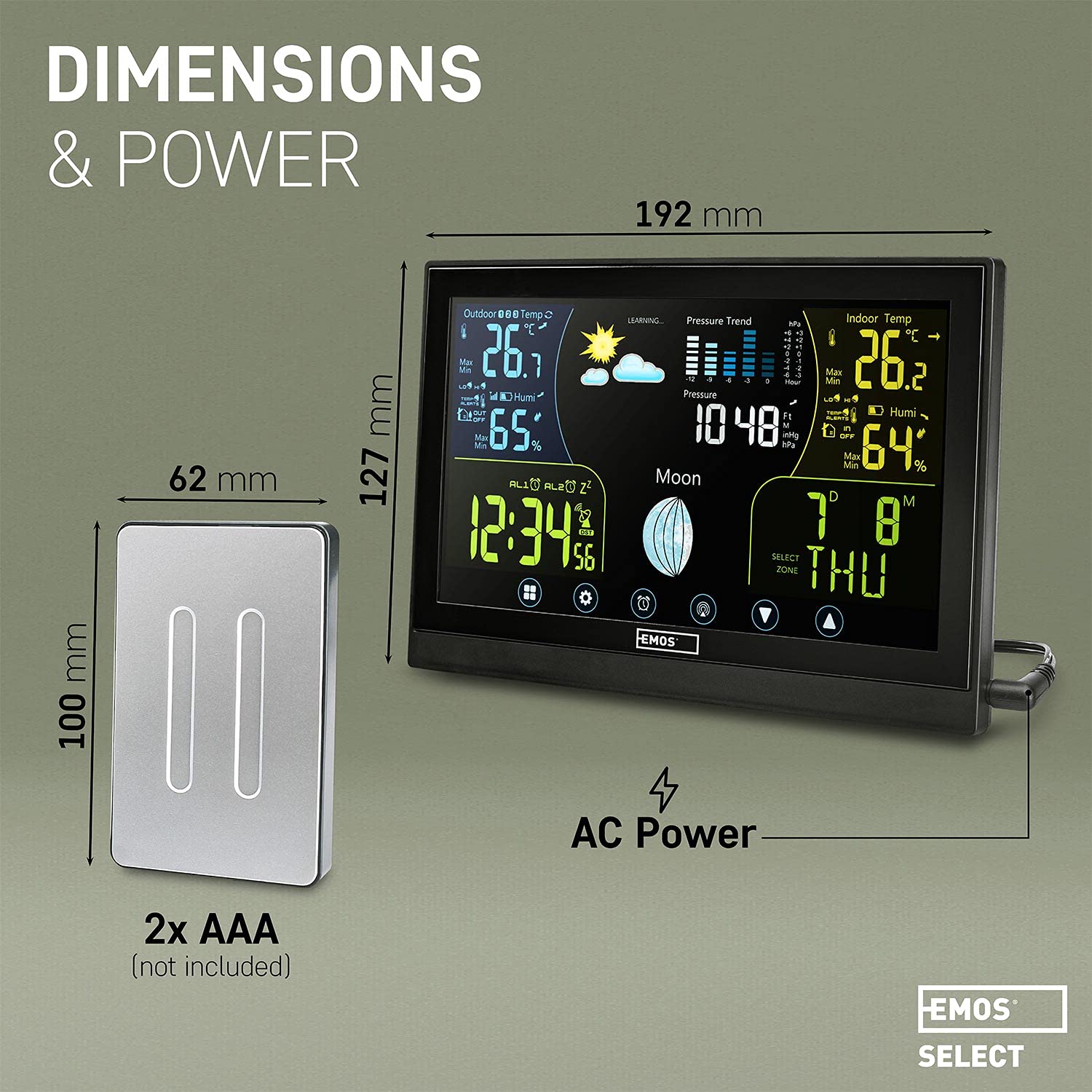
Poznámka: Je vyžadováno 5 baterií AAA (2 pro venkovní senzor, 3 pro záložní napájení hlavní jednotky), které nejsou součástí balení.
3. Nastavení
3.1 Instalace baterie
- Venkovní senzor: Otevřete přihrádku na baterie na zadní straně bezdrátového venkovního senzoru. Vložte 2 baterie typu AAA a dbejte na správnou polaritu (+/-). Přihrádku bezpečně uzavřete.
- Hlavní jednotka: Otevřete přihrádku na baterie na zadní straně hlavní jednotky meteorologické stanice. Vložte 3 baterie typu AAA a dbejte na správnou polaritu (+/-). Tyto baterie slouží jako záložní zdroj napájení.
3.2 Napájení hlavní jednotky
Pro nepřetržité osvětlení displeje a optimální funkčnost připojte dodaný napájecí adaptér k hlavní jednotce a zapojte jej do elektrické zásuvky. Záložní baterie si uchovají nastavení i během výpadku napájení.tages.
3.3 Umístění venkovního senzoru
Umístěte bezdrátový venkovní senzor na místo, které poskytuje přesné údaje o prostředí, mimo dosah přímého slunečního záření a srážek. Senzor je voděodolný (IPX4), ale pro dlouhou životnost by měl být chráněn před extrémními povětrnostními podmínkami. Lze jej instalovat až 100 metrů od hlavní jednotky, což zajistí stabilní rádiové spojení.

Obrázek 3.1: Doporučené umístění venkovního senzoru do 100 metrů od hlavní jednotky.
Obrázek 3.2: Venkovní senzor má voděodolné provedení s krytím IPX4.
3.4 Počáteční fáze synchronizace a učení
Po zapnutí obou jednotek se meteorologická stanice automaticky pokusí spojit s venkovním senzorem a synchronizovat čas pomocí rádiového signálu (DCF). Systém přejde do fáze „UČENÍ“ po dobu přibližně 14 dnů. Během této doby shromažďuje místní atmosférická data za účelem zpřesnění přesnosti předpovědi počasí. Po dokončení této fáze indikátor „UČENÍ“ na displeji zmizí a přesnost předpovědi se zlepší přibližně na 75 %.
4. Návod k obsluze
4.1 Zobrazení nadview
Barevný dotykový displej poskytuje přehledné rozhraní pro veškerá data a nastavení počasí. Mezi klíčové informační oblasti patří:
- Venkovní metriky: Teplota a vlhkost z externího senzoru.
- Vnitřní metriky: Teplota a vlhkost z vnitřních senzorů hlavní jednotky.
- 24hodinová předpověď počasí: Predikce na základě ikon a shromážděných dat.
- Trend tlaku: Hodnoty barometrického tlaku a historický trend.
- Čas: Rádiem řízený displej času.
- Aktuální fáze Měsíce: Grafické znázornění fáze měsíce.
- Datum a den: Aktuální datum a den v týdnu.

Obrázek 4.1: Detailní view přehledného rozhraní displeje meteorologické stanice.
4.2 Ovládání na dotykové obrazovce
Displej je vybaven dotykovými tlačítky umístěnými ve spodní části pro navigaci a úpravu nastavení. Jemným klepnutím na ikony získáte přístup k různým funkcím nebo změníte parametry.

Obrázek 4.2: Ukázka interakce s dotykovými tlačítky.
4.3 Nastavení času a data
Integrované rádiem řízené hodiny (DCF) automaticky nastavují a aktualizují čas a datum, včetně úprav letního času. Ruční nastavení obvykle není nutné.
4.4 Měření teploty a vlhkosti
Stanice zobrazuje aktuální vnitřní a venkovní teplotu a vlhkost. Venkovní senzor poskytuje hodnoty od -50 °C do +70 °C s přesností ±2 °C a vlhkost od 1 % do 99 % s přesností 5 %.

Obrázek 4.3: Aktuální naměřené vnitřní a venkovní teploty a vlhkosti.
4.5 Barometr a předpověď počasí
Vnitřní barometr měří atmosférický tlak a přispívá k 24hodinové předpovědi počasí zobrazené pomocí intuitivních ikon. Předpověď se stává přesnější po počátečním 14denním období učení.

Obrázek 4.4: 24hodinová předpověď počasí a zobrazení fází měsíce.
4.6 Jas displeje
Pokud je hlavní jednotka napájena síťovým adaptérem, displej nabízí několik nastavitelných úrovní jasu. Pokud je zařízení napájeno pouze ze záložních baterií, podsvícení displeje se po stisknutí tlačítka rozsvítí přibližně na 5 sekund, aby se šetřila energie.
5. Údržba
5.1 Výměna baterie
Vyměňte baterie v hlavní jednotce i venkovním senzoru, když se na displeji zobrazí indikátor slabých baterií. Vždy používejte nové baterie AAA a dbejte na správnou polaritu.
5.2 Čištění
Čištění displeje a jednotky casing, použijte měkký, suchý nebo lehceamp hadříkem. Nepoužívejte abrazivní čisticí prostředky, rozpouštědla ani chemické látky, protože by mohly poškodit povrch.
6. Řešení problémů
- Venkovní senzor se nepřipojuje:
Ujistěte se, že venkovní senzor je v dosahu 100 metrů od hlavní jednotky. Zkontrolujte, zda jsou v obou jednotkách vloženy nové baterie se správnou polaritou. Odstraňte všechny větší překážky mezi senzorem a hlavní jednotkou. - Problémy s rádiovým signálem (DCF) / nesprávný čas:
Rádiový signál pro synchronizaci času (DCF) může být ovlivněn umístěním, silnými zdmi nebo elektronickým rušením. Zkuste přemístit hlavní jednotku na jiné místo, nejlépe blízko okna a dále od ostatních elektronických zařízení. Počkejte, než jednotka znovu zachytí signál. - Nepřesné předpovědi počasí:
Meteorologická stanice potřebuje 14denní učební období pro optimalizaci přesnosti své předpovědi. Během tohoto období a bezprostředně po něm se mohou vyskytnout drobné odchylky. Pro přesný sběr dat se ujistěte, že je venkovní senzor správně umístěn. - Displej není viditelný / ztlumený:
Pro zajištění nepřetržitého a jasného osvětlení displeje se ujistěte, že je napájecí adaptér bezpečně připojen. Pokud je displej napájen ze záložních baterií, je podsvícení dočasné a po několika sekundách se vypne, aby se šetřila energie.
7. Specifikace
| Značka | EMOS |
| Reference modelu | ES5001 |
| Zdroj napájení | Napájecí adaptér (hlavní jednotka), baterie (záložní baterie hlavní jednotky a venkovní senzor) |
| Jsou vyžadovány baterie | 5x AAA (3 pro zálohu hlavní jednotky, 2 pro venkovní senzor) |
| Technologie připojení | Rádiová frekvence |
| Speciální funkce | Bezdrátové, Nástěnné hodiny, Budík, Dotykový displej |
| Rozměry hlavní jednotky | 192 mm (šířka) x 127 mm (výška) |
| Rozměry venkovního senzoru | 100 mm (výška) x 62 mm (šířka) |
| Hmotnost produktu | 530 gramů |
| Rozsah venkovních teplot | -50 °C až +70 °C (přesnost: ±2 °C) |
| Rozsah venkovní vlhkosti | 1 % až 99 % (přesnost: 5 %) |
| Rozsah venkovních senzorů | Až 100 metrů |
| Vodotěsnost (senzor) | IPX4 |

Obrázek 7.1: Rozměry a podrobnosti o napájení součástí meteorologické stanice.
8. Záruka a podpora
Informace týkající se záruky na produkt, technické podpory nebo servisních dotazů naleznete v dokumentaci dodané v místě nákupu nebo navštivte oficiální webové stránky EMOS. webwebu. Uschovejte si účtenku jako doklad o koupi.