1. Úvod
The Blaupunkt BP 4.0 FHD Dash Cam is a compact and robust in-car video recorder designed to capture your journeys in Full HD. Featuring a 140-degree wide-angle lens, an integrated microphone, and an interior camera, it provides comprehensive coverage for your vehicle. This manual provides essential information for the proper installation, operation, and maintenance of your device.
2. Obsah balení
Zkontrolujte prosím obsah balení, abyste se ujistili, že jsou přítomny všechny položky:
- Blaupunkt BP 4.0 FHD Dash Cam (Video Recorder)
- Vnitřní čočka
- Mount (Suction Cup Type)
- Napájecí kabel (nabíječka do auta)
- Uživatelská příručka

Image 2.1: Contents of the Blaupunkt BP 4.0 FHD Dash Cam package.

Image 2.2: The retail packaging for the Blaupunkt BP 4.0 FHD Dash Cam.
3. Konec produktuview
The BP 4.0 FHD Dash Cam features a main unit with a 2-inch display and a separate interior camera. It is designed for easy installation and discreet operation within your vehicle.
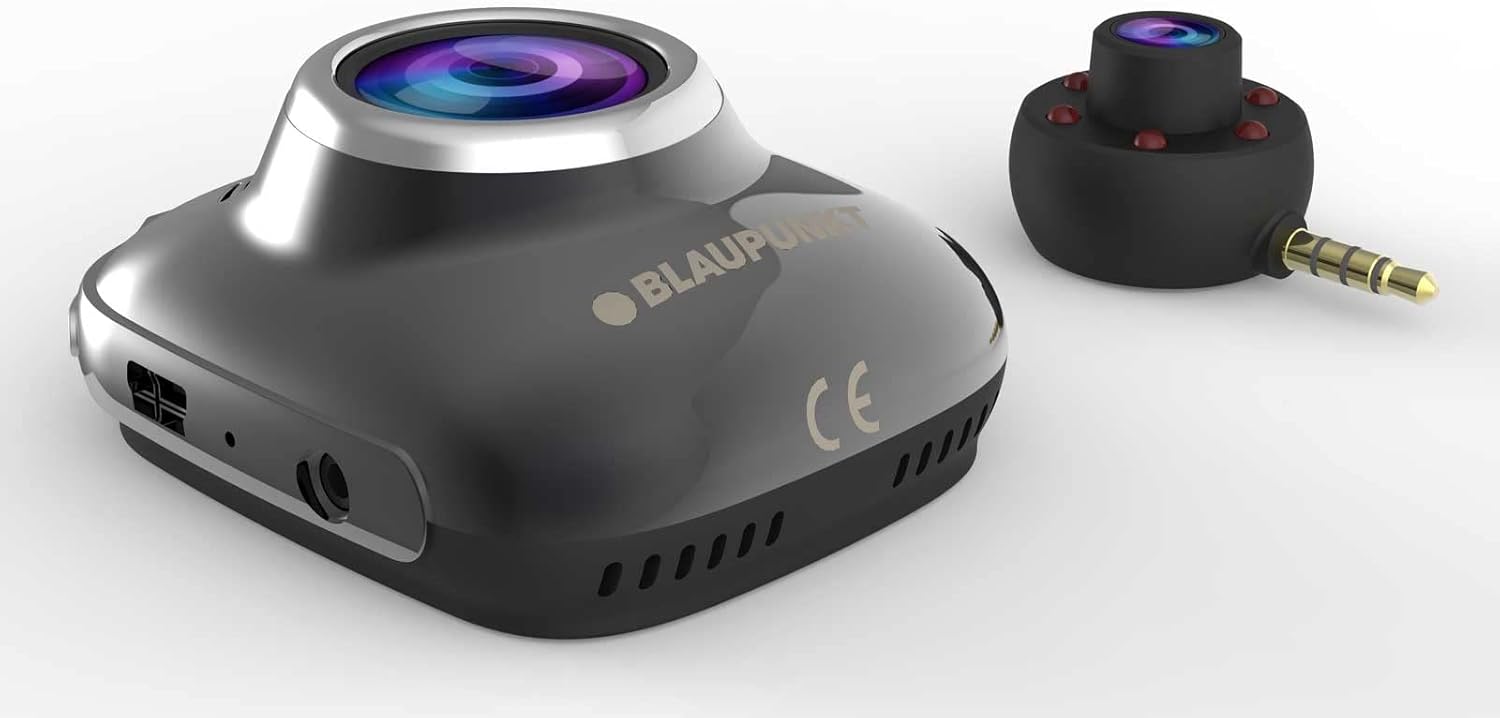
Image 3.1: Main unit and interior camera of the Blaupunkt BP 4.0 FHD Dash Cam.
Klíčové vlastnosti:
- Duální objektiv: Records both front and interior views současně.
- Širokoúhlý View: 140stupňové horizontální pole view for comprehensive road coverage.
- Integrovaný mikrofon: Captures in-cabin audio.
- 2palcový displej: Pro živé vystoupení view, přehrávání a navigace v nabídce.
- G-senzor: Automaticky uzamkne video files upon impact.
- Nahrávání ve smyčce: Neustále nahrává a přepisuje nejstarší files, když je paměťová karta plná.
- Odolný design: Constructed with zinc alloy for robustness.

Image 3.2: Dimensions of the Blaupunkt BP 4.0 FHD Dash Cam.
4. Instalace
Follow these steps for proper installation of your dash cam:
- Připravte si místo pro montáž: Vyberte si místo na čelním skle, které vám nebude překážet view of the road. Clean the area thoroughly to ensure good adhesion for the suction cup mount.
- Připevněte držák: Secure the suction cup mount to the chosen spot on the windshield. Ensure it is firmly attached.
- Namontujte Dash Cam: Slide the main dash cam unit onto the mount until it clicks into place. Adjust the angle of the camera to ensure the front lens captures the road ahead clearly.
- Vložte MicroSD kartu: Insert a high-speed MicroSD card (not included) into the designated slot on the dash cam. Ensure it is inserted correctly until it locks.
- Connect Interior Camera: Plug the interior camera's 3.5mm jack into the auxiliary port on the main dash cam unit. Position the interior camera to capture the vehicle's cabin as desired.
- Připojte napájení: Plug the car charger cable into the dash cam's power input port and then into your vehicle's 12V power outlet (cigarette lighter socket). Route the cable neatly along the windshield and dashboard to avoid interference with driving.
- Zapnutí a testování: Start your vehicle. The dash cam should power on automatically and begin recording. Check the display to confirm both front and interior camera views are visible and recording correctly.
5. Základní obsluha
Understanding the basic functions of your dash cam will ensure optimal performance.
Zapnutí/vypnutí:
- Automatický: Autokamera se automaticky zapne a začne nahrávat, jakmile je zapnuto zapalování vozidla (a do 12V zásuvky je přivedeno napájení).
- Manuální: Press and hold the power button (usually marked with a power symbol) to manually turn the device on or off.
Režimy nahrávání:
- Nahrávání ve smyčce: The camera records video in continuous loops (e.g., 1, 3, or 5-minute segments). When the memory card is full, the oldest unlocked filese automaticky přepíší.
- G-senzor (nouzové nahrávání): In the event of a sudden impact or collision, the built-in G-Sensor will detect the event and automatically lock the current video file, čímž se zabrání jeho přepsání nahráváním ve smyčce.
Navigace v nabídce:
Use the buttons located around the 2-inch display to navigate through the menu options. Common settings include video resolution, loop recording duration, G-Sensor sensitivity, date/time stamp, and format MicroSD card.
6. Údržba
Pravidelná údržba zajišťuje dlouhou životnost a optimální výkon vaší palubní kamery.
- Cleaning Lenses and Screen: Use a soft, lint-free cloth to gently wipe the camera lenses and the display screen. Avoid abrasive materials or chemical cleaners that could scratch or damage the surfaces.
- Správa microSD karet: Periodically format your MicroSD card (at least once a month) to prevent data corruption and ensure smooth recording. Back up any important video files před formátováním.
- Ovládání teploty: Avoid exposing the dash cam to extreme temperatures for extended periods. If your car is parked in direct sunlight on a hot day, consider removing the dash cam to prevent overheating.
- Aktualizace firmwaru: Zkontrolujte oficiální Blaupunkt website for any available firmware updates. Keeping your dash cam's firmware up-to-date can improve performance and add new features.
7. Řešení problémů
If you encounter issues with your Blaupunkt BP 4.0 FHD Dash Cam, refer to the following common problems and solutions:
| Problém | Možná příčina | Řešení |
|---|---|---|
| Palubní kamera se nezapne. | No power supply; faulty cable; dead battery. | Check car charger connection and vehicle's 12V outlet. Try a different power source or cable. Ensure the internal battery is charged. |
| Nahrávání se zastaví nebo zamrzne. | Slow MicroSD card; full MicroSD card; card error. | Use a high-speed (Class 10 or U1/U3) MicroSD card. Format the MicroSD card. Replace the MicroSD card if errors persist. |
| Poor video quality (especially at night). | Dirty lens; low light conditions; windshield glare. | Clean the camera lenses and windshield. Ensure no obstructions. Adjust exposure settings if available. Note that night vision performance can be limited. |
| Interior camera not working. | Loose connection; faulty interior camera. | Ensure the interior camera is securely plugged into the main unit's auxiliary port. If the issue persists, contact support. |
| Tlačítka nereagují. | Device frozen; software glitch. | Perform a soft reset by pressing the reset button (if available) or by holding the power button for 10-15 seconds. |
8. Specifikace
Detailed technical specifications for the Blaupunkt BP 4.0 FHD Dash Cam:
- Značka: BLAUPUNKT
- Název modelu: BP 4.0 FHD
- Číslo modelu položky: BP 4.0 FHD
- Barva: Zinc Alloy / Black
- Velikost obrazovky: 2 palců
- Pole View: 140 stupňů
- Rozlišení videozáznamu: 1080p, 720p
- Technologie připojení: Pomocný
- Typ montáže: Držák přísavky
- Kompatibilní zařízení: Auto, náklaďák
- Zahrnuté komponenty: Cable, Video Recorder, User Manual, Interior Lens, Mount
- Výrobce: BLAUPUNKT
- Datum prvního uvedení na trh na Amazon.com.be: 6. června 2022
- Dostupnost náhradních dílů: Informace nejsou k dispozici
- Aktualizace softwaru zaručeny do: Informace nejsou k dispozici
9. Záruka a podpora
For warranty information and customer support, please refer to the warranty card included in your product package or visit the official Blaupunkt webwebu. Konkrétní záruční podmínky se mohou lišit v závislosti na regionu a prodejci.