Zavedení
Thank you for choosing the Explore Scientific Travel Alarm Clock. This compact and versatile device is designed to provide accurate timekeeping, alarm functions, and indoor temperature readings, making it an ideal companion for travel or home use. Its radio-controlled feature ensures precise time synchronization, while the clear digital display offers easy readability.

Obrázek 1: Přední strana view of the Explore Scientific Travel Alarm Clock. The display shows 12:38 PM, December 28, Saturday, and 78.5°F.
Klíčové vlastnosti
- Rádiem řízený čas: Time is automatically set via DCF radio signal for precise accuracy.
- Displej vnitřní teploty: Shows temperature in Celsius or Fahrenheit.
- Komplexní zobrazení: Clearly displays time, date, and day of the week.
- Dva budíky s funkcí odložení: Two independent alarms with a convenient snooze function.
- Multi-Language Day Display: Day of the week display available in 7 languages.
- Modré podsvícení: Provides illumination for easy viewza zhoršených světelných podmínek.
- Indikátor slabé baterie: Upozorní vás, když je třeba vyměnit baterie.
- Přenosný design: Kompaktní a ideální na cesty.
Obsah balení
Zkontrolujte prosím obsah balení, abyste se ujistili, že jsou přítomny všechny položky:
- Explore Scientific Travel Alarm Clock (RDC1008)
- 2x AAA baterie
- Návod k použití (tento dokument)
Nastavení
1. Instalace baterie
The clock requires 2x AAA batteries for operation. These are included in the package.
- Vyhledejte kryt přihrádky na baterie na zadní straně jednotky.
- Posuňte kryt dolů a otevřete přihrádku.
- Insert 2x AAA batteries, ensuring the correct polarity (+ and -) as indicated inside the compartment.
- Nasaďte zpět kryt přihrádky na baterie jeho posunutím nahoru, dokud nezacvakne.
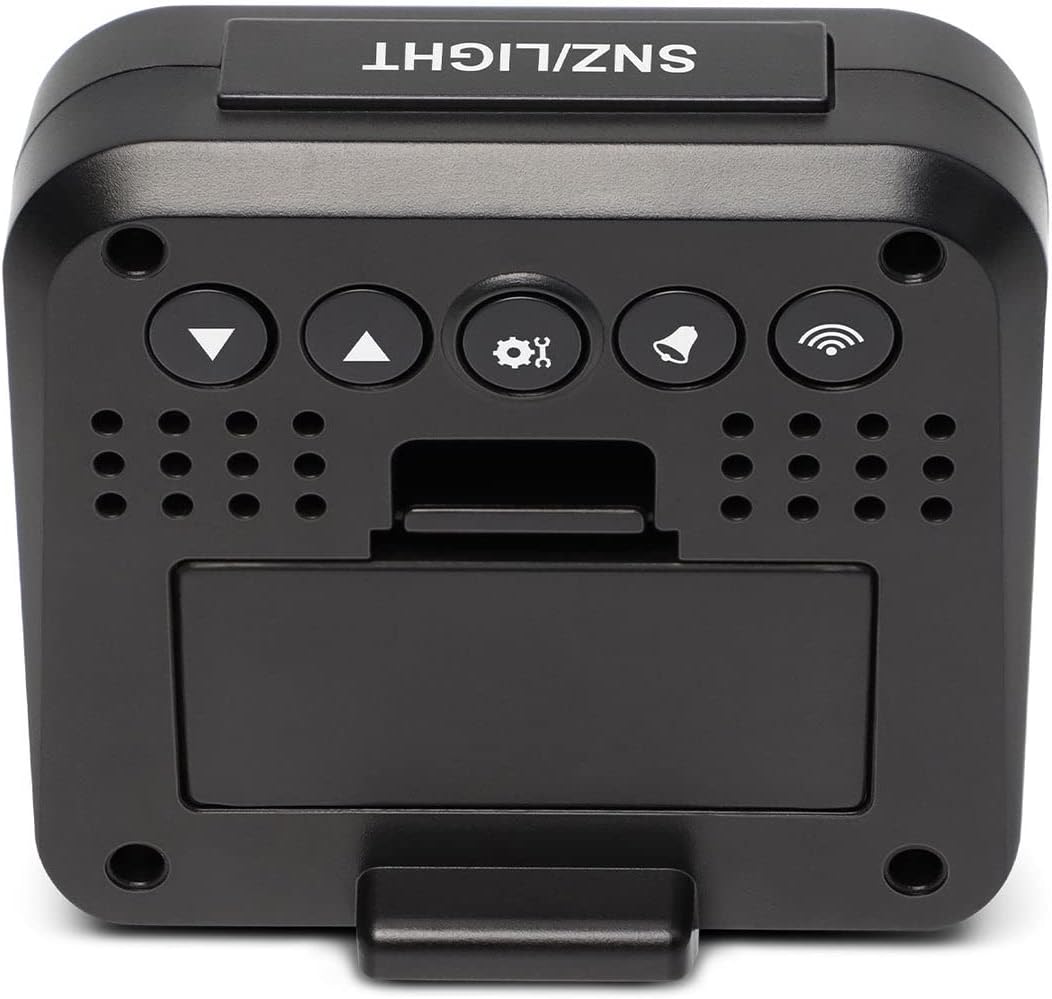
Obrázek 2: Zpět view of the clock, highlighting the battery compartment and control buttons.
2. Initial Power-On and Radio Signal Reception
Upon battery installation, the clock will power on and automatically begin searching for the DCF radio time signal. This process may take several minutes to an hour, depending on your location and signal strength. During this time, the radio signal icon (📶) bude na displeji blikat.
- Pro optimální příjem signálu umístěte hodiny blízko okna.
- Neumísťujte jej do blízkosti elektronických zařízení, která by mohla způsobovat rušení.
- Once the signal is successfully received, the time will be set automatically, and the radio signal icon will appear solid.
Návod k obsluze
Tlačítko přesview
Refer to Figure 2 for the location of the buttons on the back of the clock:
- SNZ/LIGHT Button (Top): Activates snooze during an alarm, or illuminates the backlight.
- ▼ (Down) Button: Decreases values, navigates menus.
- ▲ (Up) Button: Increases values, navigates menus.
- ⚙ (SET) Button: Vstup do režimu nastavení, potvrzení výběru.
- 🔔 (ALARM) Button: Enters alarm setting mode, activates/deactivates alarms.
- 📶 (WAVE) Button: Manually initiates radio signal search.
1. Manual Time and Date Setting
While the clock primarily relies on the radio signal, you can manually set the time and date if needed (e.g., outside signal range or for specific time zones).
- Stiskněte a podržte ⚙ (SET) button for approximately 3 seconds to enter time setting mode. The hour digits will flash.
- Použijte ▲ (Up) or ▼ (Down) tlačítka pro nastavení hodiny.
- Stiskněte ⚙ (SET) again to confirm the hour and move to minutes. Adjust minutes using ▲ (Up) or ▼ (Down).
- Pokračujte v stisknutí ⚙ (SET) to cycle through and set the year, month, date, and 12/24 hour format.
- Stiskněte ⚙ (SET) one last time to exit setting mode, or wait 15 seconds for it to automatically exit.
2. Nastavení alarmů (Alarm 1 a Alarm 2)
Hodiny mají dva nezávislé budíky.
- Stiskněte tlačítko 🔔 (ALARM) jedním stisknutím tlačítka view Alarm 1 time. Press it again to view Budík 2x.
- Zatímco viewing the desired alarm (e.g., Alarm 1), press and hold the 🔔 (ALARM) button for 3 seconds. The alarm hour will flash.
- Použití ▲ (Up) or ▼ (Down) to adjust the alarm hour. Press 🔔 (ALARM) pro potvrzení a přechod na minuty.
- Adjust alarm minutes using ▲ (Up) or ▼ (Down). Stiskněte 🔔 (ALARM) pro potvrzení a ukončení.
- To activate or deactivate an alarm, press the 🔔 (ALARM) button repeatedly until the corresponding alarm icon (SNZ1 or SNZ2) appears or disappears on the display.
3. Funkce odložení buzení
Když zazní alarm, stiskněte velké SNZ/LIGHT button on top of the clock to activate the snooze function. The alarm will temporarily stop and sound again after approximately 5 minutes.
To stop the alarm completely, press any other button on the back of the clock.
4. Zobrazení teploty (°C/°F)
The clock displays indoor temperature. To switch between Celsius (°C) and Fahrenheit (°F):
- V normálním režimu zobrazení času stiskněte ▼ (Down) button. The temperature unit will toggle between °C and °F.
5. Podsvícení
Stiskněte velký SNZ/LIGHT button on top of the clock to briefly illuminate the display backlight for easy viewv tmavých podmínkách.
6. Day of the Week Language Setting
The day of the week can be displayed in 7 languages.
- V normálním režimu zobrazení času stiskněte ▲ (Up) button repeatedly to cycle through the available languages for the day of the week display.
Údržba
Výměna baterie
When the low battery indicator appears on the display, it is time to replace the batteries. Follow the "Battery Installation" steps in the Setup section to replace the 2x AAA batteries.
Čištění
To clean the clock, use a soft, dry cloth. Do not use abrasive cleaners or solvents, as these may damage the display or casing.
Odstraňování problémů
| Problém | Možná příčina | Řešení |
|---|---|---|
| Displej je prázdný nebo tmavý. | Baterie jsou slabé nebo nesprávně vložené. | Replace batteries with new 2x AAA batteries, ensuring correct polarity. |
| Clock does not set time automatically or time is incorrect. | Poor DCF radio signal reception; interference; incorrect time zone setting. |
|
| Alarm se nespustí. | Alarm není aktivován. | Ensure the alarm icon (SNZ1 or SNZ2) is visible on the display. Re-set the alarm time. |
| Naměřená teplota se zdá být nepřesná. | Clock is placed near a heat source or vent. | Move the clock to a location with stable ambient temperature. |
Specifikace
| Funkce | Detail |
|---|---|
| Značka | Prozkoumejte Scientific |
| Číslo modelu | 1008 RDC |
| Typ zobrazení | Digitální |
| Zdroj napájení | 2x AAA baterie (součástí balení) |
| Speciální funkce | Alarm, Radio-Controlled, Snooze, Indoor Temperature |
| Jednotky teploty | ° C / ° F |
| Day of Week Languages | 7 jazyků |
| Podsvícení | Modrý |
| Materiál | Akrylonitril-butadien-styren |
| Typ montáže | Stolní deska |
Záruka a podpora
Explore Scientific products are designed for quality and reliability. For warranty information and technical support, please refer to the warranty card included with your product or visit the official Explore Scientific website. Please have your model number (RDC1008) and purchase details ready when contacting support.
Webmísto: explorescientific.com


