Zavedení
This manual provides comprehensive instructions for the installation, operation, maintenance, and troubleshooting of your ASUS AMD Radeon RX 6700 XT Gaming Graphics Card. Please read this manual thoroughly before installing and using the product to ensure proper functionality and to prevent damage.
Konec produktuview
Klíčové vlastnosti
- Powered by AMD Radeon RX 6700 XT GPU.
- Equipped with 12GB of GDDR6 memory.
- Designed for high-performance gaming.
- Features DisplayPort video output interface.
- GPU Clock Speed of 2 GHz.
Identifikace součásti

Figure 1: Retail packaging of the ASUS AMD Radeon RX 6700 XT Gaming Graphics Card, showing the product box and an included HDMI cable.

Obrázek 2: Přední strana view of the graphics card, highlighting the dual cooling fans and the "RADEON" branding.

Figure 3: Angled perspective of the graphics card, showcasing its heatsink and fan shroud design.

Obrázek 4: Zadní view of the graphics card, displaying the various DisplayPort outputs for monitor connectivity.
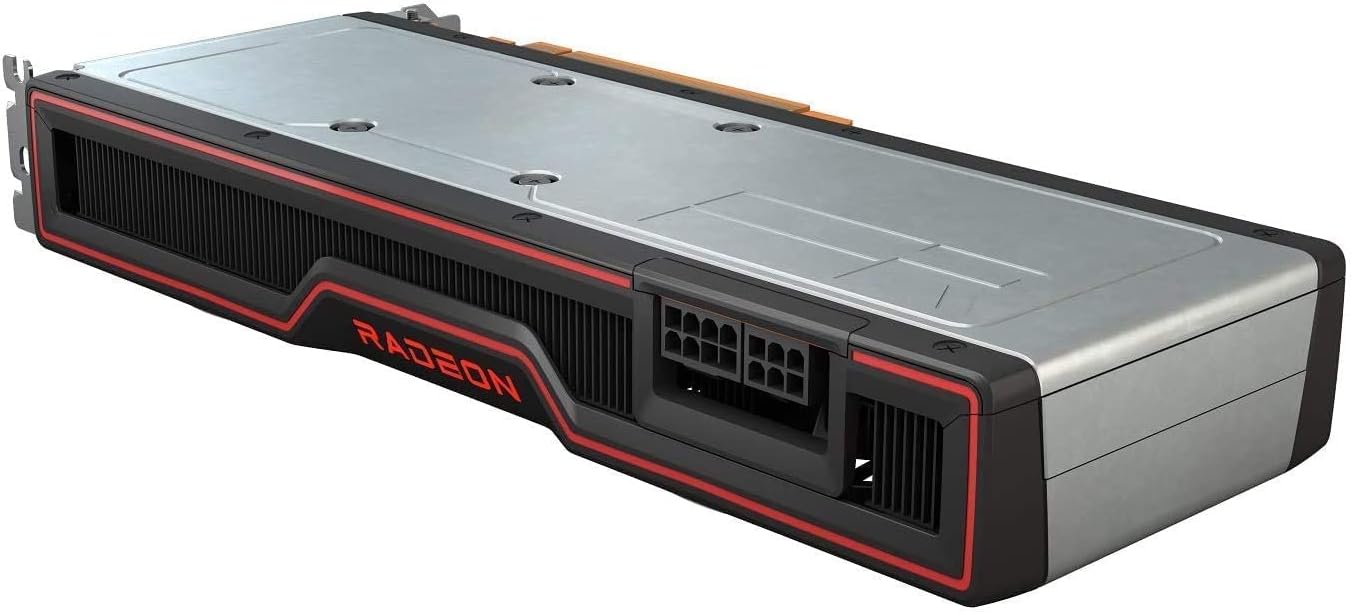
Obrázek 5: Shora dolů view of the graphics card's backplate, showing the power connectors (8-pin and 6-pin PCIe) and the overall length.
Průvodce instalací
Systémové požadavky
- PCI Express-enabled motherboard with one x16 graphics slot.
- Minimum 650W power supply with one 8-pin and one 6-pin PCIe power connector.
- Operating System: Windows 10 64-bit or later.
- 8GB system memory (16GB recommended).
Fyzická instalace
- Připravte si systém: Vypněte počítač a odpojte všechny kabely. Otevřete kryt počítače.
- Locate PCIe slot: Identify an available PCI Express x16 slot on your motherboard. Remove any expansion slot covers that block the slot.
- Nainstalujte grafickou kartu: Carefully align the graphics card with the PCIe slot and press down firmly until it is fully seated. Secure the card with the screw or latch mechanism of your case.
- Připojte napájecí kabely: Connect the required 8-pin and 6-pin PCIe power connectors from your power supply to the corresponding ports on the graphics card. Ensure a secure connection.
- Close case and connect peripherals: Close your computer case, reconnect all cables (monitor, keyboard, mouse, power), and power on your system.
Operace
Instalace ovladače
- Stáhnout ovladače: Once your system boots, navigate to the official AMD webweb (www.amd.com/en/support) or the ASUS support page for your specific model. Download the latest recommended graphics drivers for the AMD Radeon RX 6700 XT.
- Instalace ovladačů: Run the downloaded driver installer. Follow the on-screen prompts to complete the installation. It is recommended to perform a clean installation if prompted.
- Restartujte systém: After the installation is complete, restart your computer to apply the new drivers.
Konfigurace softwaru
After driver installation, you can use the AMD Radeon Software Adrenalin Edition to optimize your gaming experience, monitor performance, and adjust various graphics settings. This software is typically included with the driver package or can be downloaded separately from AMD's webmísto.
Údržba
Čištění
- Regularly clean dust from the graphics card fans and heatsink using compressed air. Ensure the system is powered off and unplugged before cleaning.
- Avoid using liquid cleaners directly on the card.
- Inspect power connectors for secure fit.
Aktualizace ovladačů
Periodically check for updated drivers on the AMD or ASUS support websites. Keeping your drivers up-to-date ensures optimal performance, stability, and compatibility with the latest games and applications.
Odstraňování problémů
| Problém | Možná příčina | Řešení |
|---|---|---|
| Žádný výstup na displej. | Graphics card not seated correctly, power cables not connected, incorrect monitor input. | Reseat the card, ensure all power cables are connected, check monitor input source. |
| Nízká snímková frekvence nebo špatný výkon. | Outdated drivers, insufficient power, overheating, background applications. | Update drivers, verify PSU wattage, ensure proper case airflow, close unnecessary applications. |
| Systém se zhroutí nebo zamrzne. | Unstable drivers, overheating, power supply issues. | Reinstall drivers, check temperatures, test with a different power supply if possible. |
Technické specifikace
| Funkce | Detail |
|---|---|
| Grafický koprocesor | AMD Radeon RX 6700 XT |
| Značka | ASUS |
| Velikost grafické paměti RAM | 12 GB GDDR6 |
| Rychlost hodin GPU | 2 GHz |
| Video výstupní rozhraní | DisplayPort |
| Číslo modelu položky | AMD RX 6700 XT |
| ASIN | B092BQK2BF |
| Hmotnost položky | 12 unce |
| Rozměry balení | 13.62 x 7.36 x 2.72 palce |
| Datum první dostupnosti | 12. dubna 2021 |
Záruka a podpora
Informace o záruce a technickou podporu získáte na oficiálních stránkách podpory ASUS. webnebo se obraťte na jejich zákaznický servis. Uschovejte si účtenku jako doklad o koupi pro případ reklamace.
Podpora ASUS Webmísto: www.asus.com/support/


