1. Úvod
The Loftie Alarm Clock is designed to enhance your sleep and wake-up experience by integrating a smart alarm, sound machine, and night light into one device. This manual provides detailed instructions for setting up, operating, and maintaining your Loftie device.

Figure 1: Loftie Alarm Clock Displaying 7:35 AM
The Loftie Alarm Clock features a two-phase alarm system, over 100 built-in sleep sounds, Bluetooth speaker functionality, and a gentle nightlight. It is designed to reduce reliance on smartphones for sleep-related functions.
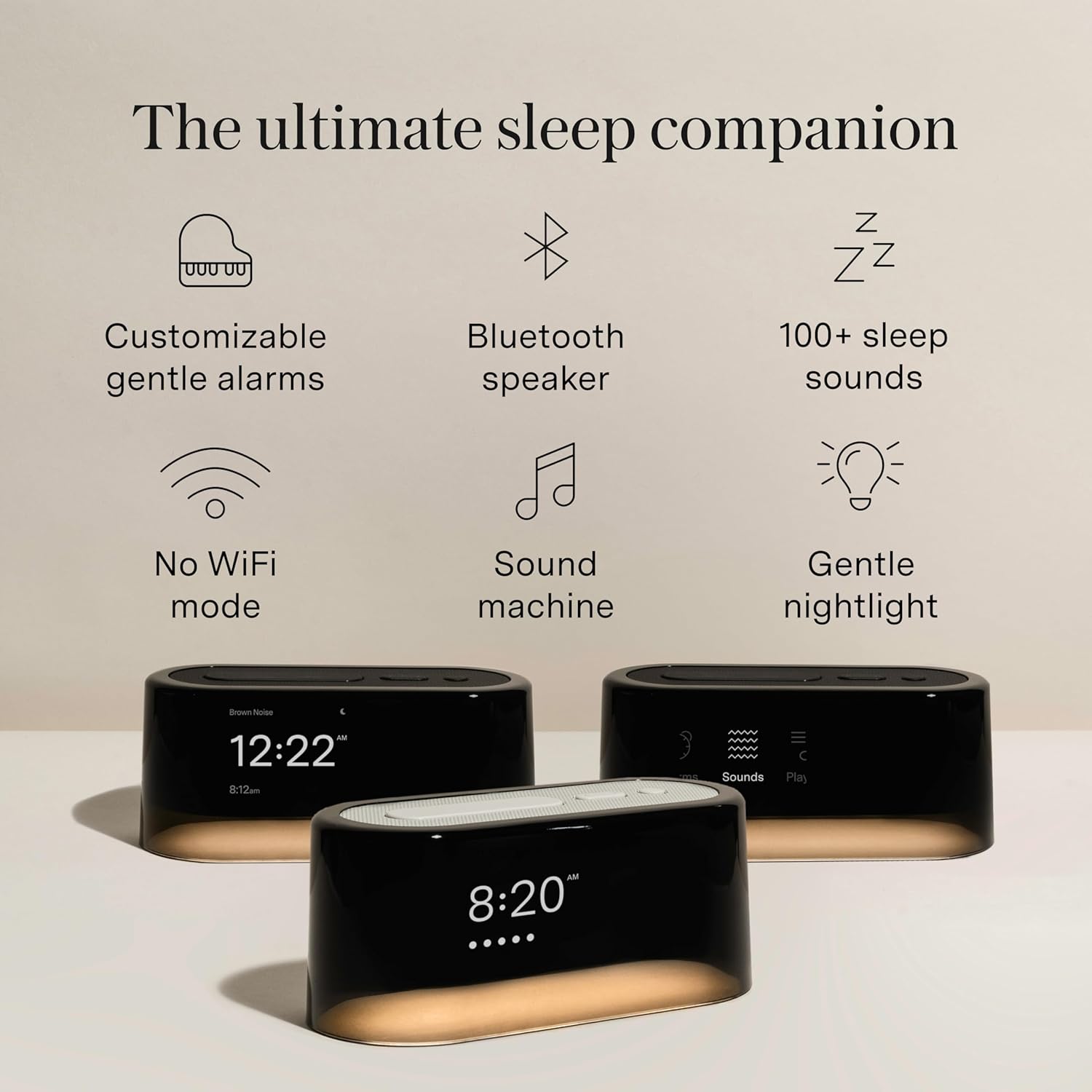
Figure 2: Loftie Features Overview
2. Nastavení
Initial setup of your Loftie Alarm Clock requires the Loftie app, a 2.4 GHz Wi-Fi connection, and Bluetooth. Follow these steps to get started:
- Download the Loftie App: Download the official Loftie app from the iOS App Store or Google Play Store on your smartphone.
- Zapnutí: Connect your Loftie Alarm Clock to a power source using the provided adapter.
- Spárovat s aplikací: Open the Loftie app and follow the on-screen instructions to pair your device. Ensure your smartphone's Bluetooth is enabled.
- Připojení k Wi-Fi: The app will guide you through connecting your Loftie to your home's 2.4 GHz Wi-Fi network. A stable Wi-Fi connection is essential for initial setup and software updates.
- Synchronizace času: Once connected, the Loftie will automatically synchronize its time.
- Optional Offline Mode: After successful setup and time synchronization, you can enable Offline Mode through the app if you prefer to use the clock without a continuous Wi-Fi connection. The clock will retain its settings and alarms.
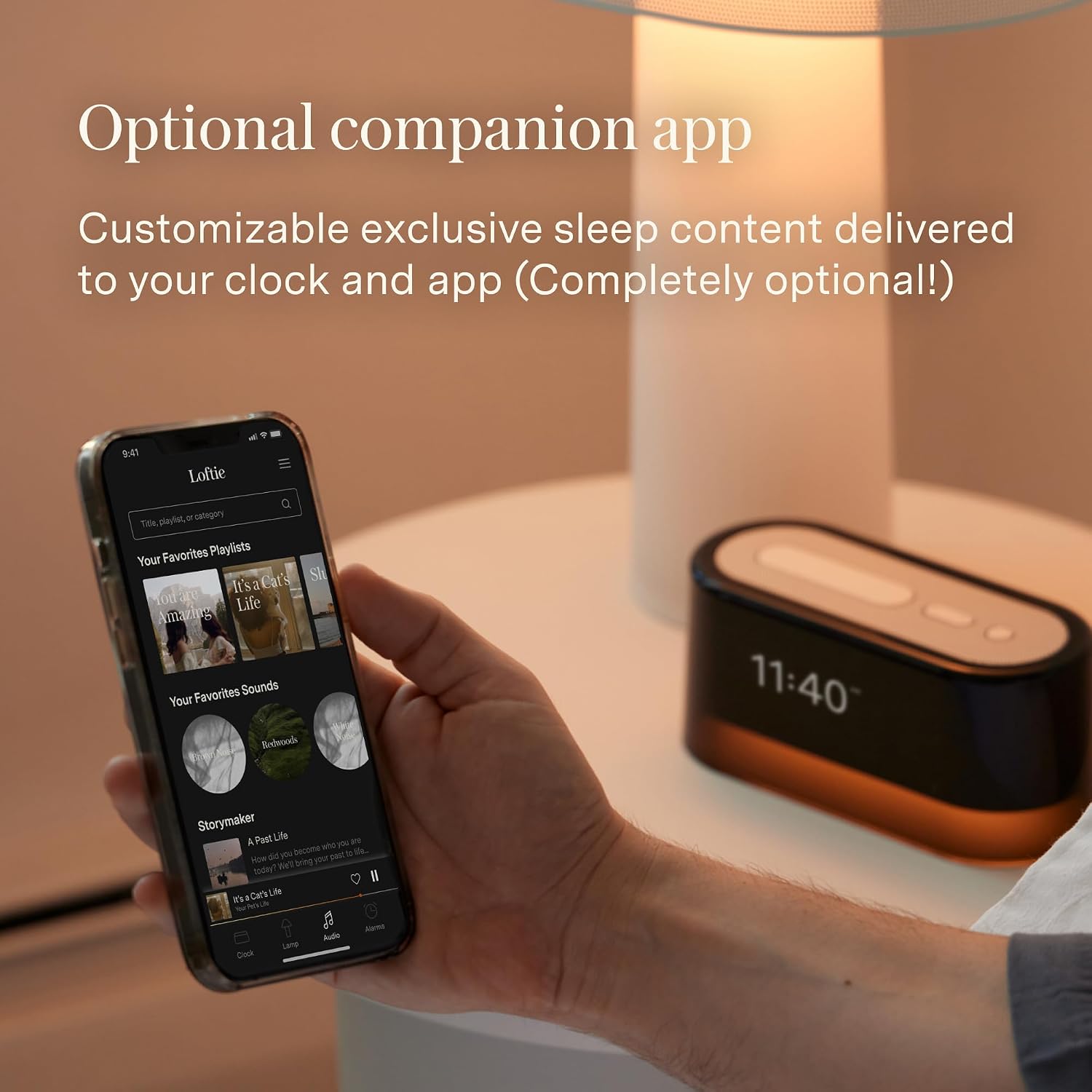
Figure 3: Optional Companion App for Setup and Control
3. Návod k obsluze
3.1. Ovládací prvky zařízení
The Loftie Alarm Clock features intuitive physical buttons on its top surface for direct control.

Figure 4: Navigating the Loftie Clock Controls
- Tlačítko "Odložit: Press once to turn the nightlight on or off. Hold down to activate the blackout display mode, which turns off the screen and light while keeping alarms active.
- Tlačítka se šipkami: Use these buttons to navigate through menus on the display. Hold either arrow button to adjust the volume of sounds and alarms.
- Vybrat tlačítko: Press this button to turn off an active alarm. It also functions to pause and play audio content from the sound machine or Bluetooth speaker.

Figure 5: Snooze Button Functionality

Figure 6: Arrow Buttons for Navigation and Volume

Figure 7: Select Button for Alarm and Audio Control
3.2. Alarmy
The Loftie Alarm Clock utilizes a two-phase alarm system for a gentle wake-up experience:
- Phase 1 (Gentle Chime): A soft, soothing sound begins to gently rouse you from sleep.
- Phase 2 (Louder Tone): After a set interval, a louder, more persistent tone activates to ensure you are fully awake.
You can adjust the alarm volume, display brightness, and select from various alarm sounds directly on the clock or through the Loftie app. The Blackout Mode feature allows the screen and light to remain off while the alarm functions normally, ideal for those who prefer a completely dark room.

Figure 8: Gentle Wake-up Experience

Figure 9: Loftie Sleep Routine Overview
3.3. Zvukový stroj
The Loftie Alarm Clock includes a built-in sound machine with over 100 sleep sounds. These include white noise, nature sounds, and guided meditations, all available without a subscription. You can select and play these sounds to aid in relaxation and sleep.

Figure 10: Extensive Sound Library
3.4. Bluetooth reproduktor
The device functions as a Bluetooth speaker, allowing you to stream audio from your smartphone or other Bluetooth-enabled devices. Please note that the Loftie Alarm Clock does not support headphone jacks.

Figure 11: Optimized Speaker for Sleep
3.5. Noční světlo
A warm and gentle nightlight is integrated into the Loftie Alarm Clock. This light can be turned on or off with a press of the Snooze button and can also be synchronized with your alarms for a gradual wake-up illumination.

Figure 12: Integrated Nightlight
3.6. Displej
The digital display is dimmable, allowing you to adjust its brightness to your preference. It shows the current time, upcoming alarms, and provides access to all Loftie features without needing the app.

Figure 13: Dimmable Display Features
3.7. App and On-Device Control
You can control and customize your Loftie Alarm Clock directly using the physical buttons on the device or through the Loftie app. Both methods allow you to set alarms, adjust settings, and manage content.

Figure 14: App and On-Device Control
4. Údržba
To ensure the longevity and optimal performance of your Loftie Alarm Clock, follow these simple maintenance guidelines:
- Čištění: Gently wipe the exterior of the device with a soft, dry, or slightly damp hadříkem. Nepoužívejte abrazivní čisticí prostředky, rozpouštědla ani agresivní chemikálie, protože by mohly poškodit povrchovou úpravu.
- Umístění: Place the Loftie on a stable, flat surface away from direct sunlight, excessive heat, or moisture. Ensure adequate ventilation around the device.
- Moc: Use only the power adapter provided with your Loftie Alarm Clock.
5. Řešení problémů
If you encounter issues with your Loftie Alarm Clock, refer to the following troubleshooting tips:
- Zařízení se nezapíná:
- Ujistěte se, že je napájecí adaptér bezpečně zapojený do zařízení i do funkční elektrické zásuvky.
- Zkuste jinou zásuvku, abyste vyloučili problémy se zdrojem napájení.
- Wi-Fi Disconnection or Inability to Connect:
- Verify that your Wi-Fi network is 2.4 GHz. Loftie devices are not compatible with 5 GHz networks.
- Zkontrolujte svůj Wi-Fi router, zda funguje správně.
- Restart your Loftie device by unplugging it for 10 seconds and then plugging it back in.
- Re-attempt the Wi-Fi setup process through the Loftie app.
- Ensure your Loftie is within range of your Wi-Fi router.
- Alarms Not Sounding:
- Check the alarm settings in the Loftie app or directly on the device to ensure alarms are enabled and set for the correct time.
- Verify the alarm volume is not set to zero.
- If using Blackout Mode, ensure the alarm is still active.
- Problémy s párováním Bluetooth:
- Ensure Bluetooth is enabled on your smartphone or audio source.
- Place the Loftie device and your audio source in close proximity during pairing.
- Forget the Loftie device from your phone's Bluetooth settings and attempt to pair again.
- Display Not Responding or Frozen:
- Perform a soft reset by unplugging the device for 10 seconds and then plugging it back in.
- If the issue persists, contact Loftie support.
6. Specifikace
| Funkce | Detail |
|---|---|
| Značka | Loftie |
| Číslo modelu | LOFTIE-CLOCK |
| Barva | Černý |
| Typ zobrazení | Digitální |
| Speciální funkce | Special Alarm, Nightlight, Sound Machine, Bluetooth Speaker |
| Rozměry produktu | 6.5 cm Š x 2.7 cm V |
| Zdroj napájení | Napájení z baterie (s AC adaptérem) |
| Typ pokoje | Ložnice |
| Materiál | Polycarbonate (PC), Alloy Steel Frame |
| Hmotnost položky | 1.5 libry |
| Baterie | 1x 9V baterie (součástí balení) |
| Typ montáže | Stolní deska |
| UPC | 860004898726 |

Figure 15: Loftie Clock Feature Comparison
7. Záruka a podpora
The Loftie Alarm Clock comes with a Limited Warranty. For specific details regarding warranty coverage and duration, please refer to the documentation included with your product or visit the official Loftie webmísto.
For technical assistance, troubleshooting beyond this manual, or warranty claims, please contact Loftie Customer Support. You can typically find contact information on the official Loftie website or within the Loftie app.
Můžete také navštívit Loftie Store on Amazon pro další informace o produktu a zdroje.


