1. Úvod
Thank you for choosing the AULA F809 Wired USB Backlit Gaming Mouse. This manual provides detailed instructions on how to set up, operate, and maintain your new gaming mouse to ensure optimal performance and an enhanced gaming experience. Please read this manual thoroughly before use.
2. Konec produktuview
The AULA F809 is a high-performance wired gaming mouse designed for precision and comfort. It features adjustable DPI settings, customizable macro programming, and vibrant LED backlighting to suit various gaming styles and preferences.
Klíčové vlastnosti:
- Konektivita: Kabelové USB
- tlačítka: 7 programovatelná tlačítka
- Senzor: Optical Movement Detection
- DPI: Multi-DPI Adjustable Sensitivity
- Osvětlení: Backlit with LED Color Lights (7-color breathing light)
- Materiál: Odolný plast
- Orientace rukou: Oboustranný design
- Kompatibilita: PC a notebook
Součásti produktu:
The package includes the AULA F809 Wired USB Backlit Gaming Mouse with an integrated USB cable.

The mouse features a comfortable ergonomic design suitable for extended gaming sessions. Its surface is made from durable plastic, ensuring longevity.
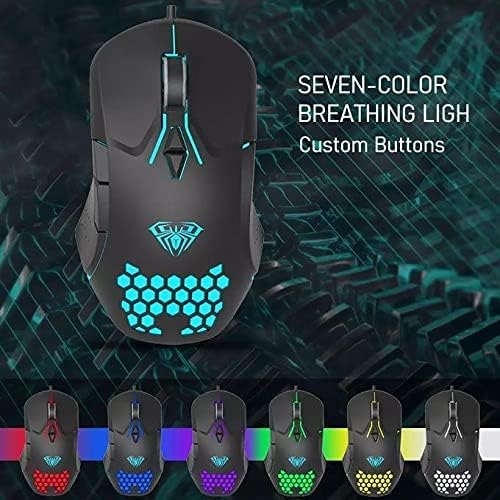
The mouse is equipped with 7 programmable buttons, allowing for personalized control and macro assignments to enhance gameplay efficiency.

3. Pokyny k nastavení
Setting up your AULA F809 Gaming Mouse is a simple plug-and-play process.
- Rozbalte myš: Opatrně vyjměte myš z obalu.
- Vyhledejte USB port: Identify an available USB port on your computer or laptop.
- Připojte myš: Insert the USB connector of the AULA F809 mouse into the USB port.
- Instalace ovladače: Váš operační systém automaticky rozpozná a nainstaluje potřebné ovladače. Tento proces může chvíli trvat.
- Připraven k použití: Once the drivers are installed, the mouse will be ready for immediate use. The LED backlighting will illuminate, indicating it is powered on.
4. Návod k obsluze
4.1 Nastavení DPI
The AULA F809 mouse features multi-DPI adjustable sensitivity, allowing you to change the cursor speed to match your preference or game requirements. The DPI button is typically located near the scroll wheel. Pressing this button cycles through different DPI settings, often indicated by changes in the LED lighting color or pattern.
- Lower DPI: Ideal for precise movements, such as sniping in first-person shooter games.
- Higher DPI: Suitable for fast-paced action or navigating multiple monitors quickly.
4.2 Programování maker
The mouse is equipped with 7 programmable buttons. To utilize macro programming, you will typically need to download the specific driver software from the AULA official webwebu. Tento software vám umožňuje:
- Assign custom functions to each of the 7 buttons.
- Create and save complex macro sequences for in-game actions.
- Adjust other mouse settings such as polling rate and lift-off distance.
Refer to the software's user interface for detailed instructions on creating and assigning macros.
4.3 LED Backlighting
The AULA F809 features dynamic LED backlighting with a 7-color breathing light effect. This lighting enhances the aesthetic appeal of the mouse and can be particularly useful for night gaming. While specific controls for lighting modes are usually managed through the driver software, some mice may have a dedicated button to cycle through effects or turn the lighting on/off.

5. Údržba
To ensure the longevity and optimal performance of your AULA F809 Gaming Mouse, follow these simple maintenance guidelines:
- Čištění: K otření povrchu myši použijte měkký, suchý hadřík. V případě odolné nečistoty lehceampOtřete hadřík vodou nebo jemným čisticím roztokem. Vyhněte se agresivním chemikáliím.
- Péče o senzor: Udržujte optický senzor na spodní straně myši čistý a bez prachu a nečistot. V případě potřeby použijte vatový tampon nebo stlačený vzduch.
- Správa kabelů: Abyste předešli vnitřnímu poškození, vyhněte se ostrému ohýbání nebo tahání kabelu USB.
- Skladování: Pokud myš nepoužíváte, skladujte ji v čistém a suchém prostředí mimo dosah extrémních teplot.
6. Řešení problémů
If you encounter any issues with your AULA F809 Gaming Mouse, please refer to the following common troubleshooting steps:
- Myš nereaguje:
- Ujistěte se, že je kabel USB bezpečně zapojený do funkčního portu USB.
- Zkuste zapojit myš do jiného USB portu na počítači.
- Restartujte počítač.
- LED světla nefungují:
- Check if the mouse is properly connected and receiving power.
- If using custom software, ensure the lighting effects are enabled.
- Pohyb kurzoru je nepravidelný:
- Vyčistěte optický senzor na spodní straně myši.
- Ujistěte se, že myš používáte na čistém, nereflexním povrchu nebo podložce pod myš.
- Upravte nastavení DPI na pohodlnou úroveň.
- Tlačítka nefungují správně:
- If buttons are programmed, check the macro software settings.
- Ujistěte se, že tlačítkům nebrání žádné nečistoty.
If the issue persists after trying these steps, please contact AULA customer support for further assistance.
7. Specifikace
| Funkce | Specifikace |
|---|---|
| Název značky | AULA |
| Název modelu | F809 |
| Barva | Černý |
| Technologie připojení | USB |
| Detekce pohybu | Optický |
| Množství tlačítek | 7 |
| Orientace rukou | Obouruký |
| Doporučená použití | Hraní |
| Kompatibilní zařízení | Osobní počítač, notebook |
| Speciální funkce | Portable, Backlit, Macro Programming, Multi DPI |
8. Záruka a podpora
For warranty information and customer support, please refer to the documentation included with your purchase or visit the official AULA webUschovejte si doklad o koupi pro případné reklamace.


