1. Úvod
Thank you for choosing the AULA F2066 Mechanical Gaming Keyboard. This manual provides detailed instructions on how to set up, operate, and maintain your keyboard to ensure optimal performance and longevity. The AULA F2066 features anti-ghosting technology, blue mechanical switches, LED backlighting, and macro programming capabilities, designed for an enhanced gaming and typing experience on PC and laptop systems.
2. Obsah balení
- AULA F2066 Mechanical Gaming Keyboard
- USB kabel
- Uživatelská příručka (tento dokument)
3. Nastavení
3.1 Připojení klávesnice
- Vyhledejte volný USB port na vašem počítači nebo notebooku.
- Connect the USB cable from the keyboard to the USB port on your computer.
- The operating system (Windows 10 or compatible) will automatically detect and install the necessary drivers.
3.2 Instalace softwaru (volitelné)
For advanced customization, including macro programming and detailed lighting effects, you may need to install the dedicated AULA software. Please refer to the official AULA website for the latest software download.

Image: The AULA F2066 keyboard software interface, showing options for custom programmable functions, profiles, macro editor, and brightness control.
4. Návod k obsluze
4.1 Základní funkce kláves
The AULA F2066 is a full-sized mechanical keyboard with standard QWERTY layout and a numeric keypad. All keys function as standard keyboard keys unless modified by special functions or macro programming.

Obrázek: Overview of the AULA F2066 Mechanical Gaming Keyboard, showcasing its full layout and LED backlighting.
4.2 Multimedia Keys and Knob
The keyboard features dedicated multimedia keys and a multi-function knob for quick access to media controls and lighting adjustments.
- Tlačítka M1, M2, M3: These are typically programmable macro keys or preset function keys.
- Ovládání multimédií: Dedicated buttons for Previous Piece, Play/Pause, Next Track.
- Knoflík: This knob serves multiple functions depending on the active mode.
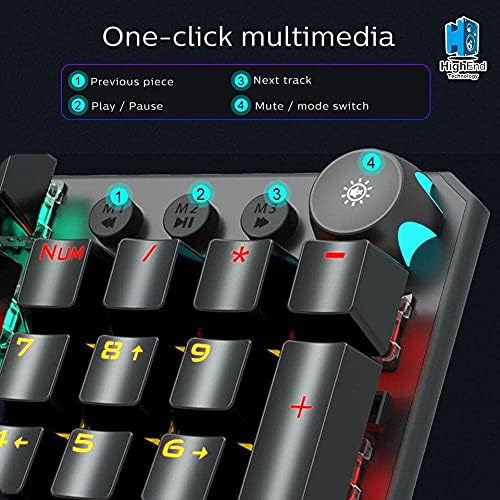
Obrázek: Detailní záběr view of the AULA F2066 keyboard's multimedia keys (M1, M2, M3) and the multi-function knob, with labels indicating their primary functions.
4.3 Funkce knoflíků
The knob has two primary modes: Game Mode and Multimedia Mode. Long press the knob button for more than 3 seconds to switch between modes.
- Herní režim: When in Game Mode, the knob button glows. Rotate the knob to adjust backlight brightness. Short press the knob to cycle through multiple lighting effects.
- Multimediální režim: When in Multimedia Mode, the knob button does not shine. Rotate the knob to adjust the system volume. Short press the knob for one-key mute/unmute.

Image: A visual guide demonstrating how to switch between Game Mode and Multimedia Mode using the knob, and the respective functions of the knob in each mode (brightness/lighting effects vs. volume/mute).
4.4 Programování maker
The AULA F2066 supports custom programmable functions via its software. This allows users to assign complex sequences of commands or single key functions to specific keys, enhancing productivity and gaming performance. Refer to the software's help section for detailed instructions on macro creation and assignment.
5. Údržba
5.1 Čištění
- Před čištěním odpojte klávesnici od počítače.
- Použijte měkký, damp cloth to wipe the surface of the keyboard. Avoid harsh chemicals or abrasive materials.
- K čištění mezi klávesami použijte stlačený vzduch k odstranění prachu a nečistot.
5.2 Skladování
Store the keyboard in a dry, cool place away from direct sunlight and extreme temperatures. Avoid placing heavy objects on the keyboard.
6. Řešení problémů
- Klávesnice nereaguje: Ujistěte se, že je kabel USB bezpečně připojen ke klávesnici i k počítači. Zkuste jiný port USB.
- Podsvícení nefunguje: Check if the backlight is turned off or set to minimum brightness using the knob or software.
- Keys not registering or double-registering: This could indicate a switch issue. Ensure the keyboard is clean and free of debris. If the problem persists, contact customer support.
- Makro funkce nefungují: Verify that the AULA software is installed and the macros are correctly configured and saved to the keyboard's profile.
7. Specifikace
| Funkce | Detail |
|---|---|
| Značka | AULA |
| Číslo modelu | F2066-I |
| Typ připojení | USB (kabelové) |
| Popis klávesnice | Herní mechanická klávesnice |
| Speciální funkce | Backlit, Anti-Ghosting, Macro Programmable |
| Kompatibilita operačního systému | Windows 10 |
| Kompatibilní zařízení | PC, notebook |
| Barva | Vícebarevné |
| Hmotnost položky | 690 g |
| Rozměry balení | 49.2 x 16.2 x 4.8 cm |
| Zahrnuté komponenty | USB kabel |
8. Záruka a podpora
8.1 Informace o záruce
The AULA F2066 Mechanical Gaming Keyboard comes with a standard manufacturer's warranty. Please retain your proof of purchase for warranty claims. The warranty covers defects in materials and workmanship under normal use. It does not cover damage caused by misuse, accidents, unauthorized modifications, or normal wear and tear.
8.2 Zákaznická podpora
For technical assistance, warranty inquiries, or further information, please visit the official AULA website or contact your local retailer. Ensure you have your product model number (F2066-I) and proof of purchase ready when contacting support.


