1. Úvod
This manual provides detailed instructions for the operation and maintenance of your Jensen CR-100 Portable AM/FM Radio Cassette Player/Recorder. Please read this manual thoroughly before using the unit to ensure proper function and to maximize your listening experience. Keep this manual for future reference.
2. Bezpečnostní informace
- Nevystavujte jednotku extrémním teplotám, vlhkosti ani přímému slunečnímu záření.
- Zabraňte pádu jednotky nebo jejímu vystavení silným nárazům.
- Nepokoušejte se jednotku rozebírat ani upravovat. Veškerý servis svěřte kvalifikovanému personálu.
- Čistěte přístroj měkkým, suchým hadříkem. Nepoužívejte abrazivní čisticí prostředky ani rozpouštědla.
- Pokud nebudete přístroj delší dobu používat, vyjměte baterie, abyste zabránili jejich vytečení.
- Baterie likvidujte správným způsobem v souladu s místními předpisy.
3. Obsah balení
Zkontrolujte prosím, zda jsou v balení obsaženy následující položky:
- Jensen CR-100 Portable AM/FM Radio Cassette Player/Recorder
- Návod k obsluze
4. Konec produktuview
Familiarize yourself with the various parts and controls of your Jensen CR-100 unit.

Obrázek 4.1: Přední strana View. This image displays the front of the Jensen CR-100, featuring the cassette window, built-in speaker, AM/FM frequency dial, and the telescopic antenna extended upwards. The Jensen logo is visible above the cassette window.

Obrázek 4.2: Boční ovládací prvky. Tento view highlights the left side of the unit, showing the volume control dial, microphone input, and the cassette control buttons including REC (Record) and PLAY.

Figure 4.3: Cassette Compartment Open. The image shows the unit with its cassette compartment door open, providing a clear view of the tape playback and recording mechanism inside.

Figure 4.4: Top/Side Ports. This perspective illustrates the top and right side of the unit, displaying the headphone jack, external microphone jack, tuning dial, and the AM/FM band selector switch.
5. Nastavení
5.1 Zapnutí jednotky
The Jensen CR-100 can be powered by either batteries or an AC adapter (not included).
Instalace baterie
- Vyhledejte kryt přihrádky na baterie na zadní straně jednotky.
- Posunutím otevřete kryt.
- Insert two (2) 'AA' (UM3) batteries, observing the correct polarity (+ and -) as indicated inside the compartment.
- Bezpečně zavřete kryt bateriového prostoru.
Poznámka: Batteries are not included. Remove batteries when the unit is not in use for extended periods to prevent leakage and damage.
AC Adapter (Not Included)
To operate the unit using an AC adapter, plug a compatible AC adapter (DC 3V, 300mA, center positive) into the DC IN jack on the unit. Plug the other end of the adapter into a standard AC wall outlet. Using an AC adapter will conserve battery life.
6. Návod k obsluze
6.1 Provoz AM/FM rádia
- Slide the function switch to the 'RADIO' position.
- Select the desired band (AM or FM) using the AM/FM selector switch.
- Pro optimální příjem FM vysuňte teleskopickou anténu. Pro příjem AM otáčejte jednotkou pro dosažení nejlepšího signálu.
- Rotate the 'TUNING' dial to select your desired radio station.
- Adjust the 'VOLUME' control to your preferred listening level.
- To turn off the radio, slide the function switch to the 'OFF' position.
6.2 Přehrávání kazet
- Slide the function switch to the 'TAPE' position.
- Press the 'STOP/EJECT' button to open the cassette compartment door.
- Vložte kazetu odkrytou stranou nahoru.
- Close the cassette compartment door firmly.
- Press the 'PLAY' button to begin playback.
- Adjust the 'VOLUME' control to your preferred listening level.
- To fast forward, press the 'F.FWD' button. To rewind, press the 'REW' button. Press 'STOP/EJECT' to stop fast forwarding or rewinding.
- To stop playback, press the 'STOP/EJECT' button.
- To listen privately, plug headphones into the headphone jack. The built-in speaker will automatically mute.
6.3 Nahrávání na kazetu
The unit allows recording from the built-in microphone or from the AM/FM radio.
Recording from Built-in Microphone
- Insert a blank cassette tape into the compartment as described in Section 6.2.
- Slide the function switch to the 'TAPE' position.
- Press the 'REC' (Record) button. The 'PLAY' button will also engage simultaneously.
- Speak clearly into the built-in microphone located on the unit.
- To stop recording, press the 'STOP/EJECT' button.
Recording from AM/FM Radio
- Insert a blank cassette tape into the compartment.
- Tune to your desired AM or FM radio station as described in Section 6.1.
- Slide the function switch to the 'RADIO' position.
- Press the 'REC' (Record) button. The 'PLAY' button will also engage simultaneously, and the radio broadcast will be recorded onto the tape.
- To stop recording, press the 'STOP/EJECT' button.
7. Údržba
7.1 Čištění jednotky
Otřete vnější část jednotky měkkým, lehce vlhkým hadříkem.amp cloth. Do not use harsh chemicals or abrasive cleaners, as they may damage the finish.
7.2 Cleaning the Tape Heads
Periodically clean the tape heads, capstan, and pinch roller to ensure optimal sound quality and prevent tape damage. Use a cotton swab lightly moistened with isopropyl alcohol. Gently wipe the surfaces and allow them to dry completely before inserting a tape.
7.3 Péče o baterii
Always use fresh batteries of the recommended type. Do not mix old and new batteries or different types of batteries. Remove batteries if the unit is not used for a long period to prevent corrosion.
8. Řešení problémů
| Problém | Možná příčina | Řešení |
|---|---|---|
| Žádná síla | Baterie jsou vybité nebo nesprávně vložené; síťový adaptér není připojen nebo je vadný. | Replace batteries, check polarity; ensure AC adapter is securely connected and functional. |
| Špatný příjem rádia | Antenna not extended; unit position; interference. | Extend telescopic antenna; rotate unit for better AM reception; move away from electronic devices causing interference. |
| Cassette tape not playing/poor sound | Tape heads are dirty; tape is damaged; incorrect function mode. | Clean tape heads (see Section 7.2); try a different tape; ensure function switch is in 'TAPE' position. |
| Nahrávání nefunguje | Tape is write-protected; microphone not close enough; incorrect function mode. | Check tape for write-protect tab; speak closer to the microphone; ensure 'REC' button is fully pressed. |
9. Specifikace
| Funkce | Specifikace |
|---|---|
| Značka | Jensen |
| Číslo modelu | CR-100SB |
| Rozměry produktu (D x Š x V) | 4.02 x 1.89 x 5.35 palce |
| Hmotnost položky | 8.4 unce |
| Zdroj napájení | Battery Powered (2 x 'AA' UM3, not included) or AC Adapter (not included) |
| Podporovaná rádiová pásma | AM, FM |
| Speciální funkce | Lightweight, Portable, Built-in Microphone, Built-in Speaker, Headphone Jack |
| Technologie připojení | Auxiliary, USB (Note: USB functionality for power only, not data transfer) |
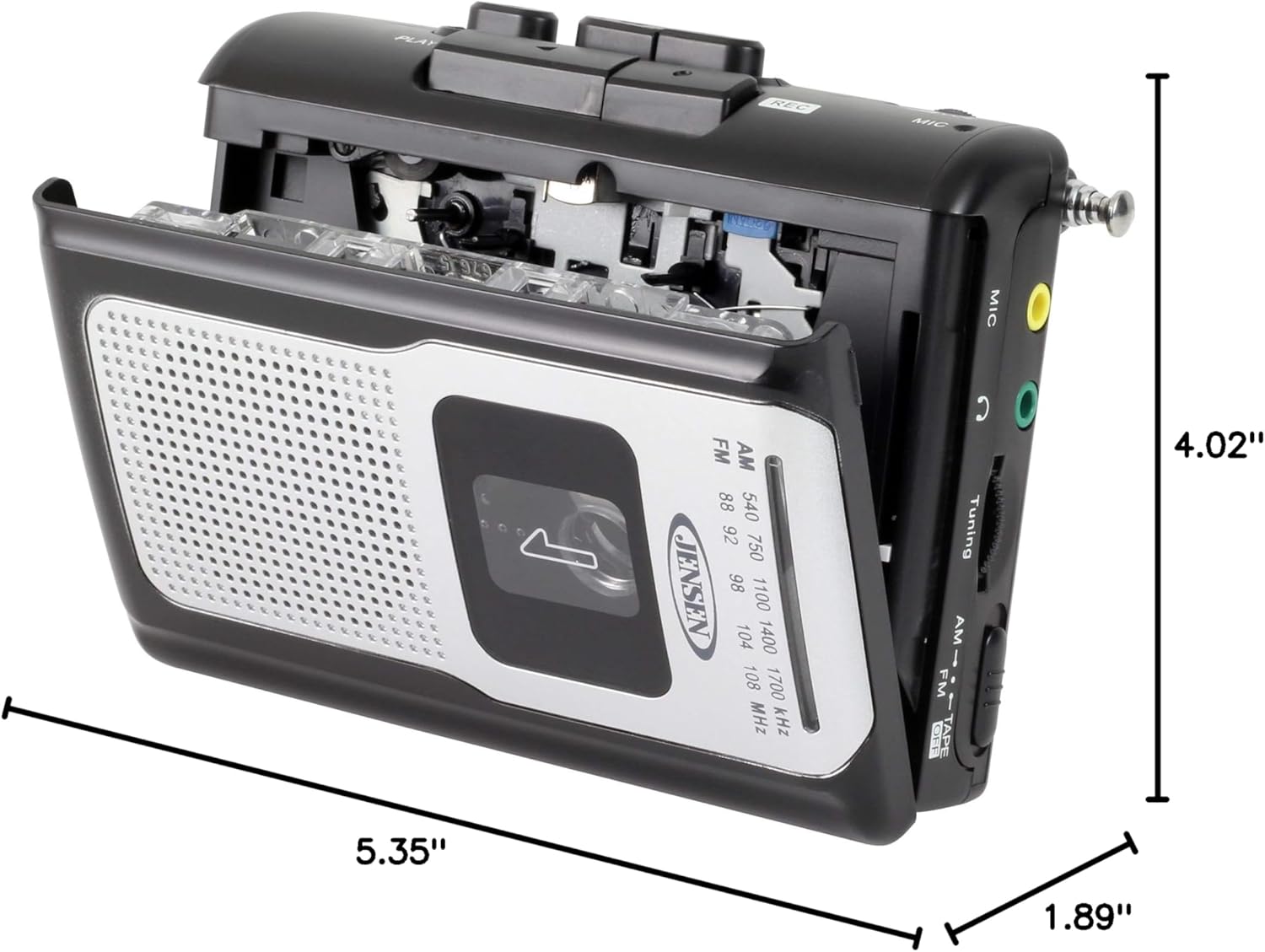
Obrázek 9.1: Rozměry produktu. This diagram illustrates the physical dimensions of the Jensen CR-100 unit.
10. Záruka a podpora
Jensen products are designed and manufactured to the highest quality standards. For specific warranty information and customer support, please refer to the warranty card included with your purchase or visit the official Jensen webUschovejte si doklad o koupi pro případ reklamace.
For technical assistance or service inquiries, please contact Jensen customer support through their official channels.


