Zavedení
This manual provides essential information for the safe and proper assembly, operation, maintenance, and troubleshooting of your Arcade1Up Outrun Stand Up Edition arcade game. Please read this manual thoroughly before assembly and retain it for future reference.
The Arcade1Up Outrun cabinet includes four classic racing games: Předběhnout, Turbo Outrun, Outrunnersa Power Drift. It features a steering wheel, gas pedal, and brake pedal for an authentic arcade experience.
Bezpečnostní informace
Always follow basic safety precautions when assembling and operating this product to reduce the risk of fire, electric shock, or injury.
- Chraňte před vodou a vlhkostí.
- Nepokoušejte se jednotku rozebírat nebo upravovat.
- Ujistěte se, že je jednotka umístěna na stabilním rovném povrchu.
- Před čištěním nebo údržbou odpojte přístroj ze zásuvky.
- Tento výrobek je určen pouze pro vnitřní použití.
Obsah balení
Verify that all components are present before beginning assembly. If any parts are missing or damaged, contact Arcade1Up customer support.
- Arcade Cabinet Panels
- Control Panel Assembly (Steering Wheel, Buttons)
- Gas and Brake Pedal Assembly
- Light-Up Marquee
- Monitor
- Napájecí adaptér
- Hardware Pack (Screws, Bolts, etc.)
- Návod k použití
Nastavení a montáž
Assembly typically requires two adults. Follow the numbered steps carefully. Tools required (not included): Phillips head screwdriver.
- Rozbalte komponenty: Opatrně vyjměte všechny díly z obalu a položte je na čistý, měkký povrch, abyste zabránili poškrábání.
- Sestavte boční panely: Attach the base and back panels to the main side panels using the provided hardware. Ensure all connections are secure.
- Instalace monitoru: Mount the monitor into the designated slot within the cabinet structure. Connect the necessary video and power cables.
- Připojení ovládacího panelu: Secure the control panel, including the steering wheel and buttons, to the front of the cabinet. Connect the control panel wiring to the main board.
- Install Pedal Assembly: Place the gas and brake pedal assembly at the base of the cabinet and connect its cable to the main board.
- Mount Light-Up Marquee: Attach the light-up marquee to the top of the cabinet and connect its power cable.
- Závěrečné kontroly: Before powering on, double-check all connections and ensure all screws are tightened.

Figure 1: Fully assembled Arcade1Up Outrun cabinet.

Figure 2: Close-up of the control panel and screen displaying game options.
Návod k obsluze
Once assembled and plugged in, the unit is ready for operation.
- Zapnutí: Locate the power switch, typically on the back or side of the cabinet, and switch it to the 'ON' position. The marquee will light up and the screen will display the game selection menu.
- Vyberte hru: Use the steering wheel or directional buttons (if present) and the 'SELECT' or 'ENTER' button to navigate through the available games: Předběhnout, Turbo Outrun, Outrunnersa Power Drift.
- Začátek hry: Press the 'START' button to begin playing the selected game.
- Ovládání hry:
- Volant: Turn left or right to control your vehicle's direction.
- Plynový pedál: Stiskněte pro zrychlení.
- Brzdový pedál: Press down to decelerate or stop.
- Shift Lever (if applicable): Use to change gears (High/Low).
- Exiting a Game: To return to the main game selection menu, press and hold the 'PLAYER 1 START' button for approximately 5 seconds.
- Vypnout: When finished playing, switch the power button to the 'OFF' position.
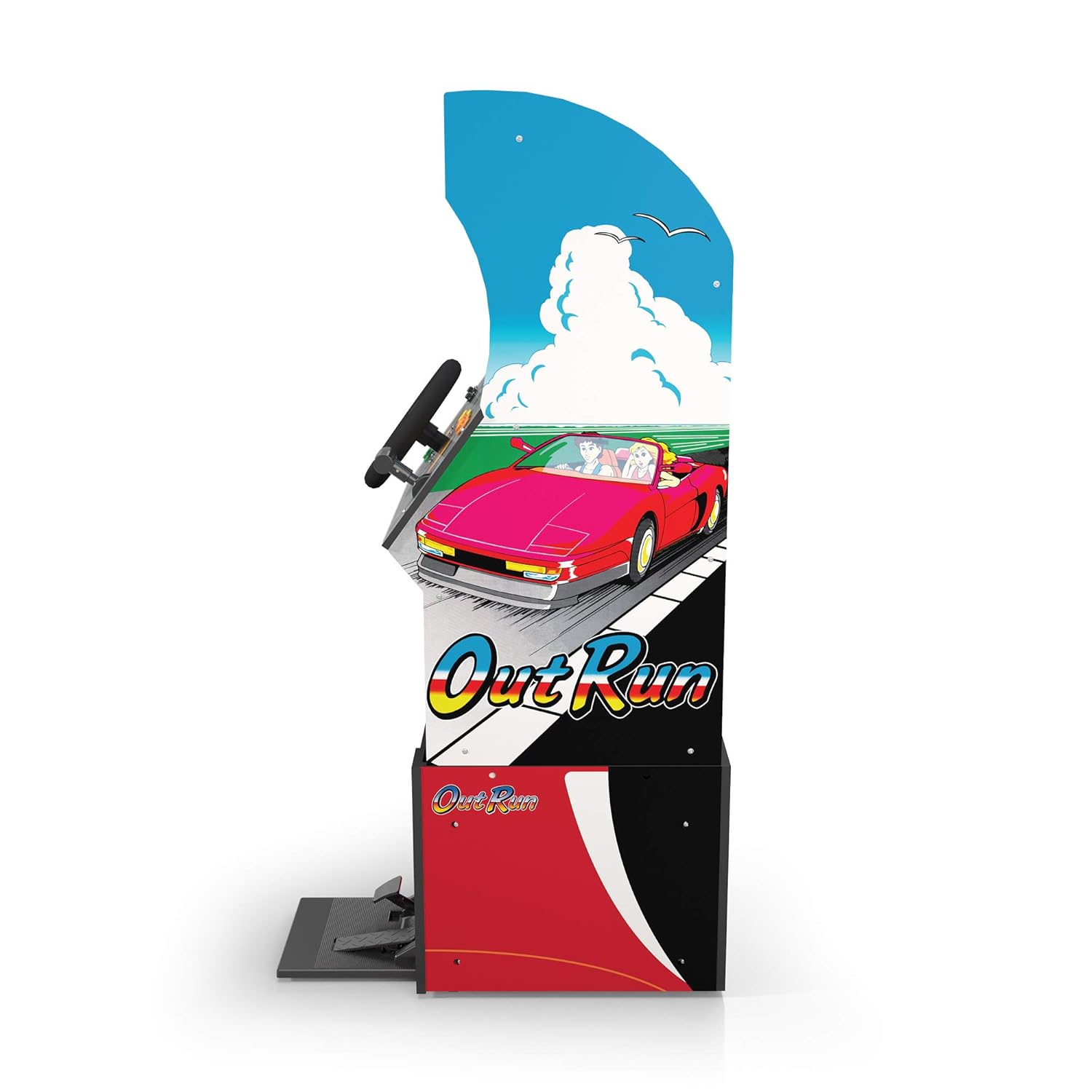
Obrázek 3: Boční profíkfile of the arcade cabinet, illustrating the driving controls.
Údržba
Regular maintenance ensures the longevity and optimal performance of your arcade cabinet.
- Čištění: K otření povrchů skříně použijte měkký, suchý hadřík. V případě odolných skvrn použijte lehceamp cloth with mild soap can be used, followed by drying. Avoid abrasive cleaners or excessive moisture.
- Péče o obrazovku: Clean the monitor screen with a microfiber cloth specifically designed for electronics. Do not spray liquid directly onto the screen.
- Údržba pedálů: Periodically check the gas and brake pedals for any debris or obstructions that might hinder their movement. Keep the area around the pedals clean.
- Správa kabelů: Ensure all cables are neatly tucked away and not pinched or exposed, which could lead to damage.
Odstraňování problémů
V této části naleznete běžné problémy a jejich řešení. Pokud problém přetrvává, kontaktujte zákaznickou podporu.
| Problém | Možná příčina | Řešení |
|---|---|---|
| Jednotka se nezapne. | Power cable not connected; Power outlet issue; Power switch off. | Ensure power cable is securely plugged into the unit and a working outlet. Check power switch is 'ON'. |
| Žádný obraz na obrazovce. | Monitor cable loose; Monitor not powered. | Check monitor's power and video cables are securely connected. |
| Controls (steering wheel/pedals) unresponsive. | Control panel/pedal cables loose; Software glitch. | Verify all control panel and pedal cables are firmly connected to the main board. Try restarting the unit. |
| Hra zamrzává nebo padá. | Dočasný problém se softwarem. | Power off the unit, wait 10 seconds, then power back on. |
Specifikace
- Číslo modelu: 195570000861
- Rozměry (sestavené): 47.75 x 23.75 x 10.5 inches (Height x Width x Depth)
- Hmotnost: 89.5 libry
- Zahrnuté hry: Outrun, Turbo Outrun, Outrunners, Power Drift
- Ovládání: Steering Wheel, Gas Pedal, Brake Pedal, Game Selection Buttons
- Moc: AC Adapter (Input: 100-240V ~ 50/60Hz, Output: Specific to adapter, refer to label)
- Výrobce: Arkáda 1Up
- Datum vydání: 7. dubna 2021
Záruka a podpora
Arcade1Up products typically come with a limited manufacturer's warranty. For specific warranty terms and conditions, please refer to the warranty card included with your product or visit the official Arcade1Up webmísto.
For technical support, missing parts, or warranty claims, please contact Arcade1Up Customer Support:
- Webmísto: arcade1up.com/pages/contact-us
- Telefon: Obraťte se na úředníka webmísto pro regionální kontaktní čísla.
Při kontaktování podpory mějte prosím po ruce číslo modelu (195570000861) a doklad o koupi.


