Zavedení
This manual provides essential information for setting up, operating, maintaining, and troubleshooting your ASUS ZenBook 14 UX425EA-EH51 laptop. Please read this guide thoroughly to ensure proper use and to maximize the lifespan of your device.

Nastavení
Obsah balení
Ověřte, zda jsou v balení produktu přítomny všechny položky:
- ASUS ZenBook 14 UX425EA-EH51 Laptop
- Rukáv
- USB-A to RJ45 Gigabit Ethernet Adapter
- USB-C to Audio Jack Adapter
- Napájecí adaptér a kabel
- Uživatelská příručka (tento dokument)
- Záruční list
Počáteční zapnutí
- Připojte napájecí adaptér: Plug the power adapter into the laptop's USB-C port and then into a power outlet. Ensure the power indicator light illuminates.
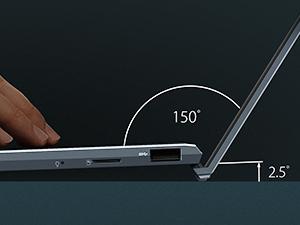
- Otevřete notebook: Carefully lift the display lid. The ErgoLift hinge will slightly tilt the keyboard for a more comfortable typing angle and improved cooling.
- Zapnutí: Press the power button, typically located on the keyboard.
- Postupujte podle pokynů na obrazovce: The laptop will guide you through the initial Windows 10 setup process, including language selection, network connection, and user account creation.
Ovládání notebooku
Externí komponenty a porty
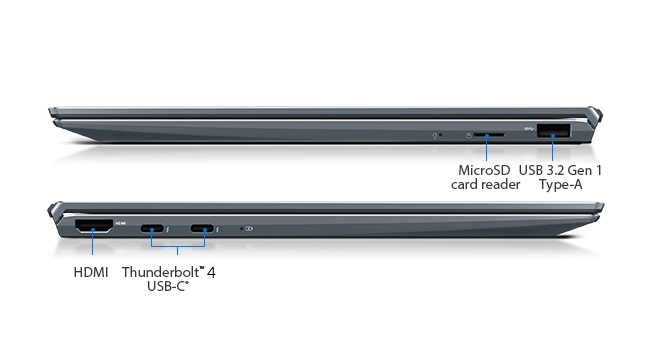
Your ZenBook 14 is equipped with various ports for connectivity:
- Levá strana: HDMI, two Thunderbolt 4 USB-C ports.
- Pravá strana: USB 3.2 Gen 1 Type-A port, MicroSD card reader, audio jack (via adapter).
Klávesnice a touchpad
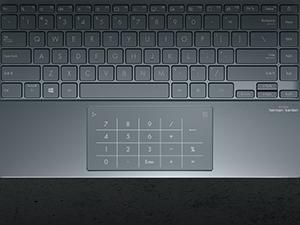
The laptop features a full-size backlit keyboard and a large touchpad. The touchpad integrates the ASUS NumberPad 2.0, which can be activated for numeric input.
- Podsvícená klávesnice: Adjust brightness using function keys (Fn + F3/F4).
- NumberPad 2.0: To activate the NumberPad, press and hold the NumberPad icon on the top-right corner of the touchpad. This transforms the touchpad into an LED-illuminated numeric keypad.
Funkce displeje
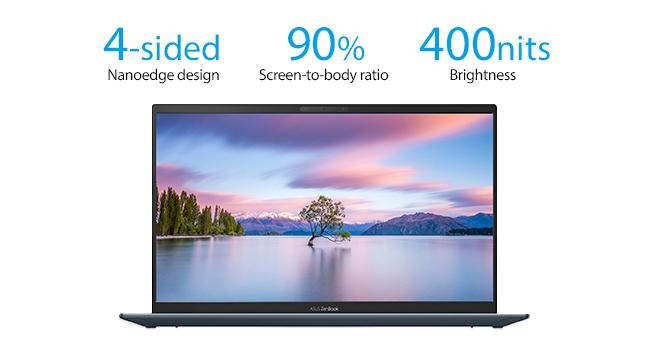
The 14-inch Full HD NanoEdge display offers a wide viewing experience with minimal bezels and anti-glare properties.
- NanoEdge Design: Provides an immersive visual experience with a high screen-to-body ratio.
- Antireflexní: Reduces reflections for comfortable viewza různých světelných podmínek.
Zabezpečení a zvuk
- Dobrý den ve Windows: Utilize the built-in IR camera for facial recognition login, providing secure and convenient access.
- AI Noise-Cancellation: Enhances audio clarity during video calls and online meetings by filtering out background noise.
Údržba
Péče o baterie
To prolong the battery life of your ASUS ZenBook 14:
- Vyhněte se extrémním teplotám.
- Nevybíjejte baterii často úplně.
- Pokud notebook skladujete delší dobu, ujistěte se, že je baterie nabitá přibližně na 50–60 %.
Pokyny pro čištění
- Use a soft, lint-free cloth for cleaning the screen and chassis.
- Pro odolné skvrny, dampen the cloth slightly with water or a screen-safe cleaning solution.
- Vyhněte se agresivním chemikáliím, abrazivům nebo rozpouštědlům.
Odstraňování problémů
Běžné problémy a řešení
- Notebook se nezapne: Ujistěte se, že je napájecí adaptér bezpečně připojen a že je zásuvka funkční. Zkuste jinou zásuvku.
- Problémy se zobrazením: If the screen is blank, try connecting an external monitor to check if the issue is with the laptop's display. Adjust display brightness using function keys.
- Pomalý výkon: Close unnecessary applications, check for background updates, or restart the laptop. Ensure sufficient free storage space.
- Problémy s připojením (Wi-Fi/Bluetooth): Check if Wi-Fi or Bluetooth is enabled in Windows settings. Restart your router or the laptop.
- Klávesnice nebo touchpad nereaguje: Restartujte notebook. Ujistěte se, že touchpadu nebrání žádné cizí předměty.
Specifikace
| Funkce | Detail |
|---|---|
| Číslo modelu | UX425EA-EH51 |
| Zobrazit | 14-inch Full HD (1920x1080) Anti-Glare IPS NanoEdge Display, 400 nits |
| Procesor | Intel Core i5-1135G7 (2.4 GHz, up to 4.2 GHz, 4 cores) |
| BERAN | 8GB LPDDR4X |
| Skladování | 512GB PCIe NVMe SSD |
| Grafika | Grafika Intel Iris Xe |
| Operační systém | Windows 10 Home (Bezplatný upgrade na Windows 11, pokud bude k dispozici) |
| Bezdrátové připojení | Wi-Fi 802.11ax, Bluetooth |
| Porty | 2x Thunderbolt 4 USB-C, 1x USB 3.2 Gen 1 Type-A, 1x HDMI, MicroSD card reader |
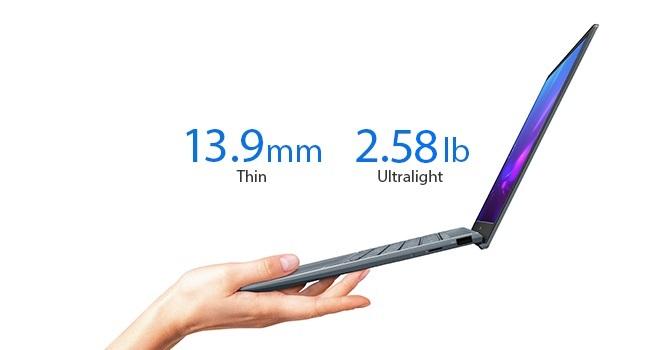
| Hmotnost | 2.58 libry (přibližně 1.17 kg) |
| Rozměry (DxŠxV) | 12.56 x 8.19 x 0.55 palců (přibližně 31.9 x 20.8 x 1.4 cm) |
| Barva | Borovicově šedá |
| Baterie | 1 lithium-iontová baterie (součástí balení) |
Záruka a podpora
Informace o záruce
Your ASUS ZenBook 14 UX425EA-EH51 comes with a limited warranty. Please refer to the included Warranty Card in your package for detailed terms, conditions, and coverage period. Keep your proof of purchase for warranty claims.
Zákaznická podpora
Pro technickou pomoc, stažení ovladačů nebo další informace o produktu navštivte oficiální stránky podpory ASUS. website. You can typically find support resources by searching for your specific model number (UX425EA-EH51) on the ASUS webmísto.
Právní prohlášení: Aktualizace na Windows 11 bude doručena na oprávněná zařízení koncem roku 2021 a zahájí se v roce 2022. Načasování se liší v závislosti na zařízení. Některé funkce vyžadují dodatečný hardware (viz aka.ms/windows11-spec).


