Konec produktuview
The Sena Spider ST1 is a Mesh-equipped communication headset designed for motorcycle riders. It features a glove-friendly jog-dial control and operates exclusively on Sena's Mesh intercom platform. This system enhances rider-to-rider communication with robust reliability, offering both Multi-Channel Open Mesh and Group Mesh modes. It includes upgraded HD Speakers for improved audio quality and is compatible with the Sena Motorcycle App.

Obrázek: Přední strana view of the Sena Spider ST1 communication system, showing the main unit with the jog dial and LED indicator.
Obsah balení
The Sena Spider ST1 package typically includes the following components:
- Communication Device (Sena Spider ST1 unit)
- USB nabíjecí kabel
- Speaker Set (HD Speakers)
- Microphone (Boom or Wired, depending on kit)
- Mounting Hardware (Clamp Kit, Glued Surface Mounting Plate)
- Velcro Pads for Speakers and Microphone
Nastavení a instalace
1. Nabíjení zařízení
Before first use, fully charge the Sena Spider ST1. Connect the provided USB charging cable to the device's charging port and a USB power source. The LED indicator will show charging status.
- Doba nabíjení: Přibližně 2.5 hodiny na plné nabití.
- Životnost baterie: Až 12 hodin hovoru.
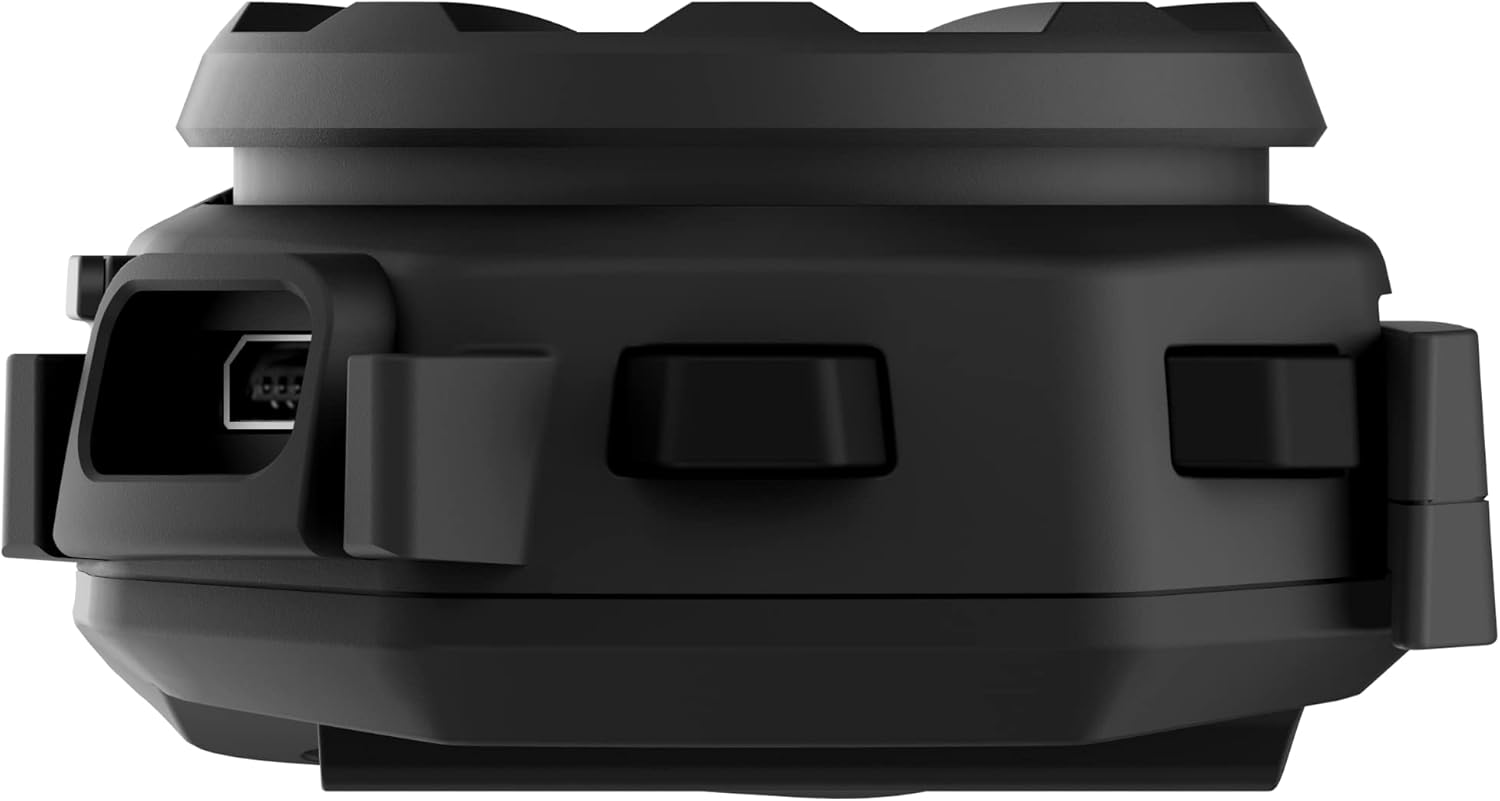
Obrázek: Boční view of the Sena Spider ST1 unit, highlighting the USB charging port for power connection.
2. Montáž na helmu
The Spider ST1 can be mounted using either the clamp kit or the glued surface mounting plate. Ensure the mounting location allows for easy access to the jog dial and does not obstruct helmet functionality.
- Vyberte umístění: Select a flat surface on the left side of your helmet.
- Připojit držák: Securely attach the chosen mounting accessory (clamp or adhesive plate) to the helmet.
- Instalace reproduktorů: Place the HD Speakers inside the helmet's ear pockets using the Velcro pads. Ensure they are positioned directly over your ears for optimal audio quality.
- Instalace mikrofonu: Attach the microphone to the helmet, positioning it close to your mouth but not directly in front of it to avoid wind noise.
- Připojení hlavní jednotky: Slide the Spider ST1 main unit onto the mounted accessory until it clicks securely into place.

Image: The Sena Spider ST1 communication system securely mounted on the side of a motorcycle helmet, with its LED indicator illuminated.
Návod k obsluze
Zapnutí/vypnutí
- Zapnutí: Stiskněte a podržte kolečko Jog Dial po dobu 1 sekundy.
- Vypnout: Stiskněte a podržte kolečko Jog Dial po dobu 5 sekund.
Ovládání hlasitosti
- Zvýšení hlasitosti: Rotate the Jog Dial clockwise.
- Snížit hlasitost: Rotate the Jog Dial counter-clockwise.
Síťový interkom
The Spider ST1 utilizes Sena's Mesh Intercom technology for seamless group communication.
- Zapnutí/vypnutí síťového interkomu: Press the Mesh Intercom Button (located on the side of the unit).
- Multi-Channel Open Mesh: Allows communication with a near-limitless number of riders. Switch between 9 channels using the Sena Motorcycle App.
- Skupinová síť: Supports up to 24 participants in a private group. Create and manage groups via the Sena Motorcycle App.

Image: A screenshot displaying the user interface of the Sena Motorcycle App, showing options for Mesh Grouping and Channel selection.
Smartphone Connectivity (Bluetooth 5.1)
Connect your Spider ST1 to your smartphone for music, phone calls, and GPS navigation.
- Režim párování: With the unit off, press and hold the Jog Dial for 5 seconds until the LED flashes red and blue.
- Připojit: On your smartphone, go to Bluetooth settings and select "Sena Spider ST1" from the list of available devices.
- Funkce:
- Přehrávání/pozastavení hudby: Stiskněte kolečko Jog Dial.
- Další skladba: Rotate Jog Dial clockwise and hold for 1 second.
- Předchozí skladba: Rotate Jog Dial counter-clockwise and hold for 1 second.
- Přijmout/ukončit hovor: Stiskněte kolečko Jog Dial.
- Hlasový asistent (Siri/Google Assistant): Stiskněte Jog Dial na 3 sekund.
Údržba a péče
- Čištění: Jednotku otřete měkkým, damp tkanina. Nepoužívejte agresivní chemikálie nebo abrazivní čisticí prostředky.
- Skladování: Pokud zařízení nepoužíváte, skladujte jej na chladném a suchém místě.
- Péče o baterie: For optimal battery life, avoid storing the device in extremely hot or cold conditions. Charge the battery at least once every six months if not used regularly.
- Voděodolnost: The device is water resistant, but not fully waterproof. Avoid submerging it in water.
Odstraňování problémů
| Problém | Možná příčina | Řešení |
|---|---|---|
| Zařízení se nezapne. | Slabá baterie. | Zařízení plně nabijte. |
| Z reproduktorů není slyšet žádný zvuk. | Speakers not connected properly or volume too low. | Check speaker connections. Increase volume using the Jog Dial. |
| Cannot connect to Mesh Intercom. | Mesh Intercom is off or out of range. | Ensure Mesh Intercom is enabled. Move closer to other Mesh users. |
| Problémy s párováním Bluetooth. | Device not in pairing mode or smartphone Bluetooth is off. | Put the Spider ST1 in pairing mode. Ensure smartphone Bluetooth is on and visible. Try restarting both devices. |
| Špatná kvalita mikrofonu. | Microphone not positioned correctly or obstructed. | Adjust microphone position closer to your mouth. Ensure it is not blocked by helmet padding. |
Specifikace
| Funkce | Detail |
|---|---|
| Název modelu | PAVOUK |
| Číslo modelu položky | SPIDER-ST1-01 |
| Materiál | Pryž |
| Barva | Černý |
| Hmotnost položky | 60 gramů (2.12 unce) |
| Rozměry produktu | 1.8"H x 3.8"Š x 1"V |
| Životnost baterie | 12 hodin (doba hovoru) |
| Doba nabíjení | 2.5 hodiny |
| Verze Bluetooth | 5.1 |
| Technologie bezdrátové komunikace | Bluetooth, Mesh Intercom |
| Maximum Mesh Range | Až 8 km (5 mil) |
| Maximální výstupní výkon reproduktoru | 100 wattů |
| Frekvenční odezva | 10000 Hz |
| Úroveň odolnosti proti vodě | Vodě odolný |
| Zahrnuté komponenty | Communication Device, Cable |
Záruka a podpora
Informace o záruce
The Sena Spider ST1 comes with a 2-letá záruka od data nákupu. Tato záruka se vztahuje na vady materiálu a zpracování při běžném používání. Uschovejte si prosím doklad o koupi pro případ uplatnění záruky.
Zákaznická podpora
For further assistance, technical support, or warranty inquiries, please refer to the official Sena resources:
- Oficiální uživatelská příručka (PDF): Download PDF Manual
- Sena Official Store: Visit Sena Store on Amazon
- For the most up-to-date support information, visit the official Sena webmísto.


