Zavedení
Thank you for choosing the Eurom Cool-Eco 120 A+ Mobile Air Conditioner. This manual provides important information regarding the safe operation, installation, maintenance, and troubleshooting of your new appliance. Please read this manual thoroughly before using the air conditioner and keep it for future reference.
Důležité bezpečnostní informace
VAROVÁNÍ: Abyste snížili riziko požáru, úrazu elektrickým proudem nebo zranění, vždy dodržujte při používání tohoto spotřebiče základní bezpečnostní opatření.
- Ujistěte se, že napájecí zdroj odpovídá objtage specifikováno na typovém štítku.
- Neprovozujte klimatizaci s poškozeným kabelem nebo zástrčkou.
- Nevkládejte prsty nebo cizí předměty do vstupu nebo výstupu vzduchu.
- Uchovávejte spotřebič mimo dosah hořlavých materiálů a otevřeného ohně.
- Před čištěním nebo údržbou jednotku vždy odpojte.
- Tento spotřebič není určen pro použití osobami (včetně dětí) se sníženými fyzickými, smyslovými nebo duševními schopnostmi nebo nedostatečnými zkušenostmi a znalostmi, pokud na ně nedohlíží osoba odpovědná za jejich bezpečnost nebo jim nebyla poskytnuta instrukce ohledně používání spotřebiče.
- Děti by měly být pod dozorem, aby bylo zajištěno, že si se spotřebičem nebudou hrát.
Konec produktuview
Hlavní jednotka
The Eurom Cool-Eco 120 A+ is a compact and portable air conditioning unit designed for efficient cooling. It features a sleek white design with integrated wheels for easy mobility.

This image shows the front of the Eurom Cool-Eco 120 A+ mobile air conditioner, highlighting its clean, white design and the Eurom logo at the bottom.

Tento obrázek zobrazuje boční profesionálafile of the air conditioner, revealing the connection point for the exhaust hose and the unit's compact dimensions.
Ovládací panel
The control panel is located on the top of the unit, providing easy access to all functions and settings.

This image shows a close-up of the air conditioner's top control panel, featuring buttons for power, mode, fan speed, timer, sleep, and swing, along with LED indicators.

Tento obrázek poskytuje detailní view of the digital display on the unit, showing the current temperature setting.
Dálkové ovládání
A convenient remote control is included for operating the air conditioner from a distance.

This image displays the remote control, which includes a small screen and buttons for adjusting temperature, mode, fan speed, and other functions.
Příslušenství
The package includes essential accessories for installation and operation.

This image shows the various accessories provided, such as the flexible exhaust hose, window slider kit, and a small drainage tube.
Nastavení
Vybalování
Opatrně vyjměte klimatizaci a veškeré příslušenství z obalu. Obal si uschovejte pro budoucí skladování nebo přepravu.
Umístění
Place the air conditioner on a flat, stable surface. Ensure there is at least 30 cm (12 inches) of space around the unit for proper airflow. Do not block the air inlets or outlets.
Instalace výfukové hadice
- Screw one end of the exhaust hose onto the exhaust port on the back of the unit.
- Prodlužte hadici k nejbližšímu oknu nebo otvoru.
- Na druhý konec výfukové hadice připevněte okenní adaptér.
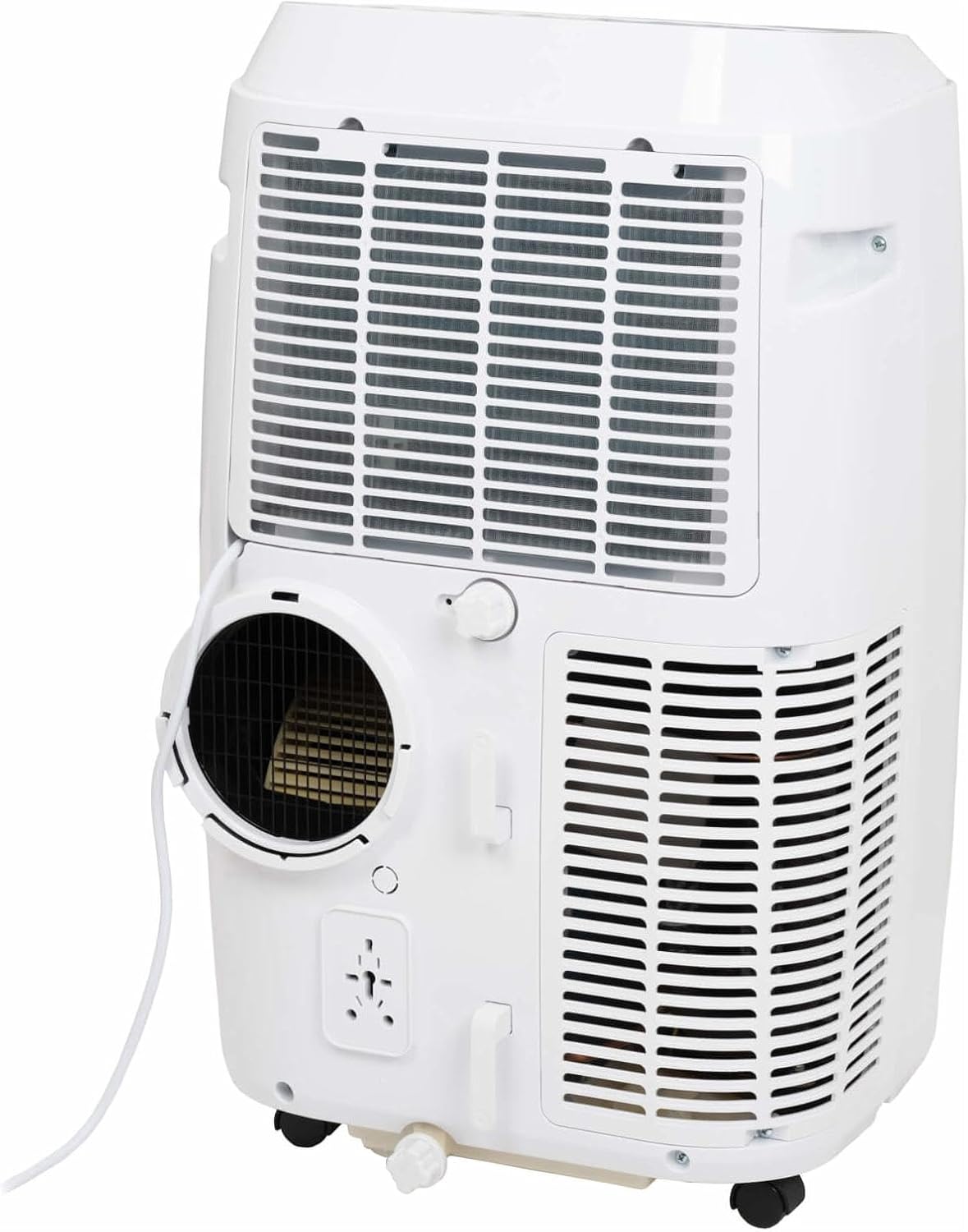
This image shows the rear of the air conditioner, illustrating where the exhaust hose connects to the unit.
Instalace okenní sady
Use the provided window sealing kit to secure the exhaust hose in a window opening. Adjust the slider kit to fit your window, then place the window adapter into the opening.
Provoz vaší klimatizace
Funkce ovládacího panelu
The control panel on top of the unit allows you to manage all settings. Press the MOC button to turn the unit on or off. Use the MODE button to cycle through cooling, fan, and dehumidification modes.
- MOC: Zapíná nebo vypíná jednotku.
- REŽIM: Selects operating mode (Cool, Fan, Dry/Dehumidify).
- Šipky NAHORU/DOLŮ: Adjusts temperature setting or timer.
- RYCHLOST: Changes fan speed (Low, Medium, High).
- ČASOVAČ: Nastavuje čas automatického zapnutí nebo automatického vypnutí.
- HOUPAČKA: Aktivuje nebo deaktivuje automatické natáčení lamel.
- SPÁT: Aktivuje režim spánku pro tišší provoz a postupné nastavení teploty.
Funkce dálkového ovládání
The remote control duplicates most functions available on the control panel, offering convenience. Ensure the remote control is pointed towards the unit's receiver when pressing buttons.
The remote control features a display showing the current settings and buttons for power, mode selection, temperature adjustment, fan speed, timer, and sleep mode.
Provozní režimy
- Režim chlazení: Provides cooling. Set your desired temperature using the UP/DOWN arrows.
- Režim ventilátoru: Cirkuluje vzduch bez chlazení. Upravte rychlost ventilátoru dle potřeby.
- Režim sušení (odvlhčování): Reduces humidity in the room. The fan speed is fixed in this mode.
Inteligentní ovládání aplikací
This model supports Smart App Control. Refer to the separate Smart App manual or the manufacturer's website for detailed instructions on connecting and controlling your unit via the app.
Péče a údržba
Čištění vzduchového filtru
The air filter should be cleaned every two weeks or more frequently depending on usage. A dirty filter can reduce efficiency and airflow.
- Odpojte klimatizaci ze zásuvky.
- Vyhledejte panel vzduchového filtru (obvykle na zadní nebo boční straně jednotky).
- Vyjměte filtr.
- Filtr omyjte teplou mýdlovou vodou. Důkladně jej opláchněte a před opětovným vložením nechte zcela uschnout na vzduchu.
Vypouštění vody
During dehumidification or in very humid conditions, water will accumulate inside the unit. The unit has an internal water tank that will trigger a "Full" indicator when full. You will need to drain the water manually.
- Pod odtokový otvor ve spodní zadní části jednotky umístěte mělkou pánev nebo nádobu.
- Odstraňte vypouštěcí zátku.
- Nechte veškerou vodu odtéct.
- Bezpečně nasaďte vypouštěcí zátku.
Skladování
Before storing the unit for an extended period, ensure the water tank is completely drained. Clean the air filter and store the unit in a dry, cool place, preferably in its original packaging.
Průvodce řešením problémů
| Problém | Možná příčina | Řešení |
|---|---|---|
| Jednotka se nezapne. | Žádné napájení; napájecí kabel odpojený; jistič vypnutý. | Zkontrolujte připojení napájení; resetujte jistič. |
| Jednotka nechladí efektivně. | Znečištěný vzduchový filtr; nesprávně nainstalovaná výfuková hadice; příliš velká místnost; otevřená okna/dveře. | Clean air filter; ensure hose is sealed; close windows/doors; check room size suitability. |
| Water tank full indicator is on. | Vnitřní nádržka na vodu je plná. | Vypusťte vodu z jednotky. |
| Jednotka je hlučná. | Jednotka není na rovném povrchu; ventilátor je zablokován. | Umístěte na rovný povrch; zkontrolujte, zda v oblasti ventilátoru nejsou žádné překážky. |
Technické specifikace
| Funkce | Specifikace |
|---|---|
| Značka | Eurom |
| Číslo modelu | 262845 |
| Chladicí kapacita | 12000 XNUMX BTU |
| Zdroj napájení | Elektrický kabel |
| Water Capacity (Internal Tank) | 1.2 litru |
Záruka a zákaznická podpora
Informace o záruce
This product comes with a manufacturer's warranty. Please refer to the warranty card included with your purchase or visit the official Eurom webPodrobné záruční podmínky naleznete na webových stránkách. Uschovejte si doklad o koupi pro případ reklamace.
Zákaznická podpora
For technical assistance, spare parts, or service, please contact Eurom customer support. Contact details can typically be found on the Eurom website or in the product packaging. When contacting support, please have your model number (262845) and serial number ready.


