1. Úvod
This user manual provides essential information for the safe and efficient operation of your Redmi Smart LED TV X55. Please read this manual thoroughly before using the product and retain it for future reference.
The Redmi Smart LED TV X55 offers a 55-inch 4K Ultra HD display, powered by Android TV, and features advanced audio and visual technologies for an immersive entertainment experience.
2. Důležité bezpečnostní informace
Při používání tohoto výrobku vždy dodržujte základní bezpečnostní opatření, abyste snížili riziko požáru, úrazu elektrickým proudem a zranění.
- Nevystavujte televizor dešti ani vlhkosti.
- Neotevírejte dvířka televizoruasing; veškerý servis svěřte kvalifikovanému personálu.
- Zajistěte řádné větrání kolem televizoru.
- Use only the power cord and accessories supplied by the manufacturer.
- Uchovávejte televizor mimo dosah přímého slunečního záření, zdrojů tepla a silných magnetických polí.
- Televizor čistěte měkkým, suchým hadříkem. Nepoužívejte tekuté ani aerosolové čisticí prostředky.
3. Obsah balení
Po vybalení zkontrolujte, zda jsou všechny níže uvedené položky přítomny a v dobrém stavu:
- 1 x Redmi Smart LED TV X55
- 2 x Table Stand Bases
- 1 x Dálkové ovládání
- 4 x Screws for stand assembly
- 1 x Uživatelská příručka (tento dokument)
- 1 x napájecí kabel
4. Konec produktuview
The Redmi Smart LED TV X55 is designed to deliver a premium viewing and audio experience. Below are its key features and components.
4.1. Visual Features
Experience stunning clarity and vibrant colors with the 55-inch 4K LED panel. Advanced technologies enhance your viewing:
- 4K LED Panel: Delivers ultra-high-definition resolution for sharp images.
- Dolby Vision a HDR10: Provides superior contrast, brightness, and color depth.
- HLG (hybridní log-gama): Supports broadcast HDR content.
- Reality Flow & Vivid Picture Engine: Enhances motion smoothness and picture quality.
- MEMC (Odhad pohybu, Kompenzace pohybu): Reduces motion blur for fast-paced scenes.

Obrázek 1: Přední strana view of the Redmi Smart LED TV X55.

Obrázek 2: Přesview of key visual features including Dolby Vision, 4K HDR, and Vivid Picture Engine.
4.2. Zvukové funkce
Immerse yourself in rich, powerful sound with the integrated audio system:
- 30W Output Speakers: Delivers clear and robust sound.
- Dolby Audio: Provides enhanced sound quality for movies and music.
- DTS Virtual:X: Vytváří vícerozměrný zvukový zážitek.
- Dolby Atmos Pass-through via eARC: Allows for advanced audio formats to be sent to compatible sound systems.
- DTS-HD: High-definition audio decoding for a cinematic sound.
4.3. Smart Features & Performance
The Redmi Smart LED TV X55 runs on Android TV 10, offering a user-friendly interface and access to a vast ecosystem of apps.
- Android TV 10: Provides a smooth and intuitive smart TV experience.
- PatchWall 4 with IMDb Integration: A curated content platform with smart recommendations and IMDb ratings.
- Quad Core Processor: Ensures seamless performance and quick app loading.
- 2GB RAM + 16GB Storage: Ample memory and storage for apps and system operations.
- Built-in Wi-Fi (2x2 Dual Band) & Chromecast: Easy wireless connectivity and content casting from mobile devices.
- Ok Google: Voice control for searching content, controlling smart home devices, and more.
- Automatický režim nízké latence (ALLM): Optimalizuje nastavení pro hraní her a snižuje vstupní zpoždění.
- Miracast: Wireless display mirroring from compatible devices.
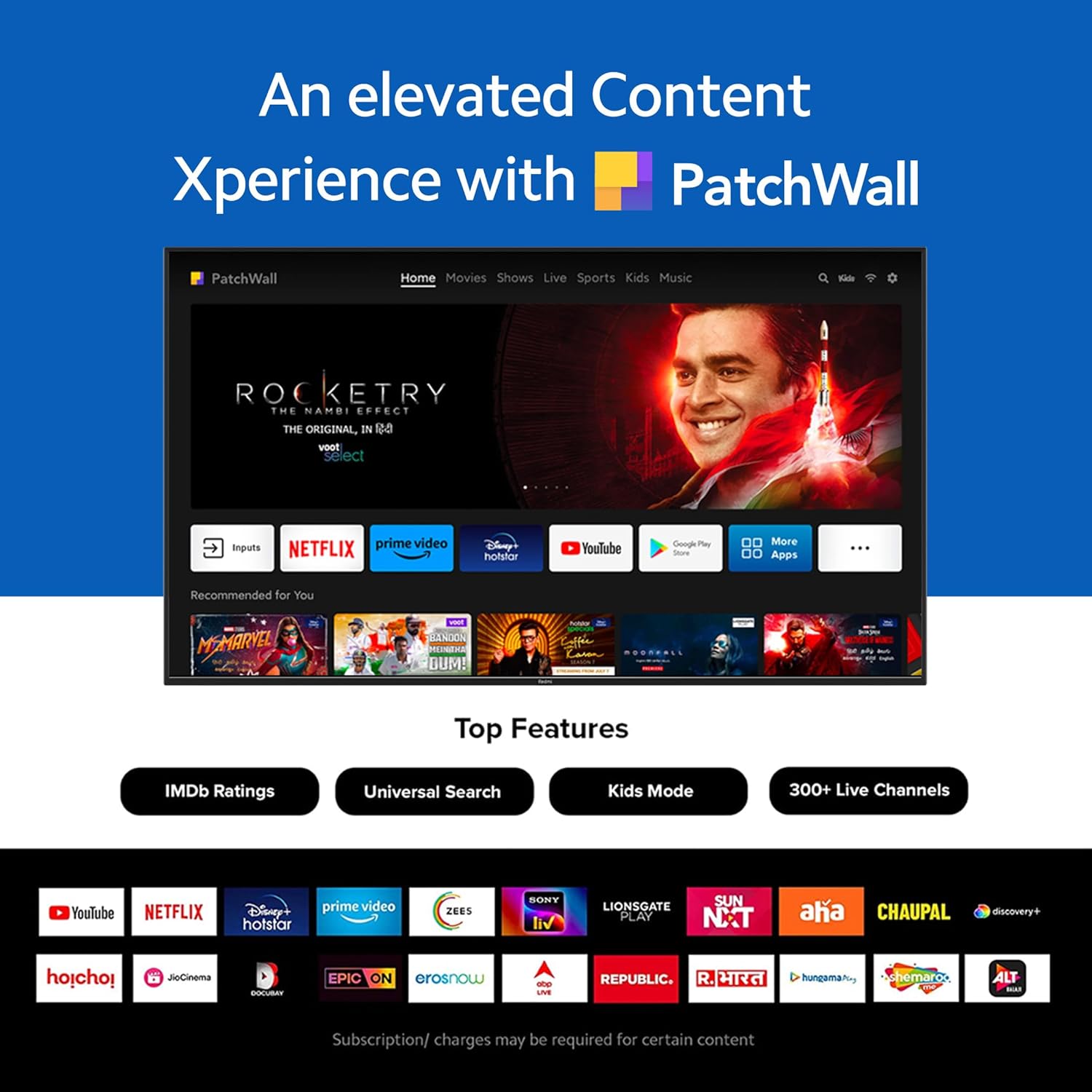
Figure 3: The PatchWall interface displaying various streaming apps and content.

Figure 4: Details on the TV's performance, including 2GB RAM, 16GB Storage, and Quad-core A55 processor.

Figure 5: Android TV 10 interface with Google Play, Ok Google, and Chromecast built-in.
4.4. Konektivita
The TV offers multiple connectivity options for various devices:
- HDMI 2.1: Multiple ports for high-definition audio and video input, supporting eARC.
- USB 2.0: Pro připojení externích úložných zařízení.
- Ethernet: Kabelové síťové připojení.
- Optický port: Digitální audio výstup.
- 3.5mm audio port: Pro sluchátka nebo externí reproduktory.
- Bluetooth 5.0 with BLE: Wireless connectivity for audio devices and accessories.

Obrázek 6: Zadní view of the Redmi Smart TV X55 highlighting various input/output ports.

Figure 7: Close-up of the TV's ports, including HDMI 2.1, USB 2.0, Ethernet, Optical, and Headphone Jack.
5. Průvodce nastavením
5.1. Fyzická instalace
Your Redmi Smart LED TV X55 can be installed on a table stand or wall-mounted.
- Instalace stolního stojanu: Attach the two provided table stand bases to the bottom of the TV using the included screws. Ensure the TV is placed on a stable, flat surface.
- Montáž na stěnu: For wall mounting, use a compatible VESA wall mount kit (sold separately). Follow the instructions provided with the wall mount kit and ensure professional installation for safety.

Figure 8: Dimensions of the Redmi Smart TV X55 for planning installation.
5.2. První zapnutí a připojení k síti
- Připojte napájecí kabel k televizoru a elektrické zásuvce.
- Stiskněte tlačítko napájení na dálkovém ovladači nebo televizoru.
- Follow the on-screen instructions to select your language, country, and connect to your Wi-Fi network or plug in an Ethernet cable.
- Sign in with your Google account to access Android TV features and the Play Store.
5.3. Setting Up Alexa Control
You can control your Redmi TV hands-free with Alexa devices. Follow these steps to set up Alexa:
Video 1: Instructions on how to set up Alexa control for your Redmi Smart TV.
To enable advanced settings for Alexa control, refer to the following video guide:
Video 2: Guide to enabling advanced settings on Redmi TV for Alexa control.
6. Návod k obsluze
6.1. Dálkové ovládání
The sleek remote control provides quick access to essential functions:
- Rychlé probuzení: Zapněte televizi za méně než 5 sekund.
- Rychlé ztlumení: Double-tap the volume down button to mute.
- Rychlé nastavení: Dlouhým stisknutím tlačítka PatchWall vstoupíte do nabídky rychlého nastavení.

Figure 9: The sleek remote control for the Redmi Smart TV X55, highlighting quick access features.
6.2. Navigace v rozhraní Smart TV
Use the remote's directional pad and OK button to navigate through the Android TV and PatchWall interfaces. Access apps, settings, and content recommendations easily.
6.3. Používání hlasového ovládání
Press the dedicated voice assistant button on your remote and speak commands to control your TV, search for content, or interact with connected smart home devices via Ok Google or Alexa.
6.4. App Usage and Casting
The TV supports popular streaming services like Prime Video, Netflix, Disney+ Hotstar, YouTube, and Apple TV. You can also cast content from your mobile devices using Chromecast built-in or Miracast.
7. Údržba
- Čištění: Gently wipe the screen and TV body with a soft, dry, lint-free cloth. Do not use abrasive cleaners or solvents.
- Aktualizace softwaru: Ensure your TV's software is up to date for optimal performance and security. Navigate to Settings > Device Preferences > About > System update to check for updates.
- Řízení spotřeby: Během bouřek nebo pokud nebudete televizor delší dobu používat, odpojte jej ze zásuvky.
8. Řešení problémů
If you encounter issues with your Redmi Smart LED TV X55, refer to the following common problems and solutions:
| Problém | Možné řešení |
|---|---|
| Žádná síla | Zkontrolujte, zda je napájecí kabel bezpečně připojen a zda je zásuvka funkční. Zkuste jinou zásuvku. |
| Žádný obraz, ale zvuk je přítomný | Ensure the correct input source is selected. Check HDMI cable connections. |
| Žádný zvuk, ale obraz je přítomen | Check volume levels and mute status. Verify audio output settings (e.g., internal speakers, external soundbar). |
| Dálkové ovládání nefunguje | Replace batteries. Ensure no obstructions between the remote and the TV. Re-pair the remote if necessary. |
| Problémy s připojením k síti | Restart your router and modem. Check Wi-Fi password. Try connecting via Ethernet. |
9. Specifikace
Detailed technical specifications for the Redmi Smart LED TV X55:
| Funkce | Specifikace |
|---|---|
| Značka | Redmi |
| Název modelu | X55 |
| Velikost obrazovky | 55 palce |
| Technologie displeje | LED-LCD |
| Rezoluce | 3840 x 2160 pixelů (4K) |
| Obnovovací frekvence | 60 Hz |
| Operační systém | Android TV 10 |
| Procesor | Čtyřjádrový A55 |
| BERAN | 2 GB |
| Skladování | 16 GB |
| Zvukový výstup | 30 wattů |
| Technologie připojení | HDMI, USB, Wi-Fi (2x2 Dual Band), Ethernet, Bluetooth 5.0 |
| HDMI porty | 3 (HDMI 2.1, eARC compatible) |
| USB porty | 2 2.0 (USB XNUMX) |
| Viewúhel | 178 stupňů |
| Poměr stran | 16:9 |
| Hmotnost položky | 15 kg 300 g |
| Typ montáže | Wall Mount; Table Mount |
10. Záruka a podpora
Your Redmi Smart LED TV X55 comes with a standard brand warranty. For specific warranty terms, duration, and service procedures, please refer to the warranty card included in your package or visit the official Redmi support webmísto.

Figure 10: Information regarding Mi Extended Warranty, offering benefits like zero documentation, genuine spare parts, cashless repairs, authorized service centers, and on-site support.
For installation services, Amazon will coordinate with the brand within 48 hours of delivery. Scheduled delivery options are available in select cities. Installation charges may apply.


