Uživatelská příručka k automatickým islámským hodinám s ázánem ALFAJR CW-15
Model: CW-15 | Brand: ALFAJR
Zavedení
This manual provides comprehensive instructions for setting up and operating your ALFAJR CW-15 Automatic Islamic Azan Prayer Clock. Designed for both wall mounting and table placement, this digital clock automatically calculates and plays the Azan five times a day based on your set location. Please read this manual carefully to ensure proper use and to fully utilize all features of your new clock.
Obsah balení
Prosím, ověřte, zda jsou v balení přítomny všechny položky:
Automatic Azan time adjustment after initial city/time setup.
Gregorian and Hijri calendar display.
Zobrazení teploty ve stupních Celsia nebo Fahrenheita.
Daylight Saving Time (DST) option.
English and Arabic display languages.
Wall-mountable or table-standing design.
Dimensions: Approximately 9 inches (width) x 8.5 inches (height).
Powered by 4 AA batteries (included) or USB-C (cable not included).
Průvodce nastavením
1. Instalace baterie
The ALFAJR CW-15 clock operates on 4 AA batteries. These are included in your package.
Najděte přihrádku na baterie na zadní straně hodin.
Otevřete kryt bateriového prostoru.
Insert the 4 AA batteries, ensuring correct polarity (+ and -).
Bezpečně zavřete kryt bateriového prostoru.
Alternatively, the clock can be powered via a USB-C cable (not included) connected to a compatible power adapter.
2. Initial Power On and Display Overview
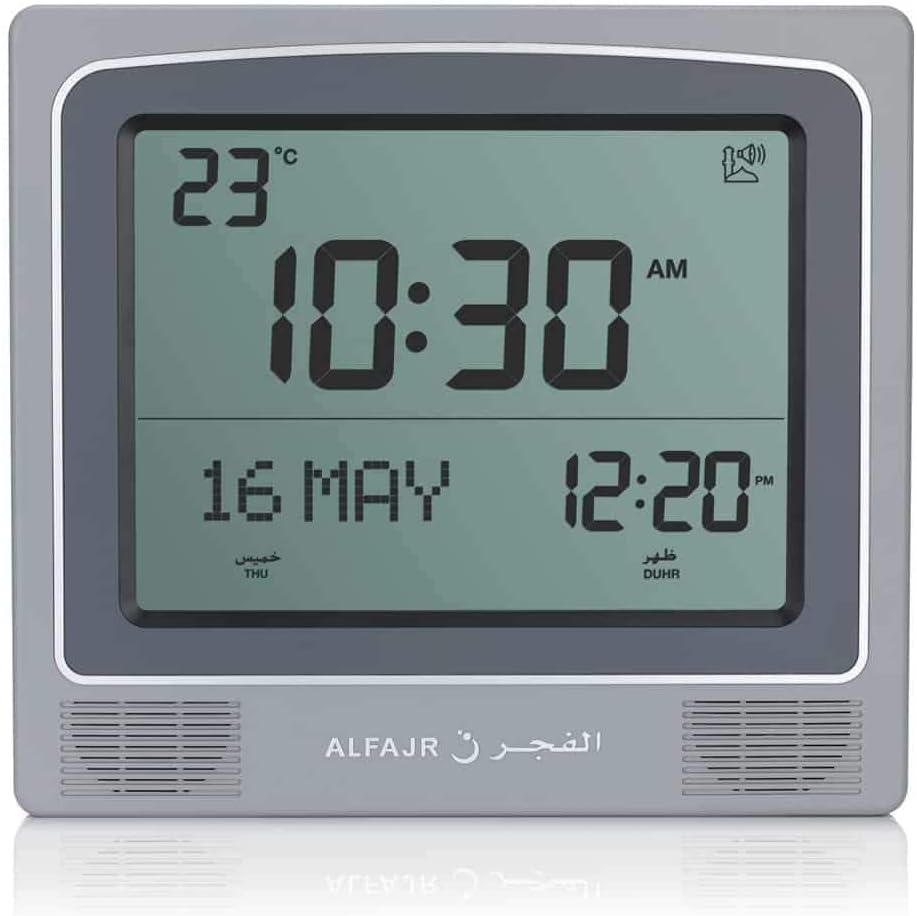
Upon inserting batteries or connecting USB-C power, the clock will power on. The display will show the current time, date, and temperature. Familiarize yourself with the buttons on the side/back of the clock: UP, SOUBORa DOLŮ.
Obrázek 1: Přední strana view of the ALFAJR CW-15 clock, showing the digital display with time, date, and temperature. The speaker grilles are visible at the bottom.
Obrázek 2: Přední strana view of the ALFAJR CW-15 clock, similar to Figure 1, but with the ALFAJR brand logo visible at the bottom center.
3. Nastavení času a data
Stiskněte a podržte SOUBOR tlačítko po dobu přibližně 3 sekund, dokud nezačne blikat zobrazení času.
Použijte UP a DOLŮ tlačítka pro nastavení hodiny. Stiskněte SOUBOR pro potvrzení a přechod na minuty.
Upravte minuty pomocí UP a DOLŮa poté stiskněte SOUBOR.
Pokračujte v tomto postupu pro nastavení roku, měsíce a dne.
Po nastavení data stiskněte SOUBOR to exit the time/date setting mode.
4. Setting Location (City or Coordinates)
Accurate Azan times depend on correct location settings. You can select a pre-programmed city or enter latitude/longitude.
Stiskněte tlačítko SOUBOR button once (short press) to enter the main menu.
Použití UP or DOLŮ to navigate to the "CITY" or "LOCATION" setting.
Stiskněte SOUBOR to enter the location setting.
Option A: Select Pre-programmed City: Použití UP or DOLŮ to scroll through the list of cities. Once your city is displayed, press SOUBOR potvrdit.
Option B: Enter Latitude/Longitude: If your city is not listed, select the option to enter coordinates. Use UP a DOLŮ to adjust the values for latitude, longitude, and time zone offset (GMT). Press SOUBOR po každé hodnotě.
After confirming your location, the clock will automatically calculate the Azan times.
5. Azan Calculation Method
The clock supports various Azan calculation methods. Consult local Islamic authorities for the recommended method in your region.
From the main menu (short press SOUBOR), navigate to "CALC. METHOD".
Stiskněte SOUBOR vstoupit.
Použití UP or DOLŮ to select the desired calculation method (e.g., Muslim World League, Umm Al-Qura, Egyptian General Authority of Survey, etc.).
Stiskněte SOUBOR potvrdit.
6. Letní čas (DST)
If your region observes Daylight Saving Time, enable this feature.
From the main menu, navigate to "DST".
Stiskněte SOUBOR.
Použití UP or DOLŮ to toggle between "ON" and "OFF".
Stiskněte SOUBOR potvrdit.
7. Jednotka teploty
You can choose to display temperature in Celsius or Fahrenheit.
From the main menu, navigate to "TEMP UNIT".
Stiskněte SOUBOR.
Použití UP or DOLŮ to select "C" (Celsius) or "F" (Fahrenheit).
Stiskněte SOUBOR potvrdit.
8. Zobrazení kalendáře
The clock can display either the Gregorian or Hijri calendar.
From the main menu, navigate to "CALENDAR".
Stiskněte SOUBOR.
Použití UP or DOLŮ to select "GREGORIAN" or "HIJRI".
Stiskněte SOUBOR potvrdit.
Návod k obsluze
1. Adjusting Azan Volume
The clock features adjustable Azan volume. The volume buttons are typically located on the side or back of the unit.
During an Azan, press the UP or DOLŮ tlačítka pro zvýšení nebo snížení hlasitosti.
Alternatively, some models may have a dedicated volume switch or buttons on the back. Refer to the physical clock for exact button placement.
2. Changing Azan Reciter
You can select from five different Azan reciters.
From the main menu (short press SOUBOR), navigate to "AZAN VOICE" or "RECITER".
Stiskněte SOUBOR vstoupit.
Použití UP or DOLŮ to cycle through the available reciters (Makkah, Madina, Egypt, AlQuds, Riyadh).
Stiskněte SOUBOR pro potvrzení vašeho výběru.
3. Daily Alarms
The clock includes daily alarm functions in addition to the Azan. These can be set for specific times.
From the main menu, navigate to "DAILY ALARM".
Stiskněte SOUBOR.
Použití UP or DOLŮ to set the desired alarm time (hour and minute).
Stiskněte SOUBOR to confirm and enable the alarm.
To disable, navigate back to "DAILY ALARM" and set the time to "OFF" or a similar option.
4. Režimy zobrazení
The clock typically cycles through different display information or allows manual switching.
The default display shows time, date, and temperature.
Krátkým stisknutím tlačítka UP or DOLŮ buttons outside of menu mode may cycle through additional information like next prayer time or Qibla direction (if available on this model).
Možnosti montáže
The ALFAJR CW-15 clock is designed for versatile placement, either on a wall or a flat surface.
1. Montáž na zeď
To mount the clock on a wall:
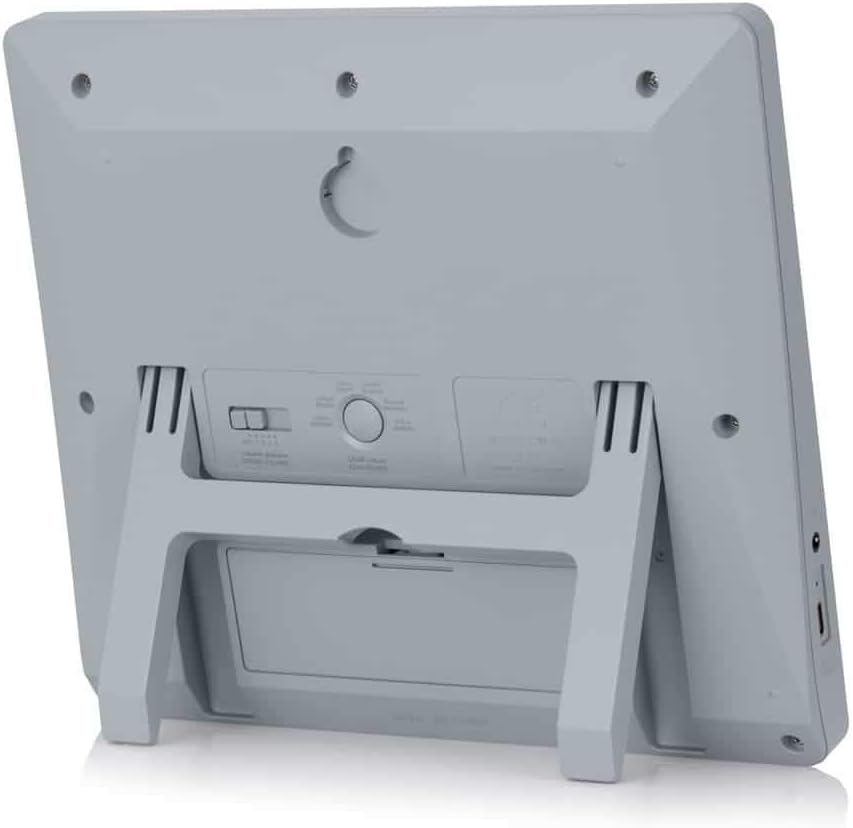
Locate the keyhole slot on the back of the clock.
Vyberte vhodné místo na zdi.
Install a screw (not included) into the wall, leaving a small portion protruding. Ensure the screw head fits into the keyhole slot.
Carefully hang the clock onto the screw, ensuring it is securely seated.
Obrázek 3: Zadní view of the ALFAJR CW-15 clock, highlighting the keyhole for wall mounting and the battery compartment.
2. Table Placement
For table or desk placement:
Locate the integrated stand on the back of the clock.
Pull out the stand until it locks into position.
Umístěte hodiny na rovný a stabilní povrch.
Obrázek 4: Strana view of the ALFAJR CW-15 clock, showing the integrated kickstand extended for stable table placement.
Údržba
1. Čištění
Pro zachování vzhledu a funkčnosti hodin:
Otřete povrch hodin měkkým, suchým hadříkem.
Nepoužívejte abrazivní čisticí prostředky, rozpouštědla ani chemické spreje, protože by mohly poškodit displej neboasing.
Avoid getting moisture into the clock's openings.
2. Výměna baterie
When the display dims or the clock functions become erratic, it's time to replace the batteries.
Otevřete přihrádku na baterie na zadní straně hodin.
Vyjměte staré baterie AA.
Insert four new AA batteries, observing correct polarity.
Zavřete přihrádku na baterie.
You may need to re-enter the time and location settings after battery replacement.
Odstraňování problémů
Problém
Možná příčina
Řešení
Hodiny se nezapínají.
Batteries are dead or incorrectly inserted. No USB-C power.
Check battery polarity. Replace with new batteries. Ensure USB-C cable (if used) is connected and power source is active.
Verify city, latitude, longitude, and GMT offset. Select the correct Azan calculation method for your region. Check DST setting.
Azan sound is too low or too high.
Je třeba upravit nastavení hlasitosti.
Adjust the volume using the dedicated buttons or through the menu.
Displej je tlumený nebo bliká.
Nízká kapacita baterie.
Vyměňte všechny 4 baterie typu AA za nové.
Clock resets unexpectedly.
Intermittent power loss or very low batteries.
Ensure batteries are fresh and securely seated. If using USB-C, check the connection and power source stability.
Specifikace
Model: CW-15
Značka: ALFAJR
Typ displeje: Digitální
Barva: Šedá
Materiál: Plast
Rozměry produktu: 8.5 palce (Š) x 9 palce (V)
Hmotnost položky: 3 unce
Zdroj napájení: 4 AA batteries (included) or USB-C (cable not included)
Typ montáže: Držák na stěnu / Stojan na stůl
Speciální vlastnosti: Automatic Azan, Multiple Azan Reciters, Gregorian/Hijri Calendar, Temperature Display, Daylight Saving Time
jazyky: angličtina, arabština
Záruka a podpora
Omezená záruka
The ALFAJR CW-15 Azan Clock comes with a limited warranty. Please refer to the warranty card included in your original packaging for specific terms, conditions, and duration. This warranty typically covers manufacturing defects under normal use.
Zákaznická podpora
For technical assistance, troubleshooting not covered in this manual, or warranty claims, please contact ALFAJR customer support through their official website or the retailer from whom you purchased the product. Please have your model number (CW-15) and purchase date available when contacting support.
Související dokumenty - CW-15
Uživatelská příručka průmyslového chladiče S&A CW-5000/5200 Uživatelská příručka pro průmyslové chladicí jednotky S&A řady CW-5000 a CW-5200 od společnosti GUANGZHOU TEYU ELECTROMECHANICAL CO., LTD., zahrnující instalaci, provoz, specifikace a řešení problémů.
Uživatelská příručka k chladicím jednotkám řady S&A CW-5000 a CW-5200 Uživatelská příručka pro průmyslové chladicí jednotky S&A řady CW-5000 a CW-5200 od společnosti GUANGZHOU TEYU ELECTROMECHANICAL CO., LTD. Zahrnuje instalaci, provoz, specifikace a řešení problémů pro přesnou regulaci teploty.
Uživatelská příručka k chladicímu zařízení řady CW-5202 User manual for the CW-5202 Series Industrial Refrigeration Chiller, providing detailed information on safety, installation, operation, adjustment, troubleshooting, and technical specifications for industrial cooling applications.
Uživatelská příručka k chladicímu zařízení řady CW-5200 Uživatelská příručka pro průmyslový chladicí a chladicí agregát řady CW-5200, která zahrnuje bezpečnostní informace, instalaci, provoz, nastavení, alarmy, řešení problémů a specifikace.
Uživatelská příručka k chladicímu zařízení řady CW-5202 Tato uživatelská příručka obsahuje podrobné pokyny pro průmyslový chladicí a chladicí agregát řady CW-5202, které zahrnují instalaci, provoz, bezpečnostní opatření, řešení problémů a technické specifikace pro optimální výkon.
Systém Thermafiber Impasse: Protipožární ochrana obvodového obvodového pláště Objevte systém Thermafiber Impasse, patentované řešení pro požární ochranu obvodových obvodových stěn od společnosti Owens Corning. Tento systém zjednodušuje instalaci, zvyšuje požární odolnost a nabízí vynikající akustické vlastnosti.