Zavedení
This manual provides detailed instructions for the setup, operation, and maintenance of your ARRIS TBS Tango 2 PRO V3 FPV RC Radio Controller. Please read this manual thoroughly before using the device to ensure proper function and safety.
Konec produktuview
The TBS Tango 2 PRO V3 is a compact and ergonomic FPV RC radio controller designed for precise control of drones. It features built-in TBS Crossfire technology for reliable long-range communication.
Klíčové vlastnosti:
- Full-size Hall sensor gimbals for accurate control.
- Integrated TBS Crossfire for robust radio link.
- Ergonomic and compact design with comfortable rubber grips.
- Built-in 5000mAh 1S LiPo battery with USB-C 2A charging.
- Speech audio output with audio jack and haptic vibration alerts.
- Open Source operating system (FreedomTX, a fork of OpenTX).
- Rocker dial and 3-button menu for navigation.
- High-resolution (128x96) black & white OLED screen with backlight.
- Digital rocker dial trim.
- Over 100 model memory with included SD-card.
- TBS Cloud compatible.

Obrázek 1: Přední strana view of the ARRIS TBS Tango 2 PRO V3 FPV RC Radio Controller. This image shows the gimbals, OLED screen, and navigation buttons.
Komponenty a ovládací prvky
Familiarize yourself with the various parts of your radio controller:
- Gimbaly: Control sticks for pitch, roll, yaw, and throttle.
- OLED obrazovka: Displays system information, menus, and model data.
- Navigační tlačítka: "EXIT", "MENU", "PAGE" buttons for menu interaction.
- Rocker Dial: Used for scrolling through menu options and adjusting values.
- Anténa: Foldable antenna for radio signal transmission.
- Port USB-C: Pro nabíjení a datové připojení.
- Audio jack: For connecting headphones for speech audio output.
- Rubber Grips: Provide comfortable handling.
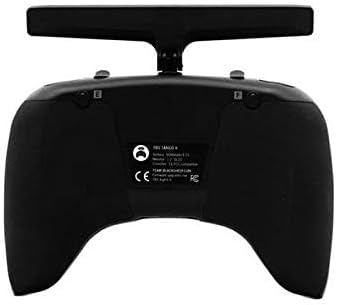
Obrázek 2: Shora dolů view of the controller, highlighting the foldable antenna and screen.
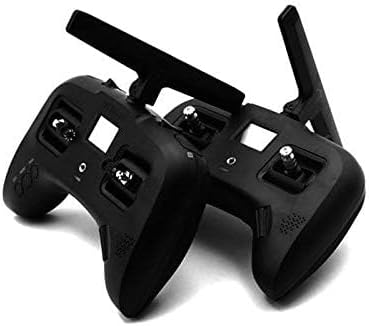
Obrázek 3: Spodní část view showing the USB-C charging port and audio jack.
Nastavení
1. Počáteční nabíjení
- Connect the included USB-C cable to the USB-C port on the bottom of the controller.
- Připojte druhý konec kabelu USB-C ke kompatibilnímu napájecímu adaptéru USB (není součástí balení).
- The built-in 5000mAh 1S LiPo battery will begin charging. A full charge typically takes approximately 2.5 hours using a 2A charger.
- The OLED screen will indicate charging status.
2. Zapnutí/vypnutí
- To power on: Press and hold the power button (usually located near the screen) until the OLED screen illuminates.
- To power off: Press and hold the power button until the shutdown sequence is initiated on the screen, then release.
3. Antenna Deployment
The antenna is foldable for transport. To deploy, gently pull the antenna upwards and rotate it into the upright position. To fold, apply a small amount of force to bend it inward and down.
Operace
1. Navigation and Menu System
The controller uses a rocker dial and three buttons ("EXIT", "MENU", "PAGE") for navigating the FreedomTX operating system.
- Rocker Dial: Otáčením procházejte možnostmi nabídky. Stisknutím vyberete možnost nebo potvrdíte nastavení.
- Tlačítko MENU: Accesses the main menu or enters sub-menus.
- Tlačítko STRÁNKA: Cycles through different pages or screens within a menu.
- Tlačítko EXIT: Návrat na předchozí obrazovku nebo opuštění aktuální nabídky.

Figure 4: Detail of the EXIT, MENU, and PAGE buttons for system navigation.
2. Gimbal Usage
The Hall sensor gimbals provide precise control. Move the sticks smoothly to control your FPV drone's flight characteristics (throttle, yaw, pitch, roll).

Figure 5: Close-up of a Hall sensor gimbal, illustrating the precision control mechanism.
3. Model Memory and SD Card
The controller supports over 100 model memories, stored on the included SD card. Use the menu system to select, create, or modify model profiles.
Údržba
- Čištění: K čištění vnější strany ovladače používejte měkký, suchý hadřík. Nepoužívejte agresivní chemikálie ani abrazivní materiály.
- Skladování: Store the controller in a cool, dry place away from direct sunlight and extreme temperatures. Ensure the antenna is folded for protection during storage and transport.
- Péče o baterie: For optimal battery life, avoid fully discharging the battery frequently. Charge the battery regularly, even if not in use for extended periods.
- Aktualizace firmwaru: Periodically check the official TBS website for firmware updates for the FreedomTX operating system. Follow the provided instructions carefully for any update procedures.
Odstraňování problémů
| Problém | Možná příčina | Řešení |
|---|---|---|
| Ovladač se nezapne. | Slabá nebo vybitá baterie. | Charge the controller using the USB-C port. Ensure the charging cable and adapter are functional. |
| Gimbals not responding or inaccurate. | Vyžaduje kalibraci; fyzická překážka. | Access the calibration menu in FreedomTX and follow the on-screen instructions. Check for any debris around the gimbals. |
| No signal to drone. | Drone not bound; antenna not deployed; range issue. | Ensure the drone is properly bound to the controller. Verify the antenna is fully deployed. Check for obstacles or interference. |
| Obrazovka je prázdná nebo nereaguje. | Software issue; power issue. | Attempt a hard reset (refer to specific FreedomTX documentation if available). Ensure battery is charged. |
Specifikace
- Značka: ARRIS
- Název modelu: TBS Tango 2 Pro V3
- Číslo modelu položky: TBS Tango 2 Pro V3
- Technologie připojení: RF
- Typ ovladače: Ovládání tlačítkem
- Kompatibilní zařízení: Trubec
- Baterie: 1 Lithium Polymer battery required (built-in 5000mAh 1S LiPo)
- Nabíjení: USB-C 2A (approx. 2.5 hours for full charge)
- Obrazovka: High resolution (128x96) black & white OLED with backlight
- Gimbaly: Full size Hall sensor
- Operační systém: FreedomTX (temporary fork of OpenTX)
- Paměť modelu: 100+ models with included SD-card
- Zvukový výstup: Speech audio output with audio jack
- Upozornění: Haptic vibration alert
- Hmotnost položky: 1.3 libry
- Rozměry balení: 8.07 x 6.18 x 3.35 palce
- Výrobcem doporučený věk: 10 let a více
Záruka a podpora
For warranty information and technical support, please refer to the official documentation provided with your purchase or visit the ARRIS official webUschovejte si doklad o koupi pro případné reklamace.
Note: Some users have reported varied experiences with third-party support channels. For the most accurate and reliable assistance, always consult official brand resources.


