1. Úvod
This manual provides detailed instructions for the installation, operation, and maintenance of your EONON GA2185J 10.1-inch Android Car Navigation System. Please read this manual thoroughly before using the product to ensure proper and safe operation. Keep this manual for future reference.
2. Bezpečnostní informace
- Doporučená profesionální instalace: Vzhledem ke složitosti elektrických systémů automobilu se důrazně doporučuje profesionální instalace, aby se zabránilo poškození jednotky nebo vašeho vozidla.
- Bezpečnost jízdy: Nepoužívejte systém způsobem, který by vás rozptyloval od řízení. Vždy upřednostňujte bezpečnost silničního provozu.
- Napájení: Ensure the unit is connected to a 12V DC power supply with negative grounding. Incorrect voltagmůže způsobit poškození.
- Teplota: Nevystavujte jednotku extrémním teplotám nebo přímému slunečnímu záření po delší dobu.
- vlhkost: Chraňte jednotku před vodou a nadměrnou vlhkostí.
- Větrání: Zajistěte dostatečné větrání kolem jednotky, aby se zabránilo přehřátí.
3. Obsah balení
Ověřte, zda jsou v balení obsaženy všechny níže uvedené položky:

Obraz: Included Accessories. This image displays all components that come with the EONON GA2185J unit, neatly arranged and numbered for easy identification.
- GPS Antenna (3m) x1
- Napájecí kabel x1
- AV kabel x2
- Microphone (3m) x1
- USB Cable (1m) x2
- Wi-Fi Antenna (1.5m) x1
- 15A Pojistka x1
- Demontážní nástroj x1
- Upevňovací šrouby x4
- Návod k použití x1
4. Konec produktuview
The EONON GA2185J is a 10.1-inch Android 10 car navigation system designed to provide a comprehensive multimedia and navigation experience in your vehicle.

Obraz: EONON GA2185J Main Unit. This image shows the front of the car navigation system, highlighting its memory specifications.
Klíčové vlastnosti:
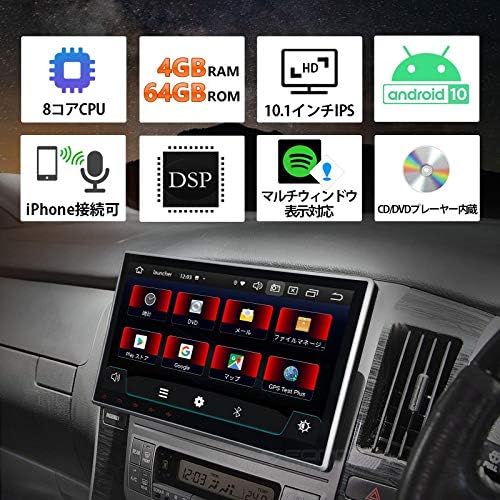
Obraz: Funkce skončilaview. This infographic summarizes the main technical specifications and functionalities of the device.
- Operační systém: Android 10
- Procesor: 8jádrový procesor
- Paměť: 4GB RAM + 64GB ROM
- Zobrazit: 10.1palcový dotykový IPS displej
- Konektivita: Built-in Wi-Fi, Built-in Bluetooth, USB
- Audio vlastnosti: DSP (Digital Sound Processor), Equalizer, Subwoofer output, RCA outputs
- Rádio: FM Tuner, AM Tuner, RDS
- Integrace smartphonu: iPhone connectivity (Mirroring)
- Multitasking: Multi-window display support
- Přehrávání médií: CD/DVD Player built-in

Obraz: Processor Details. This image highlights the powerful 8-core processor and memory configuration of the system.
Výkon:

Obraz: Fast Boot Time. This image demonstrates the system's quick startup, powering on in approximately 1 second.
The system is designed for a fast and smooth user experience, supporting numerous applications and improving data transfer speeds for efficient multitasking.
5. Nastavení a instalace
Kontrola před instalací:
- Before installation, carefully check the size and shape of your vehicle's console panel to ensure compatibility.
- If the product size does not match your console, please contact the service center directly for assistance.
Fyzická instalace:
The unit features an adjustable screen, allowing for a gap of up to approximately 35mm between the LCD panel and the main unit for optimal viewing úhly.

Obraz: Adjustable Screen Angle. This diagram illustrates how the screen can be tilted to achieve the best viewing pozice.
- Carefully remove your existing car stereo or panel.
- Connect the necessary wiring harnesses (power, speakers, accessories) to the GA2185J unit.
- Mount the unit securely into the dashboard using the provided mounting screws.
- Adjust the screen angle as needed for optimal visibility.
- Reinstall any removed panels or trim.
Připojení kabeláže:
Refer to the wiring diagram provided with your unit for specific connections. Key connections include:
- Napájecí kabel: Connect to vehicle's 12V DC power supply (constant, accessory, ground).
- Dráty reproduktorů: Připojte se k reproduktorům vašeho vozidla.
- GPS anténa: Connect the GPS antenna and place it in a location with a clear view z nebe.
- Wi-Fi anténa: Connect the Wi-Fi antenna for optimal wireless signal reception.
- USB kabely: Připojte zařízení USB pro přehrávání médií nebo nabíjení smartphonu.
- AV Cables: Use for connecting external audio/video sources or outputting video to external displays.
- Mikrofon: Připojte externí mikrofon pro handsfree volání a hlasové příkazy.
6. Návod k obsluze
Základní provoz:
- Zapnutí/vypnutí: Press and hold the power button (if available) or turn on your vehicle's ignition.
- Dotyková obrazovka: Navigate the interface by tapping, swiping, and pinching on the 10.1-inch IPS touchscreen.
- Ovládání hlasitosti: Hlasitost upravte pomocí ovládacích prvků na obrazovce nebo ovládacích prvků na volantu (pokud jsou připojeny).
Systém Android 10:
Your device runs on Android 10, offering a familiar and intuitive user interface. It supports a wide range of applications and provides a smooth, responsive experience.

Obraz: Android 10 Interface. This image demonstrates the Android 10 operating system running on the device, showcasing its multimedia capabilities.
Bluetooth připojení:
Pair your smartphone or other Bluetooth devices to the unit for hands-free calling and audio streaming.
- Přejděte do nastavení Bluetooth na zařízení.
- Povolte na svém smartphonu Bluetooth a vyhledejte dostupná zařízení.
- Select 'EONON GA2185J' (or similar name) from the list and confirm pairing.
Wi-Fi připojení:
Připojte se k síti Wi-Fi a získejte přístup k online funkcím, stahujte aplikace a procházejte internet.
- Navigate to the Wi-Fi settings menu.
- Select your desired Wi-Fi network and enter the password if required.
GPS navigace:
Utilize pre-installed or downloaded navigation applications for turn-by-turn directions and real-time traffic information.
- Ensure the GPS antenna is properly installed and has a clear signal.
- Open your preferred navigation app and enter your destination.
Zobrazení ve více oknech:
The multi-window feature allows you to split the screen and use two applications simultaneously, enhancing multitasking capabilities.

Obraz: Multi-Window Display. This image illustrates the ability to run two applications side-by-side on the screen, such as navigation and music.
Smartphone Mirroring (iPhone Connectivity):
Connect your iPhone to the unit to mirror its display and access apps, navigation, calls, and music through the car stereo's interface. This feature is designed with driving safety in mind.

Obraz: iPhone Connectivity. This image shows an iPhone connected to the car stereo, demonstrating the mirroring functionality for seamless integration.
Nastavení zvuku:
Utilize the built-in DSP, equalizer, and subwoofer output to customize your audio experience.
- Access the audio settings menu to adjust sound profiles, bass, treble, and balance.
- The DSP allows for fine-tuning of sound characteristics.
- Connect an external subwoofer to the dedicated output for enhanced bass.
7. Údržba
- Čištění obrazovky: Dotykovou obrazovku jemně otírejte měkkým hadříkem, který nepouští vlákna. Nepoužívejte abrazivní čisticí prostředky ani rozpouštědla.
- Aktualizace softwaru: Periodically check for software updates to ensure optimal performance and access to new features. Updates can usually be found on the manufacturer's website or through the system's settings.
- Obecná péče: Keep the unit free from dust and debris. Avoid placing heavy objects on the unit.
8. Řešení problémů
If you encounter issues with your EONON GA2185J, refer to the following common problems and solutions:
| Problém | Možná příčina | Řešení |
|---|---|---|
| Jednotka se nezapne. | Nesprávné zapojení, spálená pojistka, problém s napájením vozidla. | Check power cable connections. Inspect the 15A fuse. Verify vehicle's power supply. |
| Žádný zvuk. | Speaker wires disconnected, volume too low, audio settings incorrect. | Check speaker connections. Increase volume. Verify audio output settings. |
| Signál GPS je slabý nebo nepřesný. | GPS antenna improperly placed or faulty. | Ujistěte se, že má anténa GPS volný view oblohy. Zkontrolujte připojení antény. |
| Problémy s připojením Bluetooth. | Device not in pairing mode, interference, incorrect pairing process. | Ujistěte se, že obě zařízení jsou v režimu párování. Smažte předchozí párování a zkuste to znovu. Přesuňte se blíže k jednotce. |
| System freezes or becomes unresponsive. | Software glitch, too many apps running, overheating. | Perform a soft reset (refer to manual for reset button location, usually a small pinhole). Close unnecessary applications. Ensure proper ventilation. |
Pokud problém přetrvává i po vyzkoušení těchto řešení, kontaktujte zákaznickou podporu.
9. Specifikace
| Funkce | Specifikace |
|---|---|
| Velikost obrazovky | 10.1 palců |
| Operační systém | Android 10 |
| Procesor | 8jádrový |
| BERAN | 4 GB |
| ROM | 64 GB |
| Konektivita | Bluetooth, USB, Wi-Fi |
| Další funkce | AM Tuner, Bluetooth Built-in, DSP, FM Tuner, RCA, RDS, Wi-Fi Built-in, Equalizer, Subwoofer, Touchscreen |
| Kompatibilní zařízení | Smartphones, PCs |
| Typ konektoru | 3.5mm Jack, RCA |
| Režim zvukového výstupu | Surround, Stereo |
| Kontrolní metoda | App, Touch, Remote |
| Hmotnost produktu | 2.3 kg |
| Rozměry balení | 34.8 x 32 x 23.88 cm |
10. Záruka a podpora
Informace o záruce, technickou podporu nebo servisní dotazy naleznete v záruční kartě dodané s produktem nebo se obraťte přímo na prodejce/výrobce. Uschovejte si účtenku jako doklad o koupi.


