Zavedení
This manual provides detailed instructions for the installation, operation, and maintenance of your Wyze Bulb Color. This smart LED bulb offers 16 million colors, tunable white light, and smart control features, enhancing your home lighting experience.
Bezpečnostní informace
- Před instalací nebo demontáží se ujistěte, že je vypnuto napájení.
- Do not use with dimmers unless specified by the manufacturer.
- Vhodné pouze pro vnitřní použití.
- Avoid exposure to water or excessive moisture.
- Žárovku nerozebírejte.
Co je zahrnuto
- Wyze Bulb Color (2-Pack)

Image: Two Wyze Bulb Color smart bulbs, showing their colorful glow and white base with the 'WYZE COLOR' logo.
Specifikace
| Funkce | Detail |
|---|---|
| Značka | WYZE |
| Typ světla | LED |
| Speciální funkce | Měnící se barva, Stmívatelné |
| Wattage | 12 wattů |
| Velikost tvaru žárovky | A19 |
| Základna žárovky | E26 |
| Žárovkový ekvivalent | 75 wattů |
| svtage | 120 voltů |
| Teplota barev | Tunable White (2700K-6500K) |
| Jas | 1100 lumenů |
| Index podání barev (CRI) | 90+ |
| Průměrný život | 25000 hodiny |
| Kontrolní metoda | Voice (Alexa, Google Assistant), Wyze App |
| Konektivita | WiFi (2.4GHz), Bluetooth |
Pokyny pro nastavení
- Nainstalujte žárovku: Screw the Wyze Bulb Color into any standard E26 light fixture. Ensure the fixture is powered on.
- Stáhněte si aplikaci Wyze: Download the latest Wyze app from your device's app store (Google Play Store for Android or Apple App Store for iOS).
- Create/Log In to Wyze Account: Open the app and create a new account or log in to your existing one.
- Přidat zařízení: In the Wyze app, tap the "+" icon in the upper left corner, then select "Add Device". Choose "Power & Lighting" and then "Wyze Bulb Color".
- Spárování žárovky: The app will guide you through the pairing process. If the bulb is not pulsing, turn the light fixture on and off three times to enter pairing mode.
- Připojení k Wi-Fi: Select your 2.4GHz Wi-Fi network and enter the password. (Note: Wyze Bulbs operate on 2.4GHz Wi-Fi networks).
- Pojmenujte svou žárovku: Once connected, you can name your bulb for easy identification and voice control.
Video: Demonstrates the quick and easy setup process of the Wyze Bulb Color using the Wyze app, including screwing in the bulb, connecting to Wi-Fi, and naming the device.
Návod k obsluze
Using the Wyze App:
- Ovládání barev: Select your bulb in the app. Use the color wheel to choose from 16 million colors.
- Nastavení jasu: Adjust the brightness slider to your desired level (from 30 lumens to 1100 lumens).
- White Light Temperature: Switch to the "Temperature" tab to select various shades of white light, from cool white (6500K) for focus to soft white (2700K) for relaxation.
- Scény a rutiny: Create custom scenes for different moods or activities. Set schedules and automations for the bulb to turn on/off or change color at specific times or based on other Wyze device triggers.
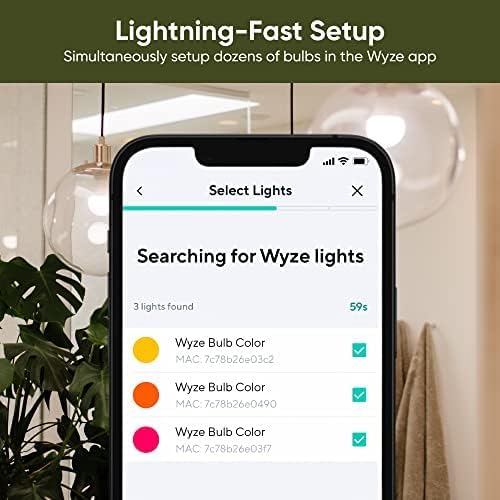
Image: The Wyze app displaying the color selection wheel, allowing users to choose from a wide spectrum of colors for their smart bulb.
Voice Control (Alexa/Google Assistant):
- Připojení k hlasovému asistentovi: Link your Wyze account to your Amazon Alexa or Google Assistant app.
- příkazy: Use voice commands such as "Alexa, turn [bulb name] blue," "Hey Google, dim [bulb name] to 50%," or "Alexa, set [bulb name] to warm white."

Image: A person interacting with a smart speaker to control the Wyze Bulb Color, demonstrating convenient voice activation.
Klíčové vlastnosti
- Nastavitelný jas: Offers a wide range of brightness from 30 lumens (2W equivalent) to 1100 lumens (75W equivalent).
- 16 milionů barev: Customize your lighting with a full spectrum of colors for any mood or occasion.
- Laditelné bílé světlo: Adjust white light temperature from cool to warm to suit your activity or preference.
- High CRI Rating (90+): Experience true and vibrant colors in your environment.
- Chytrá upozornění: Create time-based color events or automate visual notifications using other Wyze devices.
- Snadné nastavení: Quick and straightforward setup process via the Wyze app, no hub required.

Image: A dining table illuminated with a warm red light from the Wyze Bulb Color, demonstrating its ability to set a specific mood.

Image: A home office setup brightly illuminated by the Wyze Bulb Color, highlighting its 1100 lumen output for clear visibility.
Údržba
- Čištění: Před čištěním se ujistěte, že je žárovka vypnutá a vychladlá. Otřete měkkým, suchým hadříkem. Nepoužívejte tekuté čisticí prostředky.
- Aktualizace firmwaru: Regularly check the Wyze app for firmware updates to ensure optimal performance and access to new features.
- Skladování: Pokud žárovku skladujete delší dobu, uchovávejte ji na chladném a suchém místě mimo dosah přímého slunečního záření.
Odstraňování problémů
- Bulb Not Connecting: Ensure your Wi-Fi network is 2.4GHz. Try turning the light fixture off and on three times to re-enter pairing mode. Move the bulb closer to your Wi-Fi router if possible.
- Problémy s hlasovým ovládáním: Verify that your Wyze account is correctly linked to your Alexa or Google Assistant app. Check your internet connection.
- Nekonzistentní výkon: Check for and install any available firmware updates in the Wyze app. Ensure your Wi-Fi signal is strong and stable.
- Bulb Not Turning On: Check the light fixture and ensure it is receiving power. Test the bulb in another working fixture.
Informace o záruce
The Wyze Bulb Color comes with a 1-year manufacturer's warranty. Please refer to the official Wyze webna stránkách, kde najdete úplné záruční podmínky.
Podpora
Pro další pomoc navštivte oficiální stránky WYZE Store or contact Wyze customer support through their webmísto.


