1. Úvod
This manual provides instructions for the YOWU Cat Ear Headphones, Model CE MODEL-Z. These headphones feature Bluetooth 5.2 connectivity, customizable RGB lighting, and an ergonomic design for extended use. Please read this manual thoroughly before using the product to ensure proper operation and maintenance.
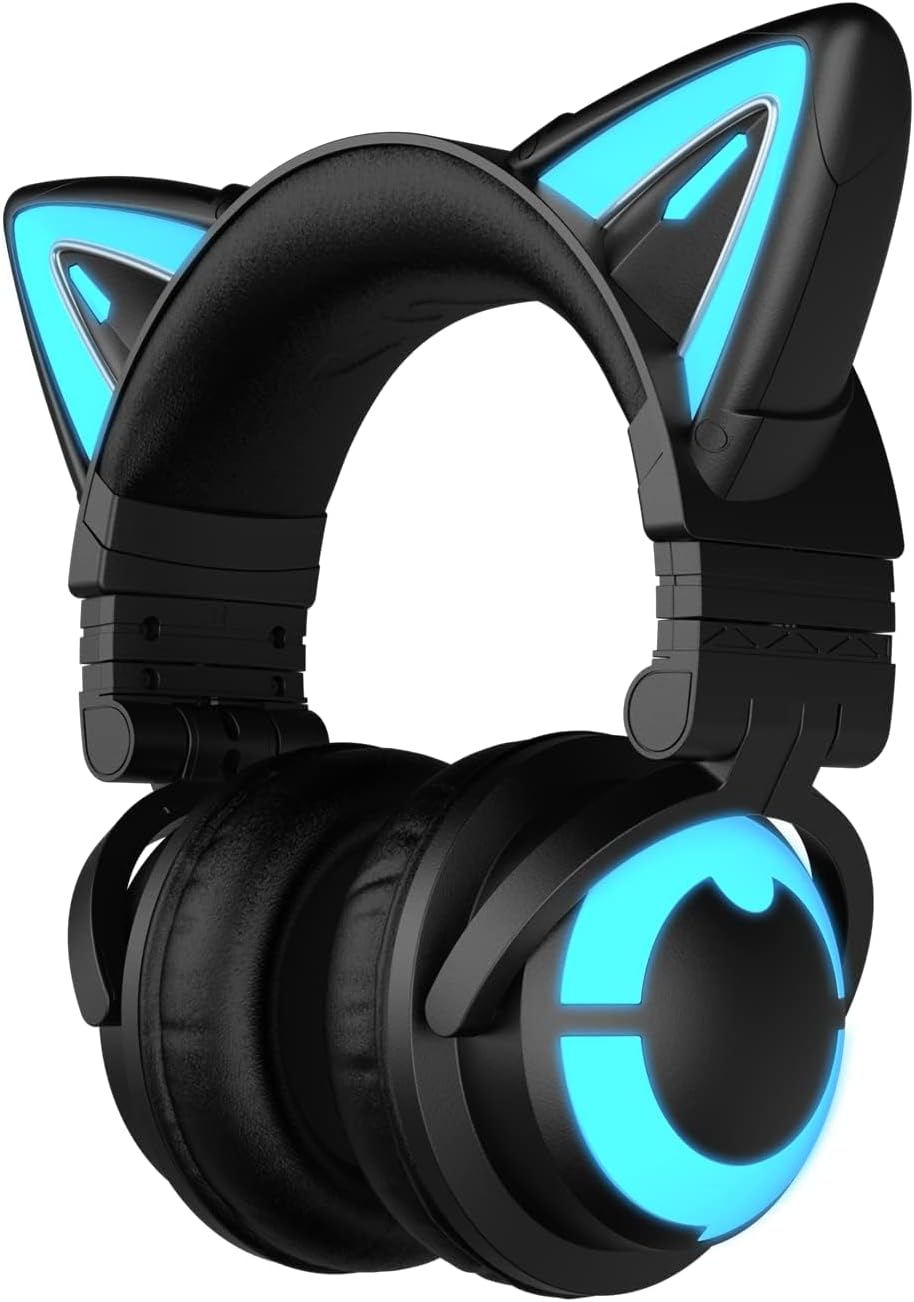
Image 1.1: YOWU Cat Ear Headphones CE MODEL-Z. This image displays the black headphones with illuminated blue cat ears and earcups.
2. Obsah balení
Ověřte, zda jsou v balení přítomny všechny položky:
- YOWU Cat Ear Headphones (MODEL-Z)
- Uživatelská příručka
- Type-C Audio/Charging Cable

Image 2.1: Package contents. The image shows the headphones, user manual, and Type-C cable neatly arranged in their packaging.
3. Vlastnosti produktu
- Připojení Bluetooth 5.2: Provides stable and low-latency wireless connection.
- 7.1 Pro Surround Sound: Offers an immersive audio experience.
- Přizpůsobitelné RGB osvětlení: Allows personalization of lighting effects.
- Ergonomický design: Features super-soft protein leather and memory foam for comfort during extended wear.
- E-sports Grade Noise Canceling: Designed to block external noise for clear communication.
- Kompatibilita s více platformami: Supports PC, mobile devices, Switch via Bluetooth, and PS4/PS5 via wired connection.
- Dlouhá výdrž baterie: Up to 48 hours of playback without lighting, or 2-10 hours with lighting.

Image 3.1: Key product features. This image highlights the ergonomic design, sound experience, Bluetooth 5.2, RGB modes, built-in microphone, and professional tuning.
4. Nastavení
4.1 Nabíjení sluchátek
Before initial use, fully charge the headphones. Use the provided Type-C charging cable and a 5V2A charger. Charging takes approximately 1.6 hours.
- Connect the Type-C cable to the headphone's charging port.
- Druhý konec kabelu připojte ke kompatibilnímu zdroji napájení USB (např. síťový adaptér, USB port počítače).
- Kontrolka bude zobrazovat stav nabíjení (podrobnosti naleznete v části o LED indikátorech).

Image 4.1: Charging the headphones. The image shows the Type-C cable connected to the headphone's charging port, with text indicating 1.6 hours for fast charging and 48 hours running with RGB light off.
4.2 Párování Bluetooth
To connect the headphones wirelessly via Bluetooth 5.2:
- Ujistěte se, že jsou sluchátka vypnutá.
- Stiskněte a podržte tlačítko napájení, dokud LED indikátor nezačne blikat, což signalizuje režim párování.
- On your device (PC, phone, tablet, Switch), enable Bluetooth and search for available devices.
- Select "YOWU CE" from the list of devices.
- Once connected, the LED indicator will change to a steady light.
4.3 Kabelové připojení
For devices that do not support Bluetooth or for a wired connection (e.g., PS4/PS5), use the provided Type-C audio cable:
- Connect one end of the Type-C cable to the headphone's audio port.
- Druhý konec připojte k audio výstupu vašeho zařízení.
- Note: An additional Bluetooth adapter may be required for XBOX connections.

Image 4.2: Wide compatibility. This diagram illustrates the headphones connecting to phones, pads, Switch, laptops, PCs via Bluetooth, and PS4/PS5, phones, PCs via wired connection.
5. Návod k obsluze
5.1 Zapnutí/vypnutí
- Zapnutí: Stiskněte a podržte tlačítko napájení po dobu 3 sekund.
- Vypnout: Stiskněte a podržte tlačítko napájení po dobu 5 sekund.
5.2 Ovládání RGB osvětlení
The headphones feature customizable RGB lighting effects. Use the dedicated lighting control button or the YOWU mobile application to adjust colors and patterns.
- Režimy osvětlení cyklu: Short press the lighting button to switch between available lighting effects.
- Customize via App: Download the YOWU app to access advanced customization options for colors, brightness, and animation speed.
5.3 Ovládání zvuku
The headphones include integrated controls for audio playback:
- Zvýšení/Snížení hlasitosti: Use the volume rocker or buttons.
- Přehrát/pozastavit: Jednou stiskněte multifunkční tlačítko.
- Další skladba: Dvakrát stiskněte multifunkční tlačítko.
- Předchozí skladba: Třikrát stiskněte multifunkční tlačítko.
5.4 Použití mikrofonu
The built-in microphone provides clear voice communication. Ensure the microphone is positioned correctly for optimal pickup.
- Ztlumit/Zapnout: Press the microphone mute button.
- The E-sports grade noise canceling feature helps reduce background noise during calls or gaming.
6. Údržba
To ensure the longevity and optimal performance of your YOWU Cat Ear Headphones, follow these maintenance guidelines:
- Čištění: K čištění sluchátek používejte měkký, suchý hadřík. Nepoužívejte abrazivní čisticí prostředky ani rozpouštědla.
- Skladování: Store the headphones in a cool, dry place, away from direct sunlight and extreme temperatures. Use the provided protective hard case for travel or long-term storage.
- Nabíjení: Always use the original charging cable or a compatible 5V2A charger to prevent damage.
- Vyhněte se vodě: Sluchátka nejsou voděodolná. Zabraňte kontaktu s tekutinami.
7. Řešení problémů
Pokud se se sluchátky setkáte s problémy, podívejte se na následující běžná řešení:
- Bez napájení: Ujistěte se, že jsou sluchátka plně nabitá. Připojte je ke zdroji napájení a zkontrolujte indikátor nabíjení.
- Nelze spárovat přes Bluetooth:
- Ensure the headphones are in pairing mode (flashing LED).
- Vypněte a zapněte Bluetooth na vašem zařízení.
- Přesuňte sluchátka blíže k zařízení.
- If connecting to a PC, some systems may require a dedicated Bluetooth dongle for optimal compatibility.
- Žádný zvuk/nízká hlasitost:
- Zkontrolujte úroveň hlasitosti na sluchátkách i na připojeném zařízení.
- Ensure the headphones are correctly paired or the wired connection is secure.
- Vyzkoušejte s jiným zdrojem zvuku nebo zařízením.
- Mikrofon nefunguje:
- Ujistěte se, že mikrofon není ztlumený.
- Zkontrolujte nastavení mikrofonu na připojeném zařízení.
- RGB světla nefungují:
- Ensure the headphones have sufficient battery charge.
- Check settings in the YOWU mobile application.
8. Specifikace
| Funkce | Specifikace |
|---|---|
| Název modelu | MODEL-Z |
| Technologie připojení | Bezdrátové (Bluetooth), Kabelové (USB-C) |
| Technologie bezdrátové komunikace | Bluetooth 5.2 |
| Jack pro sluchátka | USB-C konektor |
| Kontrola hluku | Aktivní potlačení hluku |
| Citlivost | 105 dB |
| Frekvenční rozsah | 20 Hz - 20,000 XNUMX Hz |
| Impedance | 32 Ohmy |
| Typ zvukového ovladače | Dynamický ovladač |
| Životnost baterie | 48 hodin (bez osvětlení), 2–10 hodin (s osvětlením) |
| Doba nabíjení | 1.6 hodiny |
| Hmotnost položky | 435 gramů (15.3 unce) |
| Umístění uší | Přes ucho |
| Speciální funkce | Skládací |
| Úroveň odolnosti proti vodě | Není odolný vůči vodě |
| Zahrnuté komponenty | Kabel, uživatelská příručka |

Image 8.1: Product specification comparison. This table compares features like Bluetooth version, app features, driver unit, microphone, charging time, battery life, and connection method between 3G and CE models.
9. Záruka a podpora
YOWU provides a 1-year warranty for the Cat Ear Headphones. For technical support, warranty claims, or any product-related inquiries, please contact YOWU customer support.
- Záruční doba: 1 rok od data nákupu.
- Zákaznická podpora: Refer to the YOWU official webkontaktní informace naleznete na webu nebo na obalu produktu.


