1. Úvod
The USKEYVISION V-Master Smartphone Vlogging Kit is designed to enhance your mobile video recording experience. This all-in-one kit includes essential accessories to improve audio, lighting, and stability for various content creation needs, from vlogging to live-streaming.
Klíčové vlastnosti:
- Metal Tripod with Armor Texture: A sturdy, height-adjustable tripod suitable for both handheld and desktop use, featuring a flexible grip for accessory mounting.
- Customized LED Lighting: A rechargeable LED light with 3-level brightness and adjustable color temperature (3000K-6000K). It includes four cold-shoe threads for additional accessories.
- Professional Video Microphone: A super-cardioid directional shotgun microphone designed to capture clear, crisp audio, compatible with a wide range of smartphones.
- Flexible Cold Shoe Arm: An adjustable arm that allows for versatile positioning of the microphone or LED light, adapting to diverse shooting angles.
2. Co je v krabici
Zkontrolujte prosím, zda jsou v balení přítomny všechny komponenty:
- 1x kovový stativ
- 1x 360° Rotating Ball Head
- 1x Metal Video Microphone
- 1x videosvětlo
- 1x Flexible Grip
- 1x Universal Smartphone Clip
- 1x Windshield (for microphone)
- 1x Uživatelská příručka
- 1x TRS Audio Cable
- 1x TRRS Audio Cable
- 1x Storage Case Bag

Figure 2.1: All components included in the USKEYVISION V-Master Vlogging Kit.
For a visual guide on unboxing and initial component overview, please refer to the video below:
Video 2.1: USKEYVISION V-master Unboxing. This video demonstrates the contents of the kit and initial presentation.
3. Pokyny k nastavení
Follow these steps to assemble your USKEYVISION V-Master Vlogging Kit:
- Attach the Ball Head to the Tripod: Secure the 360° Rotating Ball Head to the top of the Metal Tripod. Ensure it is tightened for stability.
- Mount the Smartphone Clip: Attach the Universal Smartphone Clip to the 360° Rotating Ball Head. Adjust the clip to securely hold your smartphone.
- Install the Flexible Grip: Connect the Flexible Grip to one of the available cold-shoe threads on the tripod or smartphone clip.
- Attach the Video Light: Mount the Video Light onto the Flexible Grip. The flexible arm allows for precise positioning of the light.
- Připojte mikrofon: Insert the Metal Video Microphone into the cold-shoe mount on the smartphone clip. Use the appropriate audio cable (TRS for cameras, TRRS for smartphones) to connect the microphone to your device's audio input.
- Apply Windshield (Optional): For outdoor recording, place the Windshield over the microphone to reduce wind noise.

Figure 3.1: The adjustable legs of the metal tripod can be extended or retracted for desired height and stability.
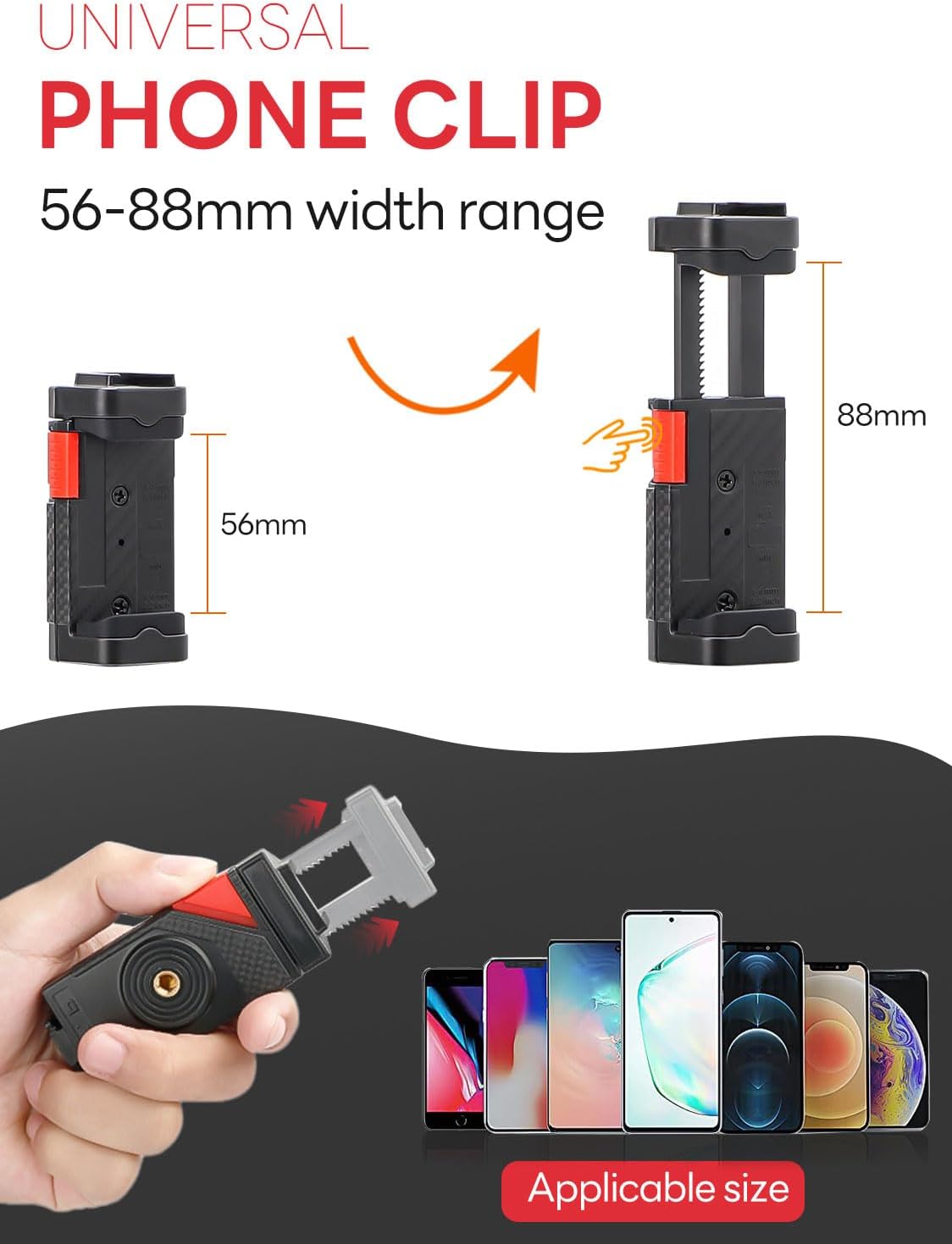
Figure 3.2: The 360° rotating ball head allows for flexible camera angles.

Figure 3.3: The universal smartphone clip securely holds devices with widths between 56-88mm.
For a visual demonstration of the kit's assembly and features, watch the video below:
Video 3.1: Introducing V-Master Smartphone Video YouTube Kit. This video provides an overview of the kit's components and basic assembly.
4. Návod k obsluze
4.1. Using the LED Video Light
- Zapnutí/vypnutí: Press and hold the power button on the back of the LED light.
- Upravit jas: Use the brightness control buttons to cycle through 3 levels of illumination.
- Úprava teploty barev: The light offers a color temperature range of 3000K-6000K. Use the mode selection button to adjust between warm, natural, and cold light settings.
- Nabíjení: The LED light is rechargeable via a Type-C charging port. A charging indicator will show its status.

Obrázek 4.1: Detailní view of the LED light's controls, including power, brightness, and charging indicator.
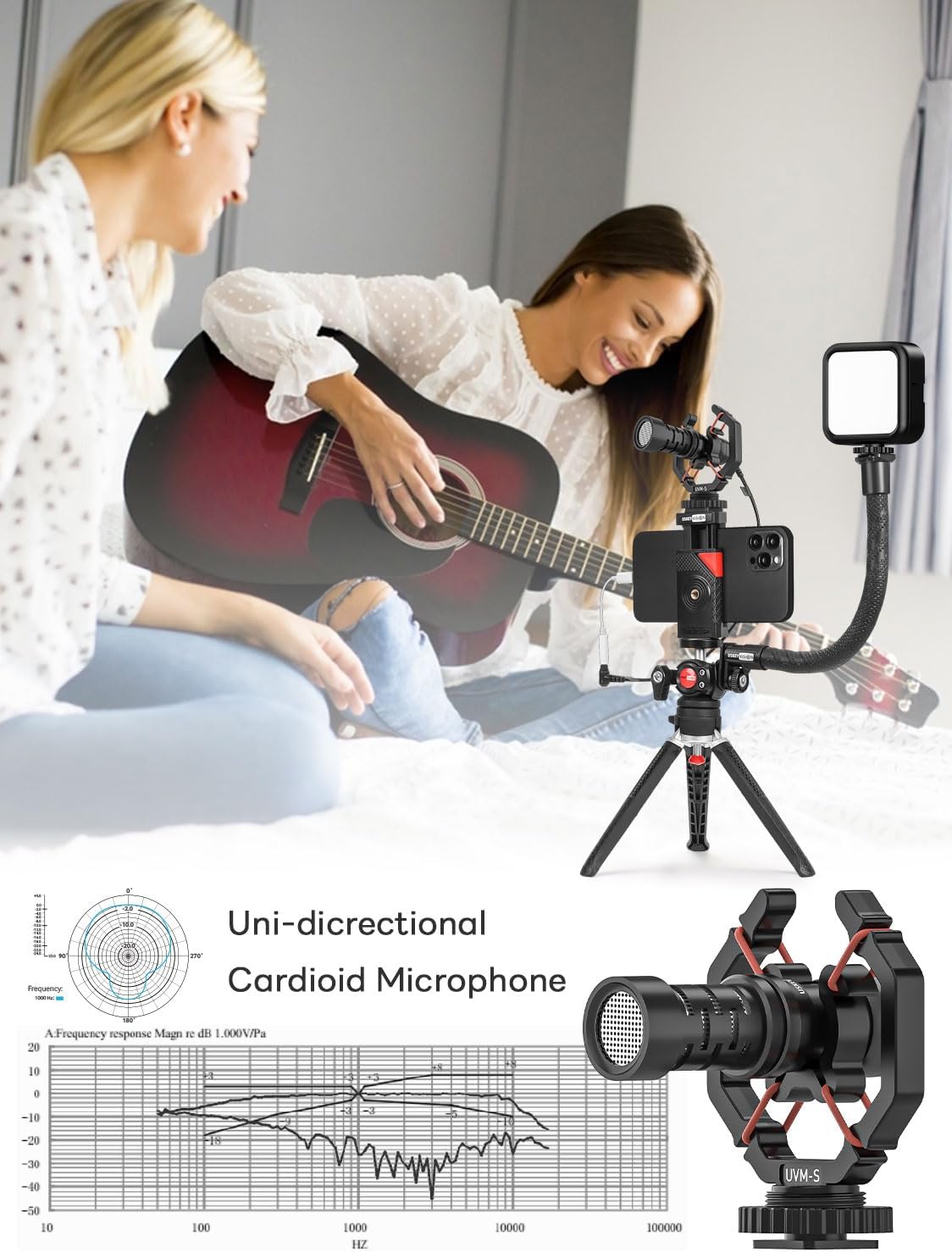
Figure 4.2: The LED light offers three distinct color temperature settings: Warm (3000K), Natural, and Cold (7000K), with adjustable brightness from 1-100%.
4.2. Using the Metal Video Microphone
- Spojení: Connect the microphone to your smartphone using the provided TRRS audio cable. For devices without a 3.5mm jack, an adapter (not included) may be required.
- Umístění: Ensure the microphone is pointed towards the audio source for optimal sound capture.
- Redukce hluku větru: When recording outdoors, use the included windshield to minimize unwanted wind noise.

Figure 4.3: The uni-directional cardioid microphone is designed to focus on sound directly in front of it, reducing ambient noise.
Observe the phone clamp's quality and stability in the following video:
Video 4.1: Quality Test Video of Phone Clip of V-Master Vlog Kit. This video demonstrates the phone clip's stability and functionality.
5. Údržba
- Čištění: Use a soft, dry cloth to clean the surfaces of the tripod, microphone, and LED light. Avoid abrasive cleaners or solvents.
- Skladování: Store the kit in the provided Storage Case Bag when not in use to protect it from dust and damage. Keep it in a cool, dry place.
- Péče o baterie: For the rechargeable LED light, ensure it is fully charged before extended storage and periodically recharge it to maintain battery health.
6. Řešení problémů
- Microphone Not Recording Audio:
- Ensure the correct audio cable (TRRS for smartphones) is used and fully inserted into both the microphone and your smartphone's audio jack.
- If your smartphone lacks a 3.5mm audio jack, verify that you are using a compatible adapter (e.g., Lightning to 3.5mm or USB-C to 3.5mm) and that it is functioning correctly.
- Check your smartphone's audio input settings to ensure the external microphone is selected.
- LED Light Not Turning On:
- Ensure the LED light is charged. Connect it to a power source using the Type-C cable.
- Press and hold the power button for a few seconds to turn it on.
- Smartphone Not Fitting Securely in Clip:
- Verify your smartphone's width is within the 56-88mm range supported by the clip.
- If using a thick phone case or accessories (like a pop socket), it may interfere with the clip's grip. Consider removing the case or adjusting the phone's position within the clip.
- Nestabilita stativu:
- Ensure all tripod legs are fully extended and locked into position.
- Confirm the 360° Rotating Ball Head is securely tightened to the tripod.
7. Specifikace
| Funkce | Specifikace |
|---|---|
| Rozměry produktu | 6.69 x 6.69 x 9.45 palce |
| Hmotnost položky | 1.81 libry |
| Číslo modelu položky | V-mistr |
| Baterie | Jsou vyžadovány 1 lithium-iontové baterie (součástí balení) |
| Speciální funkce | Handheld & Desktop use |
| Další funkce displeje | Bezdrátový |
| Výrobce | USKEYVISION |
| Kompatibilní zařízení | iPhone 15/14/13/12 mini/Plus/Pro.Max, XS Max, XR, X, 8/7/6/5/S/Plus, and other Android smartphones |
| Materiál | Kov |
| Hmotnostní limit | 6.6 libry |
| Maximální výška | 101 centimetrů |
| Typ stativové hlavy | Kulové hlavy |
| Minimální výška | 34 centimetrů |
| Složená velikost | 9.45 inches (h) |
8. Záruka a podpora
USKEYVISION offers customer support for any questions or issues you may encounter with your V-Master Vlogging Kit. Please refer to the contact information provided in your product packaging or visit the official USKEYVISION webmísto pro pomoc.
For information regarding product warranty, please consult the documentation included with your purchase or contact USKEYVISION customer service directly.