1. Úvod
Thank you for choosing the ANJANK Wooden Digital Alarm Clock. This versatile device combines an alarm clock, FM radio, and a wireless charging station, designed to simplify your bedside or desk setup. This manual will guide you through the features and functions of your new device, ensuring optimal performance and user experience.
2. Obsah balení
- ANJANK Wooden Digital Alarm Clock
- Napájecí adaptér
- Anténní drát FM
- Uživatelská příručka
3. Konec produktuview

Obrázek 1: Přední strana view of the ANJANK Wooden Digital Alarm Clock with a smartphone charging wirelessly.

Figure 2: Top panel controls including wireless charging pad, time, alarm, radio, and volume buttons.

Figure 3: Rear panel with FM/BT Volume, DC 9V input, USB port, Night Light Dimmer, Alarm Set, Time Set, and Display Dimmer controls.
3.1 Přední displej
- LED Time Display: Large, easy-to-read digits for current time.
- Indikátor dopoledne/odpoledne: Indicates morning or afternoon hours.
- Ikona alarmu: Appears when an alarm is active.
- Indikátor nabíjení: Displays when a device is wirelessly charging.
3.2 Ovládací prvky na horním panelu
- Bezdrátová nabíjecí podložka: Pro zařízení kompatibilní s Qi.
- Tlačítko odložení/ztlumení: Odloží aktivní budík nebo upraví jas displeje.
- Time Set Buttons: Adjusts hour and minute during time setting.
- Tlačítka pro nastavení budíku: Konfiguruje čas a zvuk budíku.
- FM Radio/Bluetooth Buttons: Controls radio functions and Bluetooth pairing.
3.3 Rear Panel Ports and Controls
- Vstup DC 9V: Připojuje se k napájecímu adaptéru.
- USB nabíjecí port: For charging additional devices (5V/2A).
- Konektor FM antény: Connects the included FM antenna.
- Night Light Dimmer: Adjusts the brightness of the ambient night light.
- Stmívač displeje: Adjusts the brightness of the LED time display.
- 12/24H Button: Přepíná mezi 12hodinovým a 24hodinovým formátem času.
4. Nastavení
4.1 Připojení napájení
- Připojte dodaný napájecí adaptér k Vstup DC 9V port on the rear of the alarm clock.
- Zapojte napájecí adaptér do standardní zásuvky. Displej se rozsvítí.
4.2 Záložní baterie
The device requires 2 AAA batteries (not included) for battery backup. This feature preserves time and alarm settings during a power outage, but the display will not be active and alarms will not sound.
- Otevřete kryt přihrádky na baterie na spodní straně jednotky.
- Vložte 2 baterie typu AAA a dbejte na správnou polaritu (+/-).
- Nasaďte kryt prostoru pro baterie.
4.3 Počáteční nastavení času
- Stiskněte a podržte Nastavení času button on the top panel until the hour digits begin to flash.
- Použijte Hodina a Minuta adjustment buttons (usually labeled with arrows or +/-) to set the correct hour and minute.
- Stiskněte tlačítko Nastavení času znovu stiskněte tlačítko pro potvrzení a ukončení režimu nastavení času.
- Chcete-li přepnout mezi 12hodinovým a 24hodinovým formátem času, stiskněte tlačítko 12/24 hod tlačítko na zadním panelu.
5. Návod k obsluze
5.1 Nastavení alarmu
The alarm clock supports multiple alarms and offers 9 different wake-up sounds, including a classic buzzer and FM radio.

Figure 4: The alarm clock offers 9 different wake-up sounds, including radio and beep, with a snooze function.
- Stiskněte a podržte Alarm set button (often depicted as a bell icon) until the alarm hour digits flash.
- Použijte Hodina a Minuta adjustment buttons to set your desired alarm time.
- Stiskněte Alarm set again to confirm the time. The alarm sound selection will now flash.
- Použijte Hodina a Minuta adjustment buttons to cycle through the 9 available alarm sounds (e.g., buzzer, bird chirping, ocean waves, FM radio).
- Stiskněte Alarm set one more time to confirm your sound selection. The alarm icon will appear on the display, indicating the alarm is active.
- Pro aktivaci/deaktivaci budíku krátce stiskněte Zapnutí/vypnutí alarmu tlačítko.
- To snooze an active alarm, press the large Odložit/ztlumit button on the top. The alarm will pause for 9 minutes and then sound again.
5.2 Provoz FM rádia
Connect the included FM antenna wire to the FM Antenna Jack on the rear panel for optimal reception.
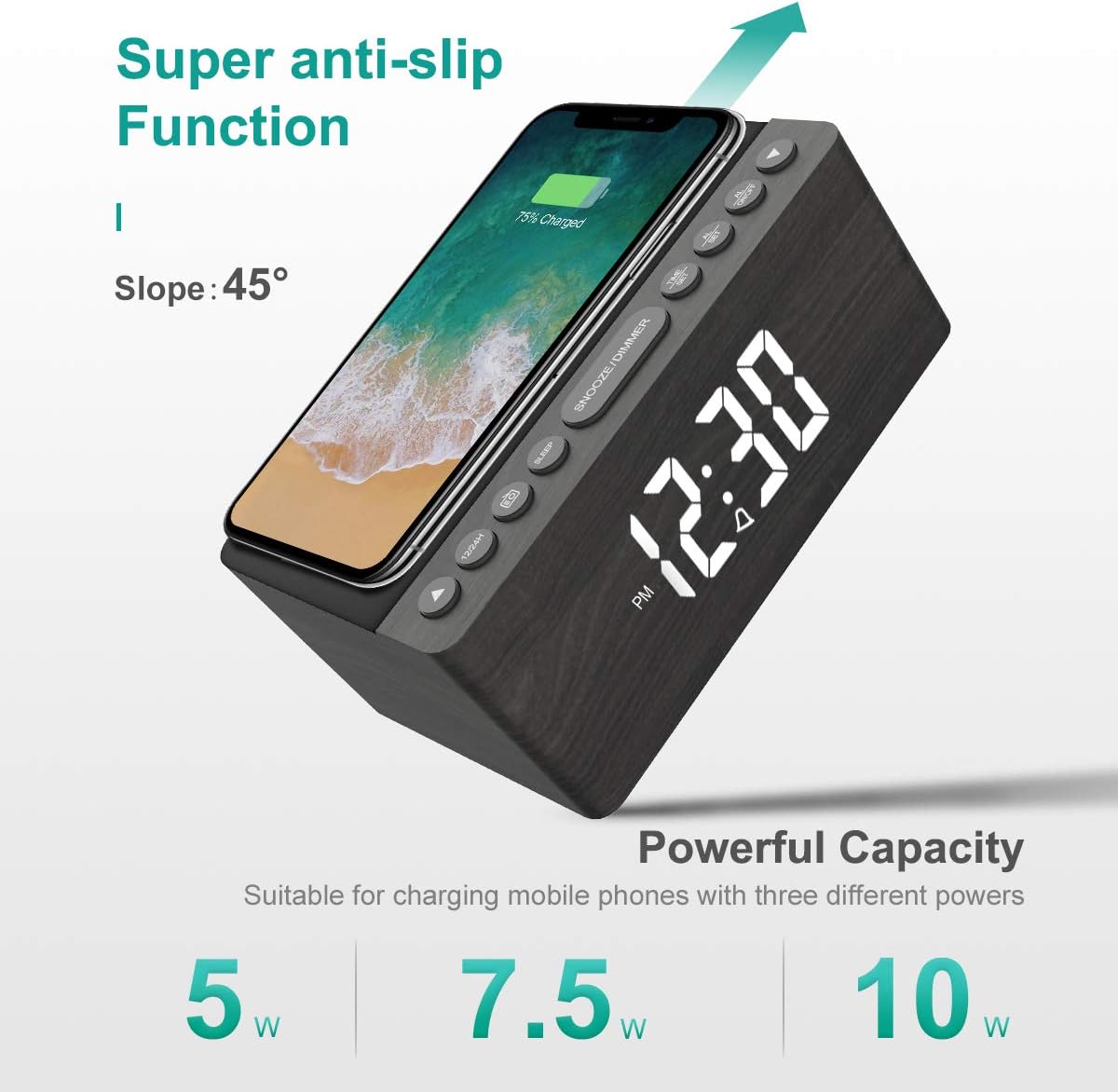
Figure 5: The alarm clock features an anti-slip surface for stable wireless charging and supports various charging powers.
Video 1: Demonstrates the FM Radio and Magnetic Wireless Charging features of a similar product.
- Stiskněte tlačítko FM rádio button (often labeled with a radio icon) to turn on the FM radio. The current frequency will be displayed.
- Automatické skenování: Stiskněte a podržte FM rádio tlačítko pro automatické prohledávání a ukládání dostupných FM stanic.
- Ruční ladění: Použijte Hodina a Minuta adjustment buttons to manually tune to a specific frequency.
- Nastavení hlasitosti: Použijte FM/BT Volume slider on the rear panel to adjust the radio volume.
- Časovač vypnutí: Stiskněte tlačítko Časovač spánku button (often labeled with a crescent moon or 'SLEEP') to set a sleep timer (10-120 minutes). The radio will play for the set duration and then automatically turn off.
5.3 Wireless and USB Charging
The ANJANK alarm clock features Qi-certified wireless charging and an additional USB port for wired charging.

Figure 6: The alarm clock provides both wireless charging for smartphones and a USB port for other electronic devices.
Video 2: Shows the wireless charging function of an alarm clock.
- Bezdrátové nabíjení: Place your Qi-compatible smartphone on the wireless charging pad on the top of the unit. Ensure the phone is centered for optimal charging. The charging indicator on the display will activate. The device supports 5W, 7.5W, and 10W adaptive charging.
- USB nabíjení: Connect your device (e.g., second phone, power bank, smartwatch) to the Nabíjecí port USB on the rear panel using a compatible USB cable.
5.4 Nastavení jasu displeje
The LED display offers 5 levels of brightness, allowing you to customize it for comfort.

Figure 7: Visual representation of the five adjustable brightness levels for the LED display.
- Použijte Zobrazit stmívač slider on the rear panel to adjust the brightness of the time display from low to high.
- The device also features an auto-dimmable function to adjust brightness based on ambient light.
5.5 Night Light Adjustment
The ambient night light can be adjusted to provide subtle illumination.
- Použijte Stmívač nočního světla button on the rear panel to cycle through different brightness levels or turn the night light off.
6. Údržba
- To clean the device, use a soft, dry cloth. Do not use liquid cleaners or abrasive materials.
- Udržujte zařízení mimo dosah vody a vysoké vlhkosti.
- Neumisťujte zařízení na přímé sluneční světlo nebo do blízkosti zdrojů tepla.
7. Řešení problémů
- Bez napájení/Vypnutí displeje: Ensure the power adapter is securely connected to both the device and a working power outlet. Check if batteries are inserted correctly for backup.
- Bezdrátové nabíjení nefunguje: Ujistěte se, že je vaše zařízení kompatibilní s Qi a správně vycentrované na nabíjecí podložce. Odstraňte z telefonu všechny silné kryty, které by mohly rušit nabíjení.
- Špatný příjem FM rádia: Fully extend the FM antenna wire. Try repositioning the antenna or the alarm clock for better signal.
- Alarm nezní: Verify that the alarm is activated (alarm icon visible) and the volume is set to an audible level. Check if the correct alarm sound is selected.
- Příliš jasný/tmavý displej: Upravte Zobrazit stmívač slider on the rear panel.
8. Specifikace
| Funkce | Detail |
|---|---|
| Značka | ANJANK |
| Model | Rádio |
| Barva | Šedá |
| Typ zobrazení | Digitální LED |
| Zdroj napájení | Elektrický kabel |
| Bezdrátové nabíjení | 10W Qi Certified (5W, 7.5W, 10W adaptive) |
| Nabíjecí port USB | Ano (5V/2A) |
| Frekvence rádia FM | 87.5-108 MHz |
| Zvuky alarmu | 9 (including radio and buzzer) |
| Zobrazit stmívač | 5 Levels, Auto Dimmable |
| Časovač spánku | 10-120 minut |
| Zálohování baterie | Potřebné 2 baterie AAA (nejsou součástí balení) |
| Rozměry produktu | 3.9"W x 2.9"H (approx. 6.4" L x 4" W x 2.9" H from image) |
| Hmotnost položky | 1.48 liber (0.67 kilogramů) |
9. Záruka a podpora
ANJANK offers a worry-free 18-month warranty for this product. Additionally, a 45-day return policy is available. For any questions or support, please contact ANJANK customer service. Responses are typically provided within 24 hours.


