Zavedení
Welcome to your Keychron K12 60% Mechanical Keyboard. This manual provides comprehensive instructions for setting up, operating, and maintaining your keyboard. The Keychron K12 is designed for versatility and performance, offering both Bluetooth wireless and USB wired connectivity, compatibility with Mac and Windows operating systems, and durable Keychron Mechanical Blue Switches within an aluminum frame.
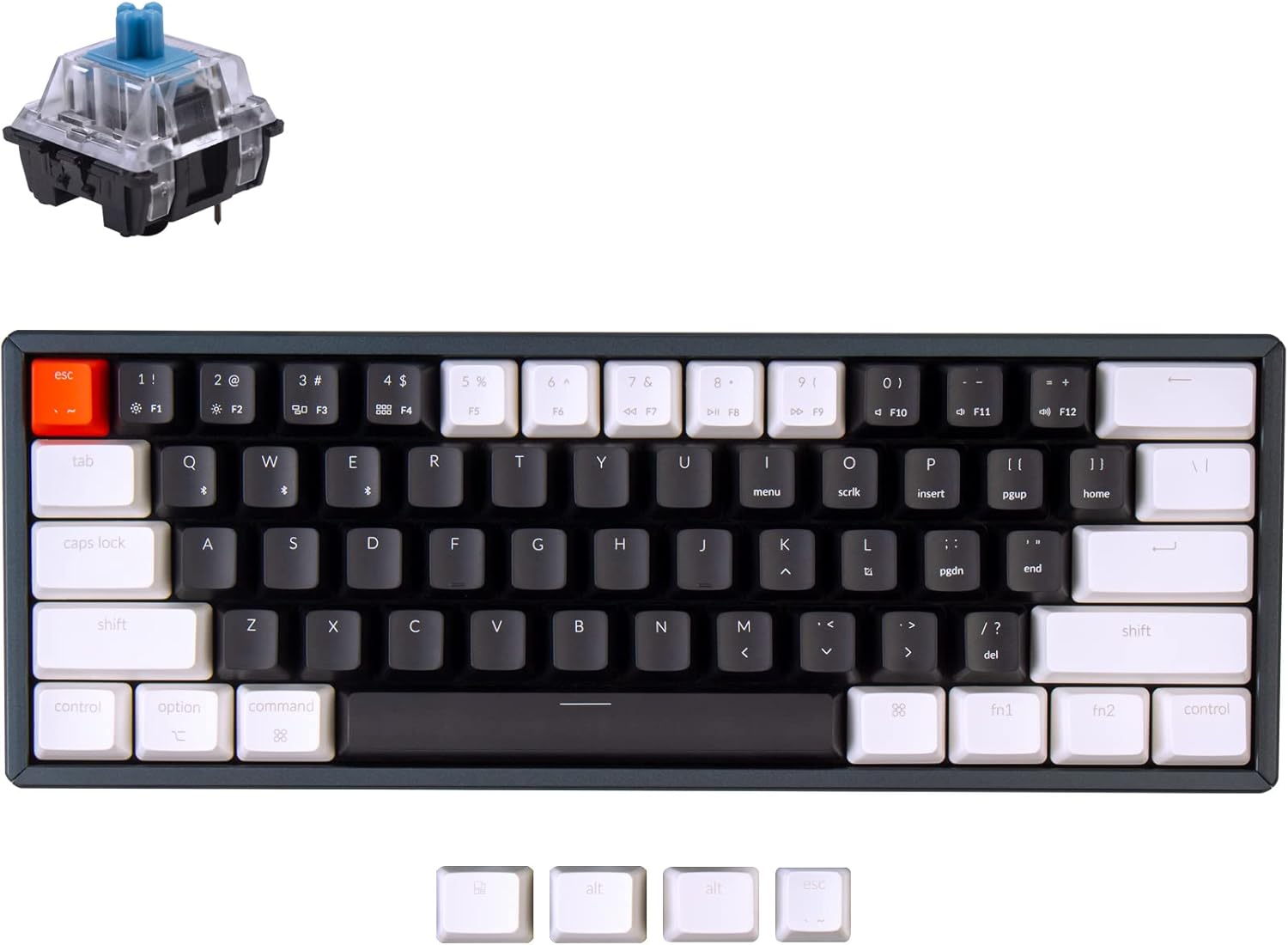
Nad hlavou view of the Keychron K12 60% mechanical keyboard, showcasing its compact layout and the distinct blue mechanical switch.
Obsah balení
Prosím, ověřte, zda jsou v balení přítomny všechny položky:
- Mechanická klávesnice Keychron K12
- Kabel USB typu C
- Keycaps for Windows and macOS
- Uživatelská příručka
Nastavení
1. Přepínač operačního systému
Locate the OS toggle switch on the side of the keyboard. Slide it to the appropriate position for your device:
- Mac/iOS: For Apple devices.
- Windows/Android: For Windows or Android devices.
2. Connection Mode Switch
Locate the connection mode toggle switch on the side of the keyboard.

Vedlejší profesionálfile of the Keychron K12 keyboard, clearly showing the USB Type-C port, the Mac/Windows operating system toggle switch, and the Bluetooth/Off/Cable connection mode toggle switch.
Kabelový režim
- Slide the connection mode switch to "Cable".
- Connect the provided USB Type-C cable to the keyboard and your computer.
Bezdrátový režim Bluetooth
- Slide the connection mode switch to "BT".
- Ensure Bluetooth is enabled on your device (computer, smartphone, or tablet).
- Stiskněte a podržte Fn + 1 (nebo Fn + 2, Fn + 3) for 4 seconds until the corresponding key starts flashing rapidly. This indicates the keyboard is in pairing mode.
- On your device, search for "Keychron K12" in the Bluetooth settings and select it to connect.
- Once successfully connected, the key will stop flashing.
- To switch between up to three paired devices, briefly press Fn + 1, Fn + 2nebo Fn + 3.

A partial view of the Keychron K12 keyboard, highlighting its ability to connect to up to three devices, including Mac and Windows systems.
3. Nastavitelné nohy
The Keychron K12 features two-level adjustable feet on the underside. Flip them out to achieve your preferred ergonomic typing angle for enhanced comfort during extended use.

Strana view of the Keychron K12 keyboard with its adjustable feet extended, demonstrating the ergonomic 9-degree typing angle.
Návod k obsluze
Funkční klávesy a ovládací prvky multimédií
Due to its compact 60% layout, the Keychron K12 utilizes the Fn key in combination with other keys to access standard function keys (F1-F12) and multimedia controls. Refer to the keycap legends for specific functions. For example, Fn + 1 přes Fn + 3 are used for Bluetooth device switching.
Správa baterie
The keyboard is equipped with a built-in 4000mAh Lithium Polymer battery for wireless operation.
- Nabíjení: Connect the USB Type-C cable to the keyboard and a power source (e.g., computer USB port or USB wall adapter). The charging indicator light will illuminate to show charging status.
- Životnost baterie: The 4000mAh battery provides extended usage time in wireless mode.

A close-up of the Keychron K12 keyboard with text overlay indicating its 4000mAh battery capacity.
Klíčové vlastnosti
The Keychron K12 keyboard offers a range of features designed for productivity and user experience:
- Kompaktní rozvržení 60 %: Features 61 keys, maximizing desk space while retaining essential functionality.
- Duální konektivita: Seamlessly switch between Bluetooth 5.1 wireless and USB Type-C wired modes.
- Podpora více zařízení: Connects with up to 3 devices and allows easy switching between them.
- Kompatibilita operačního systému: Fully compatible with Mac, Windows, Android, and iOS devices.
- Keychron Mechanical Blue Switches: Provides a tactile and clicky typing experience with a durable lifespan of up to 50 million keystrokes.
- Hliníkový rám: Ensures robust build quality and stability.
- Ergonomický design: Includes two-level adjustable feet for comfortable typing angles.
- Baterie s dlouhou výdrží: Equipped with a 4000mAh battery for extended wireless usage.

An infographic summarizing the main features of the Keychron K12 keyboard, including its compact 60% layout, dual connectivity, operating system compatibility, mechanical switches, and ergonomic adjustable feet.
Specifikace
| Funkce | Specifikace |
|---|---|
| Model | K12L2 |
| Rozložení | 60 % (61 klíčů) |
| Konektivita | Bluetooth 5.1, USB Type-C |
| Spínače | Keychron Mechanical Blue Switch |
| Operační síla | 60±10gf |
| Před cestou | 2±0.4 mm |
| Cestovní vzdálenost | 4±0.4 mm |
| Chování | Clicky |
| Úroveň zvuku | Clicky |
| Životnost | Až 50 milionů úhozů |
| Baterie | Lithium-polymer 4000 mAh |
| Materiál rámu | Hliník |
| Hmotnost položky | 2.23 libry |
| Kompatibilní OS | Mac, Windows, Android, iOS |

A detailed graphic outlining the specifications of the Keychron Mechanical Blue Switch, including operating force, pre-travel, travel distance, behavior, sound level, and lifespan.
Odstraňování problémů
If you encounter issues with your Keychron K12 keyboard, please refer to the following common troubleshooting steps:
- Klávesnice se nepřipojuje přes Bluetooth:
- Ensure the keyboard's connection mode switch is set to "BT".
- Verify the keyboard is in pairing mode (the selected Fn + 1/2/3 key is flashing rapidly).
- Check that Bluetooth is enabled on your host device.
- Try removing "Keychron K12" from your device's Bluetooth list and re-pairing.
- Ujistěte se, že je baterie klávesnice dostatečně nabitá.
- Keys not responding in wired mode:
- Ensure the keyboard's connection mode switch is set to "Cable".
- Check the USB Type-C cable connection at both the keyboard and your computer.
- Zkuste použít jiný USB port na počítači nebo jiný kabel USB typu C.
- Incorrect key functions (Mac/Windows):
- Verify that the OS toggle switch on the side of the keyboard is set to the correct operating system (Mac/iOS or Windows/Android).
- Baterie se nenabíjí:
- Ensure the USB Type-C cable is properly connected to both the keyboard and the power source.
- Try using a different USB port or a different power adapter.
Údržba
Proper maintenance will help extend the lifespan of your Keychron K12 keyboard:
- Čištění:
- Use a soft, dry, lint-free cloth to gently wipe the keyboard surface.
- For deeper cleaning, carefully remove the keycaps (using a keycap puller if available) and use compressed air to clear dust and debris from between the switches.
- Avoid using liquid cleaners directly on the switches or electronic components.
- Skladování:
- Store the keyboard in a cool, dry place away from direct sunlight, excessive heat, or extreme cold.
- Protect the keyboard from spills and impacts.
Záruka a podpora
For detailed warranty information, technical support, and frequently asked questions, please visit the official Keychron webweb (www.keychron.com) or contact your authorized retailer. Please retain your proof of purchase for any warranty claims.


