1. Úvod
The Lepro PR902103-US Smart Table Lamp offers versatile lighting solutions for your home. This LED touch lamp features RGB color changing capabilities, tunable warm to cool white light, and dimmable brightness. It is designed for seamless integration with smart home ecosystems, supporting both Amazon Alexa and Google Assistant for voice control, as well as control via a dedicated mobile application. This manual provides comprehensive instructions for setup, operation, and maintenance.

Figure 1: Lepro Smart Table Lamp showcasing its app control interface.
2. Co je v krabici
Please verify that all components are present in the packaging:
- 1 x Lepro Smart Table Lamp (Model: PR902103-US)
- 1 x 4.9 ft USB Cable
- 1 x napájecí adaptér
- 1 x Uživatelská příručka (tento dokument)
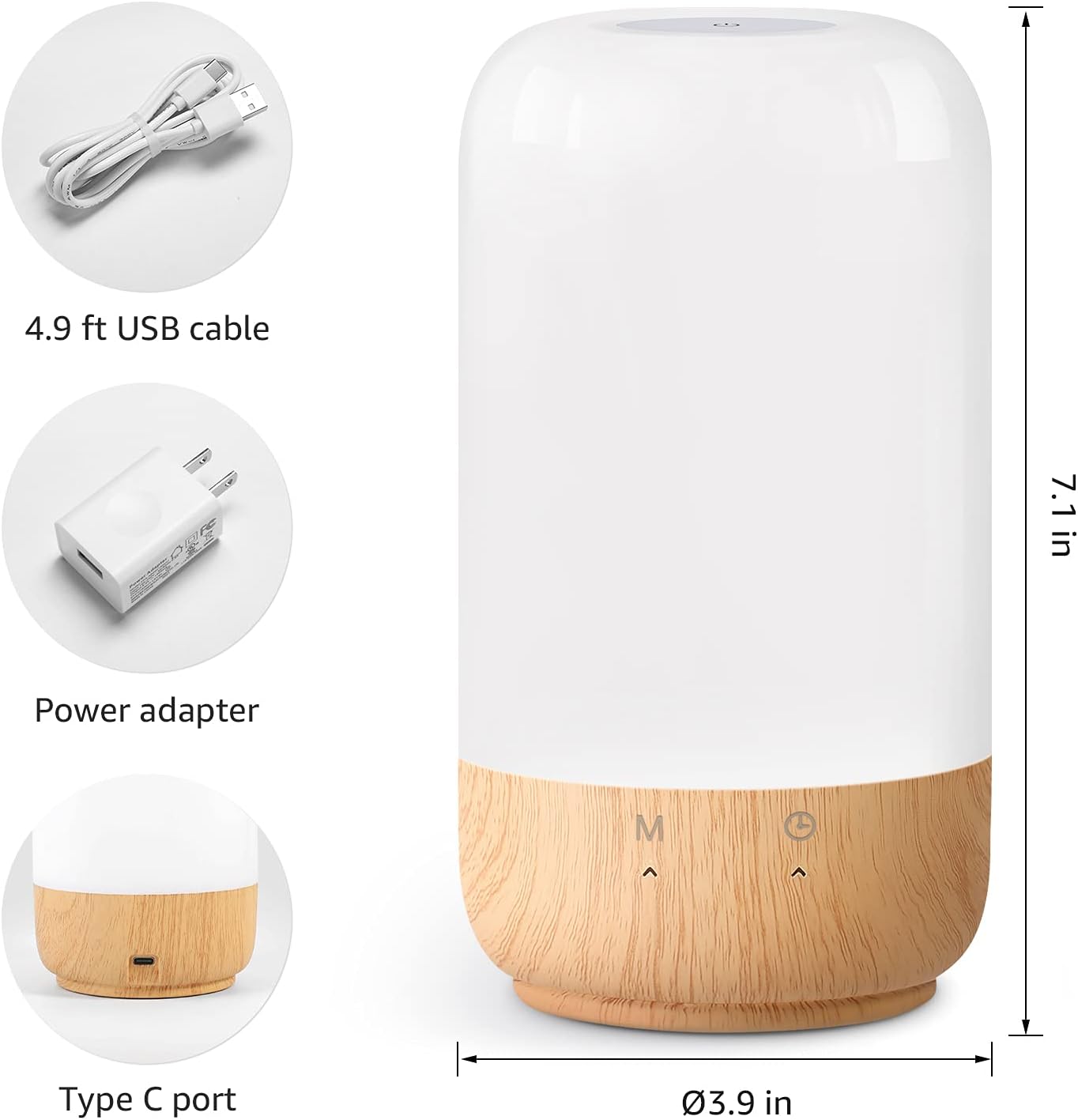
Obrázek 2: Součásti balení a rozměry produktu.
3. Nastavení
Follow these steps to set up your Lepro Smart Table Lamp:
- Připojení napájení: Připojte dodaný kabel USB k lamp's Type-C port and the power adapter. Plug the power adapter into a standard wall outlet. The lamp se rozsvítí.
- Stažení aplikace: Download the 'Lepro LampUX' app from your mobile device's App Store (iOS) or Google Play Store (Android).
- Registrace účtu: Open the 'Lepro LampUX' app and register a new account or log in if you already have one.
- Párování zařízení:
- In the app, tap 'Add Device' or the '+' icon.
- Select 'Table Lamp' from the lighting category.
- Ujistěte se, že lamp is powered on. Long press the timer button on the lamp's base for at least 5 seconds until the indicator light blinks rapidly.
- Confirm the indicator light is blinking rapidly in the app and proceed.
- Select your 2.4 GHz Wi-Fi network and enter the password. (Note: The lamp only supports 2.4 GHz Wi-Fi networks. If your router is 5 GHz, please set it to 2.4 GHz during setup.)
- The app will begin adding the device. Once successfully added, you can rename your lamp pro snazší identifikaci.
Video 1: Detailed steps on how to set up your Lepro Smart Lamp pomocí mobilní aplikace.
4. Návod k obsluze
The Lepro Smart Table Lamp can be controlled via touch, the mobile app, or voice commands.
4.1. Stiskněte Ovládací prvky
- Zapnutí/vypnutí: Short press the power button (marked 'M') on the lampzákladna.
- Nastavení jasu: Slide your finger along the left side of the lamp's base to adjust brightness.
- Color Change (RGB): Slide your finger along the right side of the lamp's base to cycle through RGB colors.
- Přepínač režimu: Short press the timer button (clock icon) to switch between white light modes (warm white, cool white) and RGB color mode.
4.2. Mobile App Controls
The 'Lepro LampUX' app provides comprehensive control over your lamp:
- Brightness & Color Temperature: Adjust the brightness level and select color temperatures from 2700K (warm white) to 5700K (cool white).
- Výběr barev RGB: Choose from 16 million colors using the color wheel in the app.
- scény: Select from pre-set scenes like 'Night', 'Read', 'Meeting', 'Leisure', or customize your own scenes with specific colors and effects.
- Timer & Wake-up: Nastavte si rozvrhy pro lamp to turn on/off automatically. Utilize the 'Sunrise Simulation' feature to gradually increase light for a gentle wake-up.

Figure 3: Mobile application interface for controlling lamp nastavení.

Obrázek 4: Lamp's timer and wake-up functions in use.
4.3. Hlasové ovládání
The Lepro Smart Table Lamp is compatible with Amazon Alexa and Google Assistant. To enable voice control:
- Ujistěte se, že vaše lamp is successfully paired with the 'Lepro LampUX' app.
- Open the Amazon Alexa or Google Home app.
- Přejděte do sekce „Dovednosti a hry“ (Alexa) nebo „Funguje s Googlem“ (Google Home).
- Hledat and enable the 'Lepro LampUX' skill/service.
- Link your 'Lepro LampUX' account with your Alexa/Google account.
- Po propojení můžete používat hlasové příkazy, jako například:
- „Alexo, zapni [L]“amp Jméno]."
- "Hey Google, set [Lamp Name] to warm white."
- "Alexa, change [Lamp Jméno] na modrou.“
- „Hej Google, ztlum [L]“amp Jméno] na 50 %.“

Figure 5: Voice control integration with Amazon Alexa.
Video 2: Demonstration of the Lepro Smart Table Lamp working with Alexa and Google Home.
5. Údržba
To ensure the longevity and optimal performance of your Lepro Smart Table Lamp, please follow these maintenance guidelines:
- Čištění: Před čištěním odpojte napájení. K otření použijte měkký, suchý hadřík.amp's surface. Avoid using abrasive cleaners, solvents, or harsh chemicals, as these may damage the finish or electronic components.
- Skladování: Při uložení lamp Pokud jej nebudete používat delší dobu, ujistěte se, že je čistý a suchý. Skladujte jej na chladném a suchém místě mimo dosah přímého slunečního záření a extrémních teplot.
- Zacházení: Manipulujte s lamp with care. Avoid dropping it or subjecting it to strong impacts.
6. Řešení problémů
If you encounter issues with your Lepro Smart Table Lamp, podívejte se na následující běžné problémy a jejich řešení:
| Problém | Možná příčina | Řešení |
|---|---|---|
| Lamp nezapne. | Žádné napájení. | Zkontrolujte, zda je napájecí adaptér bezpečně zapojený do zásuvkyamp and the wall outlet. Ensure the outlet is functional. |
| Nelze se připojit k Wi-Fi. | Incorrect Wi-Fi band (5 GHz). Nesprávné heslo. Slabý signál Wi-Fi. | Ensure your Wi-Fi network is 2.4 GHz. Verify the Wi-Fi password. Move the lamp closer to your router. |
| Hlasové ovládání nefunguje. | Skill not enabled/linked. Incorrect device name. | Ensure the 'Lepro LampUX' skill is enabled and linked in your Alexa/Google Home app. Use the exact device name configured in the app. |
| Lamp nereaguje. | Dočasná softwarová závada. | Odpojte lamp from the power outlet for 10 seconds, then plug it back in to perform a soft reset. |
7. Specifikace
| Funkce | Detail |
|---|---|
| Značka | Lepro |
| Číslo modelu | PR902103-US |
| Rozměry produktu | 3.9"H x 3.9"Š x 7.1"V |
| Hmotnost položky | 1.19 libry |
| Materiál | Plast, Dřevo |
| Typ světelného zdroje | LED |
| Wattage | 7 wattů |
| Jas | 350 lumenů |
| Světlá barva | RGB + CCT (Tunable White 2700-5700K) |
| Kontrolní metoda | App, Touch, Voice (Alexa, Google Assistant) |
| Konektivita | Pouze 2.4 GHz Wi-Fi |
| Vnitřní/venkovní použití | Krytý |
8. Záruka a podpora
Lepro products are designed and manufactured to the highest quality standards. For warranty information and technical support, please refer to the contact details provided on the product packaging or visit the official Lepro webUschovejte si účtenku jako doklad o koupi pro případ reklamace.


